Domain NamesFind and register your ideal domain name instantly.
 Web HostingEasy-to-use hosting powered by cPanel — ideal for managing websites in Nigeria.
 Windows HostingRun .NET apps with Windows-optimized hosting
 Affiliate ProgramMake money promoting our services
 Reseller HostingMake money by reselling our hosting products under your own brand
 .COM Domains
 All DomainsExplore all supported tld domains in Nigeria
 WhoisFind out who owns any domain, as well as verify your registration details
 VPS Hosting in Nigeria
 Dedicated ServersReimagine your site speed with your own complete server
 AI Website BuilderDesign your site with drag-and-drop tools
 Online Store BuilderStart your online shop without code
 Support PortalFind answers or get expert help
 Contact UsReach our team via chat or email
 BlogRead our extensive guides on web hosting and more
In this article, we explain the process of how to change PHP Version on your on Cpanel. We have chosen to show you the simplest way to do it possible.
Some of the applications/themes/plugins/modules would require certain PHP parameters or values for it to work. In our Shared servers, we have CloudLinux + CageFS + PHP Selector configuration implemented.
How to change PHP Version on your Cpanel
The instructions below will guide you through change PHP Version on your Cpanel without stress:
1. Login in the Cpanel with login details provided by Truehost
2.Go to the Software section and select MultiPHP Manager

3. Select the domain name you want to change the version
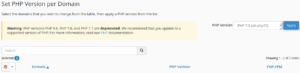
4. Select the PHP version and click Apply
Receive ‘Successfully applied PHP version’ on completion
TrueHost Cloud Nigeria (Recommended)

TrueHost Cloud is one of the most sought-after hosting services in Lagos. This is because it offers the cheapest packages in web hosting and cPanel hosting platforms in Nigeria. TrueHost Cloud, however, is not only affordable, but it is also reliable and very easy to use.
TrueHost Cloud Nigeria focuses on providing registering domains and web hosting in Nigeria. It is very affordable and very reliable. On top of that, TrueHost is really concerned about the businesses it is working with.