Domain NamesFind and register your ideal domain name instantly.
 Web HostingEasy-to-use hosting powered by cPanel — ideal for managing websites in Nigeria.
 Windows HostingRun .NET apps with Windows-optimized hosting
 Affiliate ProgramMake money promoting our services
 Reseller HostingMake money by reselling our hosting products under your own brand
 .COM Domains
 All DomainsExplore all supported tld domains in Nigeria
 WhoisFind out who owns any domain, as well as verify your registration details
 VPS Hosting in Nigeria
 Dedicated ServersReimagine your site speed with your own complete server
 AI Website BuilderDesign your site with drag-and-drop tools
 Online Store BuilderStart your online shop without code
 Support PortalFind answers or get expert help
 Contact UsReach our team via chat or email
 BlogRead our extensive guides on web hosting and more
Chances are you’re here because you probably typed your website URL into a browser and were greeted with a blank screen or an annoying error message while your customers wait.
If so, you know how frustrating it can be, but don’t worry, you’re not alone.
And if you’re running a business in Nigeria, you know every minute counts, and these moments can mean lost sales, frustrated visitors, and a lot of stress for you.
In this website troubleshooting guide, I’m going to walk you through the most common website errors and, more importantly, show you how to fix them without tearing your hair out.
We’ll start with easy checks you can do yourself, how to use our support resources, and when to seek help from our competent team.
Let’s get your site back online and keep your visitors happy.
1) Quick User-Level Website Troubleshooting
Before diving into technical fixes, let’s rule out the simple stuff first.
Believe it or not, these easy steps solve more than half the website problems we see.
1. Refresh the page – Sometimes a glitch is just a momentary hiccup. Hit F5 or click the refresh button and see if your site comes back.
2. Clear your browser cache and cookies – Old files can mess with how pages load.
In Chrome, go to Settings > Privacy and security > Clear browsing data, select Cached images and files plus Cookies, and clear them.
Then try your site again.
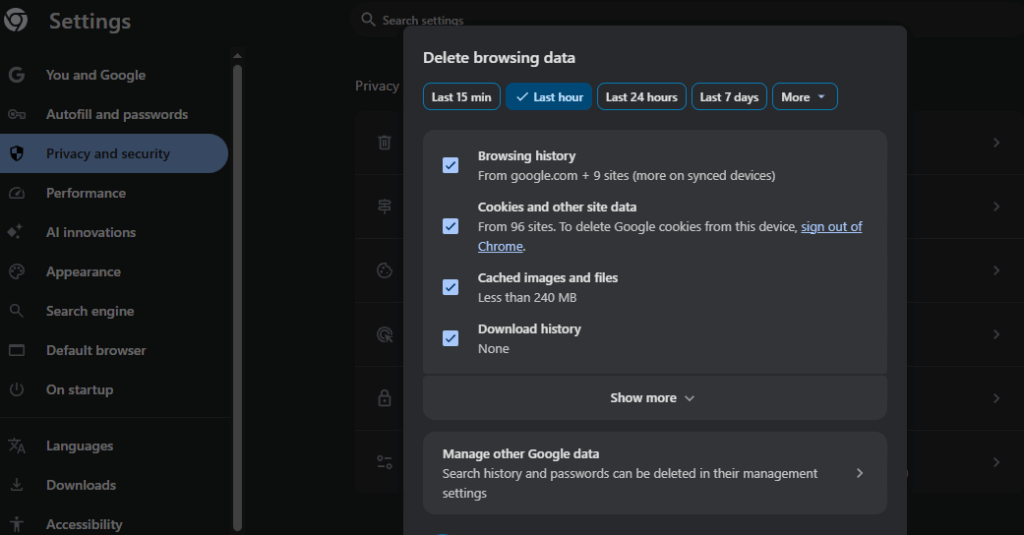
3. Try incognito or private mode – This temporarily disables extensions that might be interfering. Open a new incognito window (Ctrl+Shift+N in Chrome) and test your URL.
4. Switch browsers or devices – If it works on Firefox but not Chrome, or on your phone but not your laptop, the issue is probably on your side. Testing on another browser or device helps narrow it down.
5. Check your internet connection – Restart your router or switch to mobile data. In Nigeria, network hiccups happen often, especially during busy hours.
If none of these do the trick, it’s time to see if the site is down for everyone.
Use a free tool like downforeveryoneorjustme.com, enter your domain, and check.
If it’s down for others too, the problem is server-side or DNS-related, and that’s when website troubleshooting moves to the next level.
2) Understanding and Fixing Common HTTP Errors
If you’re running a site in Nigeria on shared hosting, WordPress, or cPanel, these errors are the ones you’re most likely to bump into.
1. 404 Not Found – “Oops, this page doesn’t exist.”
This basically means the page you’re looking for doesn’t exist. Maybe there’s a typo in the URL, the page was deleted, or a link is broken.
- Double-check the URL for spelling mistakes.
- If it’s your site, log into cPanel > File Manager and make sure the file is actually there.
- WordPress users can go to Settings > Permalinks and click Save Changes to refresh the links.
2. 403 Forbidden – “You shall not pass!”
This one pops up when you don’t have permission to access a file or folder.
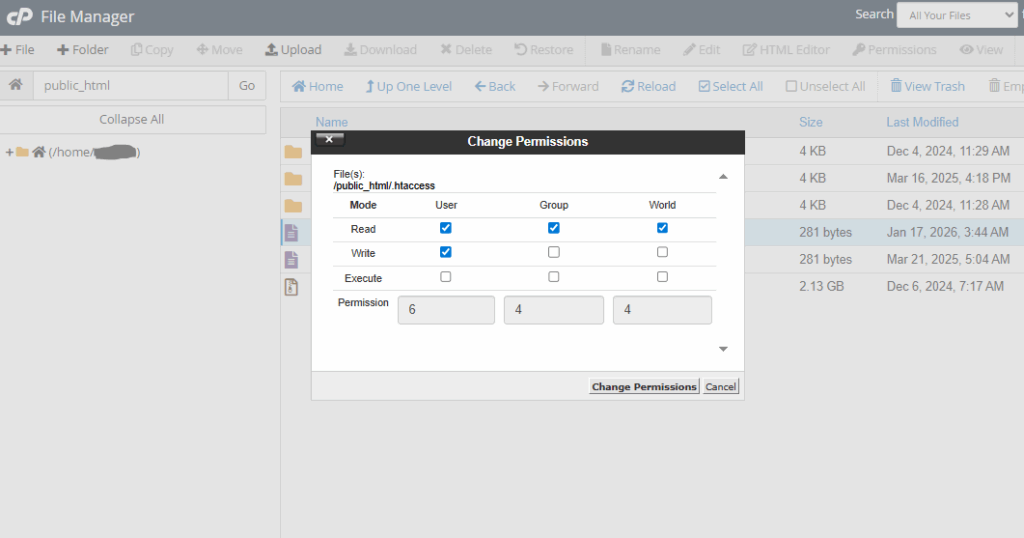
- Often, it’s just a file permission issue. In cPanel File Manager, right-click the file or folder, select Change Permissions, and set it to 644 for files or 755 for folders.
- Also check your
.htaccessfile for blocking rules—rename it temporarily to.htaccess-oldand see if that fixes it.
3. 500 Internal Server Error – “something broke.”
Ah, the classic “something broke on the server” message. It can be tricky, but it’s usually fixable.
- Start by renaming or deleting the
.htaccessfile in File Manager to see if that clears it. - For WordPress: disable plugins one by one by renaming the plugins folder (e.g., plugins-old) via FTP or File Manager, then reactivate each plugin individually.
- You can also increase the PHP memory limit in
wp-config.phpwith:define('WP_MEMORY_LIMIT', '256M'); - If the problem sticks around, our support team can help you with the server logs.
4. 503 Service Unavailable – “Server is busy, come back later.”
This happens when the server is overloaded or undergoing maintenance.
- Usually, the easiest fix is to wait a few minutes and try again.
- If it keeps happening, it might be due to traffic spikes. In that case, consider upgrading to our VPS or hybrid cloud plans for smoother handling during busy periods.
5. 504 Gateway Timeout – “This site can’t be reached.”
This means the server took too long to respond.
- Try flushing your DNS cache:
- On Windows: open Command Prompt as admin and type ipconfig /flushdns
- On Mac: open Terminal and type sudo dscacheutil -flushcache
- You can also check DNS propagation with tools like whatsmyip.org/dns-lookup to make sure your domain is pointing correctly.
6. White Screen of Death – (WordPress-only)
Just a blank page, no error message, nothing. Very spooky, but usually fixable.
Turn on debug mode by adding this to wp-config.php:define('WP_DEBUG', true);
- You’ll then see any errors that are hiding behind the blank screen.
- Most of the time, it’s a plugin or theme conflict, or your site ran out of memory. Use the plugin disable steps we mentioned earlier to pinpoint the culprit.
7. SSL / HTTPS Issues – padlock missing or “Not Secure.”
These show up when there’s mixed content or an expired certificate.
- Make sure your SSL is active in cPanel > Security > SSL/TLS. We provide free Let’s Encrypt certificates for all sites.
- To force HTTPS, you can either add a redirect in
.htaccessor use our one-click redirect tool.
See? Not as scary as it seems. A few clicks, a little detective work, and your site will be back online in no time.
3) Advanced Website Troubleshooting for Webmasters
If the basic fixes didn’t do the trick, it’s time to roll up your sleeves and dig a little deeper.
Here’s where webmasters can step in and tackle the trickier stuff, if you’re not upto it.
1. Check server error logs – In cPanel, go to Metrics > Errors.
Recent entries often point directly to the file, plugin, or script causing the problem. It’s like following a trail of breadcrumbs straight to the culprit.
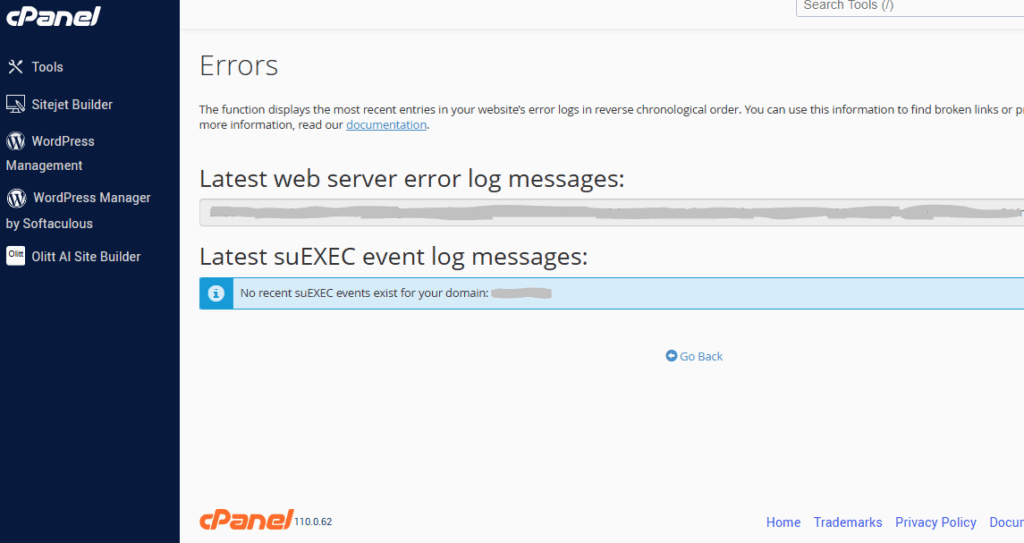
2. Verify DNS settings – Use tools like intoDNS.com or DNSChecker.org to make sure your domain is pointing to our nameservers (ns1.truehost.com.ng, etc.).
Keep in mind, DNS changes can take 24–48 hours to fully propagate.
3. Disable extensions or security software temporarily – Sometimes antivirus programs or firewalls block your site. Turn them off briefly to test if that’s the issue.
4. Keep backups and updates current – Many website problems are preventable.
Keep WordPress, themes, and plugins updated, and take advantage of our auto-backup feature in cPanel. It can save you hours of troubleshooting if something goes wrong.
Most of these steps can be handled in under 10 minutes especially with the right resources.
But if your logs show server overload, database connection failures, or you need deeper access to server logs, it’s probably time to pause the DIY approach and reach out to our support team.
They can jump in quickly and save you the headache.
4) When to Reach Out to Our Support Team at Truehost
Sometimes you’ll encounter tricky server-side errors. That’s where our Nigerian-based support team comes in.
You can reach us fast by phone (+234 1 888 9266) or WhatsApp (+1 972 674 3814).
We’re here to minimize your downtime, whether it’s checking server logs, restarting services, or walking you through cPanel fixes step by step.
Many customers tell us they wish they’d called us sooner, when what might take hours to troubleshoot alone often gets resolved in minutes with our experts.
So, if your site is hosted with us, remember that 24/7 support is included, and we’re always ready for website troubleshooting emergencies.
Don’t let a website error cost you business. Let’s fix it together.