 Domain NamesFind and register your ideal domain name instantly.
 Web HostingEasy-to-use hosting powered by cPanel — ideal for managing websites in Nigeria.
 Windows HostingRun .NET apps with Windows-optimized hosting
 Affiliate ProgramMake money promoting our services
 Reseller HostingMake money by reselling our hosting products under your own brand
 .COM Domains
 All DomainsExplore all supported tld domains in Nigeria
 WhoisFind out who owns any domain, as well as verify your registration details
 VPS Hosting
 Dedicated ServersReimagine your site speed with your own complete server
 AI Website BuilderDesign your site with drag-and-drop tools
 Online Store BuilderStart your online shop without code
 Support PortalFind answers or get expert help
 Contact UsReach our team via chat or email
 BlogRead our extensive guides on web hosting and more
When you open a website, your browser has to find where that site is stored. It needs to locate the exact server that holds the site’s files.
This whole process happens in the background within seconds, and the system that makes it possible is called DNS.
DNS is one of the foundations of how the internet works.
But the funny part is that most people only learn about it when something breaks.
Maybe a site refuses to open. Or an email stops working. Maybe a domain won’t connect.
This guide breaks everything down gently. You will learn what DNS is, why it exists, how it works step by step, and its main parts.
Understanding DNS in Plain Language
Allow me to explain the core idea.
DNS (Domain Name System) is a global naming system that converts easy domain names into the number-based addresses that computers understand.
Domain names are the simple names we use, like:
- example.com
- myshop.com
- yourbrand.net
But behind every domain is a number called an IP address. These look like:
192.168.1.1 (IPv4)
Or something like
2606:2800:220:1:248:1893:25c8:1946 (IPv6)
No one wants to type those. And frankly, no one can remember them, not even tech experts.
This is where DNS steps in. It acts like the internet’s phonebook.
You simply enter a name. DNS finds the matching number. Your browser loads the correct website.
Without DNS, opening a website would feel like dialling a 20-digit phone number every time.
Why DNS Exists
To understand why DNS is so important, think about how computers communicate. They use numbers, not names.
But we, on the other hand, love names. I mean, they are easier to say, easier to type, and easier to remember.
So DNS exists to bridge the two worlds.
It has three main purposes:
1) Simplicity
DNS lets you use a name instead of a long number. It makes the internet friendlier and easier for everyone.
2) Scalability
The internet holds billions of domains. DNS helps organise all of them in a systematic way so nothing gets mixed up.
3) Speed
DNS helps browsers locate websites quickly. It uses caching and distributed servers around the world to save time and reduce loading delays.
Without DNS, browsing would feel slow, confusing, and honestly, almost impossible for regular people.
How DNS Works
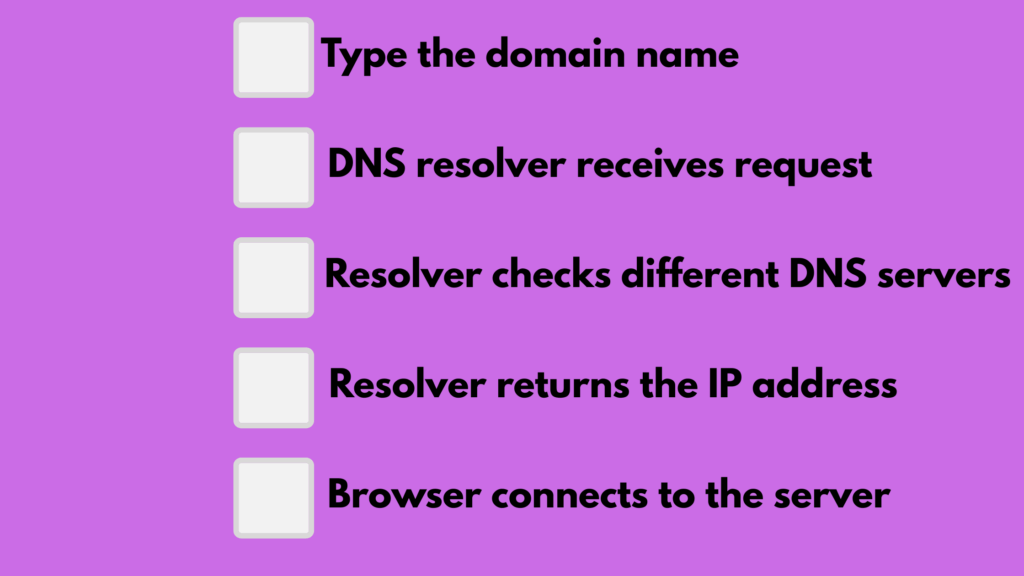
Now let me walk you through what happens each time you open a site. It all happens in milliseconds, but breaking it down makes it easier to understand.
Step 1: You type the domain name
You type something like example.com into your browser. Your device first checks whether it already has the IP address saved in its cache.
If it does, it opens the site instantly.
Step 2: A DNS resolver receives your request
If the IP is not in your cache, the request is sent to a DNS resolver.
This usually belongs to your internet provider or a public DNS service like Google or Cloudflare. The resolver’s job is to hunt down the correct IP address.
Step 3: The resolver checks different DNS servers
The resolver then performs several lookups. It goes through layers of DNS servers until it finds the exact IP linked to the domain you typed.
Step 4: The resolver returns the IP address
Once the resolver finds the IP address, it sends it back to your browser. At this point, your browser knows where the website is stored.
Step 5: Your browser connects to the server
With the correct location now known, your browser sends a request to that server. The server replies and loads the website.
All of this happens quietly. Behind the scenes. You don’t control it. You just type the name, and DNS does the heavy lifting for you.
Ready to secure your place online? Get your domain today and start building a name that people can trust.
The Main Components of DNS
DNS may seem complex, but it is easier to understand when you break it into simple parts.
Here are the four main components that make everything work smoothly.
1) DNS Resolver
This is the starting point. The resolver receives your DNS query and begins the search.
It checks your cache, your network, and external DNS servers.
2) Root Nameservers
These are the highest level of the DNS structure. When a resolver doesn’t know where to go next, it checks with the root nameservers.
There are only a handful of these in the world, and they help direct traffic to the correct TLD (Top-Level Domain) nameserver.
3) TLD Nameservers
These servers handle specific domain extensions. For example:
- .com
- .net
- .org
- .info
When the resolver reaches a TLD nameserver, it gets one step closer to finding the correct domain.
4) Authoritative Nameservers
These are the final stop in the lookup process. The authoritative nameservers store the actual DNS records for each domain.
They know the real IP address. They give the final answer that the resolver passes to your browser.
Without authoritative nameservers, no website would load because no one would know where it lives.
Common DNS Record Types
DNS has different record types, and each one controls something specific about how your domain behaves.
You can liken them to small instructions that tell the internet what to do with your domain name.
A Record
This connects your domain to an IPv4 address.
It is the most common record.
If someone types your domain, the A record tells the browser which server to visit.
AAAA Record
Similar to the A record, but for IPv6 addresses.
It is used when a server supports the newer, longer IPv6 format.
Some sites use both A and AAAA records.
CNAME Record
This points one domain or subdomain to another domain.
It is very handy when you want several subdomains (like blog., shop., or support.) to follow one main target without setting separate IPs.
For example:
blog.example.com → example.com
MX Record
This handles email.
It tells mail services where to deliver messages sent to your domain.
If MX is wrong, email stops working, or bounces.
TXT Record
This stores tiny text entries.
It is mostly used for security, verification, or ownership checks.
Examples include:
- SPF
- DKIM
- DMARC
- Google or Microsoft domain verification
These help prevent email spoofing and improve email deliverability.
NS Record
This record shows which nameservers control your domain. It tells the internet where to find the correct DNS details for that domain.
When you switch hosting companies or move your domain to a new provider, you usually update the NS records so everything points to the right place.
In Summary
DNS may feel hidden, but it is working every moment you are online. It guides your browser, your apps, and even your emails.
And turns simple names into the numbers that computers use. Travels across resolvers, root servers, TLD servers, and authoritative servers, all in a blink.
When you understand DNS, everything about managing a domain becomes easier.
You know why a site loads slowly, why a domain takes time to update, or why an email fails to arrive.
You also start to see how each DNS record shapes the behaviour of your website and services.
So the next time you type a domain and the page opens without delay, remember that DNS just completed an entire journey behind the scenes.