Domain NamesFind and register your ideal domain name instantly.
 Web HostingEasy-to-use hosting powered by cPanel — ideal for managing websites in Nigeria.
 Windows HostingRun .NET apps with Windows-optimized hosting
 Affiliate ProgramMake money promoting our services
 Reseller HostingMake money by reselling our hosting products under your own brand
 .COM Domains
 All DomainsExplore all supported tld domains in Nigeria
 WhoisFind out who owns any domain, as well as verify your registration details
 VPS Hosting in Nigeria
 Dedicated ServersReimagine your site speed with your own complete server
 AI Website BuilderDesign your site with drag-and-drop tools
 Online Store BuilderStart your online shop without code
 Support PortalFind answers or get expert help
 Contact UsReach our team via chat or email
 BlogRead our extensive guides on web hosting and more
If you’re setting up or managing web hosting on Ubuntu, you could definitely use an Ubuntu control panel to simplify server management and transform complex command-line tasks into a user-friendly graphical interface.
Managing a server by hand can quickly turn what should be an exciting website launch into a stressful, time-draining mess.
This is even worse when you’re trying to get your Nigerian business online and moving fast.
Now, a good Ubuntu control panel could sort out those command-line tweaks you’ve been spending hours wrestling with in just a few clicks.
That’s exactly why we put this guide together, to guide you through the best Ubuntu control panels for web hosting in 2026.
This is for you if you want things done quickly, securely, and without unnecessary costs.
By the end, you’ll know exactly which Ubuntu control panel fits your setup.
Ready to take back your time and sanity? Let’s look into our top picks.
Ubuntu Control Panels Worth Your Attention in 2026
The best Ubuntu control panels out there are all about speed, low resource usage, and easy setups, especially important if you’re hosting sites in Nigeria, where internet conditions can vary.
Below are some standout control panels that genuinely make web hosting easier.
1) Truehost Custom Panel – Best for Beginners and Quick VPS Setups
If you’re just starting with Ubuntu servers, our Truehost Custom Panel is the perfect launchpad.
Pre-installed on every Truehost VPS (Ubuntu 20.04/22.04 LTS), it takes care of the basics so you can focus on hosting instead of wrestling with configs.
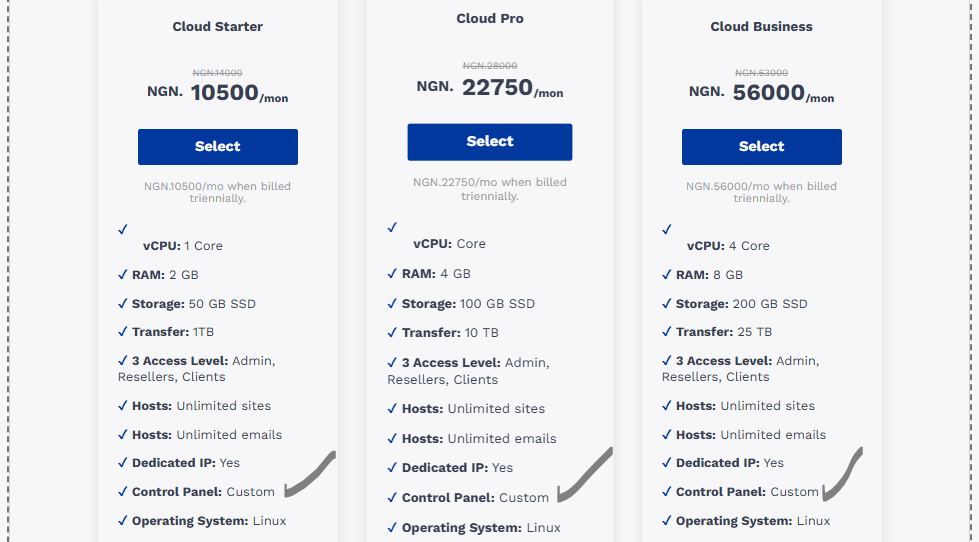
You get real-time resource dashboards, one-click OS reinstalls, and snapshot backups, all from a simple web portal right after signup.
Some of it’s best qualities are zero setup hassle, built-in DDoS basics, and admin/reseller/client views that keep things organized.
However, it’s not a full web hosting panel, since domain and email GUIs are missing, so pros might eventually layer a more advanced panel on top.
It’s perfect for first-time VPS users.
Grab our Cloud Starter VPS at ₦10,500/month (1 vCPU, 1GB RAM, 20GB NVMe), get your server live in minutes, snapshot your setup, and you’re ready to scale with a pro panel whenever you’re ready.
It’s like the gateway that makes everything else easier.
2) CloudPanel – Best for High-Performance Nginx Hosting
If speed is your top priority, CloudPanel is hard to beat. This free, lightweight Ubuntu control panel is built for Nginx and runs smoothly on as little as 1GB RAM.
It handles PHP, MySQL, Redis, and SSL automatically, making it ideal for fast WordPress or WooCommerce sites serving users in Lagos and beyond.
It stands out for its blazing-fast performance, one-click app installs, and built-in caching.
It’s even better for users with basic server knowledge and doesn’t manage email out of the box.
3) HestiaCP – Best All-Rounder for Simplicity
If you just want something that works without complexity, HestiaCP is a solid choice.
It’s beginner-friendly, light on resources, and lets you manage domains, emails, and databases from one clean dashboard.
It supports both Apache and Nginx, so you get flexibility without the learning curve.
It’s easily likable for its simple interface, low RAM usage, and no license fees, but the advanced features are limited, and backups are fairly basic.
HestiaCP is a favorite among Nigerian freelancers and small agencies hosting multiple client sites on Truehost plans.
4) Plesk – Best Premium Control Panel for Businesses and Agencies
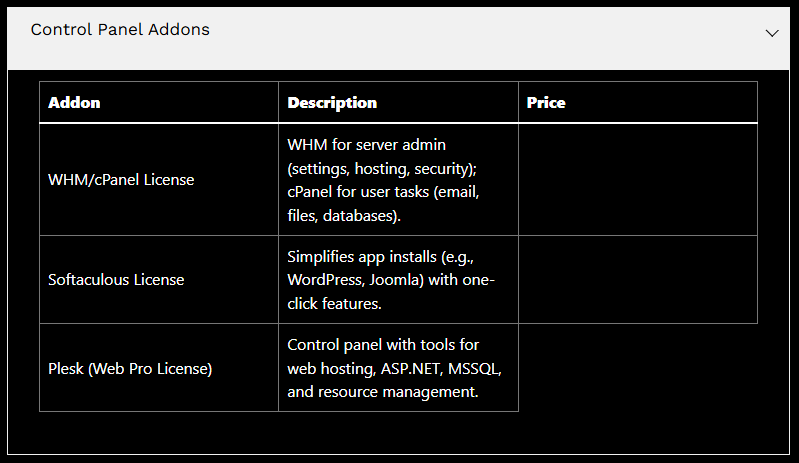
If you want a polished, all-in-one experience with professional support behind it, Plesk is hard to ignore.
This commercial Ubuntu control panel is built for stability, security, and scale, making it a favorite for agencies, SaaS teams, and serious e-commerce sites.
It supports both Apache and Nginx, comes with strong WordPress tooling, and offers a clean interface that feels refined without being intimidating.
It has excellent WordPress management, built-in security tools, and a huge extension ecosystem.
It’s good to know that it’s paid software, so you’ll need a license, but many users find the time saved is worth the cost.
Plesk runs beautifully on Truehost VPS plans with 2GB RAM or more and is ideal if you’re managing multiple client sites or want enterprise-grade reliability without deep sysadmin work.
5) CyberPanel – Built for Speed Junkies
If your site feels slow under traffic, CyberPanel might be exactly what you need.
Built on OpenLiteSpeed, this Ubuntu control panel is all about raw performance, perfect for busy forums, online stores, or viral content.
You get built-in caching, free SSL, Docker support, and email tools, all wrapped in a clean dashboard.
It stands out for its lightning-fast load times and staging sites for safe testing, but there’s a small learning curve if you’re used to Apache.
Truehost users love running CyberPanel on our entry-level VPS plans, since it squeezes every drop of speed from NVMe storage.
6) aaPanel – Easy, Clean, and Stress-Free
If you want something that just feels easy, aaPanel is a breath of fresh air.
Its modern interface makes daily tasks, like managing sites, databases, and backups, quick and painless. It’s free, lightweight, and expandable with plugins when you need more power.
It works well because of its beginner-friendly menus and low resource usage, but some advanced features come as low-cost add-ons.
It’s a great fit for solo founders juggling multiple projects without the tech overwhelm.
7) ISPConfig – When You’re Managing More Than One Server
Running multiple servers? ISPConfig keeps things sane.
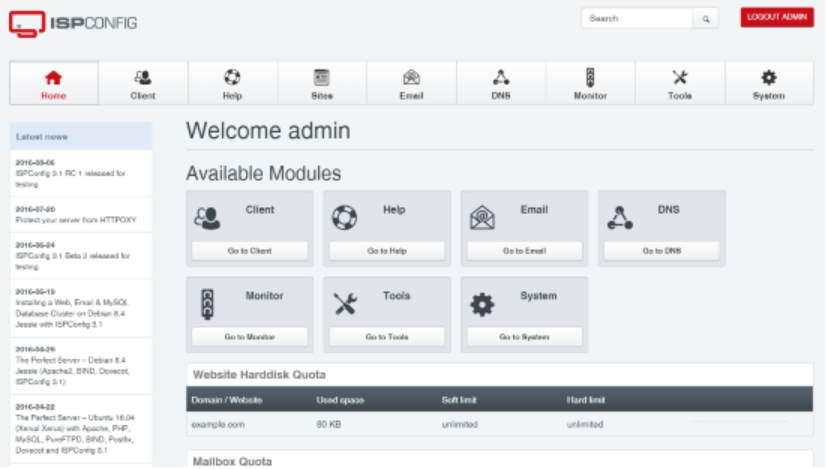
This open-source panel lets you manage web, email, DNS, and databases across several servers from one place. It’s not flashy, but it’s reliable and built for growth.
Pros use it for central control and strong permission management, but it comes with a trade-off of setup taking longer, and the interface feels old-school.
We recommend it for agencies scaling on Truehost dedicated servers.
8) Webmin / Virtualmin – Total Control for Power Users
If you like tweaking every setting yourself, Webmin with Virtualmin is your playground.
This combo gives you deep server control straight from your browser, which is perfect for advanced users who want flexibility over simplicity.
It has unmatched control and endless customization, but fair warning, it’s overkill if you’re hosting just one simple site.
Our engineers rely on it for custom deployments when fine-tuning performance.
Choosing the Right Ubuntu Control Panel for You
Not sure which one to pick? Start with what matters most to you.
If speed is everything, CloudPanel or CyberPanel are your best bets.
Prefer something simple and stress-free? HestiaCP or aaPanel will feel right at home.
Planning to scale across multiple servers? That’s where ISPConfig or Webmin/Virtualmin shine.
A few things to double-check: make sure it supports Ubuntu 20.04+ (all our picks do), runs comfortably on low RAM if you’re on a budget VPS, and includes free Let’s Encrypt SSL.
You can even test things risk-free, with Truehost’s 7-day money-back guarantee.
Installing Your Ubuntu Control Panel with Truehost
Ready to get your control panel up and running? Let’s walk through installing HestiaCP on a fresh Truehost VPS.
Step 1: Log in to Your VPS
Use your terminal (or PuTTY on Windows) and connect via SSH. You’ll find your IP and login details in the Truehost dashboard or custom panel.
ssh root@your-server-ipStep 2: Update Your Server
Before installing anything, make sure Ubuntu is up to date.
apt update && apt upgrade -yStep 3: Download and Run the Installer
Grab the official HestiaCP installer and launch it.
wget https://raw.githubusercontent.com/hestiacp/hestiacp/release/install/hestia.sh

bash hestia.sh --interactive no --email [email protected] --password yourpassword
Sit back, HestiaCP will handle everything.
Step 4: Access the Control Panel
Once installation finishes, open your browser and go to
https://your-server-ip:8083
Log in, add your first domain, and enable the firewall (UFW).
Pro tip: take a snapshot using the Truehost Custom Panel before making big changes.
Step 5: Secure It
Turn on two-factor authentication and set up automatic backups. Truehost VPS plans already include daily snapshots, so you’re covered.
And that’s it, your Ubuntu control panel is live!
If SSH isn’t your thing, our support team can install it for you for a small fee. For this exact setup, our VPS Starter plan is more than enough to get going.
Conclusion
That’s it. You’ve now seen the best Ubuntu control panels for 2026, from beginner-friendly options to high-performance and enterprise-ready setups.
The right choice saves you time, avoids headaches, and lets you focus on growing your business instead of babysitting servers.
With Truehost VPS plans, you get full root access, fast Lagos-based connectivity, and the freedom to install any panel you like.
Ready to build? Your server is waiting; let’s make something great.