Domain NamesFind and register your ideal domain name instantly.
 Web HostingEasy-to-use hosting powered by cPanel — ideal for managing websites in Nigeria.
 Windows HostingRun .NET apps with Windows-optimized hosting
 Affiliate ProgramMake money promoting our services
 Reseller HostingMake money by reselling our hosting products under your own brand
 .COM Domains
 All DomainsExplore all supported tld domains in Nigeria
 WhoisFind out who owns any domain, as well as verify your registration details
 VPS Hosting in Nigeria
 Dedicated ServersReimagine your site speed with your own complete server
 AI Website BuilderDesign your site with drag-and-drop tools
 Online Store BuilderStart your online shop without code
 Support PortalFind answers or get expert help
 Contact UsReach our team via chat or email
 BlogRead our extensive guides on web hosting and more
If the words “website migration” make your stomach tighten just a little, you’re not alone.
Thank you for reading this post, don't forget to subscribe!Moving a large website can feel a bit like relocating an entire city: thousands of pages, years of SEO work, mountains of data, and the constant fear that something important will get lost in transit.
One wrong move and suddenly traffic drops, rankings disappear, and users are left wandering broken links like digital ghosts.
However, website migration doesn’t have to be chaotic, stressful, or risky.
With the right strategy, tools, and planning, it can be a smooth, controlled transformation.
In this guide, I’ll walk through how to safely move large websites in 2026, protect your SEO, preserve performance, and make the transition feel less like a leap of faith and more like a well-mapped journey.
Here’s what we’ll look at:
- Why migrate your website this year.
- Your pre-migration checklist.
- The hands-on execution guide.
- Dodging common traps.
Let’s make your website migration a success story.
Why Migrate Your Website in 2026 And the Real Risks of Not Doing It
“It still works” is no longer good enough.
Your website may be online, but if it’s slow, outdated, or struggling to handle traffic, it’s quietly costing you money.
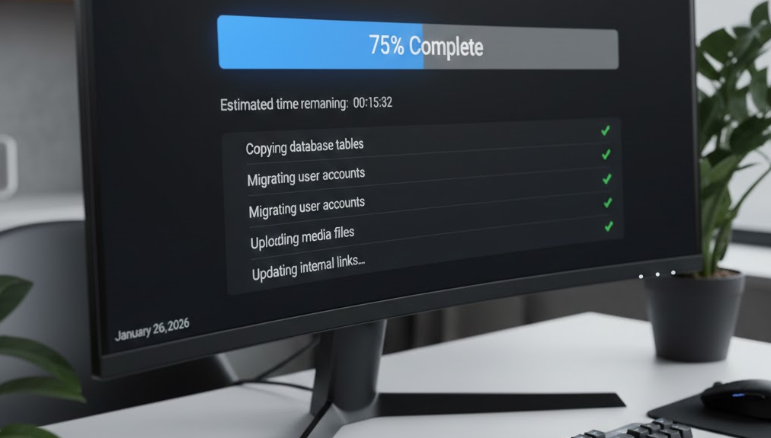
In 2026, users expect pages to load instantly, especially on mobile. When they don’t, people leave. No warning. No second chance.
With Nigeria’s digital economy booming and competition getting sharper, staying on old infrastructure puts your business at a disadvantage.
Why Website Migration Makes Sense in 2026
Website migration lets you move to faster, more secure hosting built for today’s demands. Modern servers, SSD storage, and smarter traffic routing mean:
- Faster load times
- Better user experience
- Higher conversions
- Stronger security and backups
Simply put, your site performs the way your content deserves.
The Real Risks of Not Migrating
Downtime is expensive, costing businesses millions of naira per hour.
Slow sites also suffer in search rankings, especially under Google’s mobile-first indexing. Even a one-second delay can increase bounce rates by over 30%.
Doing nothing might feel safe, but over time it leads to traffic loss, missed sales, and declining visibility.
Why This Is Especially Urgent for Nigerian Websites
Between Naira volatility and stricter data protection rules, reliable local hosting matters more than ever.
Hosting closer to your users improves speed, reduces costs, and simplifies compliance.
Platforms like Truehost use Lagos-based servers to deliver sub-2-second load times and offer plans designed for large, high-traffic websites, with free migrations included.
The Bottom Line: Migrating your website in 2026 is more than an upgrade, it’s a protective move. It safeguards your traffic, your revenue, and your future growth.
The real risk isn’t migration. It’s waiting until your site forces the decision for you.
Pre-Migration Planning
Before you touch a single file, take time to plan. Migrating a large website isn’t something you rush.
And for large websites, this stage makes up about 80% of the entire migration. Skip it, and you’ll spend the rest of the process fixing avoidable problems.
Step 1: Start With a Full Site Audit
Before anything moves, you need to understand what you’re working with.
Crawl your website using tools like Screaming Frog to identify broken links, duplicate content, outdated pages, or heavy plugins slowing things down.
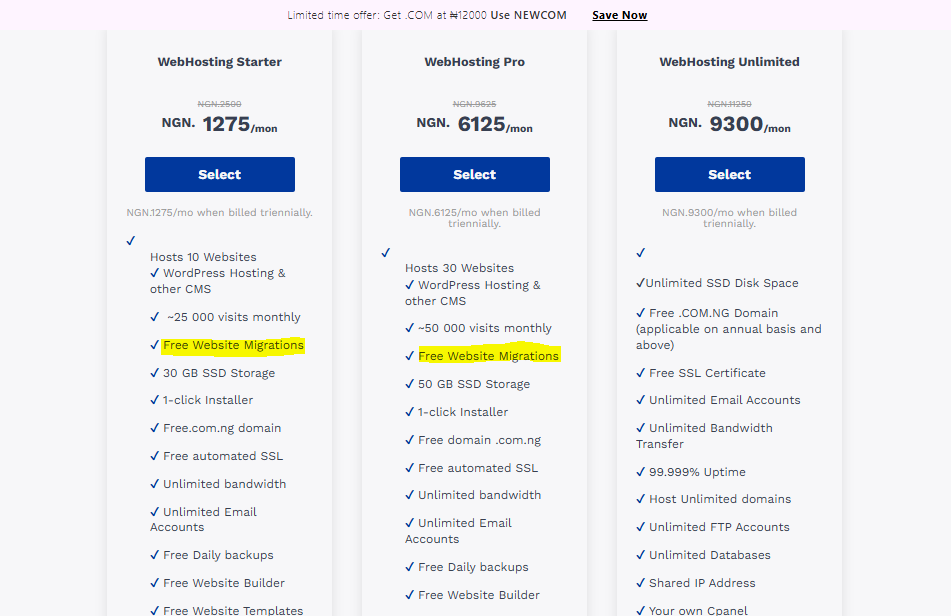
If this already sounds technical, at Truehost, we include a full site audit as part of our free website migration with any hosting plan.
Even our Starter plan at ₦1,275/month covers this, so you don’t have to figure it all out yourself.
Step 2: Define Your Migration Goals
Next, get clear on why you’re migrating in the first place. Are you aiming for faster load times? Better security? A platform that can scale as your business grows?
In 2026, performance can make or break your site.
Core Web Vitals are a big deal, and if your Largest Contentful Paint exceeds 2.5 seconds, your SEO will feel it. Set your priorities early and stick to them.
One important rule here: don’t redesign while migrating.
Changing design and infrastructure at the same time makes troubleshooting messy. Move first. Redesign later.
Step 3: Choose the Right Migration Type
There are two main categories of website migration, and it’s important to know which you are dealing with upfront.
It’s either/or:
Site Moves Involving URL Changes
These require extra care and precise redirect planning:
- Domain name changes – Ideal for rebrands
- Subdomain or subfolder changes – Consolidating content, like blog.yoursite.ng into yoursite.ng/blog
- Top-level domain changes – Moving from .com to .ng for a stronger Nigerian focus
- Protocol changes – Upgrading from HTTP to HTTPS (now mandatory, and free with Truehost SSL)
- Site structure changes – Cleaning up URLs for better user experience
Site Moves Without URL Changes
These are usually safer but still need careful planning:
- Platform changes – For example, Shopify to WordPress
- Major content updates – Pruning or rewriting content
- Mobile optimizations – Switching to PWAs for faster mobile performance
- Site redesigns – UX updates without changing URLs, best tested on staging
Step 4: Assemble the Right Team
At a minimum, you’ll need three roles covered: you, an SEO specialist, and a developer.
If that feels like too many moving parts, outsourcing can save time and reduce risk.
Our Website Management service includes expert oversight, audits, and planning, starting from just ₦500 extra per month on Pro plans, so nothing gets missed.
Step 5: Create a Realistic Timeline
Rushing a migration is one of the fastest ways to break things. A 4–6 week timeline works well for most large websites:
- Week 1: Backups and audits
- Weeks 2–3: Testing and fixing issues
- Launch: A low-traffic weekend
Always work from a staging site first (we provide this free at Truehost) and freeze content updates during the final sync to avoid data conflicts.
For Nigerian businesses, also factor in bandwidth and traffic spikes.
Step 6: Budget Smart, Not Big
A typical large-site migration can cost anywhere between ₦50,000 and ₦200,000 when you factor in tools and professional help.
But with Truehost’s free migrations, affordable hosting plans, and .com.ng domains starting at ₦5,500/year, you can significantly reduce those costs.
Get the planning right, and everything else becomes easier.
Step-by-Step Guide to Executing Website Migration
Once your planning is locked in, it’s time for the real work: execution.
This is where most people get nervous, but it’s also where a well-planned migration really pays off.
Step 1: Back Up Everything
Before anything moves, create a safety net. If something goes wrong, and sometimes it does, you want a clean way back.
Back up:
- All website files
- Databases
- Email accounts
You can do this through cPanel or with plugins like UpdraftPlus. For large websites, export files in chunks to avoid server timeouts.
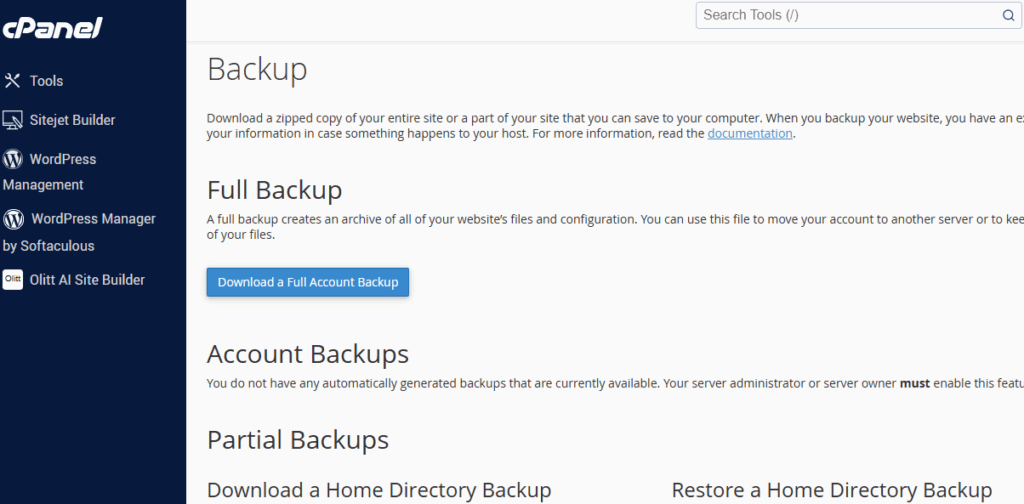
At Truehost, we run daily automated backups, with 5-day retention on Unlimited plans, but we still recommend taking a manual backup and storing it externally, just to be extra safe.
Step 2: Set Up a Staging Environment
Never migrate directly on your live site. Instead, create a staging version that mirrors your website exactly, just without public access.
Spin up your staging site on the new hosting. Restore your backup there, adjust configurations, and test freely without risking downtime.
This single step catches up to 90% of migration issues before they ever reach your users.
Pro tip: Password-protect your staging site to keep bots and search engines out.
Step 3: Migrate Your Data
Now it’s time to move the actual content.
- Transfer files via FTP (FileZilla works well for large uploads)
- Import databases through phpMyAdmin
- Use automation where possible
In 2026, there’s no need to wrestle with raw SQL unless you want to.
Tools like Softaculous and AI-assisted migration utilities handle most of the heavy lifting cleanly. If you’re switching platforms, map content carefully so every page lands where it should.
Step 4: Update Configurations and DNS
Once the site is fully working on staging, it’s time to prepare for launch.
Update your DNS records and point them to the new server, ideally during off-peak hours (around 2 a.m. Lagos time works well).
Renew or install your SSL certificate (Let’s Encrypt is free on all our plans), and make sure HTTPS works across every page.
Don’t forget to:
- Test email forwarding
- Confirm forms still send messages
- Double-check server settings
If you’re extra cautious about future security, you can also enable quantum-safe certificates.
Step 5: Implement Redirects and SEO Safeguards
This is where migrations are either saved, or ruined.
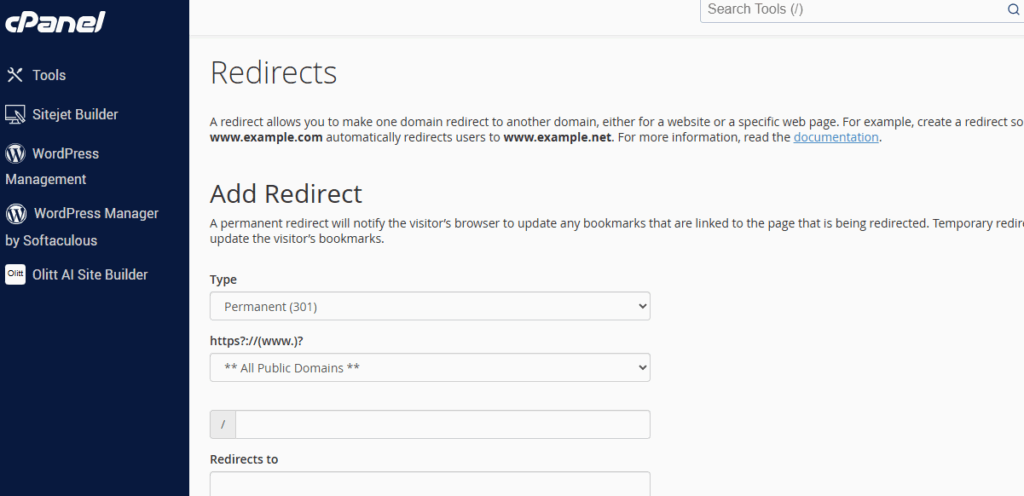
Set up 301 redirects for every old URL pointing to its new version. This preserves your SEO value and ensures visitors don’t land on dead pages.
Add canonical tags to avoid duplicates, and carry over all metadata: titles, descriptions, and schema.
While you’re here, clean up URLs where possible. Short, descriptive links like /best-laptops-ng perform far better than /product?id=123.
Also make sure your Core Web Vitals are solid:
- LCP: under 2.5 seconds
- INP: under 200ms
- CLS: under 0.1
Mobile-first performance is very vital.
Step 6: Test
Before going live, test everything, then test again.
Run:
- Google PageSpeed Insights for performance
- GA4 to confirm tracking (add launch annotations)
- SEO crawls with Screaming Frog or SEMrush
Click through forms, logins, search features, and checkout flows. Test mobile views thoroughly; Google indexes mobile first, not desktop.
This is where most issues should be fixed. At Truehost, this entire testing phase is included in our Website Management service.
Step 7: Go Live and Monitor Closely
Once you’re confident, flip the DNS switch.
DNS propagation can take anywhere from 1 to 48 hours, but our systems usually cut that down to minutes. After launch:
- Submit your new XML sitemap in Google Search Console
- Request indexing for key pages
- Monitor GA4 for traffic changes
A temporary dip of 10–20% is normal in the first few weeks. Keep monitoring for 4–6 weeks until rankings and traffic stabilize.
Tools
Use the right tools for your setup:
- Duplicator for heavy WordPress sites
- SSH access for custom scripts
- Proper hreflang tags for international audiences
Our Unlimited plans include SSH access, Python and Node.js support, and 24/7 live chat if anything unexpected pops up.
Common Pitfalls in Website Migration and How to Avoid Them
For a large site, mistakes like data loss or SEO drops can sting. Here’s how to sidestep the major pitfalls.
1. Data Overlook
Incomplete backups lead to missing content.
Solution: Verify restores on a staging environment, test a sample page fully before going live.
2. SEO Traffic Plunge
Broken redirects can tank rankings.
Solution: Map every URL before the move and implement 301 redirects meticulously. One error can drop visibility by 20–50%.
3. Extended Downtime
DNS propagation delays, especially across Nigeria’s networks, can leave your site offline.
Solution: Schedule migrations during off-peak hours and use propagation checkers.
4. Compatibility Snags
Old plugins or themes may fail on a new host.
Solution: Audit and update everything in staging.
5. Cost Creep
Hidden fees can surprise you mid-migration.
Solution: Lock in with Truehost’s all-inclusive plans, no extra costs beyond ₦9,300/month for unlimited hosting power.
Conclusion and Next Steps
Safely migrating your large site in 2026 boils down to smart planning, precise execution, and vigilant monitoring.
With that, you’re unlocking speed, security, and growth.
At Truehost, our Website Management makes it effortless, with free migrations included on fairly priced plans.
So, if you’re ready to migrate, get started risk-free.