Domain NamesFind and register your ideal domain name instantly.
 Web HostingEasy-to-use hosting powered by cPanel — ideal for managing websites in Nigeria.
 Windows HostingRun .NET apps with Windows-optimized hosting
 Affiliate ProgramMake money promoting our services
 Reseller HostingMake money by reselling our hosting products under your own brand
 .COM Domains
 All DomainsExplore all supported tld domains in Nigeria
 WhoisFind out who owns any domain, as well as verify your registration details
 VPS Hosting in Nigeria
 Dedicated ServersReimagine your site speed with your own complete server
 AI Website BuilderDesign your site with drag-and-drop tools
 Online Store BuilderStart your online shop without code
 SSLs
SSLs Support PortalFind answers or get expert help
 Contact UsReach our team via chat or email
 BlogRead our extensive guides on web hosting and more
Last updated on May 11th, 2026 at 08:32 am
Most businesses don’t think carefully about their email provider until something goes wrong, a missed deal because of a deliverability issue, a security breach that exposed client conversations, or a migration nightmare that took the IT team three weeks to clean up.
By then, the damage is already done and the fix costs far more than the right decision would have upfront.
The truth is, your email infrastructure is one of the most consequential technology decisions you’ll make as a growing business.
It touches every team, every client relationship, and every deal in your pipeline. Choosing poorly early on means painful, expensive switches later.
Choosing well means a platform that quietly scales with you as the team grows from five people to fifty, without you ever having to think about it again.
This guide is about how to choose an email provider with long-term growth in mind, not just one that works today, but one that holds up just as well two years from now when your team is bigger, your compliance requirements are stricter, and your email volume is triple what it is today.
Here are ten things every growing business needs to evaluate before committing.
1) Go for 99.9% Uptime

Uptime is the one number that sits above everything else on this list. When your email goes down, your business goes quiet, no client communication, no internal coordination, no deal follow-ups.
The financial exposure is real: according to ITIC’s 2024 Hourly Cost of Downtime Survey, over 90% of mid-sized enterprises report that a single hour of downtime costs their organization more than $300,000.
Even for smaller businesses, the proportional hit is often devastating.
A 99.9% uptime guarantee translates to less than nine hours of total downtime per year.
Premium providers go further, offering 99.99% SLA commitments, that’s under an hour annually.
Before you sign anything, read the service-level agreement carefully.
Some providers quietly exclude scheduled maintenance windows from their uptime calculations, which means the number looks great on paper but doesn’t reflect your actual experience.
If the provider misses their commitment, the SLA should specify concrete service credits or refunds, not just a vague apology.
2) Choose a Service with Local Servers
Physical distance between your team and a provider’s data centres has a direct, measurable effect on how quickly your emails send and load.
For businesses in Africa, routing traffic through servers in the US or Europe adds unnecessary lag to every message, and that lag compounds across a full day of communication.
If your team sends a hundred emails a day, that latency is invisible in any single message but quietly eats into your team’s responsiveness at scale.
Local hosting eliminates that friction entirely and keeps your email fast regardless of network conditions.
Beyond speed, local servers make compliance significantly easier. Kenya’s Data Protection Act places specific requirements on how business data is stored and processed.
Working with a provider whose infrastructure is hosted locally, or one that’s willing to sign a formal data-processing agreement committing to keep your data within your jurisdiction, puts you on the right side of those requirements before you need to think about them.
If a provider can’t tell you clearly where your data lives, that’s a red flag worth taking seriously.
3) Demand Enterprise-Level Security
A growing business cannot rely on just a password.
As your team expands and your email volume grows, so does your exposure to phishing attacks, spoofing attempts, and account compromises.
The security baseline your provider offers needs to match that reality from day one.
At a minimum, before you commit to any provider, confirm they offer:
- Multi-factor authentication (MFA) enforced across every account, not just for admins, but for every user on your plan
- TLS encryption for all emails in transit, so messages are protected between sender and recipient
- SPF, DKIM, and DMARC authentication protocols built in, DMARC in particular prevents spoofing by authorising which senders can use your domain, protecting both your deliverability and your brand reputation
If any of these are missing or require a paid add-on to activate, treat it as a dealbreaker.
Security shortcuts at this level create liabilities that compound as your business grows.
4) Build for Scale with Flexible User Limits and Automated Provisioning
The email provider that works well for a team of eight can quietly become a bottleneck at fifty.
As you grow, you need a platform that scales without creating administrative work every time someone joins or leaves.
Look for plans that don’t impose arbitrary per-user sending limits, and that allow you to raise volume caps as your business grows without forcing you to renegotiate your entire contract or move to a completely different tier.
More importantly, the provider should support automated user provisioning and de-provisioning through integration with your identity management system.
When you hire someone, their email account should be ready before their first day.
When someone leaves, their account should be deactivated instantly, not whenever IT gets around to it.
Manual provisioning at scale is both slow and a serious security risk, former employees retaining email access longer than they should is a common breach vector that the right provider makes impossible.
The right provider handles all of it automatically.
5) Ensure Seamless CRM and API Integration
Your email should not exist in a silo, disconnected from everything else your team relies on to do their jobs.
Every message your team sends and receives has context, a deal in progress, a support ticket being resolved, a relationship being carefully built, and that context should flow cleanly into the tools where your team actually works.
Before you commit to any provider, check how it connects to your existing stack.
At a minimum, it must support IMAP and SMTP for universal connectivity across devices and third-party tools.
Beyond that, confirm it offers a robust API and native integrations with the tools your team uses daily:
- CRM platforms like Salesforce, HubSpot, or Zoho CRM, so conversations sync to the right contact records automatically
- Calendar and scheduling tools, so meeting invites and availability work without friction across devices
- Support and helpdesk software, so customer emails thread correctly into your ticketing system
- Productivity suites, whether Microsoft 365 or Google Workspace, the provider should play well with whichever environment your team already lives in
Without these connections, your team spends hours manually copying data between systems.
That operational drag compounds quietly and becomes a real drag on growth.
6) Verify Built-in Migration Tools
The quality of a provider’s migration tools is one of the most overlooked factors when figuring out how to choose an email provider, and one of the most consequential.
Switching providers should not require manual exports, PST files, or third-party migration software.
A provider worth committing to long-term offers automated migration tools that transfer your emails, contacts, and calendar items from your existing platform.
Whether that’s Google Workspace, Microsoft 365, or any IMAP server, with zero data loss.
Look specifically for tools that can run migration in the background while your team continues working normally.
Delta sync is important here: it captures new messages that arrive during the migration window so nothing falls through the gap.
A provider that makes migration painful is telling you something about how they handle operational complexity generally. Take note.
7) Prioritise 24/7 Support with Clear Response Times
Email is mission-critical. When something breaks at 2 AM on a Monday, and at some point, something will, you need to reach a real person who can fix it, not a community forum and a promise that someone will look at it during business hours.
Before signing up, verify exactly what support the provider offers on paid business plans. What you’re looking for:
- 24/7 live chat or phone support for urgent issues, not just an email ticketing queue
- Published response-time SLAs for different priority levels, so you know what to expect before you’re in a crisis
- Dedicated account support for business plans, rather than shared consumer queues
- Escalation paths for critical incidents, a clear chain of who to call when the first contact doesn’t resolve the issue
Avoid any provider that relies solely on community forums or self-serve knowledge bases for their support model.
That might be fine for a personal account. It becomes a liability the moment email is carrying your most important client relationships.
8) Look for Transparent Pricing with No Hidden Overage Fees
The sticker price is rarely the real price.
Many email providers attract customers with low per-user rates and then apply overage charges for storage, outgoing message volume, or API calls once you’re fully embedded and migration feels inconvenient.
By the time you discover the true cost, switching feels harder than absorbing the fees.
Before committing, read the fine print on exactly what triggers additional charges. What happens when a team member sends 1,000 emails in a day? Does the provider throttle, block, or charge per message?
For long-term growth, look for flat-rate pricing or providers that state overage costs clearly upfront.
Better yet, find one that sends automatic alerts before you cross a threshold, so a surprise bill never appears at the end of the month.
Predictable costs are a feature, not a bonus.
9) Require Built-in Email Archiving and eDiscovery
As your business grows, legal and regulatory requirements become more relevant, not less.
Financial businesses, legal firms, healthcare providers, and any company handling client data may be required to retain every email for a set number of years, in some jurisdictions, up to seven years.
A standard trash folder doesn’t satisfy that requirement, and finding out it doesn’t during an actual compliance review is a costly way to learn.
The provider you choose should offer immutable email archiving, meaning messages cannot be deleted or altered by users once stored, and eDiscovery tools that allow you to search and export archived emails quickly when needed.
Some providers charge archiving as an add-on; others include it in business plans.
Either way, confirm it exists and understand exactly how it works before you commit.
Without it, a single compliance request or legal dispute could create significant exposure that the right provider would have made trivially easy to handle.
10) Test Mobile App Reliability and Offline Access
Your team doesn’t only check email at a desk.
Messages get read in taxis, at client sites, in areas with unreliable connectivity, and across a range of devices that your IT team has no control over.
A mobile experience that frustrates your team, slow sync, crashes, attachments that won’t load, no offline access, doesn’t just annoy people.
It creates communication gaps that cost you.
Before you commit to any provider, use the free trial to properly stress-test the mobile app. Send large attachments.
Toggle offline mode and compose a message without a signal. Search for a six-month-old email.
The provider should offer full offline access with cached emails and drafts, background sync that doesn’t drain battery, and a consistent experience across both iOS and Android.
If the mobile app is clearly an afterthought, the team will feel that every single day.
Get Your Email Right
Knowing how to choose an email provider is really about knowing what your business needs to grow without friction.
The ten factors above aren’t a wishlist, they’re the baseline for any platform you’re trusting with your most important communication channel. Tick all ten boxes and you have a provider that holds up.
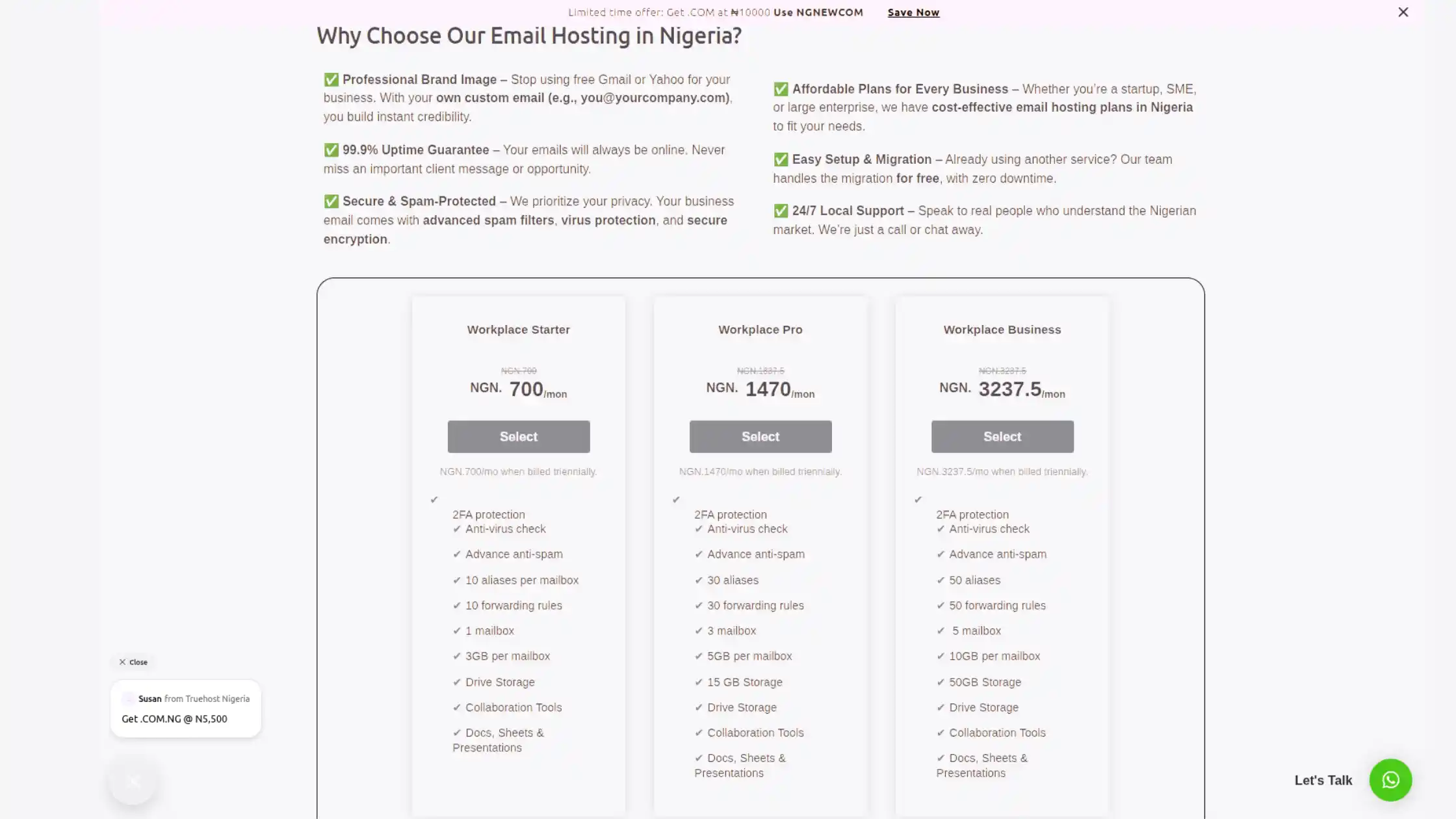
At Truehost, we have built our business email product around exactly these requirements: professional domain email, reliable local servers, strong security defaults, full IMAP and SMTP compatibility for connecting to any tool in your stack, and a support team that’s reachable when it matters.
We’re not asking you to compromise on uptime, migration support, or transparent pricing to get something affordable. You shouldn’t have to.
If your team is growing and your current email setup is starting to show the cracks, missed messages, a clunky mobile experience, no clear SLA, surprise charges at the end of the month, it’s the right moment to make a change before those problems compound into something harder to fix.
Set up your business email with Truehost today and get started, and build on a foundation that grows with you.