DomainsFind and register your ideal domain name instantly.
 Web HostingEasy-to-use hosting powered by cPanel — ideal for managing websites in Nigeria.
 Windows HostingRun .NET apps with Windows-optimized hosting
 Affiliate ProgramMake money promoting our services
 Reseller HostingMake money by reselling our hosting products under your own brand
 .COM Domains
 All DomainsExplore all supported tld domains in Nigeria
 WhoisFind out who owns any domain, as well as verify your registration details
 Dedicated ServersReimagine your site speed with your own complete server
 AI Website BuilderDesign your site with drag-and-drop tools
 Online Shop BuilderStart your online shop without code
 Support PortalFind answers or get expert help
 Contact UsReach our team via chat or email
 BlogRead our extensive guides on web hosting and more
To buy a .com domain in Nigeria, search the complete address, select its exact .com result, choose the registration term and nameservers, enter accurate registrant details, review the renewal price, and pay through our checkout.
At Truehost, a new .com currently costs 13000.00 NGN for the first year and renews at ₦20,000.00 per year. Your checkout total can change if you select a longer term or add optional services.
I tested this route from our public .COM page to Review & Checkout on 25 August 2026. I stopped before entering personal information, accepting the terms or paying, and I did not create an order or register the domain.
What you need before you start
Prepare the complete .com address you want and two sensible alternatives. Keep the name easy to spell, avoid another company’s trademark, and check how it sounds when spoken aloud. Our .COM guide can help if you are still deciding whether the extension fits your audience.
You will also need:
your legal name or organisation name;
an email address and Nigerian phone number you monitor;
your billing address;
the nameservers from your web host, if you will not use ours; and
a Visa or Mastercard accepted by Paystack, or a PayPal account.
A standard .com does not require Nigerian eligibility documents. It is a global domain, but ICANN requires accurate registrant contact details. If you are unsure about the seller or checkout, read our safer buying guide before paying.
1) Open our .COM registration page
Go to our .COM page. Confirm that the page is on truehost.com.ng, displays prices in naira, and identifies the product as .COM.
Use the Domain Search tab. The neighbouring AI Suggest and Transfer tabs serve different tasks: generating name ideas and moving an existing domain.
2) Search the complete .COM address
Enter the full address, including .com, such as yourbrand.com, then select the search button.
Including the extension keeps the result focused on the product you intend to register. If the name is already registered, change the wording rather than adding a confusing hyphen or imitating an established brand.
3) Choose the exact .COM result
The result area can show three different offers:
the exact
.comaddress;a bundle containing more than one extension; and
neighbouring options such as
.com.ng.
Select Buy Now on the card that shows your complete .com address. Choose a bundle only when you intentionally want every domain listed in it.

The exact .com result from the tested flow on 25 August 2026. Prices and availability can change.
Do not substitute .com.ng by accident. That is a different Nigerian extension with its own .COM.NG steps.
4) Set the term and nameservers
Our configuration page lets you register the domain for one to ten years. The one-year option uses the current first-year rate. Longer selections show their complete payable totals in the selector; review that figure instead of assuming every year uses the introductory rate.
The same page may offer ID Protection, Email Forwarding and Domain Vault. Select an add-on only when you understand its job and price. None of them replaces web hosting.
Keep our prefilled nameservers if you plan to host the website on our network. If another provider will host the site, replace them with the exact nameservers that provider supplied. You can also leave the domain on our defaults and update its DNS later.
Select Continue after checking the term, optional services and nameservers.
5) Review today’s charge and renewal
The Review & Checkout page shows two numbers that matter:
the amount due for the new registration today; and
the annual renewal amount.
Check that the product row contains the exact domain you searched. Then compare the first-year charge with the renewal line before adding account details.
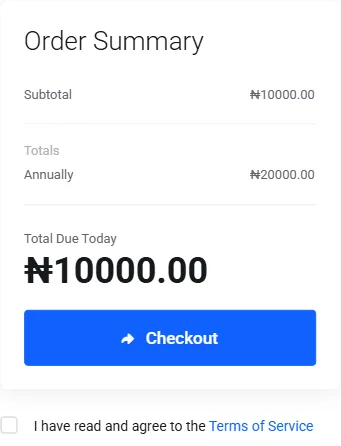
The tested one-year order summary before account details or payment. Verify the live total in your own cart.
The renewal amount may be higher than the first-year offer. Budget for ownership beyond launch day, especially when the domain will carry your website or business email.
6) Enter the registrant details
Existing customers can sign in. New customers can create an account from the checkout page and provide:
first and last name;
email address and phone number;
company name, when applicable;
street address, city, state and postcode; and
an account password.
Use details that belong to you or the organisation that should control the domain. If you are ordering for another person or company, the Domain Registrant Information selector lets you add a different contact.
Do not register a client’s business domain under a developer’s personal details merely for convenience. The intended owner should control the account email, renewal notices and recovery path.
7) Choose a payment method
At the time of testing, our checkout displayed two payment routes: Visa or Mastercard through Paystack, and PayPal.

Payment choices visible in the Truehost Nigeria checkout on 25 August 2026.
Select the method you will use, review any optional mailing-list choice, and read the linked terms. Before selecting Checkout, compare the Total Due Today with the amount you expect to authorise.
8) Pay and verify the registration
Accept the terms only after reviewing the order, then select Checkout and complete the payment instructions for your chosen method.
After payment, verify three things rather than relying on the payment screen alone:
the order or invoice shows a successful status;
the domain appears in your Truehost client account; and
you receive and respond to any registrant-contact verification email.
ICANN requires reliable registration data. A registrar can suspend a domain when the required contact verification is not completed, so use an email address you can access and act on the message promptly.
If payment succeeds but the domain does not appear in your account, contact our support team with the invoice or transaction reference. Do not submit a second payment until our team checks the first transaction.
What to do after buying the domain
Registration secures the address; it does not publish a website by itself. Your next task depends on what you are building:
connect the domain to your web host;
create business email addresses;
enable account security and renewal reminders; and
record who controls the account, email and payment method.
Our domain and hosting guide explains the next setup decision. When your name, contact details and payment method are ready, search your .COM and follow the tested path above.