Domain NamesFind and register your ideal domain name instantly.
 Web HostingEasy-to-use hosting powered by cPanel — ideal for managing websites in Nigeria.
 Windows HostingRun .NET apps with Windows-optimized hosting
 Affiliate ProgramMake money promoting our services
 Reseller HostingMake money by reselling our hosting products under your own brand
 .COM Domains
 All DomainsExplore all supported tld domains in Nigeria
 WhoisFind out who owns any domain, as well as verify your registration details
 VPS Hosting in Nigeria
 Dedicated ServersReimagine your site speed with your own complete server
 AI Website BuilderDesign your site with drag-and-drop tools
 Online Store BuilderStart your online shop without code
 SSLs
SSLs Support PortalFind answers or get expert help
 Contact UsReach our team via chat or email
 BlogRead our extensive guides on web hosting and more
Last updated on December 26th, 2025 at 12:28 pm
Every device that connects to the internet has something called an IP address.
It’s a digital address that tells the world where your phone, laptop, or server is.
Without it, nothing loads, not your website, not your emails, not even your bank app.
But here’s the part most people don’t realize: Your IP can either stay the same or change often.
And this small difference can cause big problems, especially in Nigeria, where networks already give people enough stress.
That’s why the whole static vs dynamic IP address conversation is very important. One gives you stability.
The other saves you money. And choosing the wrong one can mess up your business when you least expect it.
In this guide, you’ll get the full picture in clear, simple English. You’ll learn:
- What IP addresses really do
- The difference between static and dynamic IPs
- When each one works best in real Nigerian life
- The good and bad sides
- How to know which one you’re using
- How to switch and stay safe online
If you’ve ever been confused by IP issues, this will finally make sense.
What Is an IP Address?
An IP address is the Internet version of a home address. It tells websites and apps where to send information when you try to connect.
Without it, your device is basically invisible online.
Each IP is a set of numbers, something like 102.89.66.10. Your network gives this number to your phone, laptop, CCTV, or server so they can communicate with the rest of the world.
Every time you open Instagram, stream a movie, or load your website, your IP helps the internet know who requested what.
It’s the “sender and receiver” label on every digital package you send or receive.
In simple terms:
- You can’t browse without an IP.
- You can’t host anything without an IP.
- You can’t make online calls without an IP.
It’s the gatekeeper that keeps all your online actions moving smoothly.
But not all IP addresses behave the same way.
Some stay constant, some jump around, and that’s where many problems begin, especially for business owners who need stable connections.
What Is a Static IP Address?
A static IP address is a fixed Internet address that never changes.
Once your provider gives it to you, that number stays the same every day, every week, every year, unless you request a new one.
It works just like a permanent home. People know where to find you, delivery riders know where to drop items, and nothing moves unless you move it yourself.
When your device or server has a static IP, it becomes easy for the internet to reach you without confusion. That stability matters a lot for things like:
- A website that must stay online
- A business app that customers use 24/7
- A VoIP call center that needs clear, steady calls
- A remote team that needs reliable access
- A fintech or company that tracks logins for compliance
In places where network signals jump around, like most Nigerian cities, a static IP reduces surprises.
No sudden changes. No broken connections because your address switched at the wrong time.
How to Get a Static IP Address
Getting a static IP in Nigeria isn’t complicated, but you do need help from your internet provider. You can’t just create one on your own.
Here’s the simple process:
1) Contact Your Provider
Reach out to MTN, Airtel, Glo, or whoever gives you internet.
Tell them clearly: “I need a static IP for my business.”
Most providers only offer static IPs on:
- Fiber plans
- Business broadband
- Dedicated internet
Regular mobile data usually doesn’t qualify.
2) Pay the Fee
Static IPs are not free.
Most providers charge a yearly amount, like:
- Airtel Business: ₦10,000–₦25,000
- Glo Business: around ₦15,000
Some hosting companies, like Truehost’s VPS plans, include a static IP at no extra cost.
3) Enter the Details Into Your Router
After payment, your provider sends you:
- Your static IP
- Subnet mask
- Gateway
- DNS
You then:
- Log in to your router (usually 192.168.1.1)
- Open the WAN or Internet settings
- Switch from “Automatic” to “Manual”
- Enter the numbers they gave you
- Save and restart the router
Once this is done, your connection now has a permanent online address.
If you ever get stuck, most providers and hosting companies like Truehost can guide you step-by-step.
When Do You Need a Static IP Address?
Not everyone needs a static IP. If you’re just browsing, streaming, or scrolling TikTok, a normal dynamic IP is fine.
But some situations require a steady, unchanging address or things will break.
Here are the moments when a static IP makes a real difference:
1) Running a Website or Online Store
If your business depends on a site that must stay online, a static IP keeps it stable.
It helps with:
- SSL certificates
- Email deliverability
- Search engine trust
No sudden IP change that sends your site offline at peak hours.
2) Remote Staff and Office Access
If your team logs into a central system from different places, you need a fixed address.
It keeps remote access smooth and predictable.
3) VoIP Calls and Call Centers
Voice calls over the internet hate unstable IPs.
A static IP keeps calls from dropping and keeps conversations clear.
4) Compliance for Fintech and Corporate Work
NDPC rules, banking logs, and audit trails need clean, steady records.
Static IPs make tracking easier.
5) Tracking, CCTV, and IoT Devices
A logistics company in Abuja tracking trucks can’t afford IP shifts.
Same for CCTV cameras that need to stay connected all day.
If a disconnect can cost you money, customers, or security, you need a static IP.
Pros and Cons of Static IP Addresses
Static IPs are reliable, but they’re not perfect. Here’s the honest breakdown so you can decide if they fit your needs.
Pros
1) Very Stable
Your IP never changes. This means your website, apps, emails, and remote systems stay online without sudden breaks.
2) Better for Hosting and Business Tools
Static IPs work smoothly with servers, VPNs, VoIP calls, CCTV systems, and anything that needs a fixed address.
3) Good for SEO and Email Trust
Search engines trust consistent signals.
Your emails are less likely to land in spam because your address stays the same.
4) Good for Compliance and Tracking
If your business handles sensitive data or logs, a fixed IP makes record-keeping clean and easy.
Cons
1) Extra Cost
You pay a yearly fee, and that can be tough for small businesses.
2) Easier for Hackers to Target
Because the IP never moves, attackers know where to look.
Good firewalls and strong passwords solve most of this.
3) Not Great for Moving Devices
Static IPs work best for servers and fixed locations not phones or laptops that move around.
What Is a Dynamic IP Address?
A dynamic IP address is the opposite of a static one. It changes often.
Your provider gives you a fresh IP anytime you reconnect, restart your router, or when your current one expires.
It behaves like a bus stop in Lagos, where people come and go quickly — nothing stays the same for long.
Most Nigerians use dynamic IPs every day without even knowing it. When you:
- browse the internet
- watch Netflix or Showmax
- scroll social media
- join online classes
…your device is likely using a dynamic IP.
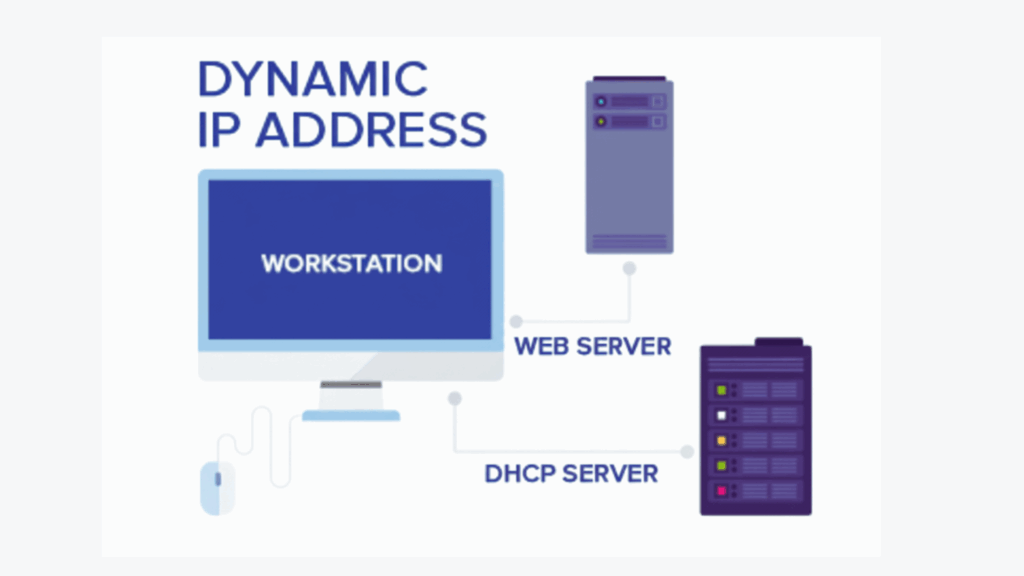
It’s simple, automatic, and free. Your provider keeps a big pool of IPs and hands them out as needed. When your session ends, the IP goes back into the pool.
This setup works well for normal internet use.
But if you’re hosting something important or running a business that needs stability, the constant IP changes can cause issues.
Dynamic IPs are flexible and easy, but not built for mission-critical tasks.
How to Get a Dynamic IP Address
Good news you probably already have a dynamic IP. Most ISPs in Nigeria give them automatically. It’s the default setting for:
- Home broadband
- Mobile data (MTN, Glo, Airtel)
- Shared hosting plans
Here’s all you need to do:
- Make sure your modem or router is on.
- Ensure DHCP is enabled (most routers have this on by default).
- Connect, your device automatically gets an IP from the provider’s pool.
If you want a fresh IP:
- Restart your router, or
- Unplug it for 30 seconds and plug it back in
Dynamic IPs are effortless, free, and perfect for casual browsing, streaming, and small teams.
For services that need a stable connection, you can use tools like Dynamic DNS to keep things connected even when the IP address changes.
Pros and Cons of Dynamic IP Addresses
Dynamic IPs are flexible and easy, but they have trade-offs. Here’s the simple truth.
Pros
1) Free and Budget-Friendly
No extra cost. Perfect if you just browse, stream, or run a small blog.
2) Privacy Boost
Since your IP changes often, it’s harder for trackers or hackers to follow you.
3) Easy and Automatic
Your router gets an IP without any setup. Plug and play.
4) Scales Easily
ISPs can manage millions of users without conflicts because IPs rotate automatically.
Cons
1) Unstable for Remote Access
If you need to log in remotely to a server or office system, IP changes can interrupt your connection.
2) Risk of Blacklists
Frequent IP changes can sometimes get your emails or services flagged as spam.
3) Not Ideal for VoIP or Hosting
Calls may drop, and hosting services may misbehave when the IP switches.
Dynamic IPs are perfect for casual users, bloggers, or small teams who don’t need constant connectivity. For larger operations or hosting, a static IP is safer.
Key Differences Between Static and Dynamic IP Addresses
Choosing between static and dynamic IP comes down to one question: stability or flexibility. Here’s a clear comparison.
| Feature | Static IP | Dynamic IP |
| Assignment | Manual/fixed by ISP | Automatic, leased from ISP |
| Cost | Paid (₦10k–₦30k yearly) | Free |
| Stability | Always the same | Changes regularly (often daily) |
| Security | Easier to whitelist | Harder to track, better privacy |
| Best Use | Servers, business, hosting, compliance | Browsing, streaming, casual use |
In Nigeria, static IPs are best for businesses, fintech, remote teams, and hosting. Dynamic IPs work for casual users, solopreneurs, and home browsing.
It’s the difference between an anchor and a raft. One keeps you steady. The other lets you float.
How to Get Static vs Dynamic IP Addresses: Step-by-Step
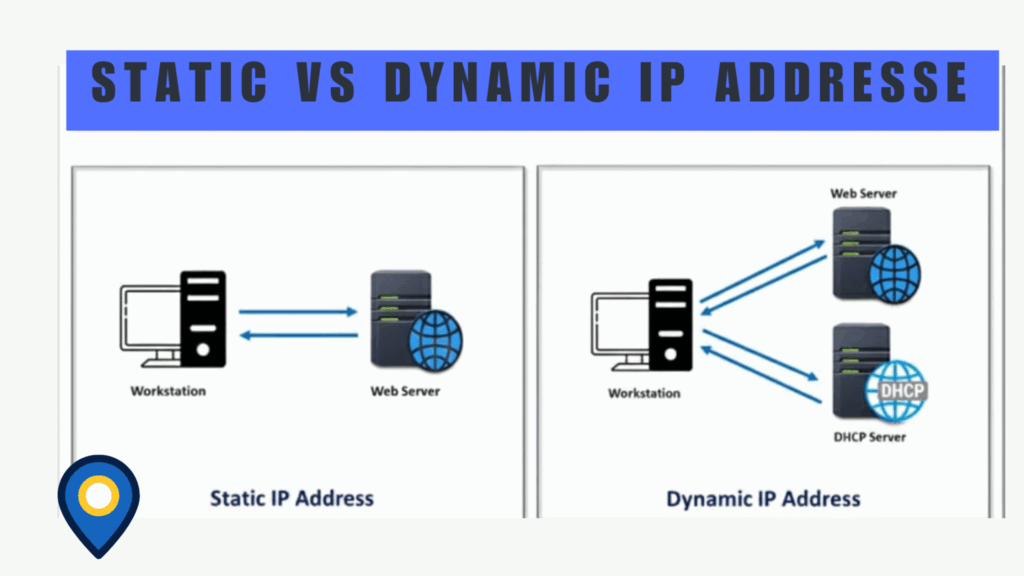
Here’s a side-by-side look at how you get each type of IP in Nigeria.
Static IP
- Call your ISP (like Airtel 111).
- Pay the yearly fee (around ₦15,000 on average).
- Manually configure your router with the numbers provided.
- Test the connection with a ping or by opening a website.
Dynamic IP
- Turn on your router or modem.
- DHCP automatically assigns an IP.
- Done with no extra cost or setup.
Tips for Nigeria:
- MTN’s app makes requesting static IPs easier.
- Glo and Airtel usually give dynamic IPs by default.
- Hosting companies like Truehost let you switch between static and dynamic from the dashboard without contacting your ISP.
Static takes effort but gives stability. Dynamic is effortless but less reliable for business-critical tasks.
Static vs Dynamic IP Addresses in VPNs
A VPN hides your real IP, but the type of IP still matters for performance and stability.
Static IP + VPN
- Gives a dedicated connection.
- Perfect for business remote work.
- Stable speeds and no sudden disconnections.
- Works well for secure access to company systems or fintech apps.
Dynamic IP + VPN
- Shares an IP from a pool with other users.
- Helps hide your identity and bypass geo-blocks.
- Can disconnect occasionally.
- Better for casual streaming or privacy-focused browsing.
In Nigeria, with networks that fluctuate, dynamic VPNs can help hide your activity.
But for business or compliance-sensitive work, static VPNs are safer and more reliable.
Pairing static IPs with VPNs ensures your connection is secure, stable, and compliant.
Hosting services like Truehost support VPN-friendly setups for both types.
How Can I See Which Type of IP Address I Have?
It’s easy to check whether your IP is static or dynamic.
On Windows
- Press Win + R, type cmd, and press Enter.
- Type ipconfig /all and look for DHCP Enabled:
- Yes = dynamic
- No = static
- Yes = dynamic
On Mac or Linux
- Open Terminal.
- Type ifconfig or ip addr.
- Look for “dynamic” or manual settings.
Online Tools
- Websites like whatismyipaddress.com show your IP type.
Router Check
- Log in to your router and check the WAN or Internet settings.
- Lease time is short = dynamic, fixed = static.
Airtel and MTN apps also show IP lease time. Short leases mean dynamic.
In just a few minutes, you can know exactly what you’re working with.
Conclusion
Now you know the difference between a static and dynamic IP address.
- Static IP: Steady, reliable, perfect for hosting, remote work, fintech, and compliance.
- Dynamic IP: Flexible, free, and great for browsing, streaming, or casual business use.
Your choice depends on your needs. If downtime costs you sales or customers, go static. If you just surf or run small projects, dynamic works fine.
Don’t let IP problems hold your business back. Hosting services like Truehost make it easy to choose the right plan, set up your IP, and stay secure.
Take control of your connection, pick the right type, and watch your online operations run smoothly.