Domain NamesFind and register your ideal domain name instantly.
 Web HostingEasy-to-use hosting powered by cPanel — ideal for managing websites in Nigeria.
 Windows HostingRun .NET apps with Windows-optimized hosting
 Affiliate ProgramMake money promoting our services
 Reseller HostingMake money by reselling our hosting products under your own brand
 .COM Domains
 All DomainsExplore all supported tld domains in Nigeria
 WhoisFind out who owns any domain, as well as verify your registration details
 VPS Hosting in Nigeria
 Dedicated ServersReimagine your site speed with your own complete server
 AI Website BuilderDesign your site with drag-and-drop tools
 Online Store BuilderStart your online shop without code
 Support PortalFind answers or get expert help
 Contact UsReach our team via chat or email
 BlogRead our extensive guides on web hosting and more
There are many ways to put your business online shared hosting, VPS, or cloud. They work, but only up to a point.
Once your website starts earning real money, speed, uptime, and security become non-negotiable.
That’s when a dedicated server setup becomes the safest choice. It gives your business its own space, power, and full control, no sharing, no slowdowns.
Many growing Nigerian businesses switch to dedicated servers because traffic spikes during big sales often crash shared and VPS hosting.
Research shows that over half of visitors leave a site that takes more than 3 seconds to load, meaning lost sales.
A dedicated server solves this. Your website runs on a single machine just for you.
Pages load faster, payments stay secure, and traffic surges don’t break your site.
In this guide, you’ll learn:
- What a dedicated server really is
- When to move on from shared or VPS hosting
- Step-by-step setup in Nigeria
- How Truehost simplifies dedicated hosting
- Tips to keep your server fast, secure, and ready for growth
By the end, you’ll know why a dedicated server is the best foundation for serious online business and how to set one up properly.
What Is a Dedicated Server?
A dedicated server is a computer that works only for your website.
With shared hosting, many websites use the same computer. When one site gets busy, every other site slows down.

That is why your pages hang during traffic spikes.
A dedicated server setup removes this problem.
You get the entire server to yourself. The speed, memory, and storage are not shared with anyone else.
Your website uses all the power it needs, anytime it needs it.
This is what that means for your business:
- Your website loads fast, even during big promotions
- Other websites cannot affect your performance
- You control what software runs on the server
- Your data stays more secure
Some people compare hosting types to housing. Shared hosting is like sharing one apartment with many people.
VPS is like renting a room. A dedicated server is your own house.
You decide what happens inside, and no one slows you down.
Hosting options compared
| Hosting Type | Control | Best Use |
| Dedicated | Full | Busy stores, growing companies |
| VPS | Medium | Small to medium websites |
| Shared | Low | Personal blogs |
If your website is important to your income, dedicated hosting gives you stability and peace of mind.
Truehost Dedicated Server Features
Setting up a dedicated server sounds complex, but Truehost makes it easier for Nigerian businesses.
Truehost offers dedicated servers with pricing in Naira, so you don’t have to worry about dollar rates or surprise charges.
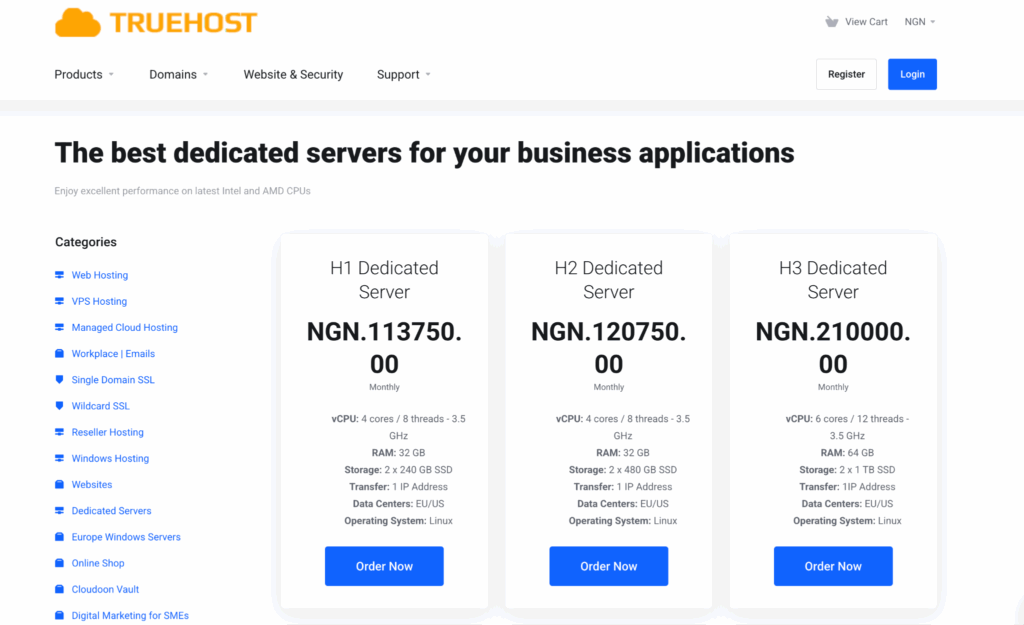
Plans start from ₦113,750 per month, and there is no setup fee.
Although the servers are hosted in Germany, they are connected through fast routes to Nigeria.
This keeps the loading speed good, with an average response time under 150 milliseconds.
For visitors in Lagos, Abuja, and Port Harcourt, the website still feels fast and stable.
Here’s what you get with Truehost dedicated servers:
- The Linux operating system, by default
- Windows are available if your application needs it
- Full root access, so you control everything
- Your resources are fully isolated
- Support for WordPress, WooCommerce, Node.js, Apache, and more
Security is also built in. Truehost includes DDoS protection to block attacks that try to overwhelm your website.
Servers are NDPR-compliant, which is important if you collect customer data.
Available plans
| Plan | Core Resources | Ideal For |
| H1 Dedicated Server | vCPU: 4 cores / 8 threads – 3.5 GHzRAM: 32 GBStorage: 2 x 240 GB SSDTransfer: 1 IP AddressData Centers: EU/USOperating System: Linux | Small businesses, blogs |
| H2 Dedicated Server | vCPU: 4 cores / 8 threads – 3.5 GHzRAM: 32 GBStorage: 2 x 480 GB SSDTransfer: 1 IP AddressData Centers: EU/USOperating System: Linux | Growing websites |
| H3 Dedicated Server | vCPU: 6 cores / 12 threads – 3.5 GHzRAM: 64 GBStorage: 2 x 1 TB SSDTransfer: 1IP AddressData Centers: EU/USOperating System: Linux | High-traffic platforms |
All plans include unlimited bandwidth, one IPv4 address, and 99.9% uptime. This means your website stays online when customers need it most.
When Do You Need a Dedicated Server?
Not every website needs a dedicated server setup. But when your business starts growing, there comes a point where cheaper hosting options begin to hold you back.
If your site is slow or unstable, customers don’t wait. They leave. And once they leave, many never come back.
You should move to a dedicated server when you notice these signs:
- Your website gets 10,000 or more visitors in a day
- Pages take longer than 3 seconds to load
- Your site crashes during sales or promotions
- You collect sensitive customer data, like payments or personal details
- Your uptime drops below 99%, even without traffic spikes
In Nigeria, traffic often rises suddenly during festive seasons, flash sales, or special promos.
Shared hosting and VPS servers struggle with this kind of pressure.
A dedicated server handles traffic without slowing down. It keeps your website stable, your checkout working, and your customers confident.
If your website brings in money, poor hosting is not a small problem. It directly affects your sales.
How a Dedicated Server Works
A dedicated server works like a private engine for your website. Everything inside it is built to serve your site only.
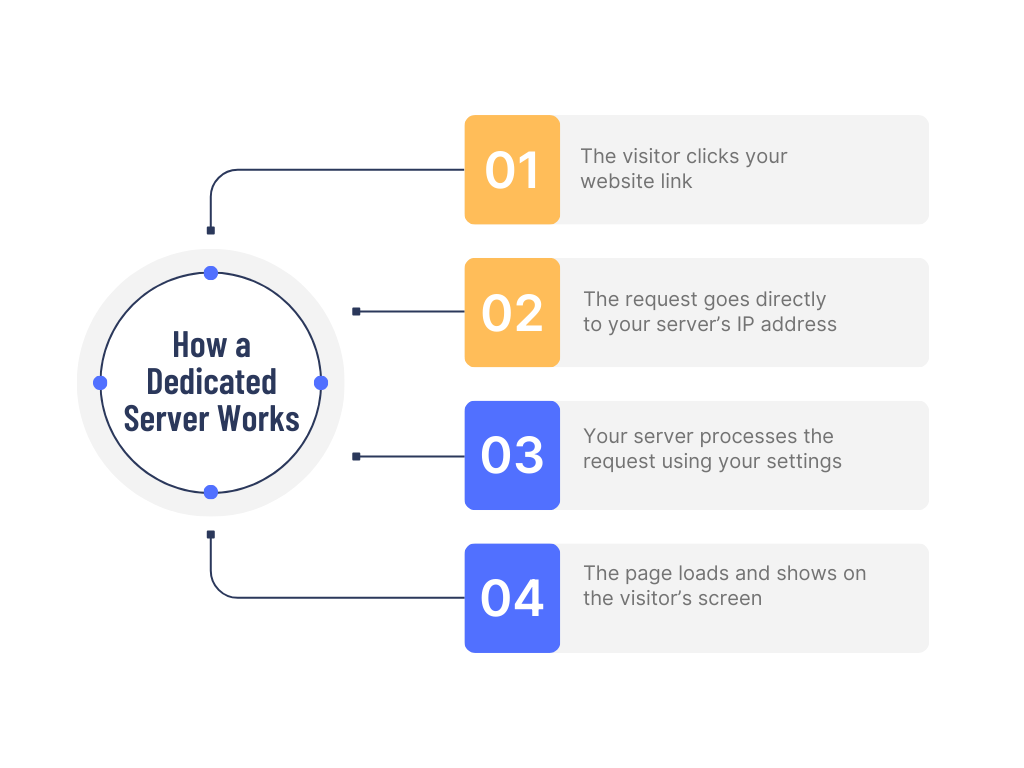
When someone visits your website, this is what happens:
- The visitor clicks your website link
- The request goes directly to your server’s IP address
- Your server processes the request using your settings
- The page loads and shows on the visitor’s screen
Because no other website uses the server, your site stays fast and stable, even when many people visit at the same time.
With a dedicated server, you control:
- The operating system, Linux or Windows
- The software you install, like Apache, Nginx, or Node.js
- How much memory and processing power your site uses
You manage the server remotely. From your laptop, you can log in using SSH on Mac or Linux, or PuTTY on Windows.
This lets you upload files, update software, and check performance anytime.
Even though Truehost servers are located in Germany, the network routes are optimized for Nigeria.
This keeps the delay low, usually under 150ms, so your website responds quickly to users across the country.
As your business grows, you can upgrade your server’s RAM, CPU, or storage without changing your website.
Requirements Before You Begin
Before setting up a dedicated server, it helps to prepare. Good preparation saves time and prevents mistakes later.
Hardware Needs
Your server must be strong enough to handle traffic. At a minimum, you should have:
- 4 vCPU cores
- 32GB RAM
- 240GB SSD storage
If you go lower than this, your website may still slow down during busy periods.
Skills Needed
You don’t need to be a tech expert, but basic knowledge helps:
- Simple Linux commands
- Understanding of ports, firewalls, and IP addresses
If this feels overwhelming, many businesses hire a system administrator for the initial setup. This often costs less than fixing server issues later.
Tools You’ll Use
To manage your server, you need:
- An SSH client like Terminal or PuTTY
- A registered domain name, such as a .ng domain
- A backup tool like Rsync or automated snapshots
Budget Planning
When budgeting, think beyond the monthly server fee:
- Dedicated server plan starting from ₦150,000
- SSL certificates, free with Let’s Encrypt
- Monitoring tools for uptime and performance
Legal and Data Rules
If you collect customer data in Nigeria:
- Follow NDPR guidelines
- Encrypt sensitive information
- Register with NITDA if required
These steps protect your customers and build trust.
Step-by-Step Dedicated Server Setup
Setting up a dedicated server is easier when you follow clear steps. You don’t have to do everything at once.
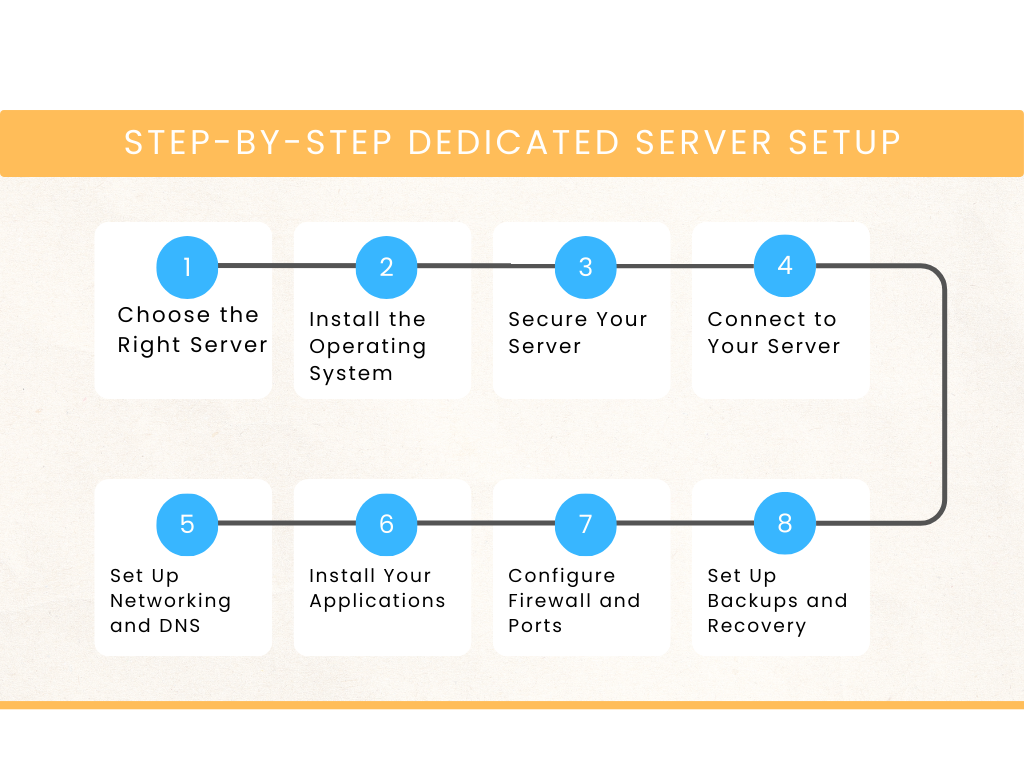
1) Choose the Right Server
Start by picking a server plan that matches your traffic and storage needs.
| Plan | Strength | Limitation |
| H1 | Affordable, reliable | Smaller storage |
| H2 | More storage | Higher cost |
| H3 | Very powerful | Expensive |
If you’re unsure, start with H1 and upgrade later.
2) Install the Operating System
Most businesses choose Linux because it is stable and fast. Windows is useful for applications built with .NET.
Truehost offers easy OS installation, so you don’t need to install it manually.
3) Secure Your Server
Security should be your first task after setup:
- Disable direct root login
- Use SSH keys instead of passwords
- Install Fail2Ban to block attacks
- Update the system regularly
This protects your server from common threats.
4) Connect to Your Server
You access your server remotely:
- Use SSH on Mac or Linux
- Use PuTTY on Windows
Once connected, you can manage files, install software, and monitor performance.
5) Set Up Networking and DNS
Every server comes with a static IP address.
You need to:
- Add this IP to your domain’s A record
- Manage DNS through NiRA or a provider like Cloudflare
This step connects your domain name to your server.
6) Install Your Applications
Install the software your website needs:
- LAMP or LEMP stack for most websites
- WordPress for blogs or online stores
Many tools support one-click installation to save time.
7) Configure Firewall and Ports
Only open what your site needs:
- Port 22 for SSH
- Port 80 for HTTP
- Port 443 for HTTPS
Block all other ports to reduce risks.
8) Set Up Backups and Recovery
Never skip backups:
- Schedule automatic daily or weekly backups
- Store backups off the server
- Test backups to ensure they work
Backups protect you from data loss and mistakes.
Common Mistakes to Avoid
Even experienced website owners make mistakes with dedicated servers. Avoiding them saves money, time, and stress.
- Skipping firewall setup
Open ports let hackers in. Only allow necessary ports: 22 (SSH), 80 (HTTP), 443 (HTTPS). - Overbuying resources
Extra CPU or RAM that you don’t use is wasted money. Monitor usage and scale wisely. - Ignoring error logs
Logs show problems before they become big. Check them regularly. - Neglecting backups
One slip can erase critical data. Automate backups and test restores. - Weak passwords and default settings
Always use strong, unique passwords and change defaults. Enable 2FA. - Forgetting local network conditions
Nigerian power cuts or internet hiccups can affect server performance. Test connections and rely on datacenter redundancies.
Truehost offers 24/7 support with local knowledge. Use it to handle problems quickly and avoid downtime.
Choosing the Right Hosting Provider
Your hosting provider is the backbone of your website. The wrong choice can slow your site, cause crashes, and frustrate customers.
Choosing the right one saves time and protects your business.
Look for these features:
- High uptime – Aim for 99.9% or higher. Every minute your site is down could mean lost sales.
- Local pricing in Naira – Avoid hidden fees or confusing dollar conversions.
- Fast connection to Nigeria – Low latency (<150ms) keeps pages loading quickly for local visitors.
- Responsive support – 24/7 support with staff who understand local challenges.
Top Nigerian Hosting Options
| Provider | Uptime | Monthly Cost (₦) | Support |
| Truehost | 99.9% | 113,750 | 24/7 chat, local knowledge |
| Hostpinnacle | 99.8% | 140,000 | Ticket support only |
| Hostafrica | 99.9% | 170,000 | Phone support available |
For ease, reliability, and Nigerian-focused service, Truehost is a standout choice. Your hosting should help your business grow, not slow it down.
Final Thoughts
A dedicated server setup is like giving your website its own engine. It keeps your site fast, secure, and ready to grow.
Here’s why it works for your Nigerian business:
- Speed – Pages load quickly, keeping customers from leaving
- Security – Sensitive data stays protected, NDPR compliance handled
- Scalability – Add resources like RAM or CPU without downtime
- Reliability – 99.9% uptime and DDoS protection
- Control – Full access to customize software and settings
Truehost’s H1 plan at ₦150,000 per month makes starting simple. No hidden fees, easy setup, and local support ready to help when you need it.
If your website is losing customers because it’s slow or unstable, a dedicated server is the solution.
Take control of your site today, and turn slow pages into fast, reliable revenue.