Domain NamesFind and register your ideal domain name instantly.
 Web HostingEasy-to-use hosting powered by cPanel — ideal for managing websites in Nigeria.
 Windows HostingRun .NET apps with Windows-optimized hosting
 Affiliate ProgramMake money promoting our services
 Reseller HostingMake money by reselling our hosting products under your own brand
 .COM Domains
 All DomainsExplore all supported tld domains in Nigeria
 WhoisFind out who owns any domain, as well as verify your registration details
 VPS Hosting
 Dedicated ServersReimagine your site speed with your own complete server
 AI Website BuilderDesign your site with drag-and-drop tools
 Online Store BuilderStart your online shop without code
 Support PortalFind answers or get expert help
 Contact UsReach our team via chat or email
 BlogRead our extensive guides on web hosting and more
Do not begin by paying. Begin by confirming that the institution and its documents qualify.
.edu.ng is a closed Nigerian namespace for approved and accredited degree-awarding tertiary institutions.
Truehost can receive the order and guide the submission, but NiRA’s rules still control approval.
A clean application connects the same institution across its legal name, regulator evidence, requested domain, and authorised contacts.
Before you start
Collect these items:
the institution’s full legal name;
confirmation of its degree-awarding tertiary status;
the correct regulator and approval route;
a proposed
.edu.ngdomain;current approval or accreditation evidence;
a signed institutional authorisation letter;
administrative and technical contacts; and
a nameserver or hosting plan.
Our requirements guide explains each item and the alternatives for institutions that do not qualify.
1) Confirm eligibility
Check four facts:
The applicant operates as a tertiary institution in Nigeria.
It holds the relevant legal and regulatory status.
It awards a recognised degree or qualifying tertiary award under that route.
The proposed name reflects the institution’s recognised name.
Primary and secondary schools should register .sch.ng. A tutorial centre or education company should choose a suitable open namespace. Options include .com.ng. .com, .dev, .io, etc.
Do not pay for .edu.ng and hope that a persuasive letter will overcome the category rules.
Success check: the legal identity, regulator document, authorisation letter, and requested domain all point to the same institution.
2) Search the name
Open the domain search and enter the institution’s preferred .edu.ng name. Start with its full recognised name or a clear abbreviation.
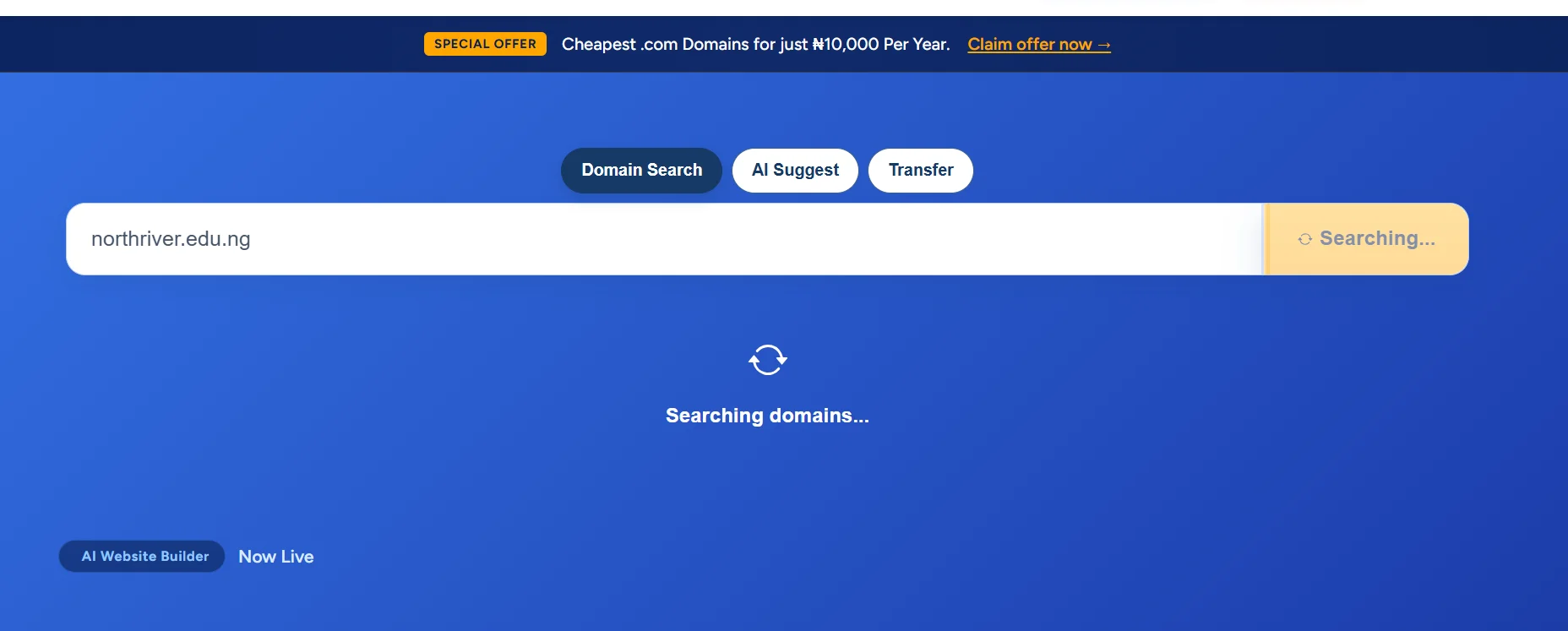
If another registrant already holds the first label, try a defensible variant. For example, a fictional North River College of Technology might compare northriver.edu.ng and nrct.edu.ng.
Avoid unrelated sales phrases or locations that do not form part of the institution’s recognised identity.
We offer cheapest .edu.ng domain registation at just 9000.00 NGN
3) Prepare the authorisation letter
Once you’ve confirmed the domain name availability, start the authorisation process.
Issue the letter on official institutional letterhead. Use the addressee or reference that Truehost support gives you for the order, since registrar procedures can change.
Include:
the date;
the institution’s full legal name;
the exact requested domain;
a statement authorising the registration and management request;
the authorised representative’s name and role;
the signatory’s name, title, and signature;
the administrative contact;
the technical contact;
the institution’s address, phone, and email; and
nameservers if support requests them.
An adaptable statement may read:
We authorise [name/role] to submit and manage the registration of [domain] on behalf of [institution]. The administrative contact is [details], and the technical contact is [details].
Do not copy a competitor’s support address into the letter. Confirm the current TNG instruction for your own order.
Example sample letter:
NORTHRIVER COLLEGE
[Official College Letterhead]
Date: 13 August 2026
To:
The Domain Registration Team
Truehost NigeriaRE: AUTHORISATION FOR THE REGISTRATION OF NORTHRIVER.EDU.NG
Dear Sir/Madam,
We, Northriver College, hereby authorise [Full Name of Authorised Representative], [Position/Role, e.g. ICT Administrator], to act on behalf of the College in connection with the registration and management of the domain name:
northriver.edu.ng
The authorised representative is permitted to submit the required registration documents, communicate with Truehost Nigeria concerning the application, provide the necessary technical information, and manage matters relating to the registration and activation of the domain on behalf of Northriver College.
The relevant institutional contacts for this application are provided below.
Administrative contact
Name: [Full Name]
Position: [e.g. Registrar]
Institution: Northriver College
Email: [official institutional email]
Telephone: [+234 xxx xxx xxxx]Technical contact
Name: [Full Name]
Position: [e.g. ICT Administrator]
Institution: Northriver College
Email: [official institutional email]
Telephone: [+234 xxx xxx xxxx]Institution details
Institution: Northriver College
Address: [Official College Address, Nigeria]
Telephone: [+234 xxx xxx xxxx]
Email: [Official College Email Address]Nameservers
Include this section only if requested by Truehost Support.
Primary nameserver: [ns1.example.com]
Secondary nameserver: [ns2.example.com]We confirm that Northriver College is applying for the registration of northriver.edu.ng for the official academic and institutional activities of the College.
We further confirm that [Authorised Representative’s Name] has our authority to liaise with Truehost Nigeria and provide the documents and information necessary to process this domain registration request.
Kindly process the application accordingly.
Yours faithfully,
[Full Name of Authorised Signatory]
[Title – e.g. Provost / Registrar / Rector]
For: Northriver CollegeSignature: ___________________________
Date: _______________________________
Official Stamp/Seal
4) Place an order

Add the available name to the order and review the billing term. Use the institution as the registrant or owner wherever the checkout asks for that role.
Enter accurate details for:
the legal registrant;
the administrative contact;
the technical contact; and
the billing contact where applicable.
An authorised consultant may coordinate the work, but the institution should retain ownership and recovery access. Do not make a contractor’s personal email the only route into the account.
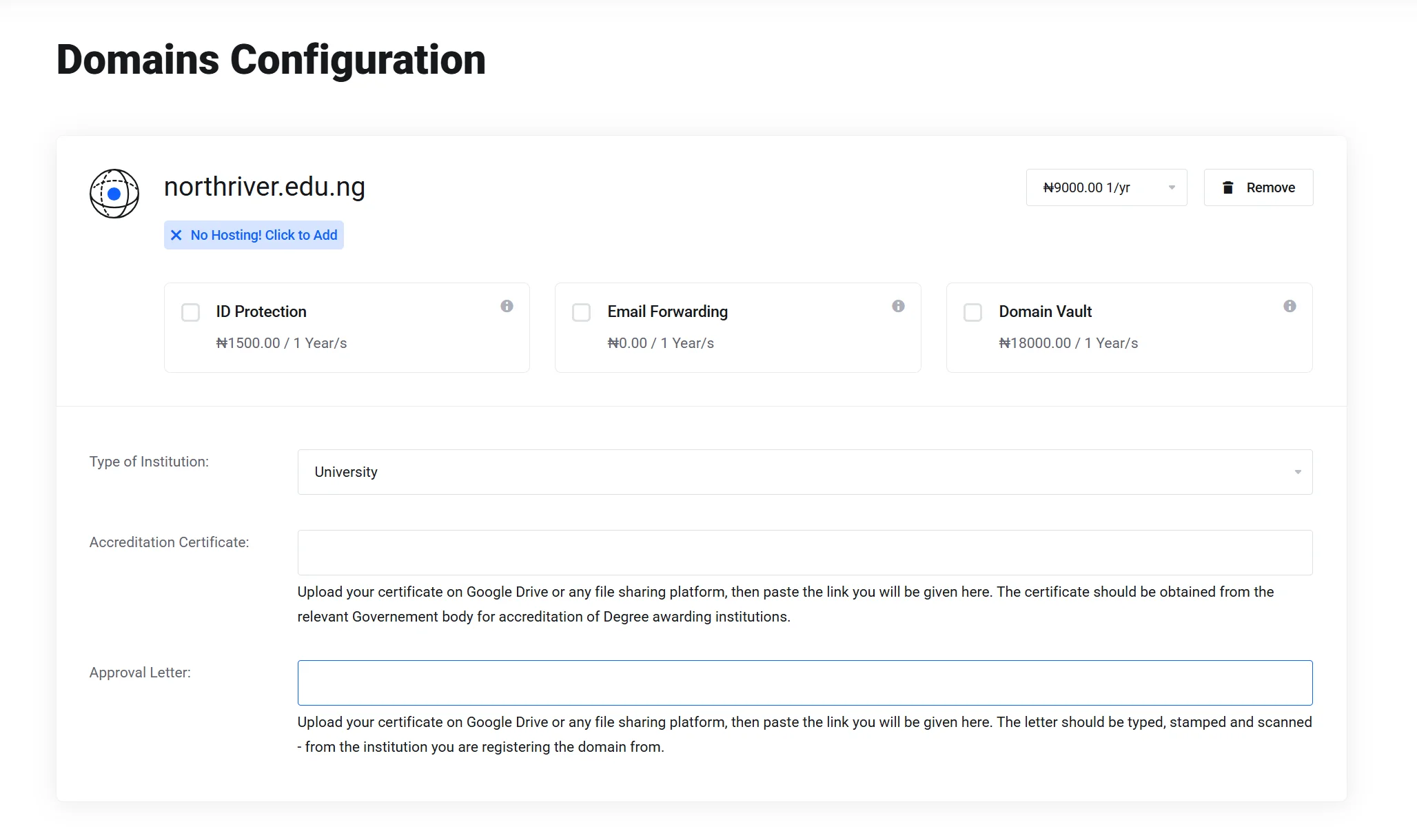
Review the spelling, term, and current price before payment. .edu.ng uses an annual registration cycle, and its current TNG renewal price displays as ₦9,000.00.
During the checkout process, you will need to select institution type, and add a link containing your verifiable documents.
Save the invoice and order number in the institution’s domain register. The support team will need a reliable reference when documents or questions arrive.
Record the account owner, recovery email, billing contact, and renewal date at the same time.
Before leaving checkout, compare the selected spelling with the signed letter character by character. A missing letter or swapped abbreviation can turn a correct document pack into a mismatched application.
5) Respond to review questions
Truehost acts as the registrar interface and follows up through the application path. NiRA controls the restricted namespace and may require clarification.
Monitor the institutional email and the client-area ticket. If a reviewer asks about a name difference, missing page, contact, or regulator status, answer with consistent evidence.
Explain genuine legal-name changes and attach the connecting document.
Do not open a second conflicting order while the first review remains active. Ask support to update or clarify the existing case.
Approval time depends on document accuracy, verification, and the questions raised. Treat any time estimate as an estimate, not a registry guarantee.
Keep all replies in the same ticket where possible. A single thread preserves the order number, documents, questions, and answers for later audit.
If support asks for a replacement file, label it clearly and state which earlier file it supersedes.
Assign one institutional coordinator to collect answers from registry, ICT, legal, and management teams.
7) Verify activation and connect services
When the order changes to active, check more than the account status.
Confirm that the domain appears in the institution’s account.
Check that the authoritative nameservers match the approved hosting or DNS provider.
Query the domain through an appropriate
.ngdomain lookup.Confirm that DNS records resolve.
Connect the website and issue an HTTPS certificate.
Configure email records before testing mail.
Domain approval, DNS propagation, website launch, HTTPS, and email setup are separate milestones. An active domain can still show no website when its DNS or hosting remains incomplete.
For more diagnostics, use our configuration guide after registry approval.
A practical activation test
Ask the ICT team to record the result of each check:
Layer | Test | Expected result |
|---|---|---|
Registrar | Open the domain in the account | Status and renewal date appear |
Delegation | Query authoritative nameservers | They match the approved DNS service |
Web DNS | Query the root and | They point to the intended web service |
HTTPS | Open the canonical address | A valid certificate covers the hostname |
Query MX and authentication records | Approved mail and policy records appear | |
Ownership | Test account recovery | Two authorised contacts can recover access |
Run the tests from outside the campus network as well. An internal resolver or cached record can hide a public DNS mistake.
When the website launches, choose one canonical hostname and redirect the other. For example, redirect www.college.edu.ng to college.edu.ng, or use the reverse.
Do not leave both versions competing without a deliberate configuration.
Prepare the public launch
Registry approval does not require the college to publish every service on day one.
Launch a small, authoritative core first:
the institution’s legal and public name;
physical address and verified contact channels;
leadership or governance information;
admissions information with dates and responsible offices;
links to the relevant regulator where appropriate;
a privacy notice; and
a clear path to report website or email abuse.
Remove unfinished pages and copied theme text before announcing the address. A new institutional domain with empty admissions pages or template contact details can create more confusion than a delayed launch.
Test every published contact before launch.
Tell staff which hostname and email pattern count as official. Update letterheads, profiles, directory listings, maps, and social accounts in a controlled sequence.
Keep redirects from any previous institutional domain for as long as the migration plan requires.
After email setup, test messages in both directions with several major receiving systems. Confirm that SPF, DKIM, and DMARC align with the services that actually send mail.
Do not publish a strict rejection policy until ICT has identified every authorised sender.
Schedule a post-launch review after the first admissions or registration cycle. Collect broken links, failed mail, recurring support questions, and confusing subdomain names.
Fix the underlying ownership or configuration issue instead of creating another temporary domain.
Common failure points
Problem | Likely reason | Next action |
|---|---|---|
Review pauses | A document is missing or unclear | Rescan and submit the requested evidence |
Name gets queried | It does not match the institution or policy | Choose or justify a defensible variant |
Contact needs correction | Admin or technical details are incomplete | Supply named institutional contacts |
Active domain shows no site | DNS or hosting remains unconfigured | Check nameservers and records |
Email fails | Mail or authentication records are missing | Configure MX, SPF, DKIM, and DMARC |
You can also review the general document guide, but use this page’s stricter .edu.ng distinction when the older guide groups education namespaces together.
Keep ownership with the institution
Treat the domain as institutional infrastructure:
use an institution-controlled account and email;
assign a renewal owner and budget line;
keep at least two authorised contacts;
store recovery details in an approved password manager;
record registrar and DNS changes; and
remove access when a staff member or contractor leaves.
Before committing to a provider, the registrar comparison explains price, renewal, document support, and ownership questions.