Domain NamesFind and register your ideal domain name instantly.
 Web HostingEasy-to-use hosting powered by cPanel — ideal for managing websites in Nigeria.
 Windows HostingRun .NET apps with Windows-optimized hosting
 Affiliate ProgramMake money promoting our services
 Reseller HostingMake money by reselling our hosting products under your own brand
 .COM Domains
 All DomainsExplore all supported tld domains in Nigeria
 WhoisFind out who owns any domain, as well as verify your registration details
 VPS Hosting in Nigeria
 Dedicated ServersReimagine your site speed with your own complete server
 AI Website BuilderDesign your site with drag-and-drop tools
 Online Store BuilderStart your online shop without code
 SSLs
SSLs Support PortalFind answers or get expert help
 Contact UsReach our team via chat or email
 BlogRead our extensive guides on web hosting and more
Last updated on December 26th, 2025 at 12:24 pm
A website cannot exist on its own.
It needs a place to live online. That place is called web hosting.
Web hosting is what keeps your website files, images, and pages online so people can visit them anytime.
Every time someone opens your website, their phone or laptop connects to a server.
That server sends your website to them in seconds. If the server is slow or unstable, your website feels slow. If the server goes down, your website disappears.
This is why web hosting is so important for businesses in Nigeria. Slow websites lose visitors.
Offline websites lose trust. And once people lose trust, they rarely come back.
This is where Ubuntu web hosting comes in.
Ubuntu is an operating system that runs on servers. It is the system working quietly in the background, making sure your website loads fast, stays secure, and runs without stress.
Many of the world’s biggest websites run on Ubuntu because it is stable, lightweight, and free to use.
When you pair Ubuntu with a local VPS from Truehost, your website loads faster for Nigerian visitors and stays online more consistently.
In this guide, you’ll learn how to host your website on an Ubuntu server step by step, using simple language and real examples.
By the end, you’ll know how web hosting works, why Ubuntu is a smart choice, and how to get your own website live without confusion.
Why Ubuntu Web Hosting Is a Smart Choice for Nigerian Businesses
Choosing the wrong hosting provider can slow down your business.
If you choose the right one, it can help it grow faster.
Ubuntu web hosting works well for Nigerian businesses because it solves real problems we face every day.
a) Cost.
Ubuntu is free. You don’t pay any license fees to use it. This keeps your hosting bill low, especially compared to Windows servers that add extra costs every month. For small businesses and startups, this difference matters.
b) Speed and Stability.
It is lightweight. It does not waste server resources. This means your website loads faster and crashes less, even on smaller VPS plans. When customers visit your site on mobile data or unstable networks, every second counts.
c) Security.
Websites in Africa face frequent attacks, especially during sales periods and holidays. Ubuntu receives regular security updates and patches. These updates quickly close security gaps, helping to protect your website and customer data.
d) Scalability.
You can start small and grow easily. Many Nigerian businesses start with low traffic, then experience sudden growth through social media or advertising.
Ubuntu handles this growth smoothly without forcing you to rebuild everything from scratch.
When you combine Ubuntu with Truehost’s Lagos servers, the benefits are even clearer:
- Faster loading times for Nigerian visitors
- Lower delay compared to foreign servers
- Easy payments with Paystack
- Hosting built for local traffic patterns
In simple terms, Ubuntu web hosting gives you control, speed, and reliability without draining your budget. It fits the way Nigerian businesses grow online.
Choosing the Right Truehost Plan for Ubuntu Web Hosting
Truehost VPS is a reliable home for websites running on Ubuntu.
Both Cloud VPS 1 and Cloud VPS 2 are Linux-based and fully support Ubuntu, so you get full server control without unnecessary complexity.
For most Nigerian startups, this setup is more than enough.
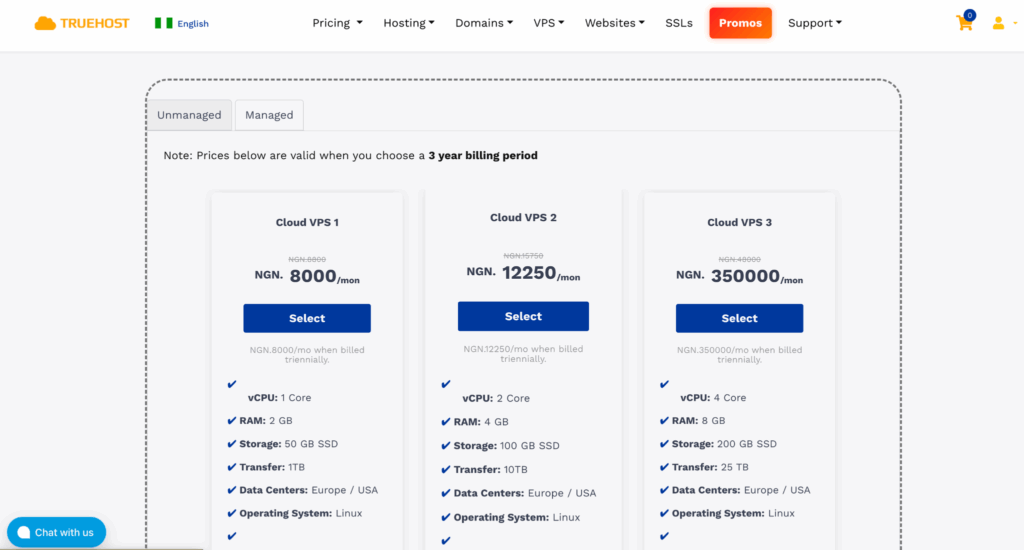
Blogs, portfolio websites, small online shops, and early-stage business sites run smoothly on Cloud VPS 1.
This plan costs ₦8,800 per month and comes ready from day one.
You get:
- 2 GB RAM
- 50 GB SSD storage
- 1 TB monthly transfer
- Ubuntu 22.04 LTS support
This setup handles WordPress, landing pages, and early customer traffic comfortably.
There is no need to search for extra tools or add-ons. Everything you need is already included when the server is created.
As your website grows, upgrading is simple.
Cloud VPS 2 costs ₦15,750 per month and adds more power by increasing the CPU and doubling the RAM.
This improves performance without forcing you to move your website or change your settings.
The upgrade happens inside the Truehost platform, and your Ubuntu environment stays intact.
Truehost also keeps the hosting experience simple and local:
- WhatsApp support for quick help
- Free website transfer
- Compliance with Nigeria Data Protection Regulation
- Clear pricing with no hidden fees
- Ubuntu 22.04 LTS for long-term stability
How to Get Started
- Visit the hosting store
- Choose Cloud VPS 1 or Cloud VPS 2
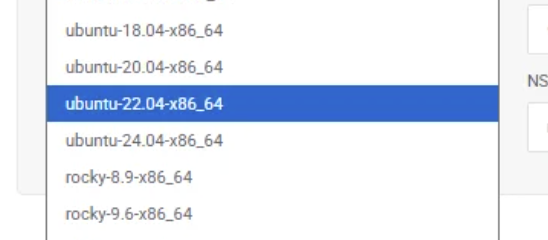
- Select Ubuntu from the operating system list
- Pay using Paystack
Provisioning is instant. Once payment goes through, your Ubuntu server is live and ready.
If you need help placing the order or want an invoice created for you, support is available to guide you.
How to Host Your Website on an Ubuntu Server (Step by Step)
This is where everything comes together.
You already have your Truehost VPS running Ubuntu 22.04. Now you’ll set it up so your website can go live and accept visitors.
You don’t need to be an expert. Each step builds on the last one.
Access Your Ubuntu Server
To manage your server, you log in using SSH.
- On Windows, use PuTTY
- On Mac or Linux, use the Terminal
Use the server IP address, username, and password sent to you by Truehost.
Once connected, you are inside your server.
1) Update Your Server
Before installing anything, update the system. This fixes bugs and installs security patches.
sudo apt update && sudo apt upgrade -y
This usually takes a few minutes. When it’s done, your server is clean and ready.
2) Install Apache Web Server
Apache is the software that shows your website to visitors. It is stable and beginner-friendly.
sudo apt install apache2 -y
sudo systemctl start apache2
sudo systemctl enable apache2
Now open your server’s IP address in a browser.
If Apache is working, you’ll see the default welcome page.
If nothing loads, allow Apache through the firewall:
sudo ufw allow 'Apache Full'
sudo ufw enable
3) Secure Your Website with SSL (HTTPS)
Websites without HTTPS look unsafe. Browsers warn users, and many people leave immediately.
You can add SSL for free using Let’s Encrypt.
sudo apt install certbot python3-certbot-apache -y
sudo certbot --apache
Enter your domain name after pointing it to your server in the Truehost DNS panel.
Your SSL certificate renews automatically every 90 days.
4) Upload Your Website Files
Your website files live in this folder:
/var/www/html
You can upload files using:
- FileZilla (SFTP), or
- SCP from your computer
To edit the default page:
sudo nano /var/www/html/index.html
Paste your website code, save, and exit.
Refresh your browser to see the changes.
If Your Site Needs a Database
For WordPress or dynamic websites:
sudo apt install mysql-server -y
sudo mysql_secure_installation
Create your database and user.
You can install phpMyAdmin if you prefer a visual tool.
5) Host Multiple Websites on One Server
If you want to run more than one website, use Apache virtual hosts.
Create a new configuration file:
sudo nano /etc/apache2/sites-available/yoursite.conf
Add:
<VirtualHost *:80>
ServerName yourdomain.com.ng
DocumentRoot /var/www/yoursite
<Directory /var/www/yoursite>
AllowOverride All
</Directory>
</VirtualHost>
Enable the site:
sudo a2ensite yoursite.conf
sudo systemctl reload apache2
If your site uses PHP:
sudo apt install php libapache2-mod-php -y
6) Point Your Domain and Go Live
Update your domain’s A record in the Truehost DNS panel to point to your server IP.
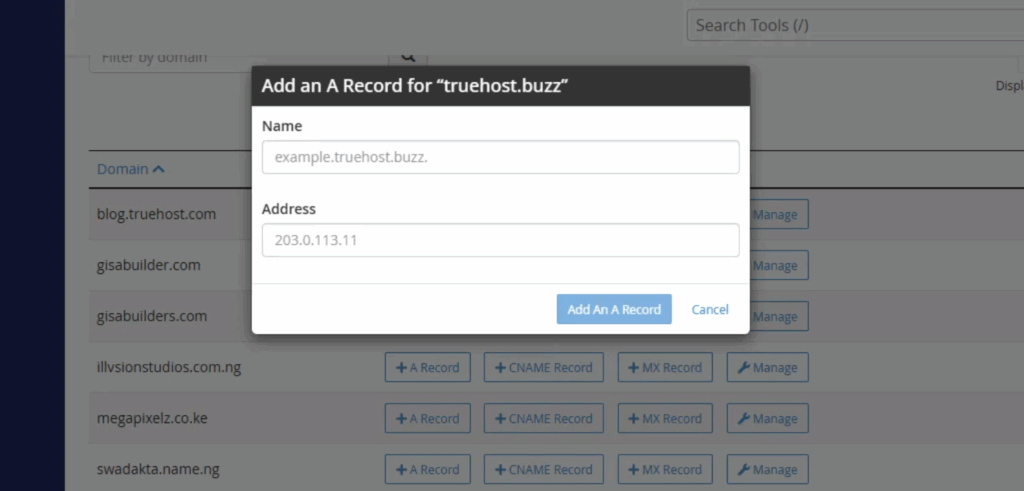
Once DNS updates, your website is live.
To monitor server activity:
sudo apt install htop
htop
For backups, you can automate simple backups using rsync to cloud storage.
If you run into trouble, Truehost’s support team is available to help you fix issues quickly.
Your website is now live on Ubuntu.
Securing Your Ubuntu Web Hosting
Security is not something to delay.
Nigerian websites are often targeted by bots and hackers, especially during festive seasons and sales periods.
A single weak setting can take your site offline or expose customer data.
The good news is that Ubuntu gives you simple tools to protect your server from day one.
1) Block Repeated Login Attacks with Fail2Ban
Fail2Ban watches your server quietly.
When someone tries to break in by guessing passwords over and over, it blocks their IP address.
Install it:
sudo apt install fail2ban -y
It works immediately after installation.
You can add extra protection for SSH by editing:
/etc/fail2ban/jail.local
2) Lock Down Your Firewall
A firewall controls what can enter your server.
You only need a few open doors.
Set the rules:
sudo ufw default deny incoming
sudo ufw default allow outgoing
Allow only what your site uses:
- SSH (22)
- HTTP (80)
- HTTPS (443)
This keeps unnecessary traffic out.
3) Use SSH Keys Instead of Passwords
Passwords are easy to guess or steal.
SSH keys are much safer.
On your computer:
ssh-keygen
Send the key to your server:
ssh-copy-id root@yourIP
Then open:
/etc/ssh/sshd_config
Disable password login and restart SSH.
From now on, only your device can access the server.
4) Scan for Malware
Malware can slow your site or redirect visitors without you knowing.
Install ClamAV:
sudo apt install clamav -y
sudo freshclam
sudo clamscan -r /var/www
Run scans weekly using a cron job to stay safe.
Extra Protection from Truehost
On Truehost plans, you also get extra layers like DDoS protection and malware monitoring. These tools help keep your site online when traffic spikes or attacks increase.
Strong security means fewer outages, better trust, and peace of mind.
Speed and Performance Tips for Nigerian Visitors
Speed decides everything online.
If a page takes too long to load, people leave. This happens even faster on mobile, and most Nigerians browse the web on their phones.
A slow site loses sales, trust, and search rankings.
Ubuntu already uses server resources efficiently. With a few tweaks, you can make your website feel much faster for local users.
1) Enable Browser Caching
Caching helps returning visitors load your site quickly. Their browser saves parts of your website instead of downloading everything again.
Add this to your Apache configuration:
<IfModule mod_expires.c>
ExpiresActive On
ExpiresByType text/css "access plus 1 year"
</IfModule>
Restart Apache after saving.
This reduces load time and saves data for your visitors.
2) Improve Database Performance
If your site uses a database, especially WordPress, tuning MySQL helps.
Open the MySQL config file:
/etc/mysql/mysql.conf.d/mysqld.cnf
Add or update:
innodb_buffer_pool_size = 256M
If your server has more RAM, you can increase this value for better performance.
3) Use Local Servers
Hosting your site on Truehost’s Lagos servers reduces delay for Nigerian users. Pages load faster compared to sites hosted in the US or Europe.
This single choice can improve speed by around 40% for local traffic.
4) Reduce Image Sizes
Large images slow websites more than most people realize.
Install an image optimizer:
sudo apt install jpegoptim -y
Compressed images load faster and use less data, which mobile users appreciate.
5) Add Cloudflare for Free
Cloudflare gives you a global content delivery network and extra security at no cost.
It helps:
- Deliver pages faster
- Protect against attacks
- Reduce server load
You can connect it in minutes.
6) Monitor Your Website
Keep an eye on how your site performs.
Use tools like:
- Truehost’s dashboard
- New Relic (free plan)
Watch load times, traffic, and errors. Small changes over time make a big difference.
If your website loads in under three seconds, you’re doing very well.
Launch Your Website on Ubuntu Today
You’ve seen how web hosting works, why Ubuntu is a solid choice, and how to set everything up step by step.
Nothing here is theory. These are the same steps real Nigerian businesses use to stay online and grow.
Ubuntu web hosting gives you what matters most:
- Speed that works well on mobile networks
- Strong security without extra cost
- Full control of your server
- Flexibility to grow when traffic increases
With a Truehost Ubuntu VPS, you are not guessing or overpaying. You start small, stay stable, and scale when your business is ready.
If you want to get started now:
- Visit the Truehost hosting store
- Choose Cloud VPS 1 or Cloud VPS 2
- Select Ubuntu 22.04 LTS
- Pay with Paystack
Your server goes live almost immediately.
The quality of your hosting affects everything. Speed, trust, search rankings, and sales all depend on it.
When your website runs well, your business feels easier to manage.
If you need help placing an order or want an invoice created, support is available to guide you.
Your website is ready for the next step.
Ubuntu gives it a strong foundation.