Domain NamesFind and register your ideal domain name instantly.
 Web HostingEasy-to-use hosting powered by cPanel — ideal for managing websites in Nigeria.
 Windows HostingRun .NET apps with Windows-optimized hosting
 Affiliate ProgramMake money promoting our services
 Reseller HostingMake money by reselling our hosting products under your own brand
 .COM Domains
 All DomainsExplore all supported tld domains in Nigeria
 WhoisFind out who owns any domain, as well as verify your registration details
 VPS Hosting
 Dedicated ServersReimagine your site speed with your own complete server
 AI Website BuilderDesign your site with drag-and-drop tools
 Online Store BuilderStart your online shop without code
 Support PortalFind answers or get expert help
 Contact UsReach our team via chat or email
 BlogRead our extensive guides on web hosting and more
When you hear web hosting vs web server, it’s easy to imagine they’re basically the same thing, like two fancy tech terms pointing to one idea.
But nope!
Mixing them up is kind of like building your dream house and confusing the land with the house itself.
They work together, they depend on each other, but they’re definitely not the same.
In this guide, I’m going to break it all down in a simple way to show you exactly what sets web hosting apart from a web server.
I’m going to start with the basics so you can decide fast and get back to growing your business.
By the time we’re done, you’ll know exactly what role each one plays, and how it can help you choose the right setup for your website.
Here’s what we’ll cover:
- The definition and overview of a web server
- The definition and overview of web hosting
- Comparison of the two terms to make sense of their relationship
- Real example to differentiate them better
Let’s make this whole web-hosting-world feel a lot less mysterious.
What Is a Web Server?
Using a restaurant example, when you walk into a restaurant and place your order, a waiter brings your food.
That’s pretty much how a web server works, just replace food with web pages.
A web server is the computer, or the software on that computer, that stores everything your website needs, from your pages, images, videos, and code.

When someone types your URL, the server receives that request, finds the right page, and sends it back, almost instantly.
It’s just like the behind-the-scenes engine of the internet. You don’t see it, but without it, nothing loads.
And this “engine” has to be on its A-game 24/7:
- Handling multiple users at the same time
- Making sure pages load fast
- Keeping hackers away from the website files
- Staying online all day, every day
Now that you know what a web server does, let’s look at the different types you’ll come across.
Types of Web Servers
Web servers come in all shapes and sizes.
Some are small and affordable, others are powerful and expensive, and each has its place depending on what you’re building.
1. Shared Server
This is like renting a seat in a danfo bus. You’re sharing one server with many other websites.
Pros: Cheap, easy, beginner-friendly.
Cons: Slower, less control, speed depends on your “neighbours.”
2. VPS (Virtual Private Server)
Imagine you’re still in the same bus, but you now have your own personal row.
You’re sharing the vehicle, but you have more space and control.
Pros: Faster, more stable, more control.
Cons: Requires some technical knowledge.
3. Dedicated Server
Here, you get the entire bus to yourself. One physical machine, fully dedicated to your website.

Pros: Maximum performance, full control, great for big websites.
Cons: Expensive, and you’re responsible for maintenance.
4. Cloud Server
Cloud servers are like using Bolt or Uber.
They are flexible, scalable, and available on demand. You only use what you need, and you can scale up when traffic increases.
Pros: Highly scalable, reliable, great for growing businesses.
Cons: Can get costly if not managed well, still requires some tech skills.
A web server is simply the system that stores your website and sends it to people when they request it.
And depending on your budget, tech skills, and website size, you can choose from shared servers, VPS, dedicated servers, or cloud servers.
Now web hosting.
What is Web Hosting
While a web server is the place where your website files live, web hosting is like renting that place for your website.
Web hosting is the service that provides your website with that home to store its files, photos, videos, and all the behind-the-scenes data.
In this case, when someone types your URL into their browser, the hosting provider makes sure your website wakes up, opens the door, and welcomes that visitor in.
But here’s the key thing: web hosting isn’t the same as the server itself.
The server is the physical machine or software engine.
Web hosting is the service that manages that machine for you, keeps it running, keeps it secure, and makes sure you never have to crawl under the hood to fix anything.
Got the difference?
Now, these are the parts your hosting provider handles:
- Keeping the server online 24/7
- Protecting it from hackers
- Updating software
- Fixing crashes
- Managing traffic from visitors
So instead of acting like a mechanic every time something goes wrong, you get a comfortable place for your site to live”web server” and people to maintain it for you”web hosting”.
Types of Web Hosting
Web hosting comes in different “living arrangements,” depending on your budget and how big your website is.
1. Shared Hosting
This is the most affordable option, like renting a room in a big house with many roommates.
Pros: Cheap, easy for beginners.
Cons: Slower if your neighbours get noisy (traffic spikes).
2. VPS Hosting (Virtual Private Server)
Still in the same building, but you get your own private mini-apartment.

Pros: More control, better performance.
Cons: Requires some technical chops.
3. Dedicated Hosting
Now you’re renting the entire building. The whole server is yours.
Pros: Maximum power and control.
Cons: Expensive, usually for big websites or businesses.
4. Cloud Hosting
This is like having access to a flexible Airbnb, scale up during busy seasons, scale down when things are quiet.
Pros: Highly scalable, very reliable.
Cons: Costs can rise fast if not monitored.
5. Managed Hosting
This one is like living in a serviced apartment, where cleaning, repairs, and maintenance handled for you.
Pros: You don’t worry about updates, security, or server issues.
Cons: Slightly more expensive, but worth it for non-techies.
In a nutshell, web hosting is the service that gives your website a home and keeps it running smoothly.
Now, if you’ve not gotten the difference yet, below is a one-on-one comparison of wen hosting vs web server.
Head-to-Head Web Hosting vs Web Server Distinction
With a clear outline of the basics, it’s time to pit web hosting vs web server head-on, so you can weigh options.
1. Who Manages It (Ownership and Control)
Web Hosting:
When you purchase a plan, you own the service for the duration you’ve paid for it. It’s however managed by the hosting company, so you don’t need deep tech skills.
Web Server:
This is owned by the hosting company and they rent a space of it or all of it to you, but manage it for you during hosting.
If you self-manage it, you’re the one responsible for maintenance, updates, security, and fixing problems.
2. What You’re Paying For
Web Hosting:
You pay for convenience, support, and a service that keeps your site running.
Web Server:
You pay for the actual machine or software. If it’s self-hosted, you handle everything else.
3. How Hard It Is to Use
Web Hosting:
Easy. Most plans come with control panels (like cPanel), one-click installs, and customer support.
Web Server:
Technical. You might need command-line skills, server setup knowledge, and ongoing maintenance expertise.
4. Who It’s Best For
Web Hosting is great for:
- Beginners
- Small business owners
- Bloggers
- People who want less tech hassle
Web Servers (self-managed) are great for:
- Developers
- Large businesses
- Custom infrastructure setups
- Projects that need full control
5. What You Actually Get
Web Hosting:
- Domain pointing
- Disk space
- Email accounts
- Security patches
- Support
Web Server:
- The operating system (Linux/Windows)
- Server software (Apache/Nginx)
- Direct control over settings
- Raw access to hardware/software
Quick Example
Let’s say you want to start an online store:
- With web hosting, you sign up, install WordPress or Shopify, and your site is ready without headaches.
- With a web server, you might need to install the server OS, configure Apache or Nginx, secure ports, set up firewalls, and troubleshoot when something breaks.
One feels like cooking a meal with a chef’s help—hosting.
The other feels like being the chef and the sous-chef—server.
Web Hosting vs Web Server: How They Work at Truehost
Now let’s use Truehost as an example to demonstrate the two, how they’re used and applied.
First off, our servers are the engine and our hosting is the whole car, from engine, wheels, driver, and fuel.
How Web Hosting Works At Truehost
When you choose a web hosting plan with us, we take care of the server environment for you, so you don’t have to worry about configuring or managing the engine yourself.
Shared Web Hosting Plans
These are perfect for bloggers, small businesses, portfolios, and new stores.
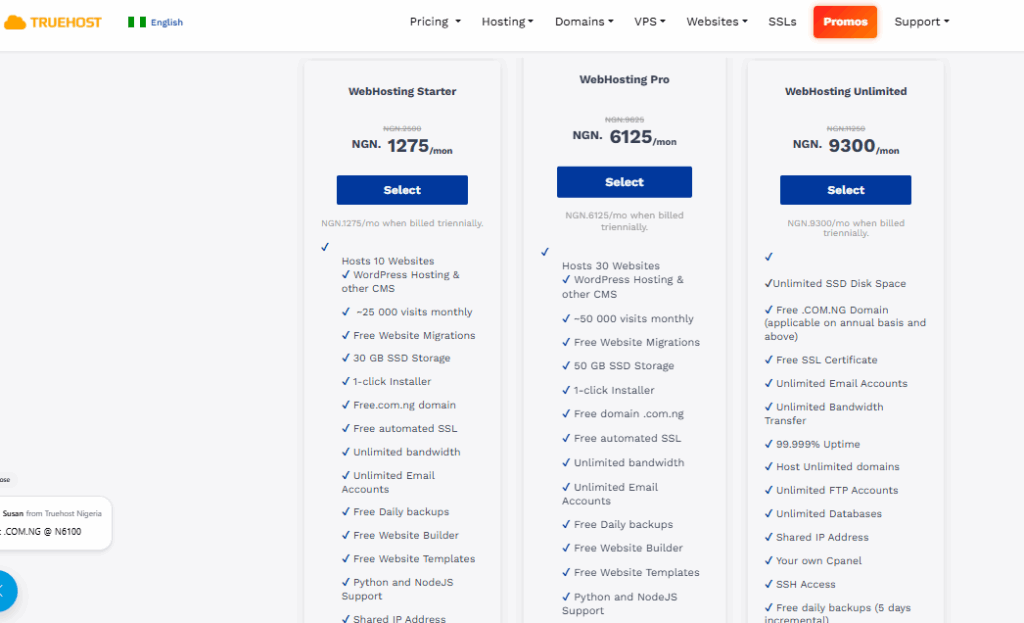
The Starter Plan is ₦1,275/month when billed triennially. This is what you get:
- Hosts up to 10 websites
- Free .com.ng domain
- 30 GB SSD storage
- Free automated SSL
- Unlimited email accounts
- cPanel access
- 1-click installers
- Free daily backups
- Python & Node.js support
The Pro Plan costs ₦6,125/month offering:
- Hosts up to 30 websites
- 50 GB SSD storage
- All Starter features and more
Lastly, the Unlimited Plan is priced at ₦9,300/month giving you:
- Unlimited SSD disk space
- Host unlimited domains
- 99.999% uptime
- SSH access
- Unlimited email and bandwidth, and more at Truehost
With hosting like this, you don’t touch the server config, since we handle the behind-the-scenes work so you can focus on your content and business.
How Web Servers Work At Truehost
Now let’s talk about the server itself — the actual engine that powers your hosting.
We offer bigger levels of access for people who want more control or more power than shared hosting provides:
VPS (Virtual Private Server)
Our VPS plans give you dedicated resources on a server you control, great for growing stores, apps, or custom setups:
We have the Cloud VPS 1 at ₦8,800/month with:
- 1 vCPU
- 2 GB RAM
- 50 GB SSD
- 1 TB transfer
We also have the Cloud VPS 2 going for ₦15,750/month, offering:
- 2 vCPU
- 4 GB RAM
- 100 GB SSD
- 10 TB transfer
Last but not least, we have the Cloud VPS 3 for ₦48,000/month, with:
- 4 vCPU
- 8 GB RAM
- 200 GB SSD
- 25 TB transfer, and more at Truehost
With a VPS, you get root access, meaning you install what you want, set it up your way, and manage the environment.
We provide the server, network, and infrastructure; you manage the stack.
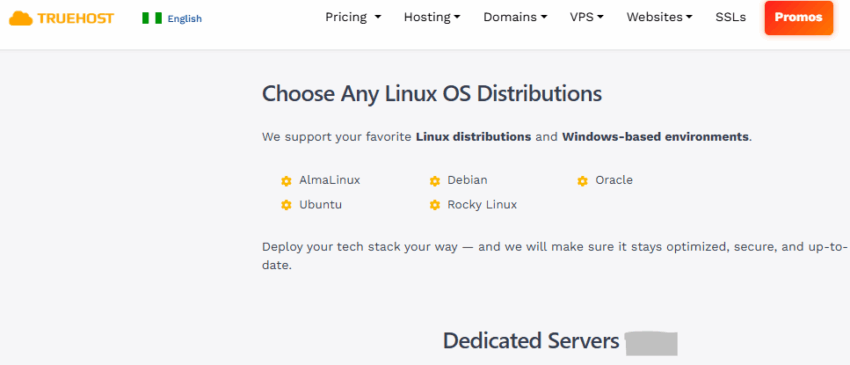
Dedicated Servers
If your project needs maximum performance and exclusivity, say, high-traffic ecommerce, enterprise apps, or big databases, our Dedicated Servers give you a whole physical machine.
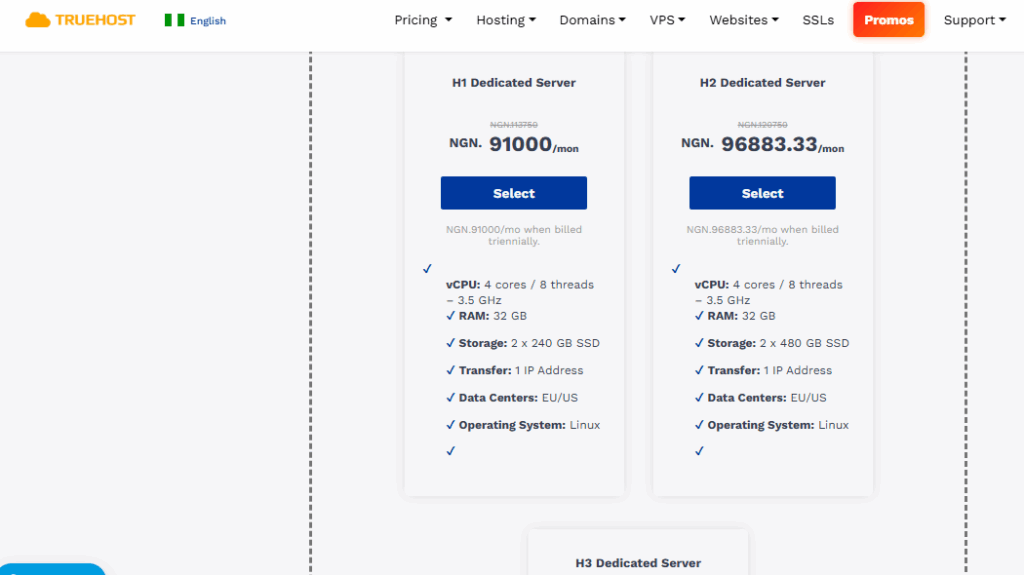
Plans start from around ₦91,000/month and up.
You get:
- Full Linux distribution support (Ubuntu, Debian, AlmaLinux, etc.)
- Germany or Kenya data centre options
- No shared resources, everything is yours, check it out here
Here you’re very close to “owning the server” but of course, we still provide the infrastructure, uptime guarantees, and support that make hosting practical.
Managed Cloud Hosting
We also offer Managed Cloud Hosting plans (Cloud Starter, Cloud Pro, etc.) that sit between shared hosting and VPS, giving you scalability and performance without the full technical load of a self-managed server.
These plans are ideal when you want cloud reliability and ease-of-use.
Check our Managed Cloud page for current offers and prices here.
Wrapping It Up
There you have it!
Web hosting vs web server comes down to ease over effort, affordability over headaches.
Servers suit the rare expert; hosting empowers you to thrive amid Nigeria’s digital boom.
Truehost gives you both, hosting so we manage things for you, or if you need it, the servers to run your own show.
Now, if you’re ready to try them, head over to Truehost for your plan, and let’s get your business online, unbreakable, and earning.