Domain NamesFind and register your ideal domain name instantly.
 Web HostingEasy-to-use hosting powered by cPanel — ideal for managing websites in Nigeria.
 Windows HostingRun .NET apps with Windows-optimized hosting
 Affiliate ProgramMake money promoting our services
 Reseller HostingMake money by reselling our hosting products under your own brand
 .COM Domains
 All DomainsExplore all supported tld domains in Nigeria
 WhoisFind out who owns any domain, as well as verify your registration details
 VPS Hosting in Nigeria
 Dedicated ServersReimagine your site speed with your own complete server
 AI Website BuilderDesign your site with drag-and-drop tools
 Online Store BuilderStart your online shop without code
 SSLs
SSLs Support PortalFind answers or get expert help
 Contact UsReach our team via chat or email
 BlogRead our extensive guides on web hosting and more
The limitations of local hosting for OpenClaw rarely show up on day one. They show up the first time NEPA takes light while your agent is halfway through a task it can’t finish without you.
That’s usually how it starts.
You install OpenClaw on your laptop, connect it to WhatsApp or Telegram, and for a week or two it feels like magic.
Then one morning your automation doesn’t run, your daily briefing never arrives, or you try to check on something from a client meeting and realize you simply can’t reach your own assistant.
Nothing is broken really. Your setup was just never built to run unattended, 24/7, the way OpenClaw expects it to.
So if you’re relying on OpenClaw for anything important like a client-facing automation, a business inbox, or a WhatsApp assistant your team depends on, you need to know where local hosting breaks before it breaks on you.
7 Limitations of Local Hosting for OpenClaw
1) Uptime and Availability Issues
One of OpenClaw’s biggest strengths is that it keeps working in the background. It can monitor events through heartbeat checks, respond to incoming messages, and run scheduled automations without waiting for you to open the application.
That only works while the Gateway is running.
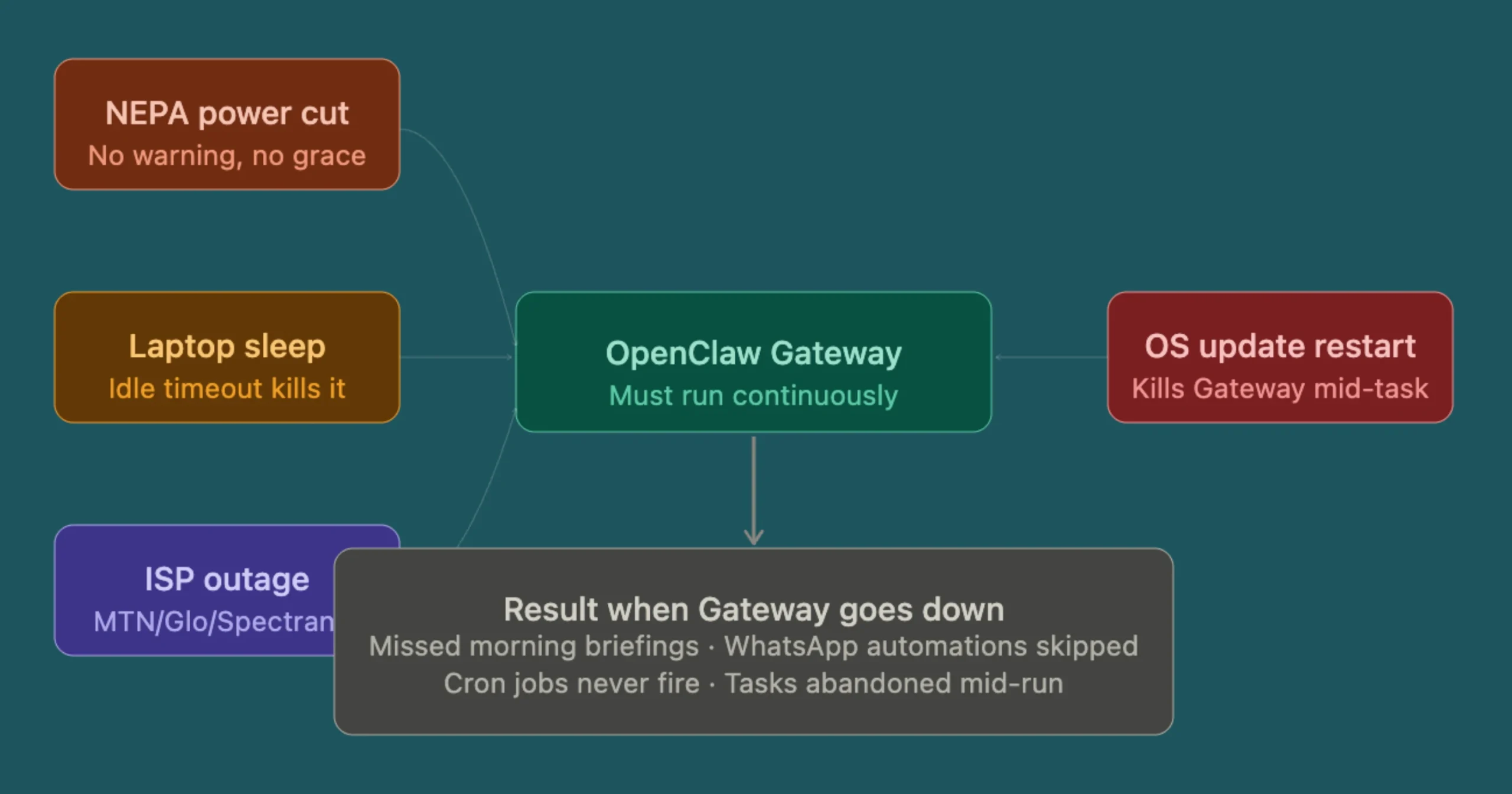
When the Gateway stops, so does your AI agent. Heartbeat monitoring pauses, scheduled tasks stop running, and incoming requests remain unprocessed until the service comes back online.
For local hosting, there are plenty of reasons this can happen:
- NEPA or PHCN power outages
- A laptop entering sleep mode
- Windows or Linux restarting after updates
- Internet interruptions from MTN, Glo, Airtel, or Spectranet
- Someone accidentally shutting down the computer
The impact usually isn’t obvious until an automation fails. Your morning briefing never arrives, a WhatsApp workflow doesn’t send, or a scheduled report is missing because the Gateway wasn’t running.
OpenClaw’s scheduled tasks run inside the Gateway process, so they depend on the service staying online continuously. If the Gateway goes offline, your automations stop with it.
For testing, occasional downtime may not be a concern. If your team or customers rely on OpenClaw every day, consistent uptime quickly becomes crucial.
2) Hardware Resource Constraints
Hosting OpenClaw locally also means relying on your computer’s hardware.
For cloud AI providers like OpenAI or Anthropic, around 2 vCPUs and 4 GB of RAM is a practical starting point. Running local AI models through Ollama requires considerably more CPU, memory, and often a dedicated GPU.
The workload also grows over time. Browser automation, connected services, scheduled tasks, and additional skills all consume more resources, making OpenClaw heavier than it was during the initial setup.
Most personal laptops weren’t designed to run demanding background services 24 hours a day.
Continuous workloads can do more harm since they:
- Generate heat
- Keep cooling fans running
- Gradually increase wear on the hardware
If you’re using an inverter or generator during power outages, electricity costs also begin to add up.
You’ll notice it even more if OpenClaw shares the same computer you use for work.
Video meetings, browsers, development tools, and other applications all compete for the same CPU and memory, making the system feel slower.
As your automations become more advanced, hardware limitations are often one of the first reasons people move to dedicated hosting.
3) Maintenance and Technical Overhead
Installing OpenClaw is only the first step. Keeping it running smoothly requires ongoing maintenance.
With local hosting, you’re responsible for managing Docker, Node.js versions, OpenClaw updates, configuration changes, and dependency issues. An update can introduce new requirements, while a community skill may stop working after a software upgrade.
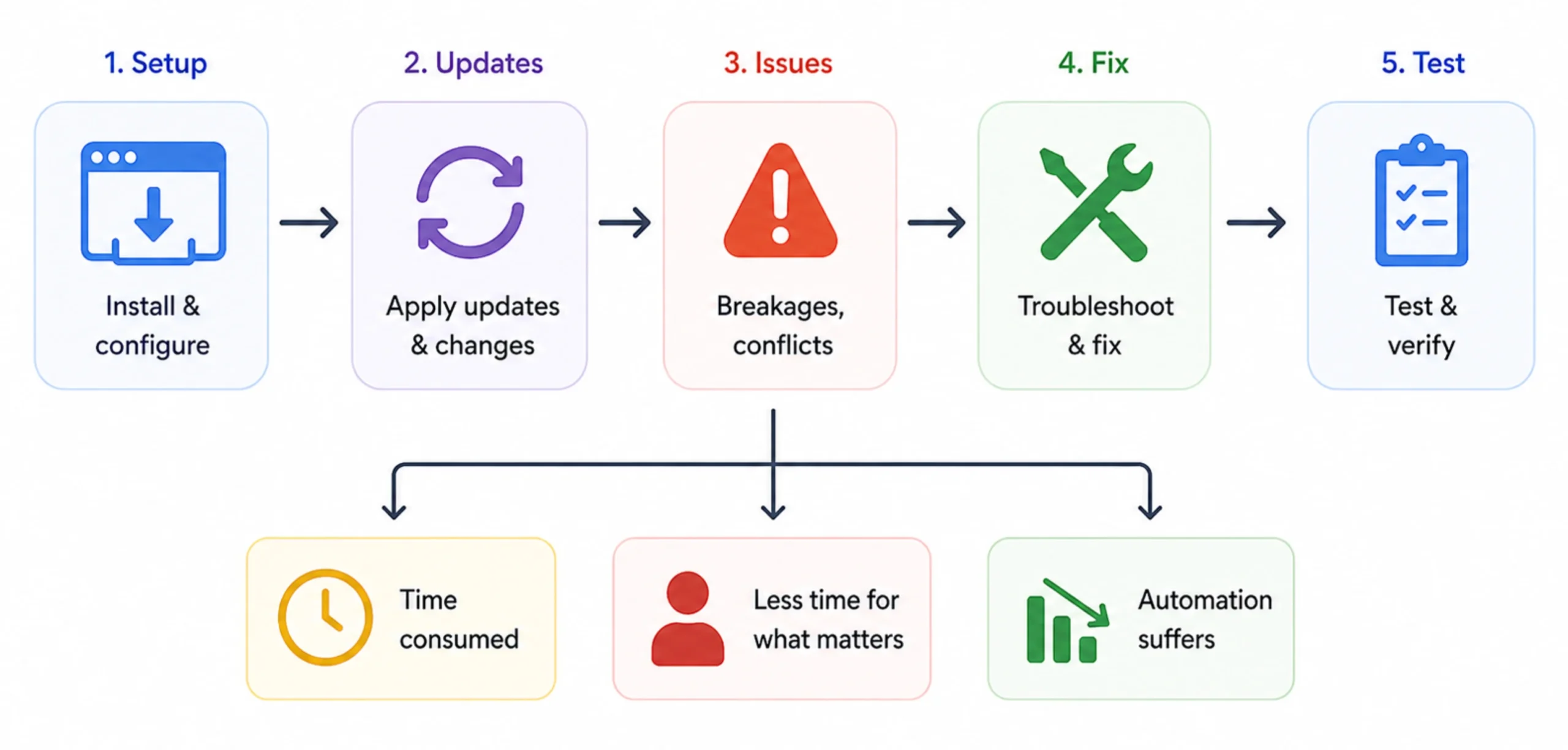
None of these tasks are unusual for self-hosted software, but they all take time.
If you’re a developer, maintaining your own environment may be part of the experience. For most business owners, it’s time that could be spent serving customers, creating content, or growing the business instead.
That’s one of the hidden costs of local hosting. The software itself is free, but the time spent troubleshooting updates and fixing technical issues can quickly outweigh the money you saved by hosting it yourself.
As your OpenClaw setup grows, so does the amount of maintenance required, making local hosting less practical for long-term, business-critical use.
4) Network and Accessibility Problems
Running OpenClaw on your home or office computer also means you’re responsible for making it accessible when you’re away.
That isn’t always easy.
Many internet providers assign dynamic IP addresses, which can change without notice and break remote connections. Opening ports on your router is another option, but it adds security risks if not configured properly.
Mobile internet creates an extra challenge. Most Nigerian networks, including MTN, Glo, Airtel, and 9mobile, use Carrier-Grade NAT (CGNAT), making direct remote access almost impossible without additional tools such as VPNs or Tailscale.
Your internet connection can also affect performance.
Home broadband typically has slower upload speeds than download speeds, which may cause delays during browser automation or when accessing your OpenClaw Gateway remotely.
The result is an AI agent that’s easy to use while you’re on the same network but much harder to manage from anywhere else.
If your work regularly takes you away from your computer, these accessibility limitations can quickly become frustrating.
5) Security Risks
OpenClaw works best when it’s connected to the services you use every day, such as your email, calendar, cloud storage, messaging apps, and business tools.
The more services you connect, the more important security becomes.
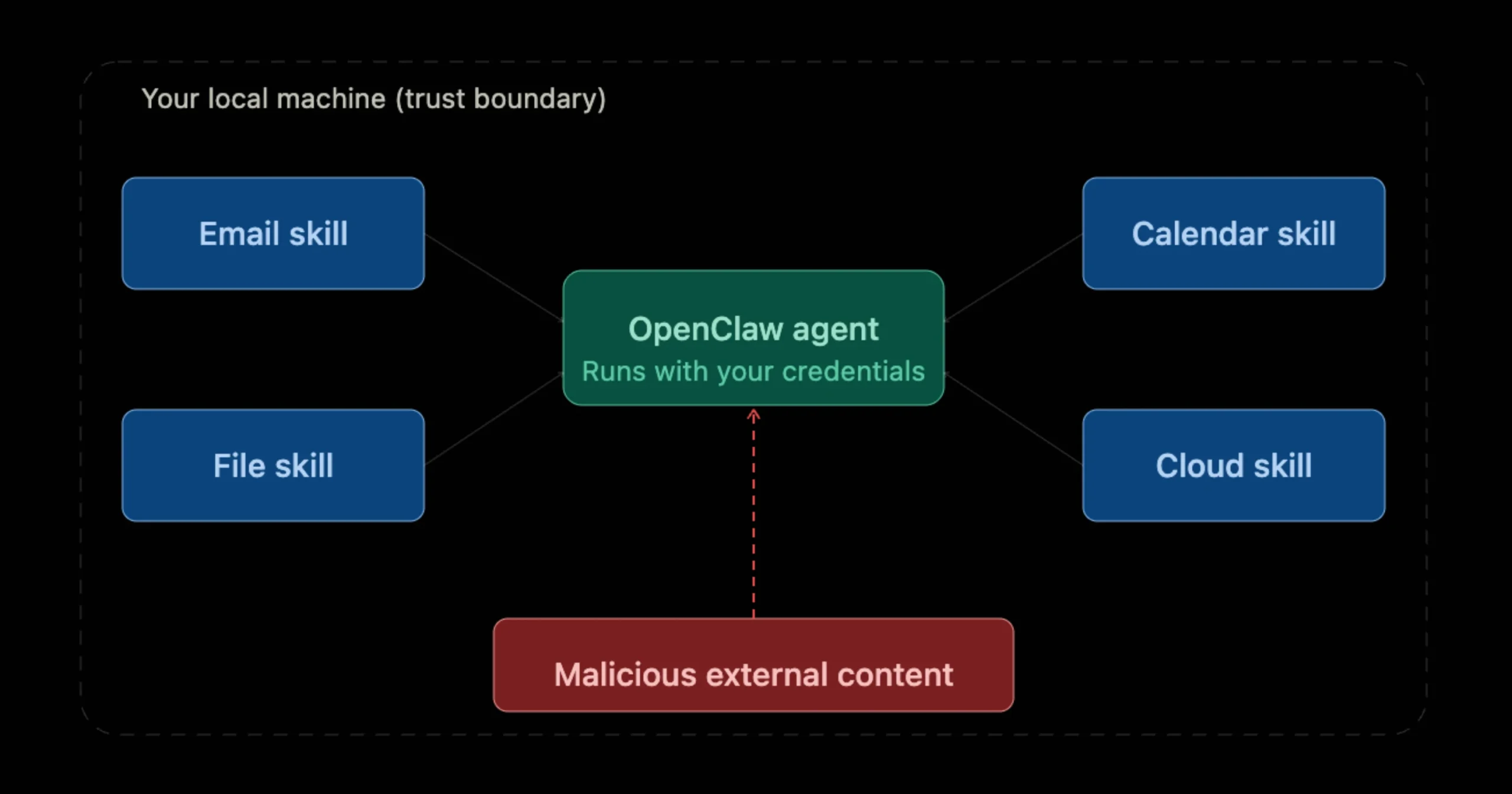
Every connected account expands what your AI agent can access. If a malicious prompt or compromised skill gains influence over the agent, it could potentially perform actions using the same permissions you’ve already granted.
Another common risk is exposing your OpenClaw Gateway to the internet without proper protection.
Security researchers have repeatedly found publicly accessible AI services that were left unsecured, allowing attackers to discover and interact with them.
Running OpenClaw safely means:
- Using strong authentication
- Keeping your software updated
- Limiting permissions
- Securing your firewall
- Encrypting connections
With local hosting, all of those responsibilities fall to you. Missing even one security step can expose sensitive business data or connected services to unnecessary risk.
6) Scalability and Performance Limits
A local installation may work well for one AI agent and a handful of automations.
As your workload grows, your computer’s limits become much more noticeable.
Adding more browser automations, connected services, or additional agents increases CPU, memory, and storage usage. Once your hardware reaches its limits, automations take longer to finish, response times increase, and overall performance starts to decline.
If you’re running local AI models with Ollama, hardware requirements increase even further. Larger models consume significantly more memory and processing power, and they may still struggle to match the speed and quality of cloud-based models like Claude or GPT.
There’s also the challenge of monitoring API usage. As more workflows run throughout the day, keeping track of costs manually becomes increasingly difficult.
Unlike a VPS, a home computer can’t be upgraded with extra resources in just a few clicks. When your workload grows, scaling often means replacing the hardware entirely.
7) Backup and Disaster Recovery
Every computer eventually runs into problems:
- A hard drive can fail
- A laptop can be stolen
- Files can be deleted by accident
- An operating system can become corrupted
When OpenClaw is hosted locally, those events can wipe out your configuration, workflows, memory, and installed skills.
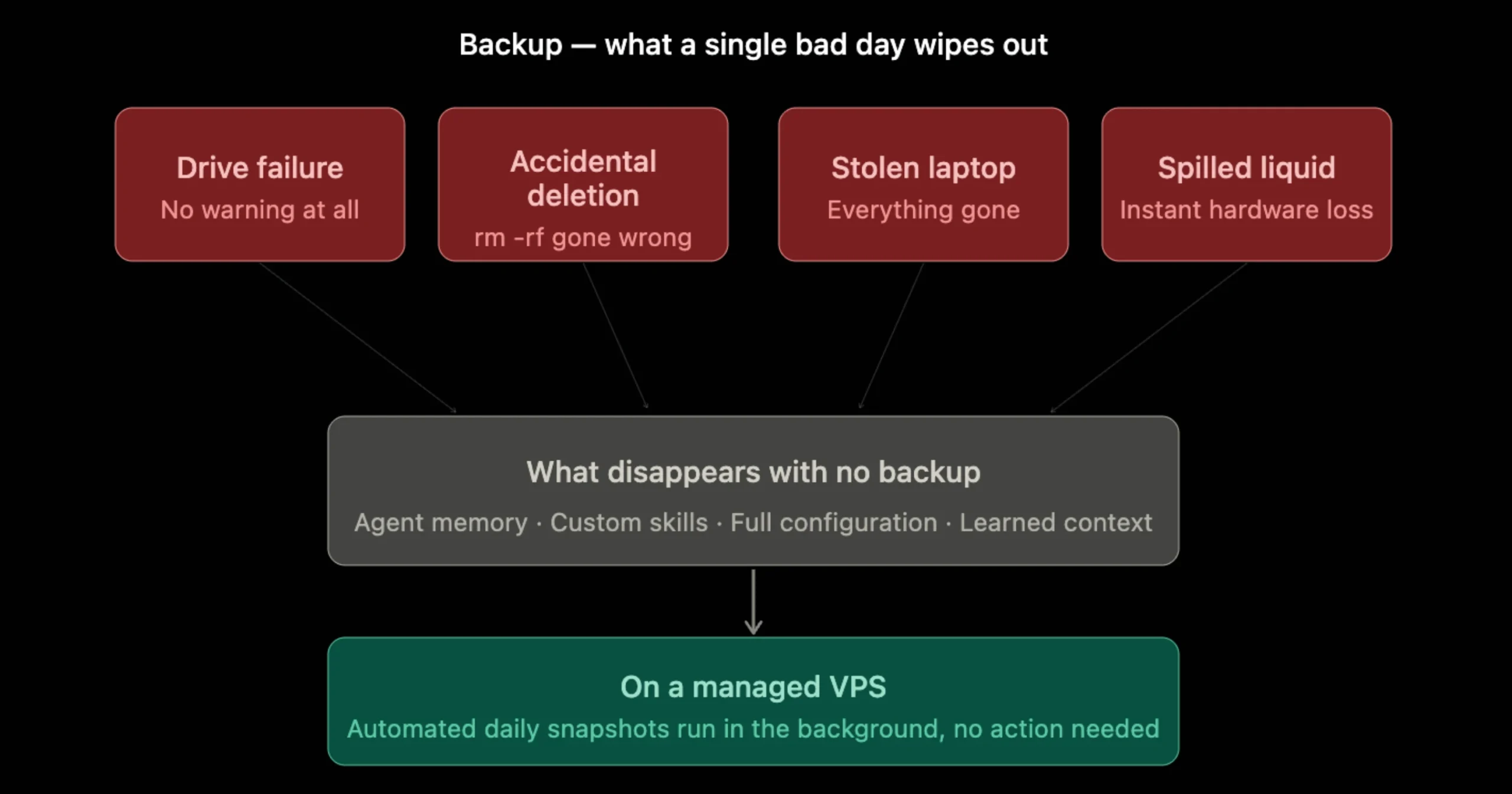
Without recent backups, recovering everything usually means starting over.
The biggest challenge is consistency. Many people intend to create regular backups but only remember after something has already gone wrong.
OpenClaw recommends keeping your workspace in a private Git repository as a minimum backup practice. While that helps protect your configuration, it’s still your responsibility to create and maintain those backups.
With a VPS, automated snapshots and scheduled backups make disaster recovery much simpler. If something unexpected happens, you can restore your environment much faster and get your OpenClaw agent running again with minimal downtime.
Limitations of Local Hosting for Openclaw FAQs
How long does it take to set up OpenClaw?
With a local install, expect 30 to 90 minutes depending on your familiarity with Docker and Node.js. On managed VPS hosting with a one-click installer, setup typically takes under 10 minutes.
Can I run OpenClaw without a GPU?
Yes. OpenClaw works fine with cloud AI providers like OpenAI or Anthropic, and no GPU is required on your end. A GPU only becomes relevant if you want to run a local AI model through something like Ollama.
Do I need a server to run OpenClaw?
You don’t need one to get started. But for anything beyond testing, especially if reliability, remote access, or continuous uptime is important, a VPS is the more practical long-term choice.
How do I run OpenClaw safely?
Restrict which tools your agent can access. Keep sensitive skills sandboxed. Never expose your Gateway publicly without authentication. Use a firewall. Keep OpenClaw updated. On a managed hosting setup, several of these defaults are handled for you.
What is the best OpenClaw setup?
For most users who need a reliable, always-on agent: a cloud VPS with managed deployment, your own AI provider API key, automated backups, and SSL configured from day one.
How much space do I need to run OpenClaw?
Roughly 10–20GB of storage covers a standard setup without a local model. Running a local LLM through Ollama adds significantly more, depending on the model size.
What is the best OS for OpenClaw?
Ubuntu 22.04 LTS is the most consistently supported option. Most OpenClaw documentation and community guides assume a Linux environment, and it’s what most managed VPS providers deploy by default.
Local Hosting vs. VPS Hosting for OpenClaw
Strip away the detail, and the comparison comes down to five realistic differences:
- Uptime: A local machine depends on your power supply and internet connection. A VPS continues running even if your laptop is switched off or your office loses power.
- Remote access: A VPS provides a stable public address that you can reach from anywhere. With local hosting, remote access often requires additional networking tools and configuration.
- Security: A VPS starts with a dedicated server environment that can be properly secured. On a local computer, every firewall rule, software update, and security setting is your responsibility.
- Maintenance: Local hosting means managing updates, troubleshooting issues, and creating backups yourself. Many VPS hosting solutions simplify these tasks with automated backups and easier server management.
- Cost: Running OpenClaw locally may appear free at first, but electricity, hardware wear, internet reliability, and the time spent maintaining the system all add to the overall cost. A modest Openclaw VPS plan is often cheaper once you account for all four.
At Truehost, we offer OpenClaw VPS hosting with benefits like pre-configured, 1-click installs, Naira billing, and reliable support.
Instead of worrying about power outages, hardware limitations, or missed automations, you can focus on building workflows that help your business grow.
Explore our OpenClaw VPS hosting plans today and give your AI agent the reliable home it deserves.