Domain NamesFind and register your ideal domain name instantly.
 Web HostingEasy-to-use hosting powered by cPanel — ideal for managing websites in Nigeria.
 Windows HostingRun .NET apps with Windows-optimized hosting
 Affiliate ProgramMake money promoting our services
 Reseller HostingMake money by reselling our hosting products under your own brand
 .COM Domains
 All DomainsExplore all supported tld domains in Nigeria
 WhoisFind out who owns any domain, as well as verify your registration details
 VPS Hosting
 Dedicated ServersReimagine your site speed with your own complete server
 AI Website BuilderDesign your site with drag-and-drop tools
 Online Store BuilderStart your online shop without code
 Support PortalFind answers or get expert help
 Contact UsReach our team via chat or email
 BlogRead our extensive guides on web hosting and more
The future of AI is more than conversational. It’s autonomous, and OpenClaw leads the way.
While most AI assistants live trapped inside a browser tab, waiting for you to type a prompt, OpenClaw breaks out of that sandbox.
It represents a massive shift from passive chat interfaces to active local agents that can control your browser, execute shell commands, and run scheduled tasks on autopilot.
By operating directly on your system, this open-source agent bridges the gap between text generation and real-world execution. It stops acting like a chatbot and starts functioning like a digital teammate.
To see how it shifts your workflow into overdrive, you need to look under the hood.
These are the top OpenClaw features redefining what an AI assistant can do.
Top OpenClaw AI Assistant Features
1) Multi-Channel Messaging
One of the first things you’ll notice about OpenClaw is that it doesn’t ask you to change the way you communicate.
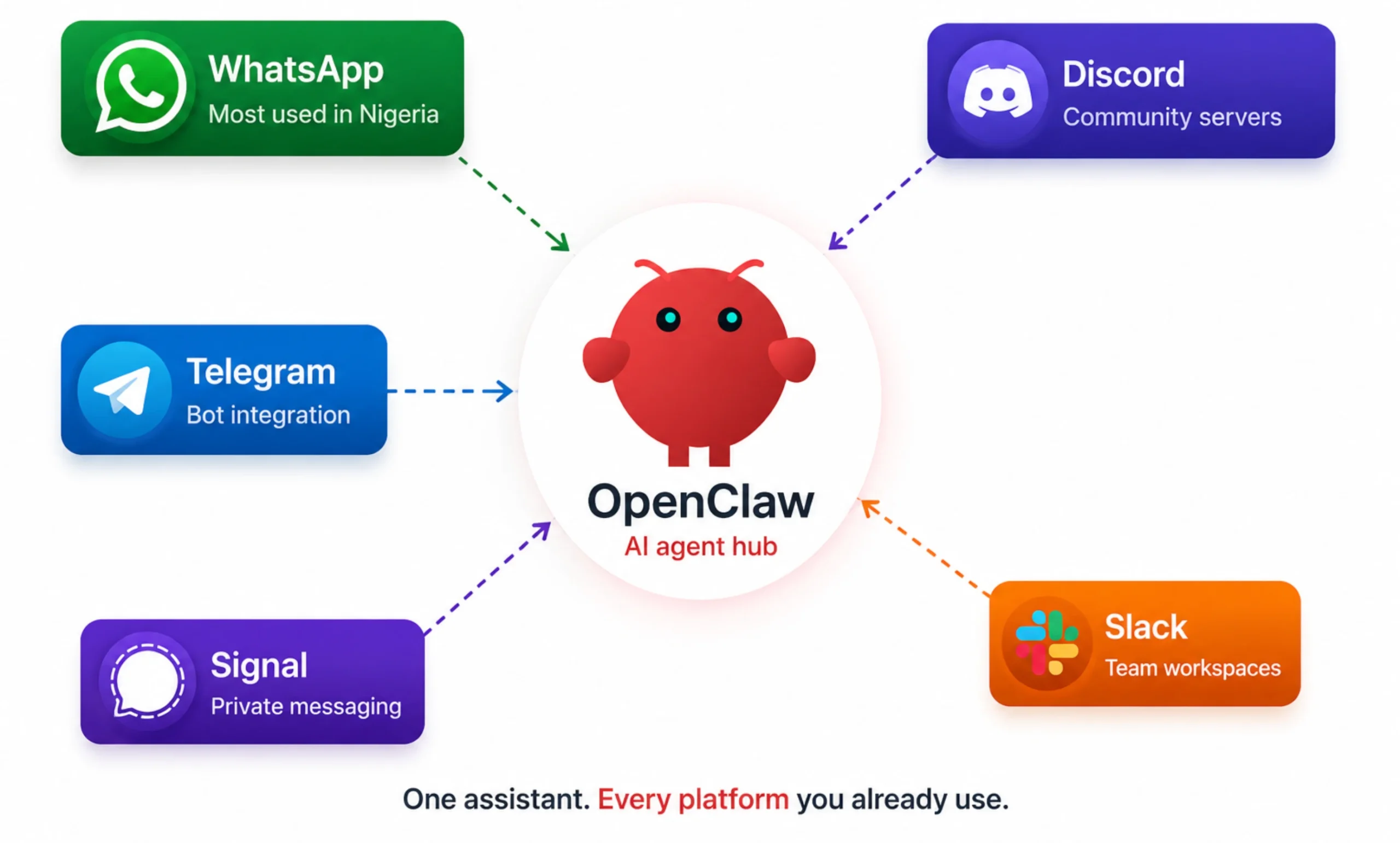
Instead of introducing another dashboard or mobile app, it connects to messaging platforms you already use, including WhatsApp, Telegram, Discord, Slack, and several others.
For many businesses in Nigeria, WhatsApp is already the main communication channel for customers, suppliers, and internal teams.
Running your AI assistant through the same app means you don’t have to switch between different tools or convince everyone to learn a new platform. You simply chat with OpenClaw the same way you would chat with a colleague.
This makes it much easier to use AI throughout the day because it’s available where your conversations are already happening.
2) The AgentSkills System
OpenClaw is designed to grow with your needs through its AgentSkills system. A skill is a reusable capability that teaches the assistant how to perform a specific task, much like installing an app on your smartphone.
There are many ready-made skills available for common activities such as checking emails, creating GitHub issues, retrieving weather information, or interacting with external services.
Instead of building every automation yourself, you can install existing skills and start using them immediately.
If your workflow is unique, you can also create custom skills to extend OpenClaw even further. This flexibility allows the assistant to adapt to your business instead of forcing your business to adapt to the software.
3) Persistent Memory
Starting every conversation from scratch quickly becomes frustrating, especially when you’re working on long-term projects. OpenClaw avoids this by keeping persistent memory.
It stores conversations, preferences, and project information as local files, allowing the assistant to remember important details between sessions. You don’t have to explain your business, preferred writing style, or ongoing tasks every time you start a new chat.
Over time, this creates a much more natural experience because the assistant builds on previous interactions rather than treating every conversation as completely new.
4) The Heartbeat (Proactive Scheduling)
Heartbeat is one of the features that sets OpenClaw apart from traditional AI assistants. Instead of waiting for instructions, it can check for scheduled work automatically through its heartbeat cycle and the HEARTBEAT.md configuration.
This allows OpenClaw to perform routine tasks throughout the day without someone constantly prompting it.
It can monitor supplier pricing overnight, watch competitor websites for changes, generate daily summaries from group chats, or remind you about unfinished work before your day begins.
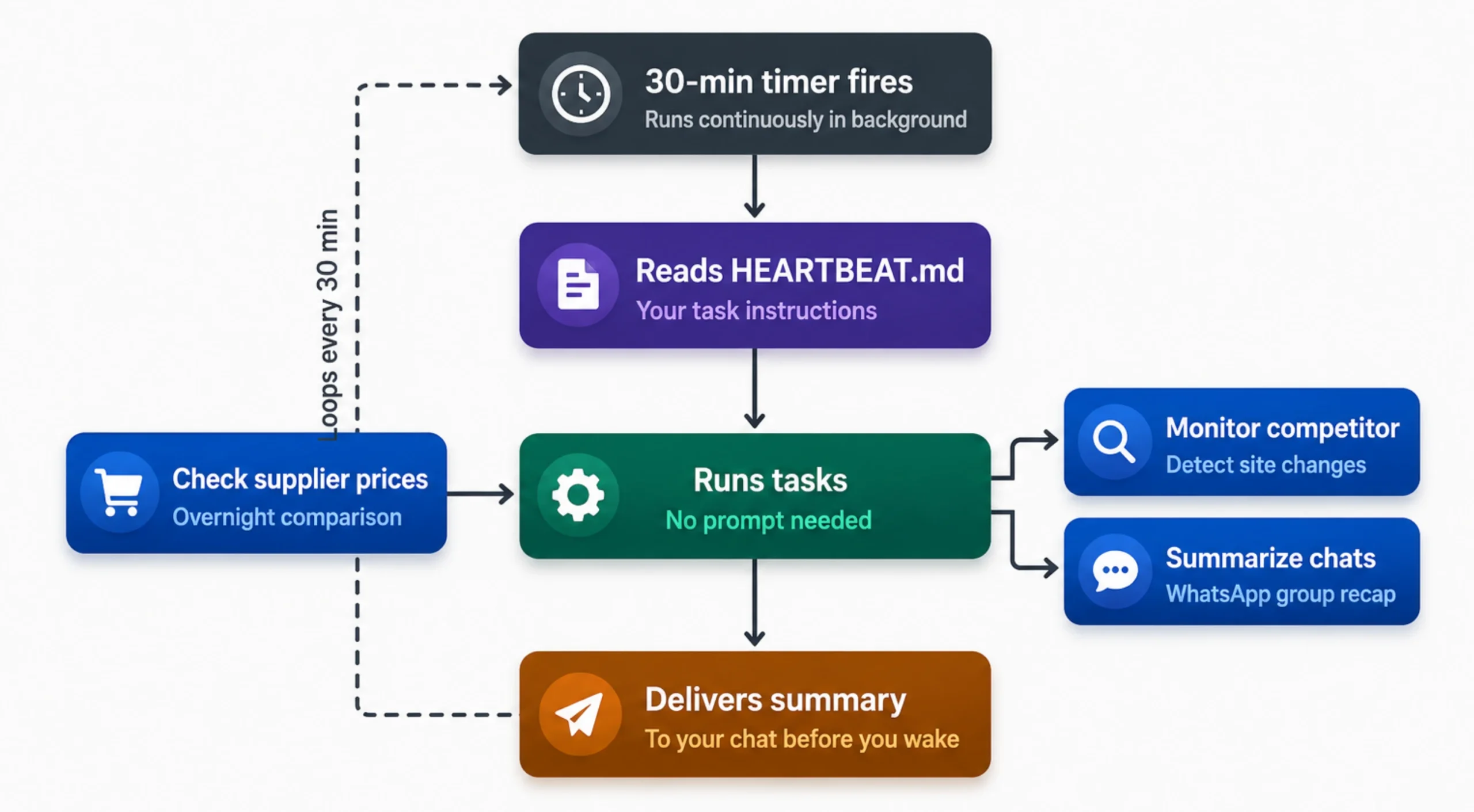
The result is an assistant that stays productive in the background, helping you keep up with routine activities even when you’re focused on something else.
5) Browser and Computer Control
OpenClaw can do much more than answer questions. It can browse websites, fill out online forms, extract information from web pages, run shell commands, and manage files on your computer or server.
You can choose to run these actions in a sandboxed environment for extra protection or allow broader system access when your workflow requires it.
This opens the door to automating repetitive work that normally takes up valuable time.
For example, OpenClaw can collect competitor pricing from several websites, complete repetitive web forms, or carry out a research task that would normally take you an hour to finish manually.
Rather than clicking through the same steps every day, you can let the assistant handle them while you focus on more important work.
6) Model-Agnostic Design
Unlike many AI platforms that lock you into a single provider, OpenClaw gives you the freedom to choose the language model that works best for your needs.
It supports popular providers such as OpenAI’s GPT models, Anthropic’s Claude, Google Gemini, DeepSeek, and several others.
If privacy is a priority, you can even connect OpenClaw to models running entirely on your own hardware through platforms like Ollama.
This flexibility also helps manage costs. Routine tasks can be handled by a smaller, more affordable model, while more demanding work can be assigned to a larger model with stronger reasoning capabilities.
Instead of paying premium pricing for every request, you can match the right model to the right job.
As new AI models become available, you can switch providers without rebuilding your entire workflow, giving you much more freedom than assistants tied to a single ecosystem.
7) Privacy and Self-Hosting
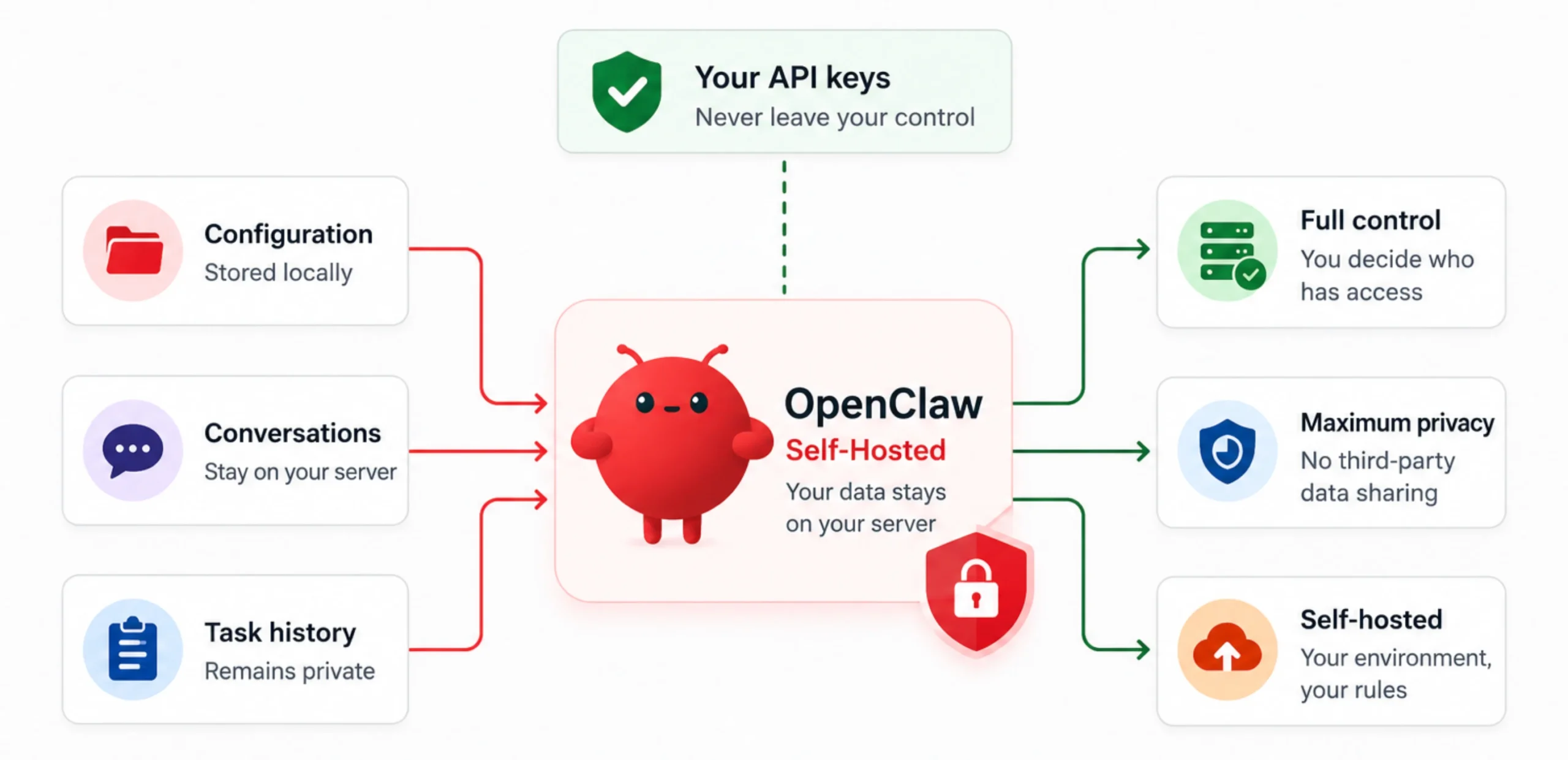
Privacy is one of the main reasons many people choose OpenClaw.
Your configuration files, conversation history, memory, and task records remain on your own machine or server, while your API keys stay under your control instead of being stored by a third party.
This approach is especially valuable for businesses that work with confidential information, internal documents, customer records, or sensitive projects.
Keeping data within your own environment gives you greater control over how that information is stored and accessed.
Of course, self-hosting only delivers these benefits if the system stays online. Running OpenClaw from a personal laptop works for testing, but the assistant stops working as soon as the computer is turned off, goes to sleep, or loses its internet connection.
That’s why many businesses choose to host OpenClaw on a dedicated VPS.
At Truehost, we provide OpenClaw VPS hosting that keeps your assistant available around the clock, allowing features like persistent memory, scheduled tasks, and continuous monitoring to work as intended.
8) Voice Support
OpenClaw also supports voice conversations on macOS, iOS, and Android, making it easy to give instructions while you’re away from your keyboard.
The push-to-talk feature is particularly useful when you need a quick response or want to capture an idea before you forget it.
You can ask questions, create reminders, or assign tasks using your voice, then continue with whatever you’re doing.
If you spend much of your day moving between meetings, travelling, or multitasking, voice support adds another convenient way to interact with OpenClaw without interrupting your workflow.
9) Productivity and Developer Integrations
OpenClaw fits into a wide range of workflows because it integrates with many of the tools people already rely on every day.
If you’re using it to stay organized, it works with applications such as Notion, Trello, Apple Notes, and Apple Reminders. You can create tasks, update projects, keep track of ideas, and manage your daily workload without jumping between multiple apps.
For developers and technical teams, OpenClaw offers even more possibilities. It integrates with GitHub, supports scheduled cron jobs, responds to webhook triggers, and can automate repetitive development and DevOps tasks.
This makes it useful for everything from monitoring repositories to running routine maintenance jobs.
10) Open Source, MIT License
OpenClaw is completely open source and released under the MIT License. Anyone can inspect the source code, modify it, and use it without paying a subscription fee for the software itself.
This openness has helped build an active community that continues to improve the project by fixing bugs, adding new features, and sharing AgentSkills that others can install and use.
It also means you’re never locked into a single vendor.
You remain in control of your installation and can customize OpenClaw to suit your own requirements, be it running it for personal automation, software development, or business operations.
Hosting Is Important for These Features to Work Well
Looking back at this list, none of these features work well without stable, always-on hosting.
Especially the features that make OpenClaw powerful, like heartbeat, memory, and 24/7 monitoring, all depend on the assistant staying online continuously.
Run it from a personal laptop, and it stops working the moment that laptop sleeps, loses power, or drops its internet connection. Every interruption stops your AI assistant from doing its job.
In that case, you have no other option but to get a dependable, always-on server. It’s the difference between OpenClaw doing what it was designed to do and it quietly going offline without you noticing.
Our Truehost OpenClaw VPS package is conveniently built to get you reliable uptime, local Nigerian pricing with no forex payment friction, and support hours that match your timezone.
With the hosting taken care of, you can focus on putting OpenClaw to work for your business instead of maintaining the infrastructure behind it.
These OpenClaw AI assistant features are powerful if you run a business or want to automate your own workflow. You just need to get our pre-installed OpenClaw VPS hosting and focus on making your business simpler.