Domain NamesFind and register your ideal domain name instantly.
 Web HostingEasy-to-use hosting powered by cPanel — ideal for managing websites in Nigeria.
 Windows HostingRun .NET apps with Windows-optimized hosting
 Affiliate ProgramMake money promoting our services
 Reseller HostingMake money by reselling our hosting products under your own brand
 .COM Domains
 All DomainsExplore all supported tld domains in Nigeria
 WhoisFind out who owns any domain, as well as verify your registration details
 VPS Hosting in Nigeria
 Dedicated ServersReimagine your site speed with your own complete server
 AI Website BuilderDesign your site with drag-and-drop tools
 Online Store BuilderStart your online shop without code
 Support PortalFind answers or get expert help
 Contact UsReach our team via chat or email
 BlogRead our extensive guides on web hosting and more
Many Nigerian business owners operate on lean budgets.
Every Naira spent on overheads like hosting or design is a Naira not spent on inventory, logistics, or marketing.
The old myth suggested that to get a professional email, you first needed to buy a domain, then buy hosting, then configure a complicated cPanel.
That process often cost between ₦15,000 and ₦50,000 upfront, a significant barrier for a startup or side hustle. Thankfully, that era is over.
The modern digital infrastructure allows you to bypass the expensive middlemen entirely.
You can now claim your digital real estate today without touching a line of code or paying for a website you do not need.
The first method we will explore gets you running in under ten minutes with zero financial investment.
The second method requires a small annual fee for your domain but unlocks the highest level of trust with a .ng extension.
Both methods achieve the same goal: a branded email that builds authority and helps you stand out in crowded inboxes.
To create a free business email that bypasses the complexity of traditional hosting, you need to follow the specific steps below.
By the end of this guide, you will have a fully functional, professional email address that you can put on your business cards, social media bios, and invoices immediately.
Step-by-Step: Creating Your Free Business Email
There are two direct routes, pick the one that fits where your business is right now. Both will get you a professional email address by the time you finish reading this paragraph.
The only requirement is that you take action. So let me break down exactly what you will achieve with each path and the precise steps to make it happen.
Option 1: Get a Professional Email Completely Free in Minutes Using a Free Domain
What you’ll achieve: A professional email like [email protected] without buying anything.
Provider to use: Neo.
Neo is a platform specifically designed for people who want a business email but do not own a domain name and do not want to buy one. They solved the chicken-and-egg problem by giving you a free domain that ends with .co.site.
Now, do not get hung up on the fact that it is not a .com or .ng. The most important part of your email address is your brand name.
When a client sees [email protected], their brain registers “Chika’s Catering” as the key information. The suffix fades into the background.
What stands out is that you are not using a generic free email provider. That alone puts you ahead of 70% of small businesses in Nigeria. The second advantage of Neo is speed.
Because you are using their domain and their email system, there are zero technical configurations. You do not touch DNS records. You do not wait for propagation. You do not verify anything complicated.
You sign up, pick a name, and your inbox is live instantly. You can be sending professional proposals within the same minute you decide to take your business seriously.
Do this now:
1) Go to Neo’s website and click Get Started.
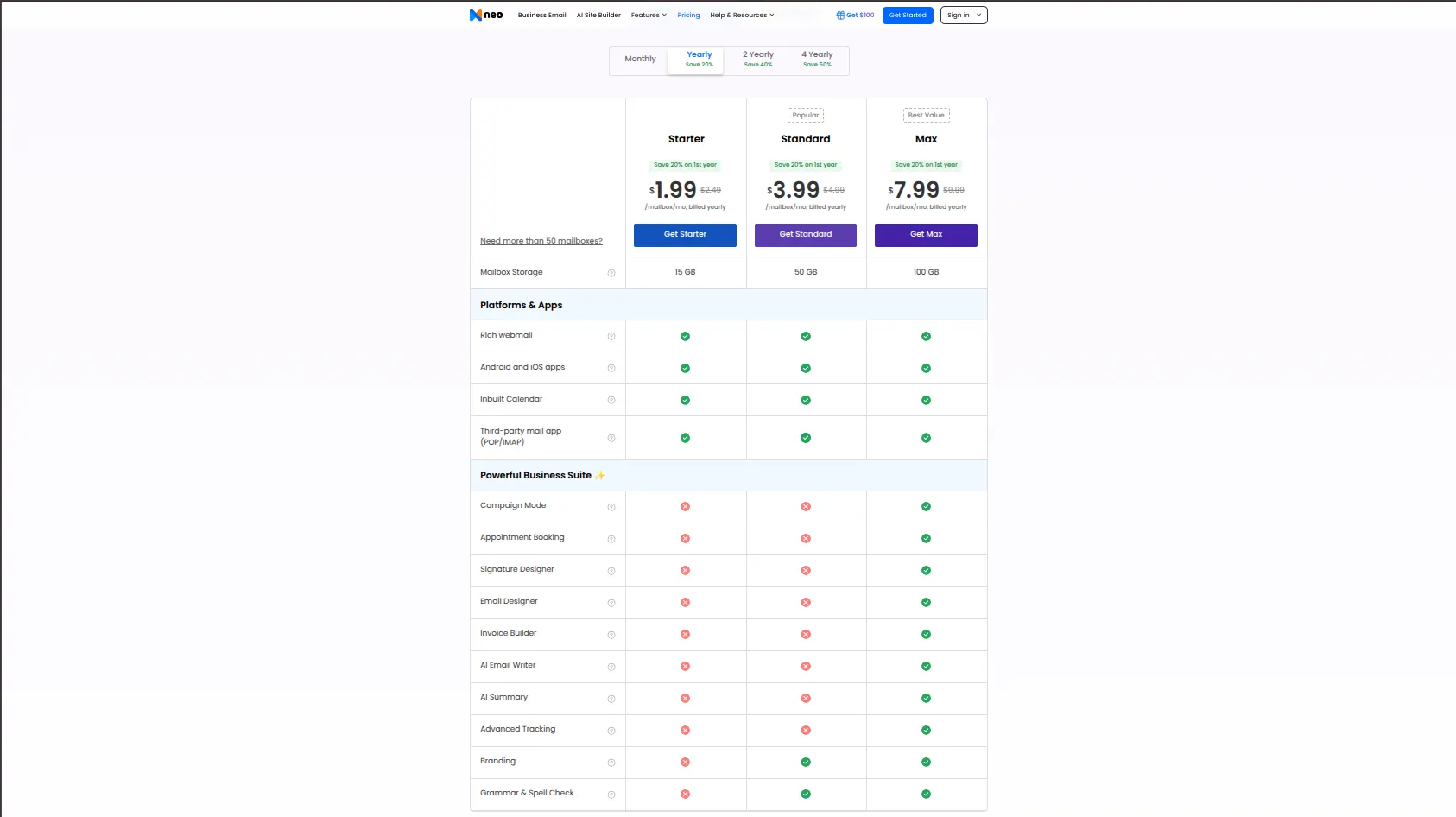
The homepage is clean and simple. Avoid any distractions. You are looking for a button that says “Get Started,” “Sign Up,” or “Create Account.” Do not click on anything about pricing yet.
The free option is available during the signup flow. If you see a page asking for credit card information, you have clicked the wrong thing. Go back and look for the free option.
Neo makes money from paid upgrades later, but their onboarding process clearly offers the free .co.site domain as a legitimate path. Take it.
When asked if you own a domain, select “No, I need a new one.” This is the most important click in the entire process.
Many people get confused here. They assume that if they say “No,” the process will end or they will be rejected. That is not the case.
Saying “No” tells Neo that you do not have a domain, and they should give you one of your free ones. That is exactly what you want. So click No with confidence.
You are on the right track. The next screen will ask you what name you want for your free domain.
2) Search for your business name and claim a free .co.site domain (e.g., chikascatering.co.site).
Type your business name into the search bar. If chikascatering.co.site is available, claim it immediately. If it is taken, do not panic.
Add a modifier that makes sense for your business. You could add ng for Nigeria: chikascateringng.co.site.
You could add your location: chikascateringikeja.co.site. You could add hq or official or your industry keyword.
The goal is to keep it short, memorable, and directly connected to your brand. Avoid random numbers or complicated spellings.
Once you find an available domain, click to claim it. It is yours for free for as long as you use Neo’s service.
3) Create your mailbox by choosing your desired username.
You will instantly have an address like [email protected], ready to use in client emails, proposals, and social media bios.
Choose a username that makes sense for your business role. hello@, info@, contact@, support@, and sales@ are all standard options. If you are a solo operator, using your first name like chika@ is also perfectly fine.
The key is consistency. Once you pick a username, stick with it across all your business communications. Your inbox is now live.
You can send and receive emails immediately. Neo provides a web interface you can use from any browser, and most plans also allow you to connect the email to your phone’s default mail app.
This gives you instant separation from the crowd without spending a Naira.
For a freelancer sending their first five proposals, a startup testing a new service, or a side hustle that has not yet turned a profit, this is the ideal solution.
Option 2: Set Up a Custom .ng Email (Your Own Domain) for Maximum Trust
You will invest a small annual fee in a domain, then attach a world-class email service for free.
What you’ll achieve: A permanent, 100% branded address like [email protected] that scales with you.
Providers to use: Truehost or Leanna.ng for the domain, Zoho Mail for the free email.
This is the premium path without the premium price tag. Buying your own domain is like buying land.
With a .com.ng or .ng domain, you own the digital real estate. You can sell it. You can move it to any email provider. You can build a website on it later. You can create unlimited email addresses.
The domain is yours as long as you pay the annual renewal fee, which for a .com.ng through Truehost can be as low as ₦5,500 per year. The return on that investment is staggering when you consider the doors a professional email opens.
Why specifically a .ng domain? Because it signals to other Nigerians that you are local, registered, and serious.
If you are targeting government contracts, educational institutions, traditional businesses, or older clients, the .ng extension carries weight.
For freelancers targeting international clients, a .com.ng also works well because it is unique and memorable.
The second piece of this puzzle is Zoho Mail. Zoho is an Indian company that builds business software. Their “Forever Free” plan is legendary in the small business community.
You get up to five users, each with 5GB of storage, completely free. There are no time limits.
There are no hidden upgrades that suddenly appear. You can use it for ten years and never pay a Naira to Zoho.
The only cost is your domain registration with Truehost.
Combined, you have a world-class email system that competes with Google Workspace and Microsoft 365, but you are paying nothing for the email software and only ₦5,500 for the domain.
Do this now:
a) Buy your .ng domain:
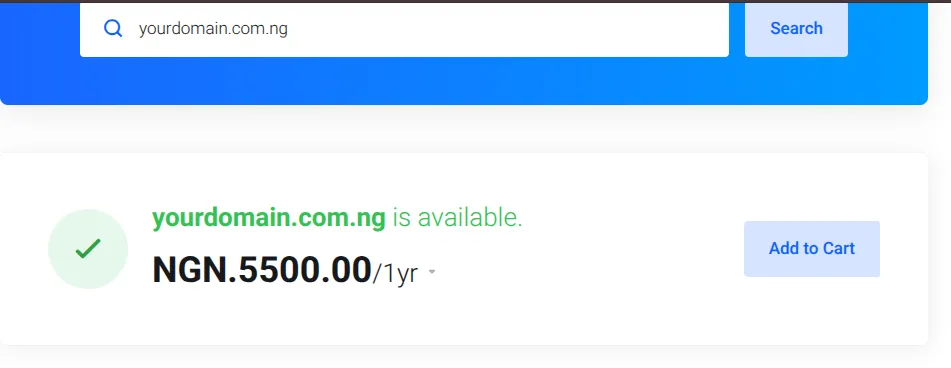
Head to Truehost and register your domain. A .com.ng can cost as low as ₦5,500 per year. This is your digital property.
When you go to Truehost’s website, use the domain search bar to check if your desired name is available.
If it is, add it to your cart and complete the payment. You will need to provide basic information like your name, email address, and phone number.
This is standard for domain registration. Keep your login details safe because this is how you will manage your domain for years to come.
If your exact business name is taken, try adding “ng,” “africa,” “hq,” or your industry keyword. Do not give up easily. With a little creativity, you will find an available domain.
b) Open a free Zoho Mail account:
Go to Zoho Mail, sign up for the Forever Free plan (up to 5 users, 5GB each), and enter your new domain when prompted.
The signup process will ask you if you already own a domain. Say yes. Type in the .com.ng domain you just bought. Zoho will then walk you through creating an administrator account.
This will be your main login. Choose a strong password. Write it down somewhere safe. You are now ready for the next step, which is the only slightly technical part of the entire process.
c) Verify domain ownership:
Zoho will give you DNS/MX records. Copy them, go back to your domain registrar’s dashboard, and paste them into the DNS settings.
This connects your domain to Zoho’s email system, takes a few minutes to activate. Let me translate that sentence into plain English.
DNS records are just instructions that tell the internet where to send email for your domain. Zoho will show you a page with a few lines of text.
One will be a TXT record for verification. A couple will be MX records for mail exchange. You need to copy each one exactly.
Then you log into your Truehost account, find the DNS management section (often called “Zone Editor” or “DNS Settings”), and paste those records into empty fields. Save your changes. That is it.
The internet will update within a few minutes to a few hours. In most cases, Zoho will detect the changes within 30 minutes and automatically verify your domain.
d) Create your professional mailboxes:
Once verified, create addresses like orders@, support@, or [email protected] directly from Zoho’s admin panel. You can also create group addresses.
For example, you can create [email protected] and have it forward to three different people. You can create billing@ for invoices. You can create careers@ if you start hiring.
The free plan gives you five separate user accounts, which means five different people can each have their own login and password. For a small business owner with one or two employees, this is more than enough.
Once your mailboxes are created, you can log into Zoho Mail’s web interface or set up the email on your phone using the Gmail app, the Outlook app, or the default iOS Mail app. Zoho provides clear instructions for each setup.
Now you have full corporate authority, zero website required, and you own the name forever.
To create a free business email using the custom domain method, you only pay for the domain. Zoho’s email service remains free forever.
Ready to elevate your business image?
You don’t need a website, a developer, or a massive budget to start commanding respect in the Nigerian business space.
Whether you take the instant-free route with Neo or invest a token into your own .ng domain powered by Zoho Mail, you are making the one change that instantly upgrades how customers, investors, and partners perceive you.
The takeaway is straightforward: a branded email is your first handshake, and it costs either nothing or next to nothing to make it firm and memorable.
Don’t let another client slip away because of a generic email address.
If you’re serious about building a lasting brand, secure your .ng domain today. Head over to Truehost and grab your custom domain for as low as ₦5,500 per year, then set up your free professional email on Zoho.
Alternatively, if you want to create a free business email without spending a single Naira, go directly to Neo and claim your .co.site domain right now.
Both methods work. Make the choice today. Your professional future starts with your next email. Go get it.