Domain NamesFind and register your ideal domain name instantly.
 Web HostingEasy-to-use hosting powered by cPanel — ideal for managing websites in Nigeria.
 Windows HostingRun .NET apps with Windows-optimized hosting
 Affiliate ProgramMake money promoting our services
 Reseller HostingMake money by reselling our hosting products under your own brand
 .COM Domains
 All DomainsExplore all supported tld domains in Nigeria
 WhoisFind out who owns any domain, as well as verify your registration details
 VPS Hosting
 Dedicated ServersReimagine your site speed with your own complete server
 AI Website BuilderDesign your site with drag-and-drop tools
 Online Store BuilderStart your online shop without code
 Support PortalFind answers or get expert help
 Contact UsReach our team via chat or email
 BlogRead our extensive guides on web hosting and more
Maybe a job application asked for a Yahoo address specifically. Maybe you just want a second inbox away from your main Gmail.
Whatever brought you here, you want to create a Yahoo Mail account in Nigeria without getting stuck halfway through, wondering why your verification code never arrived.
Most guides walk through the signup form and stop there.
They never mention what happens when a Nigerian network SMS runs late, or what to do when someone in another country already takes your preferred username.
This guide covers both the full signup process and the parts that actually trip Nigerian users up.
What You’ll Need Before You Start
Gather these three things first, and the whole signup takes under five minutes instead of stalling halfway through.
Missing any one of them is the most common reason a Nigerian user has to restart the form.
- An active Nigerian mobile number that can receive either SMS or WhatsApp messages, since Yahoo verifies almost every new account through one of the two.
- A stable internet connection. Yahoo’s signup form times out after a period of inactivity, so a weak signal partway through can force you to start again.
- A rough idea of two or three email address options, in case your first choice is already taken by another Yahoo user somewhere else in the world.
- Five uninterrupted minutes. Starting the form, getting distracted, and coming back later is the fastest way to trigger a session timeout partway through verification.
Setting Up Your Yahoo Mail Account
Step 1: Open Yahoo’s Official Signup Page
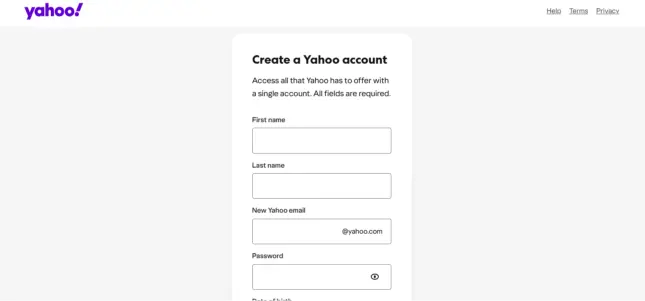
Open your browser and go directly to Yahoo’s account creation page rather than searching for it.
Typing the address in yourself, or bookmarking it once you land there, avoids the lookalike signup pages that sometimes rank in search results.
Use a browser you update regularly, since Yahoo’s signup form occasionally behaves oddly on very old browser versions.
Chrome, Safari, and Firefox all work fine as long as they’re reasonably current.
Step 2: Enter Your Name
Yahoo asks for your first and last name before anything else.
Use your real name if you plan to use this inbox for job applications or official correspondence, since a mismatched name can raise questions later.
You can still change your display name afterward in your account settings, so a small typo here isn’t something you need to restart the entire form to fix.
Step 3: Pick Your Email Address
Choose something professional if there is any chance a recruiter, client, or bank will see it.
Firstname.lastname or a close variation reads better than a nickname.
- If your first choice is taken, add a middle initial or your birth year rather than random numbers, which can look less trustworthy to whoever receives your emails.
- Avoid usernames built entirely from numbers or symbols, since these are more often flagged as spam accounts by other mail providers you’ll be emailing.
- Keep it short enough to say out loud over the phone, since you’ll likely be reading it to clients, banks, or support agents at some point.
Step 4: Create a Strong Password
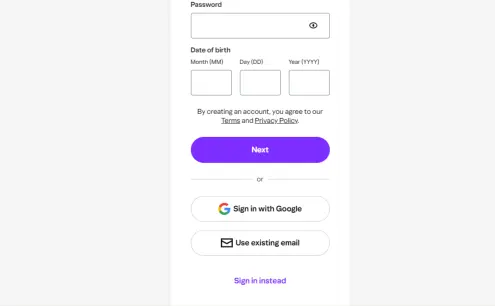
Mix letters, numbers, and symbols rather than reusing a password from another account.
Avoid your name, birth date, or anything else visible on your social media profiles, since these are the first guesses in any password attack.
Consider a short, memorable phrase with a number and symbol swapped in, rather than a single word.
A phrase is genuinely harder to guess and easier to remember than a random jumble of characters.
Step 5: Add Your Nigerian Phone Number
Select Nigeria’s country code, +234, before entering your mobile number.
Double-check every digit here, since a single mistyped number sends your verification code to a stranger instead of your own phone.
Drop the leading zero from your local number once you’ve selected +234, since Yahoo’s form expects the number in international format without it.
Step 6: Enter Your Date of Birth
Yahoo asks for your date of birth to confirm you meet its minimum age requirement. Gender is optional at this stage, so leave it blank if you would rather not share it.
Enter your actual birth date rather than an approximate one, since Yahoo occasionally asks you to confirm this detail again during account recovery further down the line.
Step 7: Verify Your Phone Number
Click continue, and Yahoo sends a short verification code by SMS. Enter it exactly as shown, then click Verify to finish creating your account.
- If the SMS takes more than a few minutes, wait before requesting a second code, since Nigerian mobile networks occasionally delay international SMS delivery.
- If no code arrives at all, look for Yahoo’s Get Code on WhatsApp option on the same screen. Yahoo built this specifically for countries where SMS delivery isn’t always
reliable, and it sends the same verification code straight to your WhatsApp instead.
- Enter the code within a few minutes of receiving it, since Yahoo’s verification codes expire after a short window for security reasons.
Step 8: Explore Your New Inbox
Once verification succeeds, Yahoo drops you straight into your new inbox.
Take a minute to find the compose button and check your account settings before you start sending emails from it.
Look for the settings gear icon in the top corner of the inbox.
From there, you can update your display name, add a signature, and set up folders before your first real email arrives.
Signing Up From the Yahoo Mail App Instead
The steps above work the same way inside the Yahoo Mail mobile app, which many Nigerian users prefer since it avoids switching between a browser and an SMS app during verification.
- Download Yahoo Mail from the Google Play Store or Apple App Store
- Open it
- Tap Create Account on the welcome screen.
The form itself asks for the same details in the same order:
- Your name
- Your chosen address
- A password
- Your phone number
- Your date of birth.
The one real advantage of the app is that your WhatsApp and SMS both sit on the same device you’re signing up on.
This makes switching between verification methods faster if your first attempt doesn’t go through.
Allow notifications when the app asks, since Yahoo uses them for both incoming mail alerts and future sign-in approvals through Account Key.
Once the account exists, it stays synced automatically between the app, your browser, and any other device you sign into later.
Secure Your Account Once It’s Created
Creating the account is only half the job. Take two minutes right after signing up to protect it properly, since a hijacked inbox causes far more trouble than the setup itself.
- Add a recovery email address in your account settings, separate from your phone number, so you have a second way back in if you ever lose access to your Nigerian SIM.
- Turn on two-step verification under Account Security, which asks for a one-time code in addition to your password whenever you sign in from an unfamiliar device.
- Review the devices and apps connected to your account every few months, and remove anything you no longer use or recognise.
- Write your password down somewhere other than your phone’s notes app, since losing both your phone and your password at once locks you out of every recovery option at the same time.
- Avoid reusing your Yahoo password on other Nigerian apps or websites, so a breach on one service never puts your email at risk, too.
Connecting Yahoo Mail to Your Phone’s Default Mail App
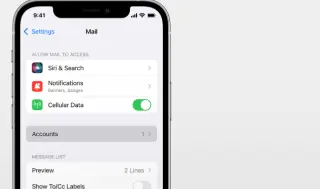
Many Nigerian users prefer checking Yahoo Mail through their phone’s built-in Mail app or through Outlook rather than opening a separate Yahoo app.
Both support Yahoo Mail through standard IMAP and SMTP settings, which take about two minutes to add once you know the right values.
- Incoming server (IMAP): imap.mail.yahoo.com, port 993, with SSL turned on.
- Outgoing server (SMTP): smtp.mail.yahoo.com, port 465 or 587, with SSL or TLS turned on.
- Username: your full Yahoo email address, not just the part before the @ symbol.
- Password: a Yahoo app password rather than your normal login password, generated from Account Security if you have two-step verification turned on.
Most phones detect these settings automatically the moment you type in your Yahoo address and password, and only ask for the manual values above if that automatic detection fails.
What to Do When Signup Doesn’t Go Smoothly
Your Verification Code Never Arrives
This is the single most common hold-up for Nigerian users creating a Yahoo account.
Switching to the WhatsApp verification option covered in Step 7 rather than requesting the same SMS code repeatedly.
This is because resending the identical message rarely fixes a delivery problem on the network side.
Your Preferred Username Is Already Taken
Yahoo automatically suggests close alternatives the moment your first choice is unavailable.
Adding a middle initial, a short number, or your profession to the username usually clears this without making the address look unprofessional.
Yahoo Asks You to Verify Again Later
If Yahoo asks for extra verification after you sign in from a new device or location, this is a routine security check rather than a sign that anything is wrong with your account.
Confirm through your recovery phone number or alternate email, and the request clears immediately.
Yahoo Locks Your Account Right After Signup
A brand-new account sometimes gets flagged for extra review if Yahoo’s system detects unusual signup activity from your network or device.
This is a routine automated check rather than a permanent block, and access typically restores within 12 hours on its own, or immediately once you confirm your identity through the Sign-in Helper.
The Verification Code You Entered Says It’s Incorrect
Codes expire a few minutes after Yahoo sends them, so an old code from an earlier attempt will always come back as invalid.
Request a fresh code rather than retyping the same one a second time, and enter it as soon as it arrives instead of leaving the tab open.
Your Browser or Data Plan Blocks the Signup Page
Some Nigerian mobile data bundles and office networks run aggressive ad blockers or content filters that occasionally interfere with signup forms.
Switching to your regular mobile data instead of office WiFi, or turning off a browser extension that blocks scripts, usually clears this without needing to contact anyone.
You Don’t See a WhatsApp Verification Option
The WhatsApp option only appears if the phone number you entered is genuinely reachable through WhatsApp.
Yahoo’s system detects your signup as coming from a region where SMS delivery is inconsistent.
If it doesn’t show up automatically, wait for the SMS option to time out first, since that’s usually when the alternative appears on screen.
Yahoo Mail or Gmail: Which Should You Actually Pick
If you’ve gotten this far, you may still be deciding between Yahoo Mail and Gmail rather than assuming Yahoo is the only option.
Both are free, both work fine for personal use, and neither is objectively better for every situation.
- Pick Yahoo Mail if a form, application, or employer specifically asks for a Yahoo address, or if you want an inbox that’s separate from your existing Google account.
- Pick Gmail if you already use Google Docs, Google Drive, or an Android phone, since Yahoo Mail doesn’t integrate with any of those the way a Google account does.
- Either way, treat the free account as a personal or backup inbox rather than the address you put on a business card, for the same reason covered below.
A Free Inbox Is a Good Start, Not a Finish Line
A Yahoo Mail account is genuinely useful for personal use, old job applications, and keeping your main inbox free of signup spam.
None of that changes once you’re running an actual business in Nigeria.
A client or supplier trusts [email protected] far more than the same message sent from a free @yahoo.com address.
Truehost’s Workplace email plans give you that custom domain address for around 700 naira a month, with local support and no dollar billing to track.
The switch matters more than it might seem.
A Yahoo address makes a side hustle look like a hobby, while a custom domain address makes it look like a business a client can trust with a deposit.
Moving your existing contacts across takes an afternoon, not a rebuild from scratch.
Whichever inbox you end up using today, the steps above will get you a working Yahoo account in a few minutes, WhatsApp verification and all.
Frequently Asked Questions
1) Is Yahoo Mail actually free to use in Nigeria?
Yes. Creating and using a standard Yahoo Mail account costs nothing anywhere in the world, Nigeria included. Yahoo makes its money from advertising shown inside the free inbox, not from a signup or usage fee.
2) Can I create a Yahoo account without a phone number?
Yahoo strongly prefers phone verification for new accounts, and most signups will hit a wall without one. Once your account exists, you can remove your phone number from your settings and rely on a recovery email instead.
3) How much free storage does a new Yahoo Mail account get?
Free Yahoo Mail accounts now come with 20GB of storage, down from the 1TB Yahoo used to advertise for years. That’s still generous enough for years of ordinary email use, and paid add-ons are available if you ever need more.
4) Can I use one Nigerian phone number for more than one Yahoo account?
Yahoo allows the same phone number to verify a small number of separate accounts, but not an unlimited number. If Yahoo rejects your number as already in use, try your alternate email verification option instead.
5) Is it safe to create a Yahoo account on a shared or cybercafé computer?
It can be, as long as you sign out fully and clear the browser’s saved passwords before you leave. Turning on two-step verification the moment your account is created adds a second layer of protection in case anyone reuses the browser session after you.
6) What happens if I forget my Yahoo password later?
Yahoo’s Sign-in Helper lets you reset your password using either your recovery phone number or your alternate email address. This is exactly why adding both during setup, rather than skipping the optional fields, matters more than it seems to at the time.
7) Can I turn a free Yahoo account into a business email later?
Not directly. Your @yahoo.com address stays a Yahoo address no matter how you use it, so moving to a custom domain means setting up a separate business email account and migrating your contacts across.
8) Does my Yahoo account need to use a Nigerian phone number specifically?
No. Yahoo accepts phone numbers from any country during signup, so a number from another country works just as well for verification. Using a Nigerian number simply makes the WhatsApp fallback and any future recovery steps more convenient, since it’s the number you’re most likely to still control years from now.