DomainsFind and register your ideal domain name instantly.
 Web HostingEasy-to-use hosting powered by cPanel — ideal for managing websites in Nigeria.
 Windows HostingRun .NET apps with Windows-optimized hosting
 Affiliate ProgramMake money promoting our services
 Reseller HostingMake money by reselling our hosting products under your own brand
 .COM Domains
 All DomainsExplore all supported tld domains in Nigeria
 WhoisFind out who owns any domain, as well as verify your registration details
 Dedicated ServersReimagine your site speed with your own complete server
 AI Website BuilderDesign your site with drag-and-drop tools
 Online Shop BuilderStart your online shop without code
 Support PortalFind answers or get expert help
 Contact UsReach our team via chat or email
 BlogRead our extensive guides on web hosting and more
OpenClaw vs Google Assistant becomes a real question once you want more than a simple voice helper.
Google Assistant is the voice helper built into your phone, ready the moment you say the wake word.
A wake word is simply the phrase, like “Hey Google,” that turns the assistant on.
OpenClaw is a very different tool, an open-source AI agent you run on your own server.
Open source just means the code is public, so anyone can inspect, copy, or improve it.
An AI agent, on the other hand, does not just answer questions; it actually completes tasks for you.
So, how do you decide which one truly deserves a spot in your daily life?
This comparison looks at what each one costs and what each one can actually do for you.
It also covers how private your data stays with either option you choose to run.
Along the way, we will explain a few technical terms in plain, simple words.
By the end, you should know which fits your needs and what it costs in naira.
OpenClaw vs Google Assistant Comparison Table
| Feature | OpenClaw | Google Assistant |
|---|---|---|
| What it is | Self-hosted, open-source AI agent that works with the AI model you choose | Cloud-based voice assistant built into Android and Google devices |
| Where it runs | Your own device or a VPS you control | Google’s servers, tied to your Google account |
| What it can do | Skills, computer and browser control, replies across WhatsApp, Telegram, Slack, Discord, and more | Voice commands, smart home control, calls, reminders, phone integration |
| Cost | Free and open source; you only pay for hosting and AI model usage. A VPS built for OpenClaw starts from NGN 10,500/mo, billed triennially with Truehost | Free with your Google account; advanced Gemini features require a paid subscription starting from $4.99/month |
1) Cost and OpenClaw VPS Pricing in Nigeria
Google Assistant is free with any Google account, and that has not changed much over the years.
What has changed is Gemini, the newer assistant now replacing it, since some of its more advanced features sit behind a paid Google AI subscription.
Gemini is simply Google’s newer, smarter AI model, and it now powers most assistant features.
Here is a quick breakdown of what each subscription tier costs and includes:
| Subscription Tier | Monthly Cost (USD) | Cloud Storage | Key Features Included |
|---|---|---|---|
| Google AI Free | $0.00 | 15 GB (Standard) | Everyday reasoning with standard Gemini models, basic search assistance, and smart home voice commands. |
| Google AI Plus | $4.99 | 400 GB | AI Inbox tools in Gmail, Daily Brief agent access, and higher usage limits than the free tier. |
| Google AI Pro (Formerly AI Premium) | $19.99 | 5 TB | Deep Research tools, Gemini integration inside Docs/Gmail, NotebookLM Plus expansion, and Jules coding agent access. |
| Google AI Ultra | From $99.99 | Starts at 20 TB | Up to 20x higher usage limits than Pro, early access to Deep Think models, and premium developer studio limits. |
For basic voice commands, Google Assistant remains free either way, which is worth weighing carefully in the OpenClaw vs Google Assistant cost comparison.
Most casual users honestly never need to pay Google anything at all.
OpenClaw itself is also free and open source, so the software carries no price tag.
What you actually pay for is the server that keeps it running around the clock.
The table below lists nine solid OpenClaw VPS provider options, along with what each plan actually includes.
Compare the specs and pricing to find the setup that matches your budget and needs.
| Provider | Plan | Start Price | What You Get |
|---|---|---|---|
| Truehost | OpenClaw Starter | ₦14,000.00 billed triennially | 1 vCPU, 2 GB RAM, 50 GB NVMe, 4 TB bandwidth, pre-configured OpenClaw, dedicated support |
| OVHcloud | VPS 2 | $8.50/mo, billed annually | 4 vCore, 8 GB RAM, 75 GB NVMe SSD, 1 Gbps unlimited bandwidth |
| Kamatera | Micro / Dev Entry | $6.00/mo, billed annually | 1 vCPU, 2 GB RAM, 20 GB NVMe storage |
| LumaDock | VPS.S1 | $4.99/mo, billed annually | 2 vCPU, 2 GB RAM, 30 GB NVMe storage |
| Hostinger | KVM1 | $6.49/mo, billed annually | 1 vCPU, 4 GB RAM, 50 GB NVMe, 4 TB bandwidth |
| Contabo | OpenClaw Personal Use | EUR 4.40/mo, billed biannually | 4 vCPU, 8 GB RAM, 100 GB SSD, auto backup available |
| Hetzner | CX23 | $4.09/mo, billed annually | 2 vCPU, 4 GB shared RAM, NVMe storage |
| xCloud | Cloud VPS 6GB | $9.99/mo, billed annually | 6 GB RAM, 100 GB NVMe SSD, 4 vCPU, 30 TB bandwidth |
| DigitalOcean | One Click Droplet Marketplace | $12.00/mo, billed annually | 1 vCPU, 2 GB RAM, sandboxed Ubuntu setup |
Your AI model usage adds a separate cost that depends on how often OpenClaw runs tasks.
Most AI providers charge based on how many words your assistant reads and writes.
Light personal use often costs less than what a paid subscription assistant would charge monthly.
This is where the OpenClaw vs Google Assistant cost gap becomes clear for most households.
Heavy daily use can cost more, so it helps to track your usage early on.
2) Privacy and Data Control
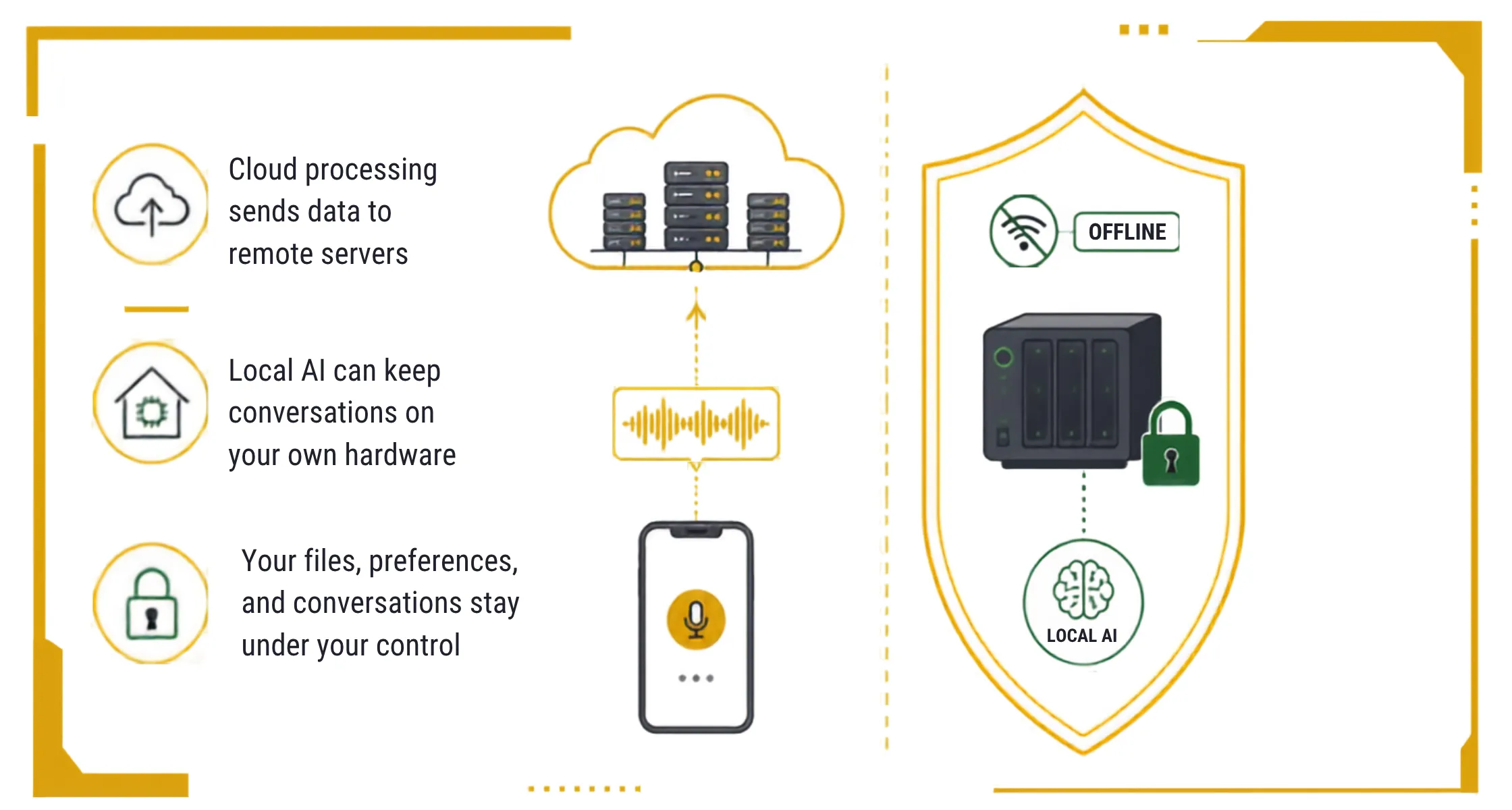
Google Assistant processes almost everything inside Google’s cloud to recognize your voice and pull answers fast.
The cloud simply means large, powerful computers owned and run by Google, not by you.
This cloud-first setup means your data keeps flowing through Google’s servers somewhere far away.
For many people, that tradeoff feels fine, since convenience matters more than strict privacy.
OpenClaw takes the opposite approach, since it runs on hardware that you fully control.
You can even run certain OpenClaw setups fully offline using local AI models instead.
That means your words never have to leave your own server at all.
Your conversations, files, and preferences stay on your own server, not a third party.
This is a real point of difference in any honest OpenClaw vs Google Assistant privacy comparison.
If privacy tops your list of priorities, this alone might settle the decision for you.
3) Integrations and Skills
Google Assistant works best inside Google’s own ecosystem of apps and connected devices.
It connects smoothly with Gmail, Google Calendar, Drive, and your Android device by default.
Outside that ecosystem, though, its options start to feel a little more limited.
OpenClaw takes a broader approach through an open skills system built for cross-platform use.
A skill, in simple terms, is just a small add-on that teaches OpenClaw a new trick.
It connects to WhatsApp, Telegram, Slack, Discord, and other apps you already use daily.
Developers can also build custom skills, so OpenClaw grows to match your exact workflow.
This flexibility is a strong point in favor of OpenClaw for anyone outside Google’s ecosystem.
If your daily apps stretch beyond Google’s world, OpenClaw adapts far more easily.
4) Reliability and Uptime
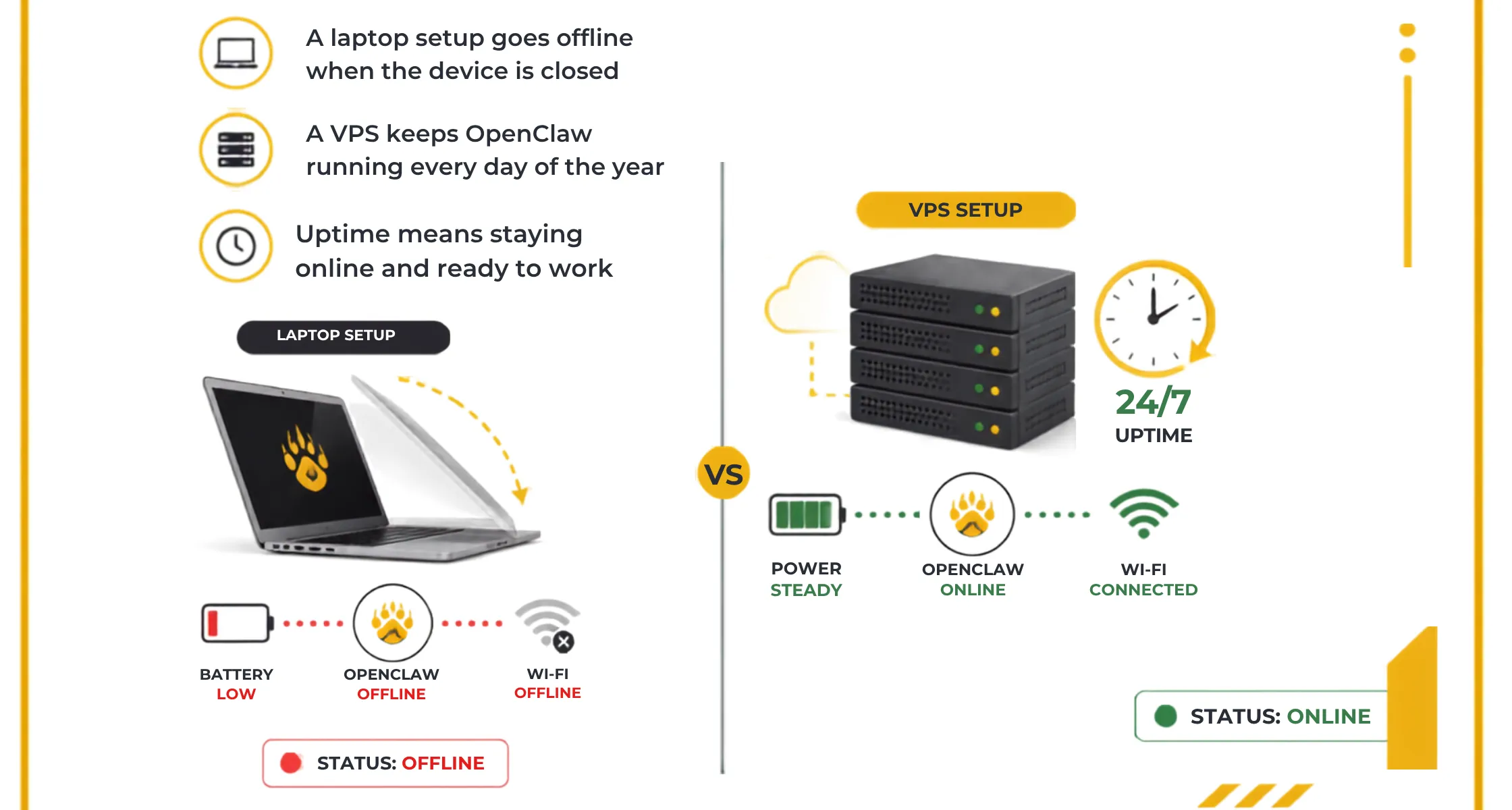
If OpenClaw runs on your personal laptop, it only works while that laptop stays on.
Close the lid, and your assistant goes offline right along with your device.
That can be frustrating if you expect a reply while you are away from your desk.
A VPS solves this problem completely, since it keeps OpenClaw running every day of the year.
Your battery life and home internet no longer decide whether OpenClaw can respond to you.
Uptime, in simple words, just means how often something stays online and ready to work.
Google Assistant does not face this issue, since it lives on infrastructure Google already manages.
Google’s own team handles all the maintenance, updates, and server issues behind the scenes.
Uptime is one area where the OpenClaw vs Google Assistant gap depends entirely on your setup.
OpenClaw vs Google Assistant Setup and Getting Started
Google Assistant needs no setup at all once you turn on your phone for the first time.
It comes preinstalled on Android phones and most smart speakers, ready the moment you speak.
That instant readiness is honestly one of its biggest selling points for busy people.
OpenClaw, on the other hand, asks a lot more of you before it can actually do anything useful.
You need a device running around the clock, either your own hardware or a VPS.
A VPS, or virtual private server, is basically a rented computer that never sleeps.
You also need a bit of setup to connect it to your messaging apps and AI model.
That said, the process is not as scary as it might sound at first.
Most people get OpenClaw fully running within an hour if they follow a clear setup guide.
A preconfigured VPS built specifically for OpenClaw can shrink that setup time down even further.
In short, Google Assistant wins on speed, while OpenClaw rewards a little early patience.
What Each One Can Do
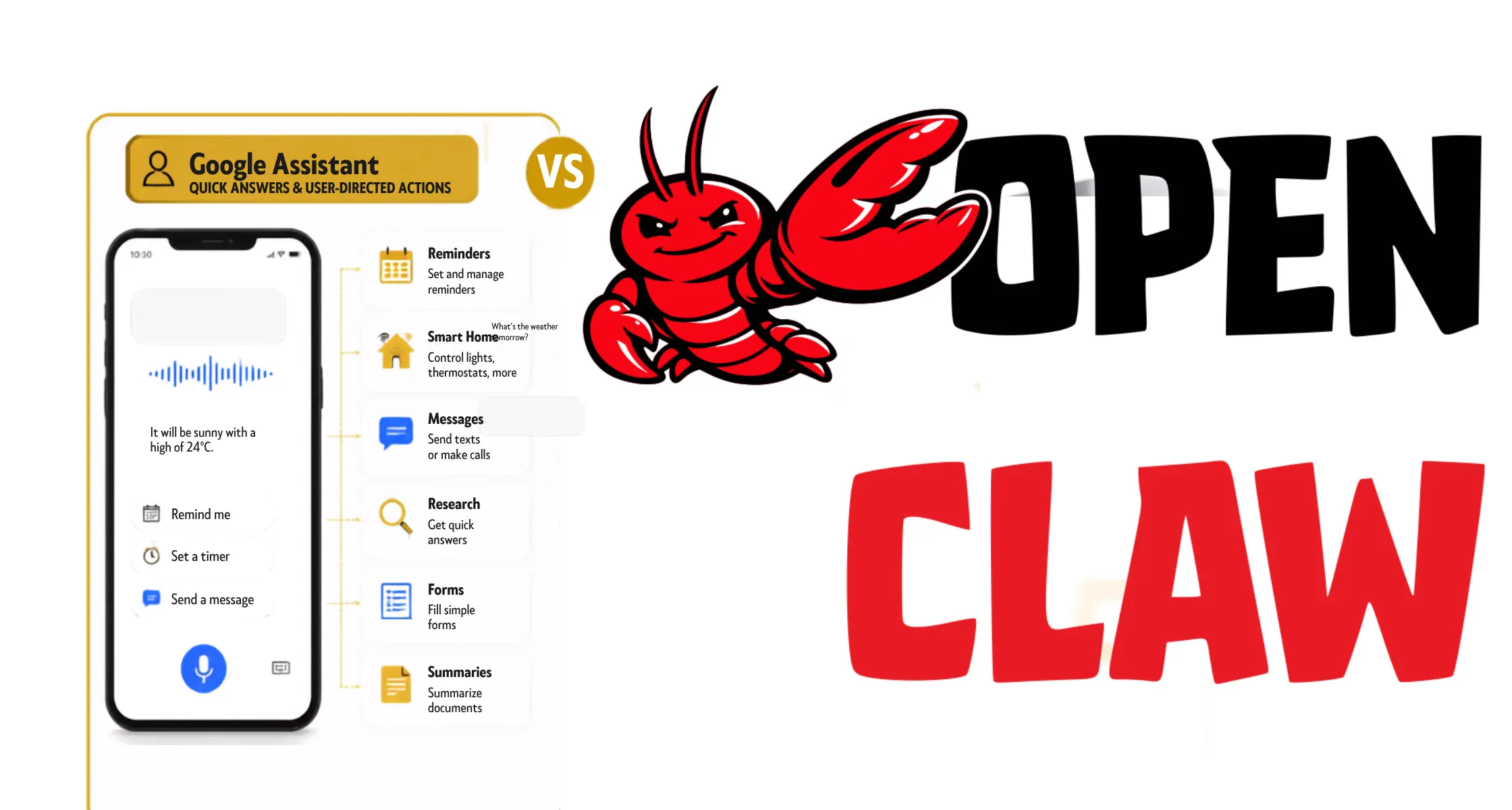
Google Assistant works as an interface between you and the quick answers you need right away.
You ask it something, it answers, and you stay in charge of every next step.
Think of it as a fast, friendly helper that never takes action without your say-so.
Here is a quick look at what Google Assistant handles well every day:
- Answering quick questions, like the weather, sports scores, or simple math.
- Setting timers, alarms, and reminders so you never forget small daily tasks.
- Controlling smart home gadgets, like lights, plugs, and thermostats, with your voice.
- Making calls, sending texts, and reading messages out loud while your hands stay free.
- Playing music, podcasts, or news briefings on command through connected speakers.
OpenClaw works as an agent instead, and that difference changes what it can do for you.
You give it a goal, and it takes several steps on its own to reach that goal.
Instead of one quick answer, it plans, acts, and checks its own work along the way.
Here are a few real tasks OpenClaw can handle from start to finish:
- Researching flights, comparing prices, and drafting a full travel itinerary for you.
- Monitoring a work project for updates and reporting back once a task finishes.
- Reading and replying to messages across WhatsApp, Telegram, Slack, and Discord.
- Browsing websites, filling out forms, and pulling information without you clicking anything.
- Summarizing long documents, emails, or articles into a short, easy-to-read version.
That is the real gap in the OpenClaw vs Google Assistant comparison most people notice first.
Google Assistant answers questions, while OpenClaw actually goes and finishes the job for you.
Security Considerations to Know Before You Choose
OpenClaw’s design gives the AI fairly broad access to your tools and messaging accounts.
There is little separation between the AI itself and the credentials it uses to act.
Credentials are simply the usernames, passwords, and keys that prove who you are online.
This trade-off deserves honest attention before you connect any sensitive accounts to it.
Keep your OpenClaw server updated, use strong unique passwords, and limit what you connect.
A little caution early on saves you real headaches later, so do not skip it.
Google Assistant carries a different risk profile, since your data mostly stays inside one company.
Google handles most of the heavy security work for you behind the scenes already.
Security is a real factor to weigh in any OpenClaw vs Google Assistant decision you make.
OpenClaw vs Google Assistant: Which One Fits You
If you mostly want quick answers, timers, and smart home control, Google Assistant already fits.
There is little reason to add extra setup and cost for tasks this simple.
It just works, right out of the box, with almost no learning curve at all.
If you want an assistant that takes real action across your messages and files, choose OpenClaw.
It suits people comfortable with a small VPS budget and a bit of setup work.
The extra effort pays off once you see how much manual work it removes.
Many people end up running both side by side, using each one for its strength.
Google Assistant handles the small daily stuff, while OpenClaw handles the bigger, longer tasks.
That combination often settles the OpenClaw vs Google Assistant question better than picking just one.
Get OpenClaw Running Without the Guesswork
Choosing between OpenClaw vs Google Assistant really comes down to how much control you want.
Google Assistant wins on convenience, while OpenClaw wins on what it can actually do.
Neither one is truly wrong, since the right pick depends on your own daily habits.
If OpenClaw sounds like the right fit, a Nigerian VPS built for it helps a lot.
Truehost offers OpenClaw hosting priced in naira, with root access and support when you need it.
Root access simply means full control over your server, with no restrictions holding you back.
That local pricing and support remove a lot of the usual setup stress.
Visit Truehost to compare plans and get your own AI assistant running today.
OpenClaw vs Google Assistant FAQs
Neither one wins every time, since OpenClaw vs Google Assistant really depends on what you need done. OpenClaw wins on real automation, while Google Assistant wins on convenience. Think about your daily habits before deciding which one fits your life best.
Yes, plenty of people run both at once without real conflict. Google Assistant handles quick voice tasks, while OpenClaw handles deeper automation work.
Google Assistant is much easier, since it works immediately with no setup required. This is often the deciding factor in an OpenClaw vs Google Assistant choice for beginners.