Domain NamesFind and register your ideal domain name instantly.
 Web HostingEasy-to-use hosting powered by cPanel — ideal for managing websites in Nigeria.
 Windows HostingRun .NET apps with Windows-optimized hosting
 Affiliate ProgramMake money promoting our services
 Reseller HostingMake money by reselling our hosting products under your own brand
 .COM Domains
 All DomainsExplore all supported tld domains in Nigeria
 WhoisFind out who owns any domain, as well as verify your registration details
 VPS Hosting in Nigeria
 Dedicated ServersReimagine your site speed with your own complete server
 AI Website BuilderDesign your site with drag-and-drop tools
 Online Store BuilderStart your online shop without code
 Support PortalFind answers or get expert help
 Contact UsReach our team via chat or email
 BlogRead our extensive guides on web hosting and more
Web hosting stores your website’s files and databases so visitors can access them online.
Email hosting provides dedicated servers for sending, receiving, and storing your emails.
While web hosting powers your website, email hosting ensures reliable, professional communication using your custom domain.
Many Nigerian business owners assume these two services come bundled together automatically.
That assumption leads to slow websites, emails landing in spam, and confusing support tickets.
This guide breaks down the real differences so you can choose wisely.
Core Differences Between Email Hosting and Web Hosting
The table below breaks down the technical and functional differences between the two services.
| Feature | Web Hosting | Email Hosting |
| Primary Purpose | Display website content (HTML, media, databases) to internet visitors. | Manage, send, and receive professional electronic communications. |
| Protocols Used | HTTP and HTTPS. | SMTP (outgoing), IMAP/POP3 (incoming). |
| DNS Records | Uses A records to point your domain to the web server. | Uses MX records to route your emails to the mail server. |
| Key Performance Metrics | Focuses on speed, page load times, and absorbing surges in visitor traffic. | Focuses on high deliverability (avoiding spam folders) and robust email security. |
| Security Priorities | SSL certificates, malware detection, and web application firewalls. | Spam filters, encryption (SPF/DKIM/DMARC authentication), and malware scanning. |
Now, let’s unpack the real-world implications behind these differences.
1) Primary Function
Email hosting sends and receives email via mail servers that speak SMTP, IMAP, and POP3.
When you send a message from [email protected], an SMTP server handles the outgoing leg.
When you open your inbox to read new messages, an IMAP server delivers them to your phone or laptop.
These mail servers live on infrastructure designed specifically for electronic messages.
They queue messages when delivery fails, retry later, and keep logs of every transaction.
Web hosting serves website pages and content via HTTP and HTTPS.
When someone types your domain into a browser, the web server grabs HTML files, images, CSS stylesheets, and JavaScript code, then sends them across the internet to that visitor’s screen.
The server’s job is to deliver those files fast and correctly. Nothing more. It does not care about email. It does not queue messages. It just serves pages.
Here is the catch that trips up many Nigerian business owners.
When you buy a cheap “all-in-one” hosting package, the provider often runs email and web services on the same shared server. That sounds convenient.
But a sudden spike in website traffic can starve the email service of CPU and memory. Your website stays up but your emails stop flowing.
Or worse, some other customer on that shared server sends out a batch of spam. The server’s IP address gets blacklisted.
Now both your website visitors and your email recipients get blocked. That is the hidden cost of bundling.
Knowing email hosting vs web hosting at this basic level saves you from that trap. Keep the functions separate, keep your reputation clean.
2) Server Resources Used
Email hosting relies on CPU for processing mail queues, disk space for stored messages, and bandwidth for transmission.
Every time you send an attachment, the mail server uses CPU to scan it for viruses, encrypt it for transport, and queue it for delivery.
The server also needs disk space to store your sent messages, drafts, and archived conversations.
A busy sales team sending dozens of proposals daily can easily fill 5 GB within a year. Bandwidth comes into play when you sync your inbox across a laptop, a phone, and a tablet.
Every device downloads the same messages.
Web hosting relies on CPU for executing website code, RAM for caching, disk space for files, and bandwidth for visitors.
When someone visits your WordPress site, the server executes PHP code, queries the database, and assembles the page before sending it.
RAM caches database queries and page fragments so repeat visitors load faster. Disk space holds your theme files, uploaded images, plugins, and backups.
Bandwidth gets consumed every time a visitor loads a page or downloads a file.
The resource demands differ in timing.
Email servers work steadily all day, processing messages as they arrive. Web servers work in bursts. A social media post goes viral and suddenly thousands of visitors hit your site at once.
That burst needs high CPU and RAM immediately. A cheap shared web host cannot handle that burst. Your site crashes.
But if you had separated your email onto dedicated email hosting, at least your inbox keeps working while you fix the site.
3) Uptime & Reliability Needs
Email downtime delays critical business communication. A few hours without email can cost a deal.
Imagine a client sends a purchase order at 9am. Your email server is down until 2pm. By the time you reply, the client has moved to a competitor.
For Nigerian SMEs, that scenario plays out more often than providers admit. Email uptime needs to be 99.9% or better.
And even when the server is up, your messages must actually reach inboxes, not spam folders.
That deliverability piece depends on IP reputation, authentication records, and spam filtering.
Uptime alone is not enough.
Website downtime affects public visibility.
If your site goes down for an hour, potential customers see an error page and might not come back. That is damaging, especially for e-commerce stores.
But here is the reality most business owners overlook. Website downtime usually announces itself loudly.
You notice right away because you try to visit your own site. Email downtime is quieter. Messages bounce silently. Customers assume you are ignoring them.
Hours pass before you realize something is wrong.
For that reason, many experienced entrepreneurs treat email uptime as more urgent than website uptime.
A site can be down for maintenance. Email cannot.
When you separate your services, you choose different uptime guarantees for each.
Dedicated email hosting providers design their infrastructure for near-constant uptime because they know the stakes.
Shared web hosts treat email as an afterthought. The difference in reliability is not small.
4) Security Priorities
Email hosting battles spam, phishing, spoofing, and blacklisting.
This fight requires three specific authentication protocols: SPF, DKIM, and DMARC. SPF tells receiving servers which IP addresses are allowed to send email for your domain.
DKIM adds a digital signature to every outgoing message so recipients can verify it was not tampered with.
DMARC tells Gmail and Yahoo what to do when an email fails those checks. Without all three working together, your domain is an open target.
Scammers can spoof your address and send phishing emails that look like they came from you. Your customers get scammed. Your reputation burns.
Web hosting battles malware, DDoS attacks, SQL injection, and unauthorized access.
The tools here are different: web application firewalls block malicious requests before they reach your code.
SSL certificates encrypt traffic between visitors and your server. File scanners detect injected backdoors. Regular software updates patch known vulnerabilities.
A good web host also isolates your account from other customers on the same machine so a neighbor’s breach does not become your breach.
Notice the overlap? Both need SSL certificates, but for different reasons. Both scan for malware, but at different layers.
The security skills required for email hosting are not the same as for web hosting. A company that excels at website security might be clueless about email authentication.
5) Management Complexity
Email hosting involves configuring DNS records (MX, SPF, DKIM), managing spam filters, and handling bounce management. You log into your domain registrar or DNS provider.
You add MX records pointing to your email host’s servers. You add TXT records for SPF and DKIM. You set up a DMARC policy.
Then you configure spam filter settings: whitelist certain senders, blacklist persistent spammers, adjust sensitivity so legitimate messages do not get quarantined.
When emails bounce, you dig through logs to see why. Was the recipient’s mailbox full? Did your IP land on a blocklist? Is your domain’s reputation damaged?
Web hosting involves managing databases, CMS updates, file backups, and performance optimization.
You install WordPress or another CMS. You create a database and connect it. You upload your theme and plugins.
You configure automatic backups. You monitor site speed and optimize images, enable caching, and maybe set up a CDN.
When something breaks, you check PHP error logs, database connection strings, and file permissions.
Here is the practical reality for Nigerian business owners.
Most people find web hosting management more familiar because they have used platforms like WordPress before.
Email hosting management feels foreign because DNS records and SPF are not things you see every day. But the complexity is worth it.
A poorly configured web host just makes your site slow. A poorly configured email host makes your messages vanish.
Spend the hour learning how to set up MX records properly. That hour pays back forever.
6) Cost Structure
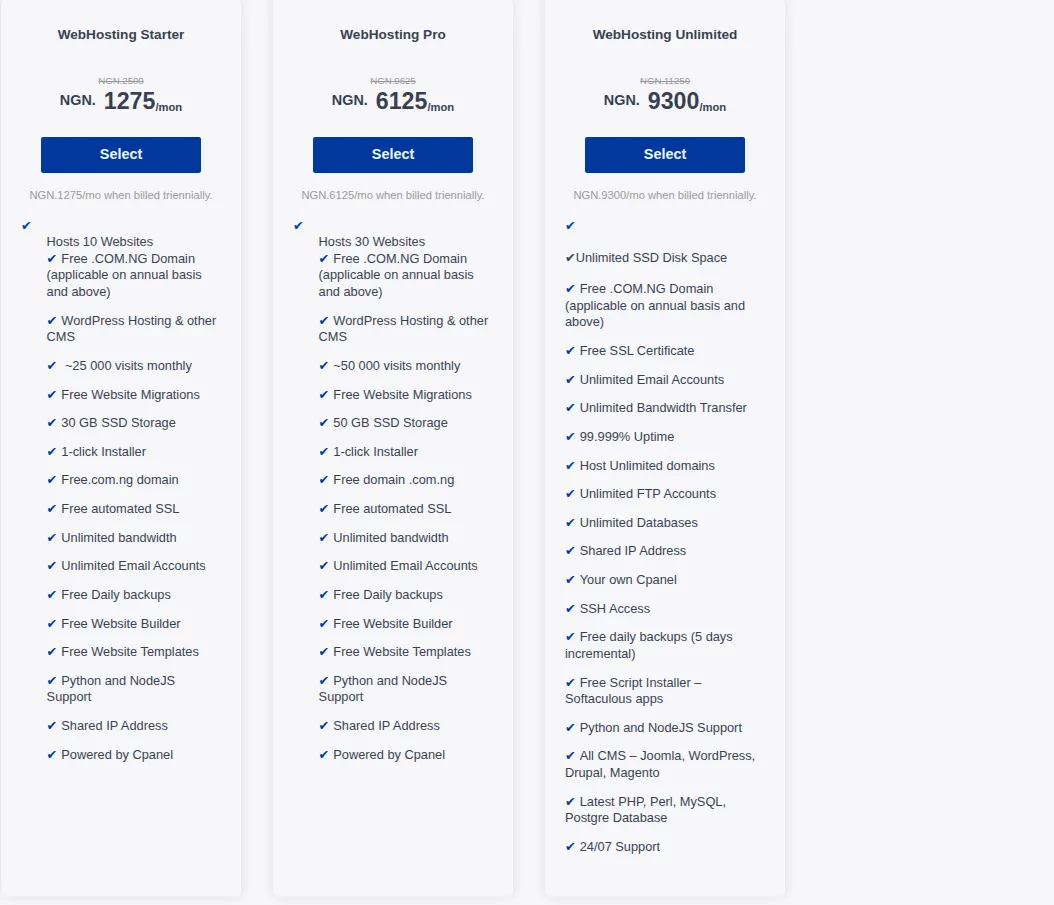
Standalone email hosting is cheap because it uses minimal resources.
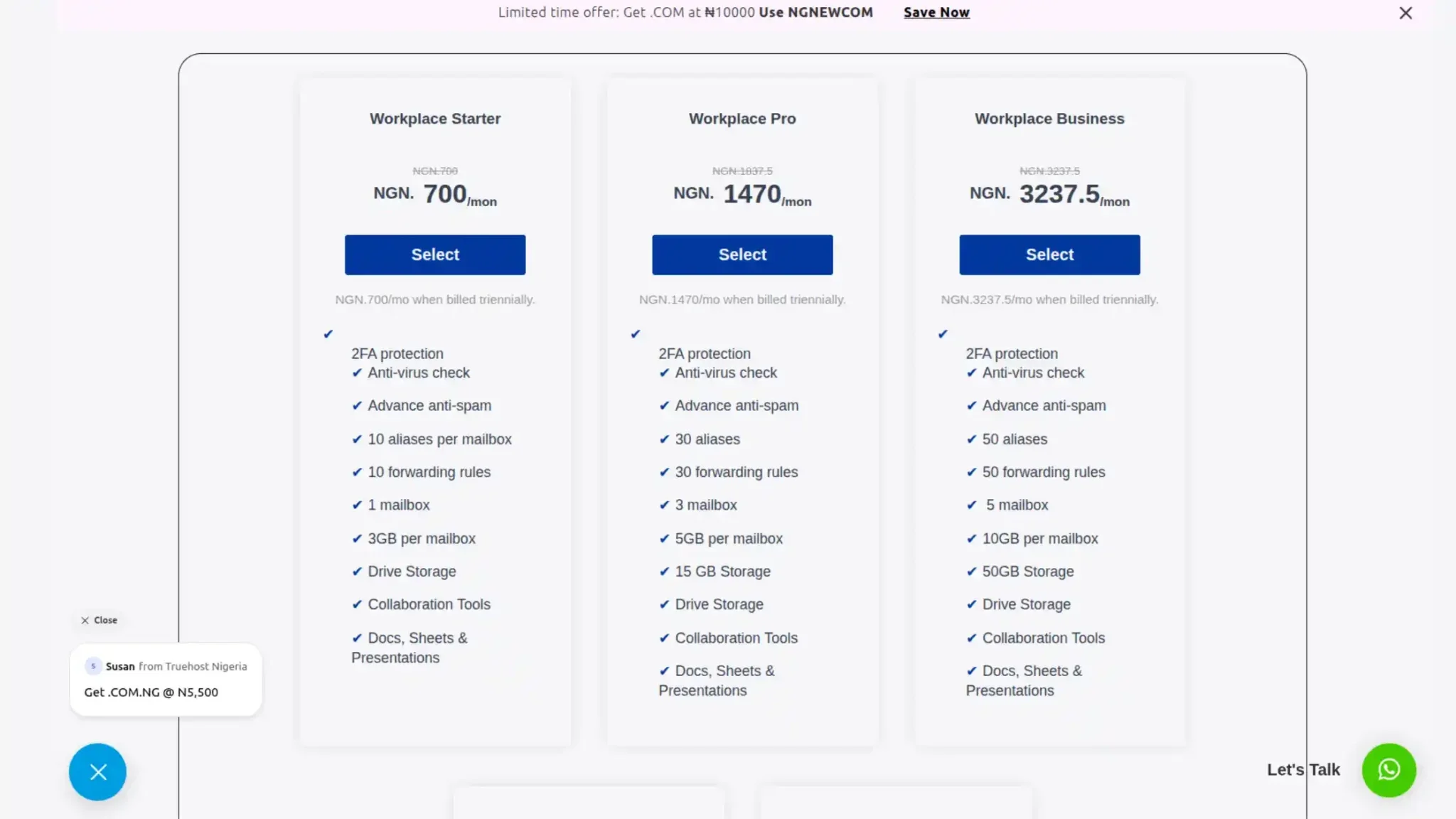
A dedicated email plan from a Nigerian provider like Truehost can cost as low as ₦700 per month.
For that fee, you get a professional mailbox on your custom domain, full spam filtering, proper authentication support, and local customer service. International options like Zoho Mail offer free plans for up to five users.
Paid plans start at around $1 per user per month. At that price, there is no excuse to use a generic Gmail address for business.
Web hosting starts low but scales with traffic.
A basic shared hosting plan might cost ₦2,500 to ₦5,000 per month. That gets you a website live on the internet with moderate speed and storage.
But as your traffic grows, you need more resources.
A VPS (Virtual Private Server) can cost ₦15,000 to ₦50,000 per month.
A dedicated server jumps to ₦100,000 or more. High-traffic sites with thousands of daily visitors require those upgrades.
The cost comparison reveals a hidden advantage of separation. Email hosting costs remain flat even as your website grows.
Whether you have ten customers or ten thousand, your monthly email cost stays the same.
If you bundle email inside a web hosting plan, upgrading your website forces you to pay more for email too, even though your email needs did not change.
That is inefficient. Smart business owners look at email hosting vs web hosting as separate line items in their budget.
They allocate fixed low costs to email and variable costs to web hosting based on actual traffic.
Which One Do You Need?
If you only need professional branded email [email protected] and do not have a website yet, standalone email hosting is all you require.
Freelancers, consultants, and offline businesses like salons or bakeries fall here.
Providers like Truehost offer email-only plans from ₦700 per month, billed in naira, with local support.
You buy the domain, buy the email plan, configure a few DNS records, and start sending from a professional address. No website needed. No hosting needed. Just email.
If you want both a website and email, the smartest setup is to separate them.
Buy web hosting for your site and dedicated email hosting for your inboxes.
Point your DNS A records to the web host and MX records to the email host.
This keeps your website’s performance and your email’s deliverability independent of each other.
Your site can crash from a traffic spike without affecting your email. Your email can have a delivery issue without taking down your site.
You can switch web hosts without migrating your email, and vice versa. That flexibility saves time, money, and headaches.
If budget forces you into a bundled plan, at minimum confirm that the host offers isolated IP reputation and proper spam filtering.
But as your business grows, separation becomes a necessity, not a luxury.
Because when your website is your storefront, your email is your handshake. Both deserve a foundation that does not crack under pressure.
Ready to get your professional email setup? Start with us at Truehost.
Our email hosting plans start from ₦700 per month, include full SPF/DKIM/DMARC support, and come with local support that actually answers.