Domain NamesFind and register your ideal domain name instantly.
 Web HostingEasy-to-use hosting powered by cPanel — ideal for managing websites in Nigeria.
 Windows HostingRun .NET apps with Windows-optimized hosting
 Affiliate ProgramMake money promoting our services
 Reseller HostingMake money by reselling our hosting products under your own brand
 .COM Domains
 All DomainsExplore all supported tld domains in Nigeria
 WhoisFind out who owns any domain, as well as verify your registration details
 VPS Hosting in Nigeria
 Dedicated ServersReimagine your site speed with your own complete server
 AI Website BuilderDesign your site with drag-and-drop tools
 Online Store BuilderStart your online shop without code
 Support PortalFind answers or get expert help
 Contact UsReach our team via chat or email
 BlogRead our extensive guides on web hosting and more
Look, I am going to keep this real with you. When people say webmail account, they think it is one specific thing. It is not.
So before you go clicking around and getting frustrated, let me break down exactly what your options are. Some of these will get you an email address in five minutes flat.
Others take a bit more setup but give you that professional [email protected] that makes people take you seriously. I have done all three of these myself, so I am going to walk you through them.
There’s no single webmail account type. Which one you go for depends entirely on what you need it for.
Option 1: Open a Free Personal Webmail Account
Perfect for personal use, job applications, or informal side hustles. You’ll get an address like [email protected] or [email protected].
This is the route most Nigerians start with. And honestly? For what it is, it works fine.
You want to send your CV to a company? Gmail works. You want to sign up for social media accounts? Yahoo works.
You want to receive receipts from your online shopping? Any of these will do the job.
The catch is that these addresses scream personal, not professional.
If you are applying for a serious role or pitching a business proposal, [email protected] is not doing you any favors. But for everything else? These are solid, free, and fast.
Popular providers and how to sign up:
- Gmail:
Go to gmail.com, click Create account, and fill in your name, desired email address, and password.
Google will ask for a phone number for verification, Nigerian numbers work fine.
The verification text comes through in seconds on MTN, Glo, Airtel, and 9mobile.
One thing to note: Google will try to pull you into their ecosystem with calendar, drive, and all that.
You can ignore it if you just want email. Just click through and get to your inbox.
- Yahoo Mail:
Visit mail.yahoo.com, click “Sign up,” enter your details, and set your password. Yahoo also requires phone verification for Nigerian accounts.
Yahoo is older. Some people swear by it.
The interface is busier than Gmail in my opinion, but it works.
If you grew up using Yahoo in the early 2000s and you are comfortable there, no need to switch.
- Proton Mail:
If privacy is very important to you, go to proton.me, select “Create a free account,” and choose your username.
Proton does not require a phone number, just a username and password. This one is different.
Proton is built for people who do not want Google or Yahoo reading their emails to serve ads.
The free plan gives you 500MB of storage, which is not a lot, but for personal use it is fine. The interface is clean.
And no phone number means you can sign up even if you are having SIM registration issues. That alone makes it worth considering for some people.
Done in: Under 5 minutes. Seriously.
Best for: Personal emails, job seekers, casual use. If all you need is an address to receive your bank statements and your cousin’s wedding photos, this option is your friend.
Now, here is where most guides stop. They tell you to get Gmail and call it a day. But that is not why you are reading this.
You want to understand webmail properly. You want to know how to create webmail account options that go beyond the basic personal stuff.
So let me get into the real meat. The next two options are for people who own domains or hosting.
And trust me, if you have a business name, even a small one, these options will change how customers see you.
Option 2: Set Up Webmail Through Your Hosting cPanel
If you purchased hosting from a Nigerian provider like Truehost, Qservers, or HostAfrica, your hosting package includes webmail access through cPanel.
This is the one people forget about.
You pay for hosting, maybe for a website you never built, and you do not realize that sitting right there in your account is a perfectly functional webmail system.
You already paid for it. It is yours. You just need to turn it on.
When you buy hosting, the company gives you a control panel to manage everything. That control panel is called cPanel.
Inside cPanel, there is a section for email. You click a few buttons, type a username, set a password, and boom, you have a professional email address attached to your domain.
And because it is webmail, you can access it from any browser.
Your office computer, a cafe laptop, your friend’s phone, it does not matter. You log in, your inbox is there.
How to create and access your webmail account:
a) Log into your cPanel.
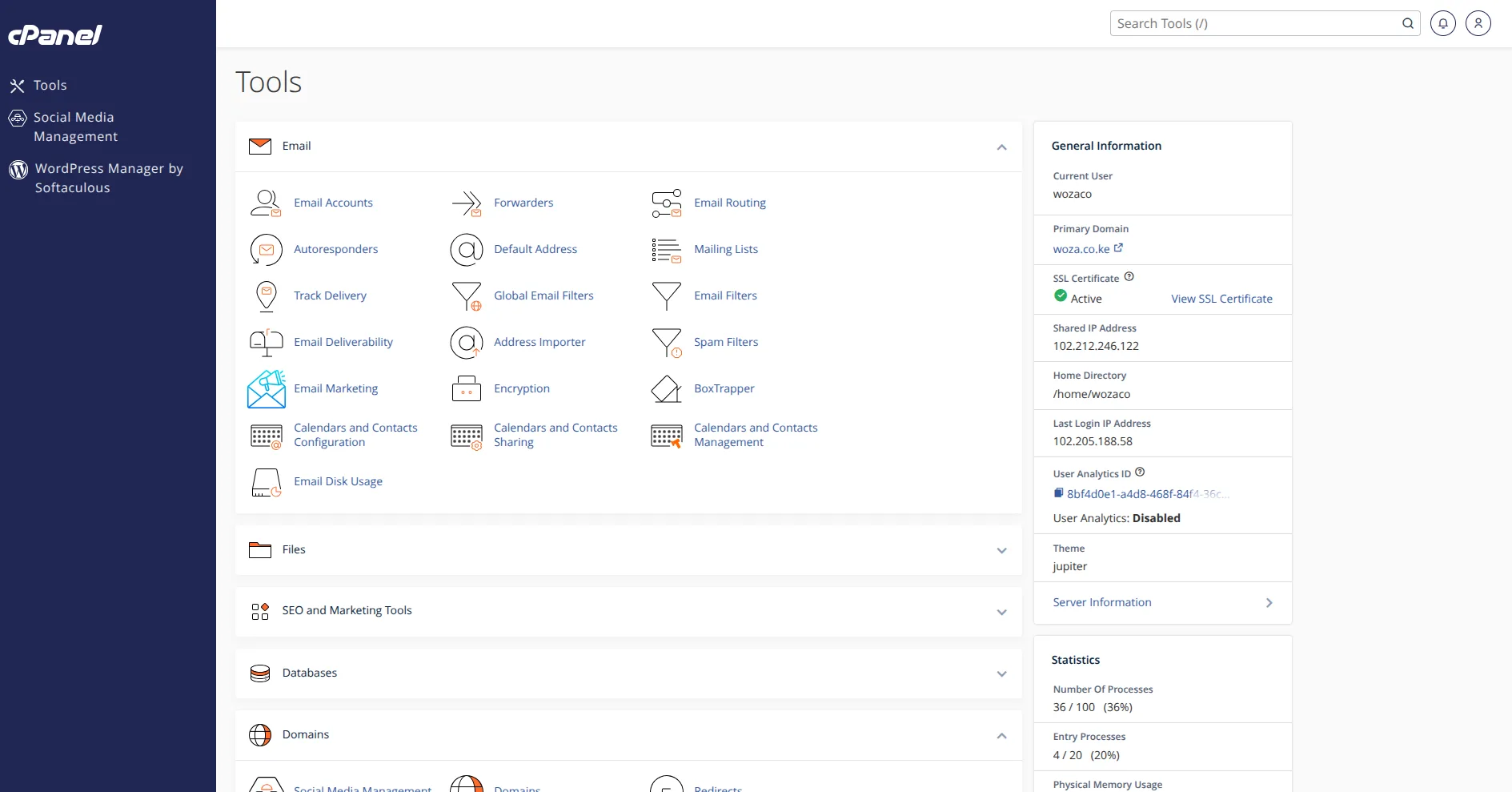
Your hosting provider e.g., Truehost would have sent you a link, typically yourdomain.com/cpanel.
Enter your username and password. If you cannot find the login details, check your email from when you first bought the hosting.
Search for “welcome” or “cPanel.” If you still cannot find it, contact their support. Nigerian hosting support can be slow, but they will eventually get you the details.
b) Navigate to Email Accounts.
Inside cPanel, scroll to the “Email” section and click on “Email Accounts.” Do not get distracted by all the other icons. cPanel looks overwhelming at first.
Databases, domains, security, metrics, ignore all of it. You want Email Accounts. That is your target.
c) Create a new email address.
Click the “+ Create” button. Select your domain from the dropdown, enter your desired username e.g., info, sales, yourname, set a strong password, and define the mailbox storage limit.
For storage, start with something reasonable like 1GB. You can always increase it later.
For the password, use a combination of uppercase, lowercase, numbers, and symbols. Write it down somewhere. You will thank yourself later.
d) Access your webmail.
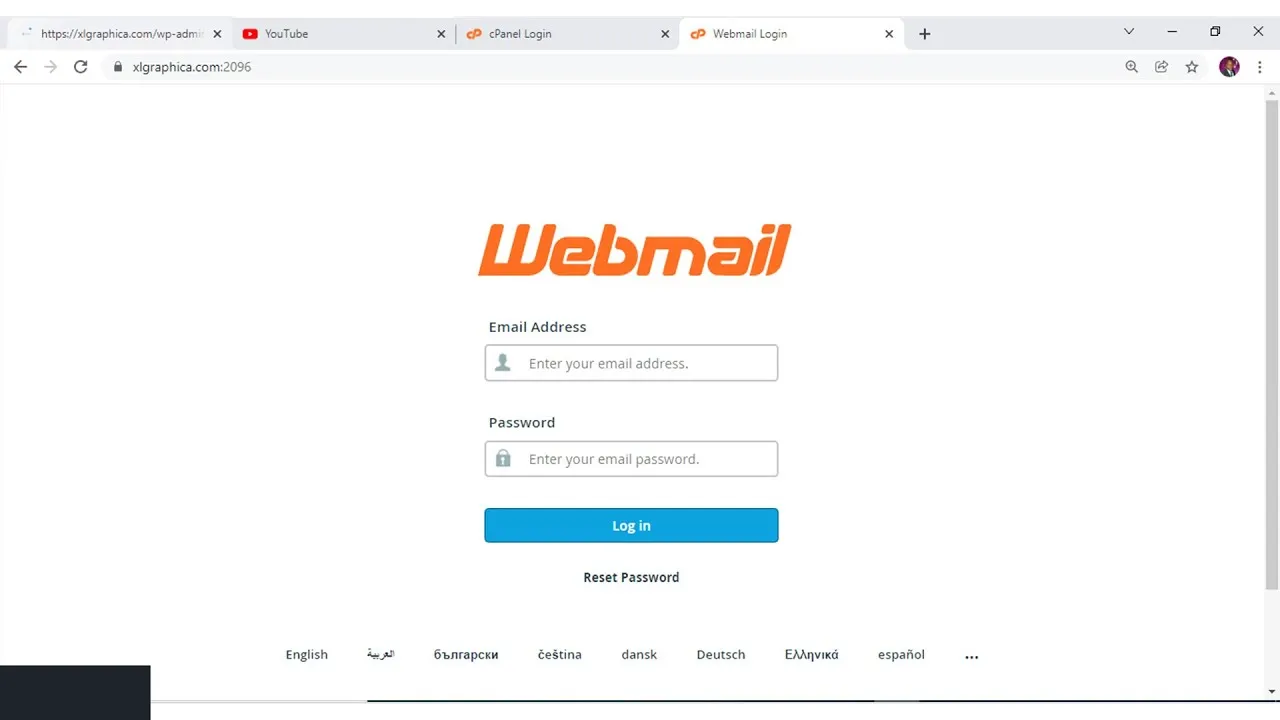
Once created, you can log into webmail in two ways:
- Go to
yourdomain.com/webmailand enter your full email address and password. This is my preferred method. It is direct and does not require going through cPanel every time. - Or, from inside cPanel, click the “Check Email” button next to the account you just created. This opens Roundcube, the default webmail interface.
What you’ll see: Roundcube gives you a clean, Gmail-like interface inside your browser. You can read, reply, organize folders, and manage your inbox, all without any app.
Roundcube is not fancy. It does not have AI features or smart categorization. But it works. It loads fast even on slow Nigerian networks.
And because it is webmail, you can check your email from any device without installing anything.
Done in: 10-15 minutes. Most of that time is just navigating cPanel for the first time. Once you know where things are, you can create a new email account in under two minutes.
Best for: Business owners who want [email protected] and browser-based access. If you already bought hosting, use it. Do not let it sit there empty.
Option 3: Sign Up for Free Business Webmail (Zoho Mail)
If you already own a domain, you can attach it to Zoho Mail’s Forever Free plan and access everything through Zoho’s browser-based webmail.
This is the hidden gem.
You buy a domain from somewhere like Truehost, pay maybe ₦5,500 for a .com.ng, and then you connect that domain to Zoho.
Zoho gives you five free email accounts, each with 5GB of storage. Forever. No monthly fee. No hidden upgrade after six months.
Just free email on your own domain. And because it is webmail, you log into Zoho’s website from any browser and your inbox is right there.
Clean interface, no ads, works on phones and laptops.
How to set it up:
a) Go to Zoho Mail at zoho.com/mail and click “Sign Up.”
Select the “Free Plan” option. Do not let them upsell you. The free plan is right there. It might say “Forever Free” or “Free (up to 5 users).” Click that one.
b) Enter your domain.
When prompted, input the domain you already own e.g., mybusiness.com.ng. If you do not own a domain yet, go buy one first. Truehost sells .com.ng domains. Then come back to this step.
c) Verify domain ownership.
Zoho will give you DNS records.
Log into your domain registrar’s dashboard, where you bought the domain, paste those records into the DNS settings, and wait a few minutes for verification.
This sounds technical but it is really just copy and paste. Zoho shows you the records.
You open another tab with your domain registrar. You paste. You save. Done. DNS propagation takes a few minutes to a few hours.
Most of the time, Zoho verifies within 30 minutes.
d) Create your users.
Once verified, go to the Zoho Mail Admin panel, click “Add User,” and create email addresses like [email protected] for up to 5 users free, each with 5GB storage.
You can create sales@, support@, yourname@, whatever you need.
e) Access your webmail.
Log in at mail.zoho.com using your full email and password. Zoho’s webmail interface is clean, ad-free, and works perfectly on Nigerian mobile browsers.
Done in: 20-30 minutes (due to DNS propagation). The actual work takes five minutes. The waiting is for the DNS to update.
Best for: Business owners who want [email protected] without paying for hosting. If you have a domain but no hosting, Zoho is your answer.
Pro Tip: When you register a domain with us at Truehost (a .com.ng goes for around ₦5500/year), you get access to our cPanel-powered webmail system included. This means you can create branded emails like [email protected] and access them instantly through the Roundcube webmail interface, no extra hosting plan required at the entry level.
Get Started Today
You don’t need a developer, a laptop, or even a website to get your own webmail account up and running in Nigeria.
If you need something instantly for personal use, Gmail or Yahoo will have you sorted in five minutes.
If you’ve already invested in hosting, your cPanel webmail (Roundcube) is sitting there waiting for you, just log in.
And if you want the professional edge of a custom domain email without paying monthly hosting fees, Zoho Mail’s free plan combined with your own .ng domain is the sweet spot.
The bottom line: webmail gives you the freedom to handle business from any browser, anywhere.
Now you know exactly how to create webmail account options exist for every budget and skill level. There is no excuse to keep using a personal address for business.
If you want the simplest local solution, grab your domain from Truehost today and your webmail inbox comes with it.