Domain NamesFind and register your ideal domain name instantly.
 Web HostingEasy-to-use hosting powered by cPanel — ideal for managing websites in Nigeria.
 Windows HostingRun .NET apps with Windows-optimized hosting
 Affiliate ProgramMake money promoting our services
 Reseller HostingMake money by reselling our hosting products under your own brand
 .COM Domains
 All DomainsExplore all supported tld domains in Nigeria
 WhoisFind out who owns any domain, as well as verify your registration details
 VPS Hosting in Nigeria
 Dedicated ServersReimagine your site speed with your own complete server
 AI Website BuilderDesign your site with drag-and-drop tools
 Online Store BuilderStart your online shop without code
 Support PortalFind answers or get expert help
 Contact UsReach our team via chat or email
 BlogRead our extensive guides on web hosting and more
When you get your first Virtual Private Server, it’s exciting and a little intimidating. Suddenly, you’re no longer sharing space with everyone else. You have your own server, your own resources, and the freedom to run things your way.
But then reality hits.
You log in, try to make changes, and realize you can’t do everything you expected. Certain settings are locked. Some software won’t install. Important tweaks are out of reach. That’s usually the moment you start wondering, “Do I really control this server?”
That’s where VPS root access comes in.
Think of root access as the master key to your VPS. It unlocks full control of your server environment, from installing custom software to changing system-level settings that regular hosting simply doesn’t allow. With it, you decide how your server runs, not the other way around.
In this guide, you’ll learn what VPS root access truly means, how to set it up the right way, and the essential security steps that keep your server safe. Whether this is your first VPS or you’re looking to tighten security on an existing one, you’ll walk away confident, in control, and protected.
What Is Root Access in a VPS?
Root access is what gives you real control over your VPS.
On most VPS servers (which usually run Linux), the root user is the top-level account, the super admin. There are no restrictions. If something can be changed, installed, or removed, root access lets you do it.
With root access, you can:
- Edit any file on the server
- Install or remove any software
- Change deep system settings
- Create, manage, or restrict users
- Control security at the system level
Without root access, like on shared hosting, you can only work within tight limits. You use what’s provided, and that’s it.
With root access, your VPS starts to feel like a dedicated server, just without the high cost.
You’re free to shape it exactly how you want. Whether you’re hosting a website, running an app, managing a database, or even setting up a game server, root access lets you build your server around your needs, not someone else’s rules.
Why Root Access Matters
Root access isn’t just a “nice to have.” It’s the reason many people choose a VPS in the first place.
When you have root access, you’re no longer boxed into preset limits. You’re in charge of how your server behaves, what it runs, and how secure it is.
Here’s why that matters:
i) Full system control
You decide what services start, stop, or run in the background. Nothing runs on your server unless you allow it. This level of control helps you avoid unnecessary software and keeps your system clean and efficient.
ii) Custom setup that fits your needs
With root access, you can install any tool, framework, or application your project requires. Whether it’s a custom web stack, a specific database version, or a background service, you’re free to build your server around your goals, not hosting limitations.
iii) Stronger security choices
Security isn’t one-size-fits-all. Root access lets you configure firewalls, control user permissions, change login methods, and lock down sensitive areas of your server. You decide how strict or flexible your security should be.
iv) Better performance tuning
Every project is different. With root access, you can optimize memory usage, adjust server settings, and fine-tune performance so your VPS runs smoothly, even under heavy load.
How to Set Up Root Access on Your VPS
In most cases, root access is enabled the moment your VPS is created. Your hosting provider gives you the keys; it’s up to you to use them safely.
When you sign up for a VPS, you usually receive:
- Your server’s IP address
- The root username (commonly root)
- A temporary password or an SSH key
These details are all you need to get started.
1) Connect to Your VPS Using SSH
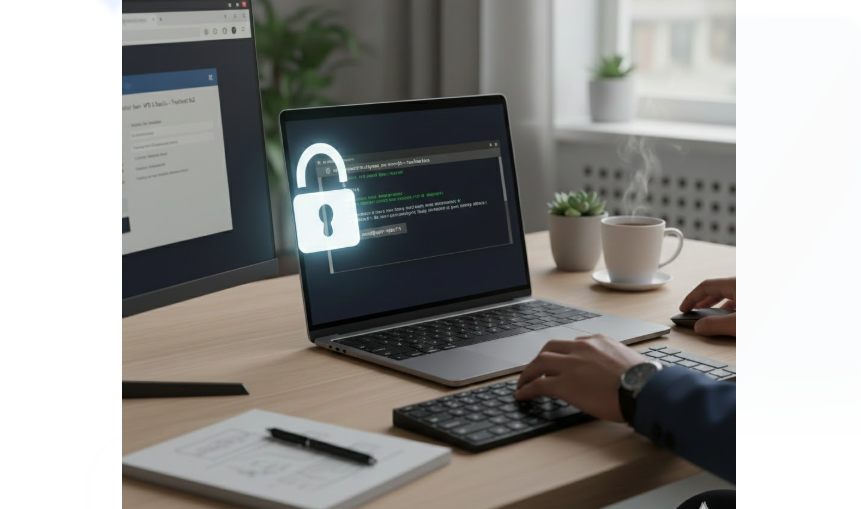
SSH is the safest way to access your server remotely. It creates a secure connection between your computer and your VPS.
- On Windows, you can use tools like PuTTY or the built-in Windows Terminal.
- On Mac or Linux, you simply open the Terminal app.
Once connected, you’ll log in using the root username and the password or SSH key provided. If you’re using a password, this should be temporary, and that brings us to the next step.
2) Change the Root Password Immediately
One of the first things you should do after logging in is change the root password.
Temporary passwords are often simple and sometimes reused across systems. Leaving them unchanged makes your server an easy target.
Choose a password that is:
- Long
- A mix of letters, numbers, and symbols
- Unique to your VPS
This single step greatly reduces the risk of unauthorized access.
3) Update Your Server Right Away
New servers are not always fully up to date. Updates fix bugs, patch security holes, and improve stability.
After logging in, update your system packages and apply the latest security fixes. If the system asks for a reboot, do it.
This simple habit, keeping your server updated, is one of the easiest and most effective ways to protect your VPS.
Setting up root access doesn’t have to be complicated. Once you connect securely, change your password, and update your system, you’ve already taken your first big step toward a safe and well-managed VPS.
5 Essential Security Tips for VPS Root Access
Security isn’t something you set once and forget. It’s an ongoing habit. The moment your VPS goes live, it becomes visible on the internet, and automated bots will start knocking, trying thousands of login attempts every single day.
The good news? A few smart steps can shut most of them out completely.
Here’s how we recommend you protect your VPS root access.

1) Disable Direct Root Login
Once you’ve created a regular user with sudo privileges, there’s no reason to keep logging in as root.
Disabling direct root login adds an extra layer of protection. Instead of attacking the known “root” account, anyone trying to break in would first have to guess your username, then your password or key. That extra hurdle stops many attacks before they even begin.
You still keep full control, just in a much safer way.
2) Use SSH Keys Instead of Passwords
Passwords can be guessed, cracked, or reused. SSH keys are different.
They work as a pair:
- A public key stored on your server
- A private key stored on your computer
Your VPS will only allow access if both keys match. No guessing nor brute force. No shortcuts.
Once SSH keys are set up, your server simply ignores password login attempts, which is a huge security win.
3) Change the Default SSH Port
By default, SSH listens on port 22. Hackers know this, so they aim there first.
Changing your SSH port is like moving your front door to a different street. Automated bots keep knocking on the old door and never find you.
This simple change alone can block the majority of automated attacks without affecting your normal access.
4) Install a Firewall
A firewall decides who gets in and who stays out.
Think of it as a security guard checking every connection request. If it’s not on the approved list, it’s turned away.
On Linux servers, tools like UFW (Uncomplicated Firewall) make this easy. You can allow only essential services, like SSH and web traffic, and block everything else by default.
Less exposure means less risk.
5) Set Up Fail2Ban
Fail2Ban is your VPS’s watchful eye.
It monitors login attempts and looks for suspicious behavior. If someone repeatedly fails to log in, Fail2Ban automatically blocks their IP address for a set period.
This stops brute-force attacks in real time, without you having to watch logs all day.
Strong security doesn’t require advanced skills. It’s about smart habits. With these five steps in place, your VPS becomes a much harder target, letting you enjoy the power of root access without constant worry.
Common Mistakes to Avoid with Root Access
Root access gives you full control, but small mistakes can turn that power into a security risk. Many VPS issues don’t come from advanced attacks. They happen because of simple habits that are easy to overlook.
Here are the most common mistakes you should avoid.
a) Logging in as root every day
Using the root account for routine tasks increases the chances of accidental damage or security exposure. A single wrong command can affect the entire system. It’s much safer to work with a regular user and only switch to root when necessary.
b) Using weak or default passwords
Default or simple passwords are one of the first things attackers try. If your password is short, reused, or easy to guess, your server is vulnerable. Strong, unique passwords (or better yet, SSH keys) close this door quickly.
c) Leaving unnecessary services running
Every service running on your VPS is another possible entry point. Many servers start with tools you may never use. If you don’t need a service, turn it off. Fewer running services mean fewer ways for attackers to get in.
d) Skipping system updates
Outdated software is one of the easiest targets on the internet. Updates often fix known security flaws, and attackers actively look for servers that haven’t patched them. Delaying updates leaves your VPS exposed for no good reason.
e) Giving root access to too many people
The more people with root access, the higher the risk. Shared access increases the chances of mistakes, leaked credentials, or misuse. Only trusted users should have elevated privileges, and even then, only when necessary.
Avoiding these mistakes goes a long way. When you manage root access carefully, your VPS stays stable, secure, and fully under your control, exactly how it should be.
Conclusion
VPS root access gives you freedom, real freedom. You get to decide how your server runs, what it allows, and how secure it is. But that freedom only works in your favor when it’s handled with care.
By setting up root access properly, following smart security practices, and avoiding common mistakes, you turn your VPS into a powerful, reliable foundation for your projects. You reduce risk, improve performance, and gain confidence knowing your server is truly under your control.
If you’re looking for a VPS that gives you full root access, strong performance, and support that actually understands your needs, Truehost is a solid choice. We offer flexible VPS plans, reliable infrastructure, and a team ready to help you every step of the way.