Domain NamesFind and register your ideal domain name instantly.
 Web HostingEasy-to-use hosting powered by cPanel — ideal for managing websites in Nigeria.
 Windows HostingRun .NET apps with Windows-optimized hosting
 Affiliate ProgramMake money promoting our services
 Reseller HostingMake money by reselling our hosting products under your own brand
 .COM Domains
 All DomainsExplore all supported tld domains in Nigeria
 WhoisFind out who owns any domain, as well as verify your registration details
 VPS Hosting
 Dedicated ServersReimagine your site speed with your own complete server
 AI Website BuilderDesign your site with drag-and-drop tools
 Online Store BuilderStart your online shop without code
 Support PortalFind answers or get expert help
 Contact UsReach our team via chat or email
 BlogRead our extensive guides on web hosting and more
OpenClaw handles the operational layer of your AI setup. It manages the agents, conversations, channels, memory, schedules, sessions, and integrations that allow an AI system to keep working after you’ve closed your laptop.
The OpenAI side provides the brain.
ChatGPT’s models, specifically the Codex runtime, handle the actual reasoning, tool calling, code execution, and multi-step problem-solving. OpenClaw provides the environment around that intelligence and keeps everything connected.
The OpenClaw OpenAI subscription integration is what brings these two pieces together.
Instead of purchasing OpenAI API credits separately and paying according to the number of tokens your agents consume, you can connect an eligible ChatGPT Plus or Pro subscription to OpenClaw through OAuth authentication.
That gives your OpenClaw agents access to the supported Codex capabilities through the subscription you’re already paying for, rather than adding a separate per-token API bill for those agent turns.
OpenAI supports this type of subscription-based OAuth access for Codex through external tools and workflows.
The result is a setup where your ChatGPT subscription can power agents that keep working around the clock.
Your OpenClaw instance can handle WhatsApp or Telegram conversations, scheduled tasks, coding workflows, research jobs, reports, and other automations while OpenAI handles the reasoning behind those tasks.
So, before you start building, let’s look at the ChatGPT plans and see which one really makes sense for OpenClaw.
ChatGPT Subscription Plans
Here, the key feature to look for is access to Codex.
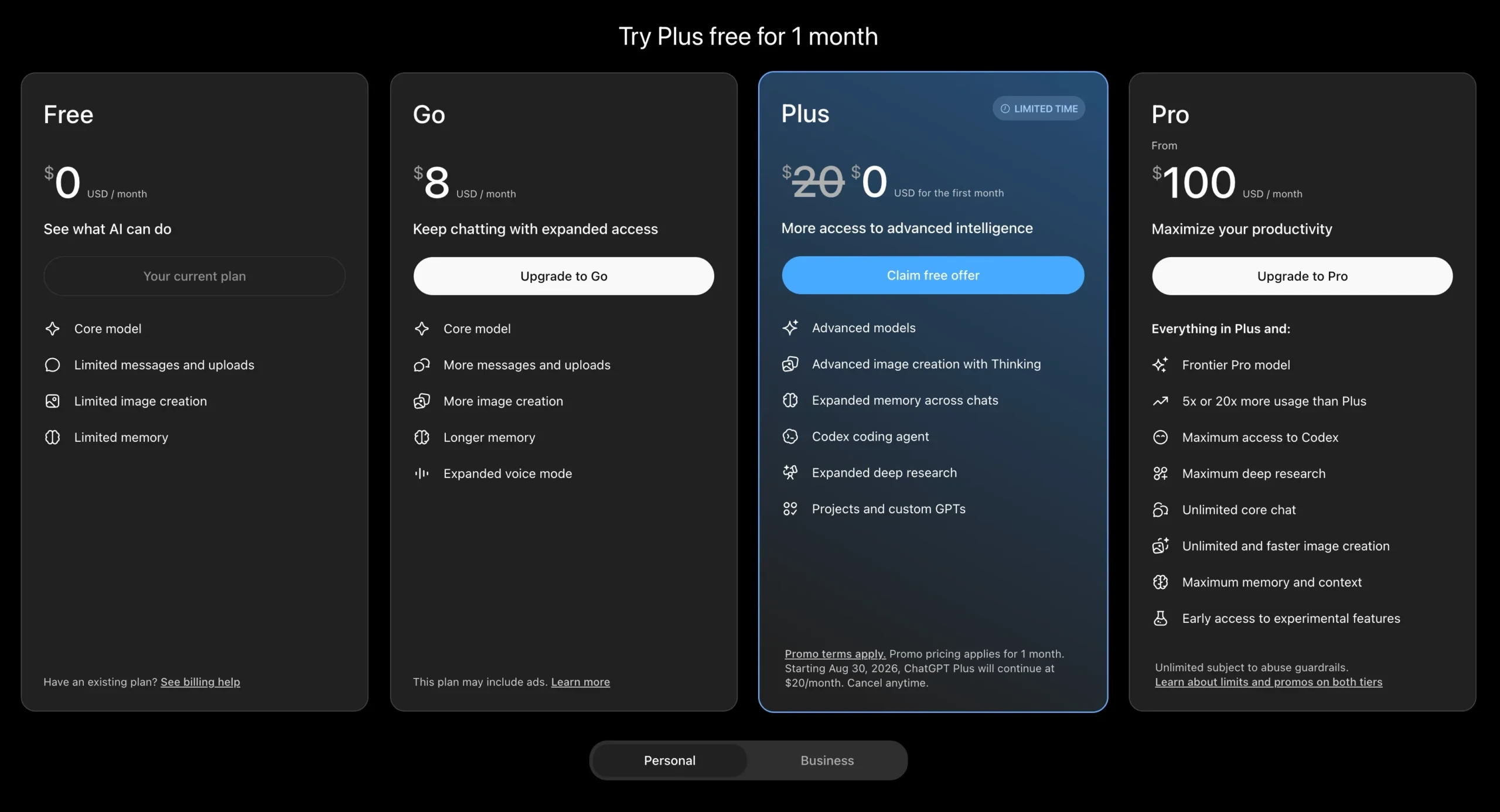
a) Free: $0/month
The free plan gives you limited access to ChatGPT features and is not useful for running OpenClaw agents through the subscription integration.
If you’re planning to connect OpenClaw to OpenAI, you’ll need a paid plan that provides the required Codex access.
b) Go: $5/month
Go provides expanded access compared with the Free plan and may include ads.
However, it does not include the Codex coding agent required for this OpenClaw subscription setup.
For OpenClaw agents, Go is therefore not the right tier.
c) Plus: $20/month
Plus is the minimum practical tier for OpenClaw.
For $20 per month, you get Codex access alongside advanced models, expanded memory, deep research, projects, and other advanced ChatGPT capabilities.
For someone building personal agents, testing automation, or running a moderate workload, this is the natural place to start.
d) Pro: From $100/month
Pro is designed for heavier users who need substantially more usage than Plus provides.
Depending on the Pro tier, you can get 5x or 20x the usage available on Plus, along with access to the Frontier Pro model, maximum Codex access, higher deep research limits, and other expanded capabilities.
If you’re running several agents at once or your workflows regularly push against Plus limits, Pro gives you considerably more room to work.
e) Business: $20/user/month
Business is aimed at teams rather than individual users.
It includes Codex access, a team workspace, integrations with services such as Microsoft 365, Google Drive, Slack, and GitHub, centralized billing, SAML SSO, and business data protections that exclude your business data from model training by default.
For a solo OpenClaw setup, Plus or Pro will generally be more relevant.
The important point across these plans is that ChatGPT subscription billing and OpenAI API billing are separate.
Your subscription can provide the supported Codex access used by OpenClaw. If another application uses the OpenAI Platform API directly, that API usage is billed separately.
For most people starting with OpenClaw, Plus at $20/month is the sensible starting point. Pro becomes more attractive once your agents are doing enough work to consistently run into Plus usage limits.
How the OpenClaw OpenAI Subscription Integration Works
The integration uses OAuth authentication with PKCE rather than a traditional API-key setup.
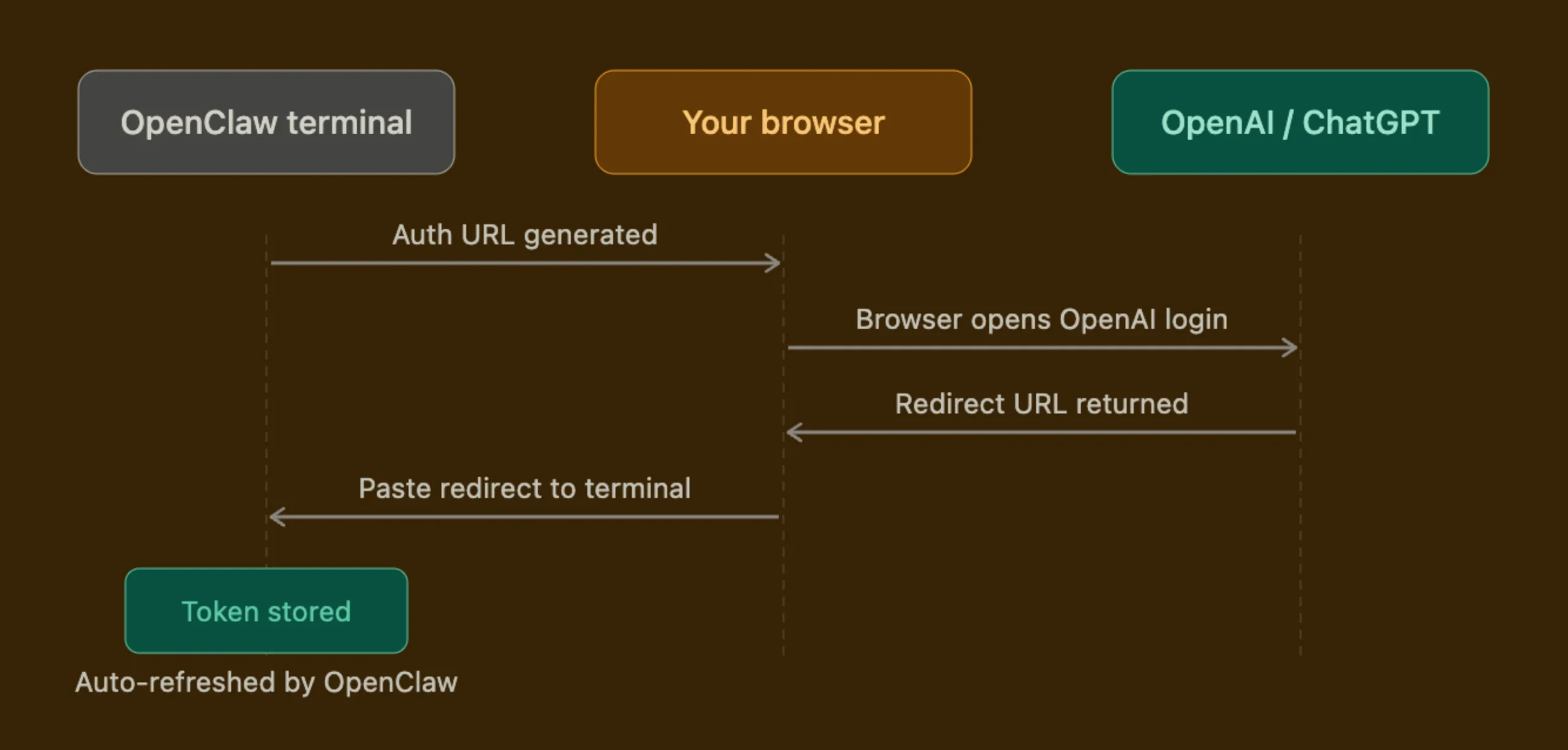
You sign in with your ChatGPT account, authorize the connection, and OpenClaw manages the authentication credentials needed for the Codex connection.
There are two layers working together.
1) OpenClaw handles the outer layer.
OpenClaw is responsible for the parts of the agent system that connect it to the rest of your environment.
That includes:
- Channels such as WhatsApp and Telegram
- Agent sessions
- Memory
- Scheduled tasks and cron jobs
- Media handling
- Conversation history
- Integrations
- Agent configuration
2) Codex handles the inner loop.
Codex handles what happens when the agent needs to perform a task.
That includes:
- Tool calling
- Thread state
- Code execution
- Reasoning
- Multi-step problem-solving
- Context management
This gives each system a clear responsibility.
OpenClaw handles the agent environment and communication. Codex handles the reasoning and execution inside each agent turn.
Each OpenClaw agent also has its own Codex home and thread state, giving agents separate working environments rather than putting everything into one shared state.
There’s also something worth getting right about how Codex loads tools. Instead of dumping every possible tool schema into the prompt at the start of a session, Codex searches for and loads tools on demand.
This means less prompt bloat, cleaner replies, and better overall performance, especially in longer sessions where context pressure adds up.
What this looks like in practice: agents that respond faster, stay on task longer, and produce more coherent outputs than setups where tool lists are front-loaded.
Step-by-Step Setup of OpenClaw OpenAI Subscription
Before you begin, you need:
- An active ChatGPT Plus or Pro subscription
- A running OpenClaw instance
- Terminal or SSH access to your OpenClaw server
- A browser or another device available to complete authentication
A VPS is the easiest option if you want the agent to stay online continuously.
1) Start the OpenAI authentication process
Open your OpenClaw terminal and run:
openclaw onboard --auth-choice openaiOpenClaw will start the authentication process and provide the information required to authorize your ChatGPT account.
2) Complete the OAuth authentication
Open the authorization URL provided by OpenClaw in your browser.
Sign in with the ChatGPT account that has your Plus or Pro subscription and authorize the connection.
Once authentication is complete, return to your terminal and follow the remaining prompts.
3) Use the device-code path on a headless server
If OpenClaw is running on a VPS without a graphical browser, you can use the device-code option:
openclaw models auth login --provider openai --device-codeThis allows you to complete the authentication process from another device while OpenClaw continues running on the server.
4) Select your model
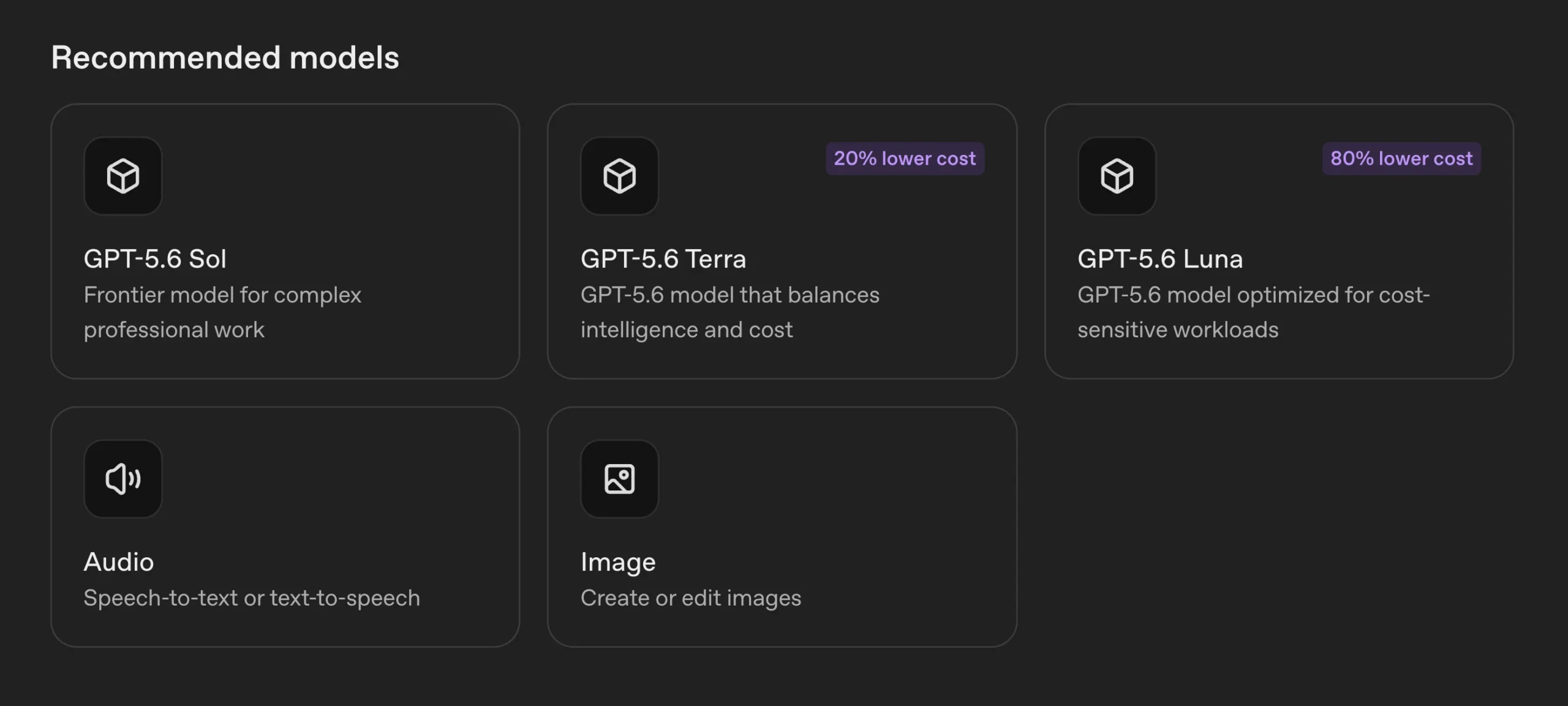
Once the OpenAI connection is authenticated, choose your preferred model:
openclaw models set openai/gpt-5.6-solThe exact models available can depend on your OpenClaw version and the Codex catalog available to your account.
5) Verify the connection
Check that OpenClaw can see the OpenAI models:
openclaw models list --provider openaiYou can also check the Codex connection from your agent interface:
/codex statusThis should confirm if the native Codex runtime is active.
6) Keep a backup API key
Even when your main OpenClaw workflows use the ChatGPT subscription, keeping an OpenAI Platform API key available is useful.
Some features, particularly real-time voice, require a Platform API key but not the Codex OAuth connection.
Having a small API balance available gives you another option for those features without changing your main subscription-powered setup.
What are the Real Limits, and How to Avoid Them?
The OpenClaw OpenAI subscription works particularly well for:
- Coding tasks
- Multi-step automation
- Memory-based workflows
- WhatsApp and Telegram agents
- Long-running sessions
- Scheduled jobs
- Tool-based workflows
- Software development tasks
The main thing to watch is usage.
Your ChatGPT subscription has usage limits that reset periodically.
Those limits are usually generous for ordinary ChatGPT use, but an OpenClaw installation can generate considerably more activity when several agents, scheduled jobs, and automated workflows are running at the same time.
For example, a single person chatting with ChatGPT occasionally is very different from three agents running scheduled tasks, responding to WhatsApp messages, calling tools, and processing large requests throughout the day.
Heavy parallel workloads can therefore reach usage limits much faster.
When you hit a model’s allowance, that model can become temporarily unavailable until the usage window resets.
This is one of the biggest reasons Pro becomes useful for production workloads. Its higher usage capacity gives active agents more room to operate before hitting those limits.
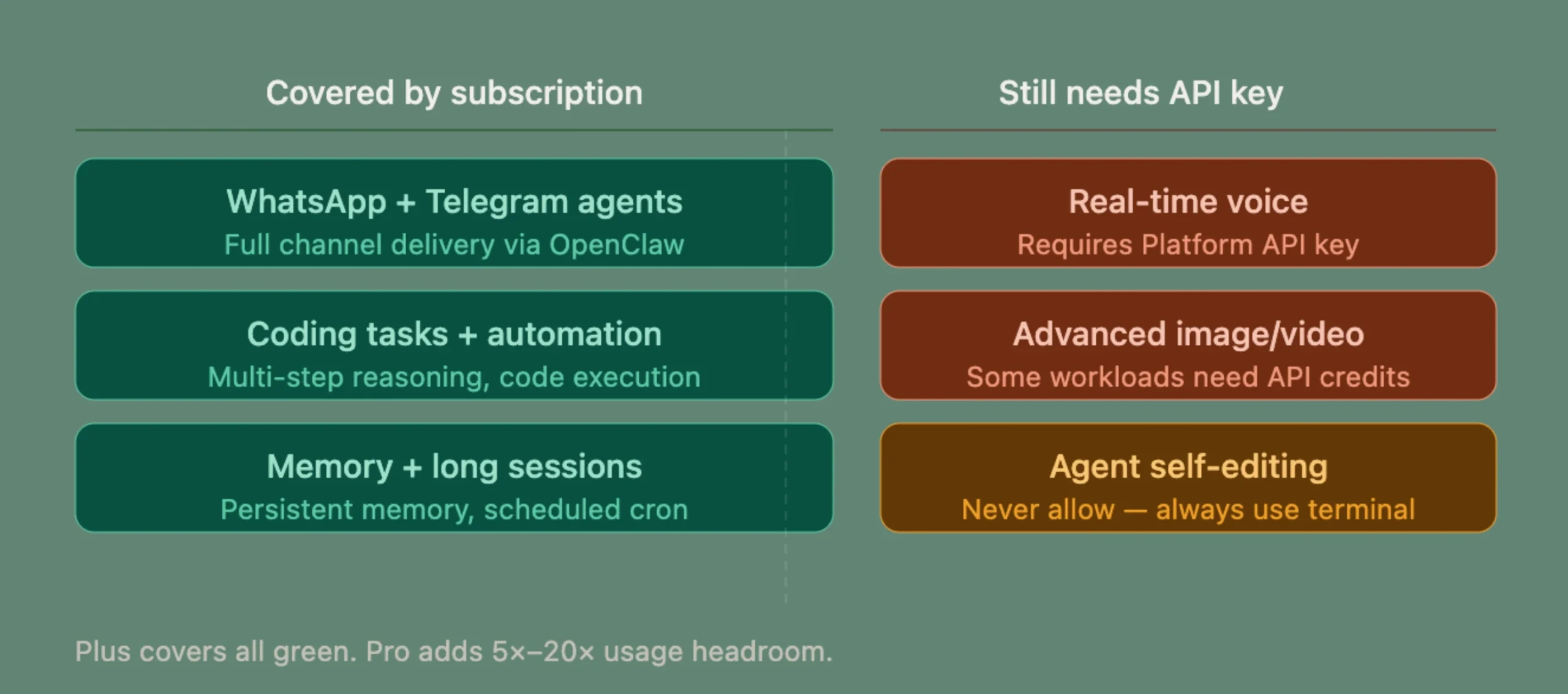
There are also some capabilities that still require a separate API key.
1. Realtime voice uses OpenAI’s Platform Realtime API and requires Platform API credentials. A Codex OAuth token should not be treated as a replacement for a Platform API key for those endpoints.
2. Some advanced image and video workloads may also require separate API access depending on the particular service and workflow you’re building.
And there’s one operational rule worth keeping firm:
Don’t allow your agents to modify their own authentication settings.
Your agents should be able to perform the tasks you’ve assigned to them, but changes to authentication, provider configuration, and core model settings should remain under human control.
As for the current Codex catalog, models such as GPT-5.6 Sol, Terra, and Luna are available as flagship options, subject to the models exposed by your account and OpenClaw setup.
Does the OpenClaw OpenAI Subscription Make Practical Sense in Nigeria?
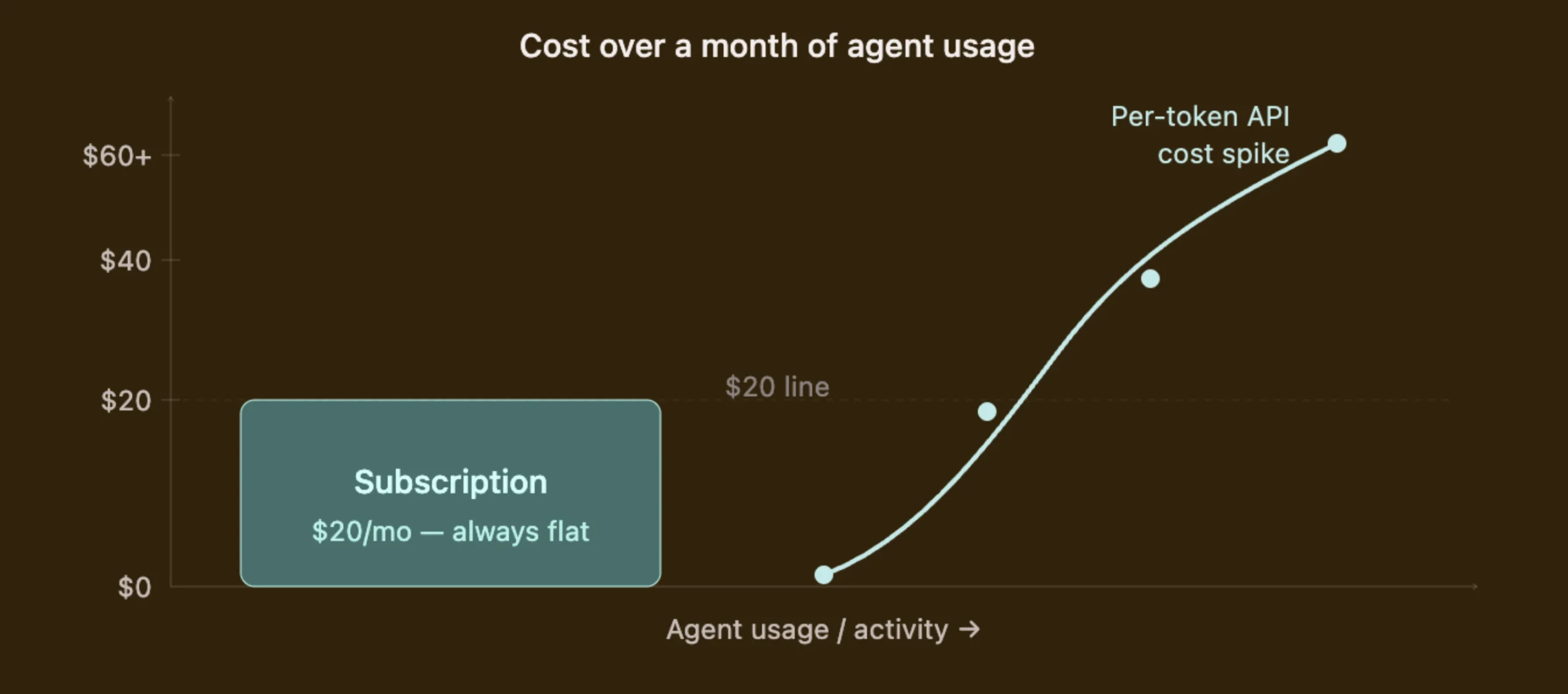
For Nigerian users, the biggest advantage is simple and direct: predictable subscription costs.
With the OpenAI API, your bill depends on usage. If an agent suddenly handles a large number of conversations or runs many token-heavy workflows, your API costs can rise with it.
That can make monthly budgeting harder.
A ChatGPT Plus subscription gives you a fixed monthly subscription price for the supported usage included in the plan.
At $20 per month, Plus is a relatively accessible starting point. The amount you pay in naira will depend on the current exchange rate and the payment method you use, so it’s better to treat the dollar price as the reference point.
The setup makes the most sense for people such as:
a. Freelancers: You can use agents to automate research, reports, client communication, data processing, and other repetitive parts of your client work.
b. Small businesses: A WhatsApp or Telegram agent can handle customer conversations, answer common questions, collect information, and trigger other business workflows.
c. developers: If you’re building automation pipelines for local businesses, OpenClaw gives you a way to combine messaging channels, scheduled tasks, tools, and AI reasoning in one environment.
d. Existing ChatGPT Plus users: If you’re already paying for ChatGPT Plus, connecting it to OpenClaw can give that subscription another practical use beyond ordinary conversations.
There is one group that should probably wait before making the switch.
If you’ve never used OpenClaw before and you’re still figuring out what your agents will do, start by getting OpenClaw running and testing your workflows first.
Once you know what you’re building, you can decide if the subscription route gives you better value.
The other advantage is self-hosting.
With OpenClaw running on your own VPS, you control the server, credentials, integrations, automation environment, and configuration instead of handing the entire agent environment to another hosted automation service.
Why Run Your OpenClaw OpenAI Subscription on Truehost VPS?
Your ChatGPT subscription can provide the AI capability, but OpenClaw still needs a machine to run on.
A local machine is not a reliable host for always-on agents. Every time your laptop closes, the agents go offline. Scheduled cron jobs don’t fire. WhatsApp messages go unanswered. The automation you built only runs when you’re there to babysit it.
A VPS stays online.
Your OpenClaw instance can continue running while your laptop is switched off, your internet connection changes, or you’re away from your desk.
At Truehost, our OpenClaw Application Hosting gives you one-click OpenClaw deployment, 99.9% uptime, free SSL, and full root access.
You spend your time configuring agents, not provisioning infrastructure. And if you’re in Nigeria, local payment is supported, so no fighting with international billing just to keep a server running.
Get OpenClaw running on Truehost VPS, connect your ChatGPT Plus or Pro subscription, and your agents run 24/7, without your laptop having to be on.
Now you know how to turn a flat $20/month ChatGPT subscription into a 24/7 autonomous agent system.
The remaining part is a reliable place to host OpenClaw. That’s where we excel at Truehost.