Domain NamesFind and register your ideal domain name instantly.
 Web HostingEasy-to-use hosting powered by cPanel — ideal for managing websites in Nigeria.
 Windows HostingRun .NET apps with Windows-optimized hosting
 Affiliate ProgramMake money promoting our services
 Reseller HostingMake money by reselling our hosting products under your own brand
 .COM Domains
 All DomainsExplore all supported tld domains in Nigeria
 WhoisFind out who owns any domain, as well as verify your registration details
 VPS Hosting in Nigeria
 Dedicated ServersReimagine your site speed with your own complete server
 AI Website BuilderDesign your site with drag-and-drop tools
 Online Store BuilderStart your online shop without code
 Support PortalFind answers or get expert help
 Contact UsReach our team via chat or email
 BlogRead our extensive guides on web hosting and more
To register a .ng domain with us, search the complete address, select its exact result, choose the term and nameservers, review the order, then sign in and pay.
The standard .ng route is open and does not require eligibility documents. Our current registration price is ₦13,500.00. Renewal is ₦15,000.00.
I retested our current journey with nghelp822.ng on 22 August 2026. The domain moved from our .ng search to configuration and then Review & Checkout. I stopped before entering personal details or paying, so I placed no order.
What you need before registering
Have these details ready:
the complete
.ngaddress you want and two alternatives;your registrant and billing contact details;
your host’s nameservers if you will not use ours; and
a payment method available on the live checkout.
NiRA manages Nigeria’s .ng registry. Its current register.ng portal marks .ng as an open zone, which means the standard application does not require supporting documents except in special cases. Your chosen name still has to follow NiRA’s registration rules.
Choose a name that:
uses letters, digits, or an internal hyphen;
does not begin or end with a hyphen;
is not entirely numeric;
uses at least three characters before
.ngfor the standard registration route; andstays within 64 characters when you count the complete
.ngaddress.
NiRA normally handles one- and two-character names through an auction process. It may also reserve premium, geographic, offensive, or rights-conflicting names. You can check the full restrictions in the NiRA policy.
Prepare two or three concise alternatives before you search. If you still need to narrow the list, use our availability guide first.
1) Search the complete .ng address
Open our .ng search and enter the complete address you want, such as yourbrand.ng. Including .ng keeps the result focused on the exact TLD you intend to buy.
Select search domain and wait for the result cards to load.
2) Select the exact .ng result
Find the card that shows your complete .ng address. The page may also present a bundle, but this guide follows the single .ng card with its own Buy Now button.

The exact .ng card shows both the first-year and renewal amounts. Captured 22 August 2026.
Confirm the spelling and read both price lines. Use the first-year amount for today’s budget and the renewal line for the cost of keeping the name.
Select Buy Now on that exact card. Our checkout then opens the domain configuration page.
3) Configure the registration
Our configuration page lets you choose the registration period, review optional services, and set nameservers.
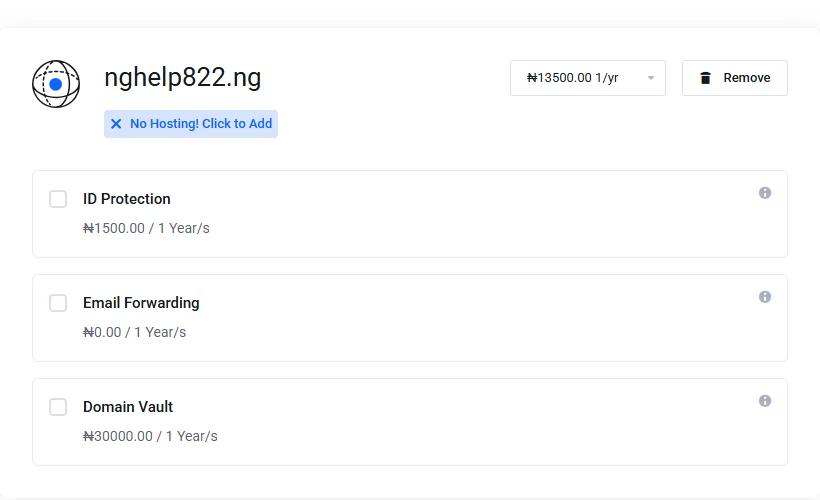
The domain term and each optional service have separate price controls. Captured 22 August 2026.
Choose the registration period
During the test, the term selector offered one to five years. Choose the period that fits your budget and how long you expect to keep the name. The total changes with the selected term, so use the amount beside the selector as your working figure.
Review optional services
The page showed ID Protection, Email Forwarding, and Domain Vault as separate choices. I continued without selecting any of them, which confirmed that the domain could proceed without an add-on. Open the information control beside an option before adding it, then account for its charge in the cart total.
Set the nameservers
The correct choice depends on where you will manage the website or DNS:
Hosting with us: keep the default nameservers already in the fields.
Hosting elsewhere: replace them with the nameservers supplied by that host.
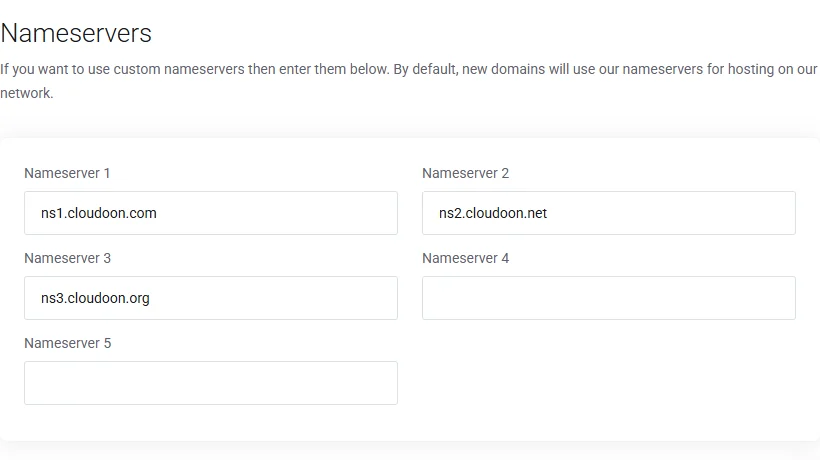
Replace these defaults only when another host has supplied the nameservers. Captured 22 August 2026.
Copy custom nameservers carefully. A misspelt nameserver can prevent the domain from reaching the intended website or email service even after registration succeeds.
Select Continue when the domain, term, options, and nameservers look correct.
4) Review the order
The Review & Checkout page brings the essential figures together before you enter billing details or pay.
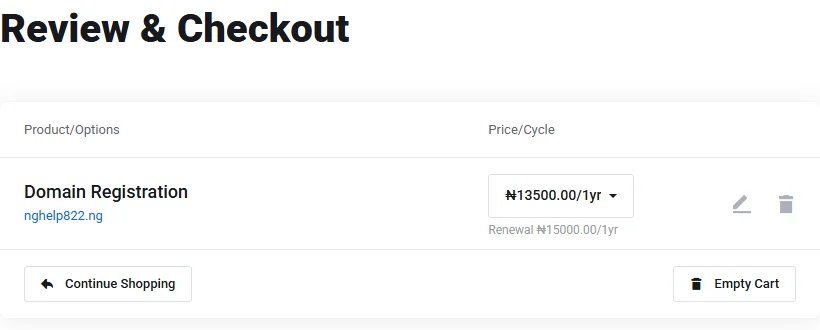
The domain line separates the amount due for the selected term from the renewal amount. Captured 22 August 2026.
Check these four items:
the complete domain spelling;
the registration period;
the amount due today; and
the renewal amount and cycle.
Also confirm that the cart contains only the services you selected. Use the edit or remove control if the spelling, term, or options need correction. Fixing the cart now avoids paying for an order you did not intend to place.
5) Sign in and pay
Existing customers can sign in. New customers can create an account in the checkout.
Enter accurate billing information and an email address and phone number you control. The checkout also contains a Domain Registrant Information section. Keep the default contact when the billing contact should also serve as the registrant, or add a different contact when you place the order for another person or organisation.
During the test, checkout showed card payment through Paystack and PayPal. Choose a method available on the live page, read the terms, and submit the order.
I stopped the test immediately before that submission. I did not test payment approval, registry submission, or activation time.
6) Check the domain after payment
After payment, open your client area and inspect the domain record. Confirm:
the domain status;
the registrant contact details;
the expiry or renewal date; and
the active nameservers.
If the status does not become active or the record differs from your order, contact our support team from the account that placed the order. Include the order number and domain name so we can trace the correct transaction.
Registration secures the address. Your website and email still need the relevant hosting or DNS records before people can use them.
Fix a blocked or incorrect order
The name is already taken
I tested this branch with google.ng. Our search returned already taken and displayed alternatives. Return to the search field and try one of the compliant names you prepared.
NiRA has reserved the name
If an apparently unused name still cannot proceed, it may fall into a reserved, premium, geographic, or policy-controlled category. Ask our support team to check its registry status before changing the spelling solely to force an order through.
You use external hosting
Enter the exact nameservers from your hosting provider on the configuration page. Ask that provider for the values if its setup email does not show them clearly.
The cart total is higher
Check the selected term and optional services. The cart total reflects those choices, while the renewal line shows the future recurring amount for the domain.
Register your .ng domain
When your name and contact details are ready, register .ng through our current search and checkout.