Domain NamesFind and register your ideal domain name instantly.
 Web HostingEasy-to-use hosting powered by cPanel — ideal for managing websites in Nigeria.
 Windows HostingRun .NET apps with Windows-optimized hosting
 Affiliate ProgramMake money promoting our services
 Reseller HostingMake money by reselling our hosting products under your own brand
 .COM Domains
 All DomainsExplore all supported tld domains in Nigeria
 WhoisFind out who owns any domain, as well as verify your registration details
 VPS Hosting
 Dedicated ServersReimagine your site speed with your own complete server
 AI Website BuilderDesign your site with drag-and-drop tools
 Online Store BuilderStart your online shop without code
 Support PortalFind answers or get expert help
 Contact UsReach our team via chat or email
 BlogRead our extensive guides on web hosting and more
WordPress has quietly become the backbone of the Nigerian internet.
Bloggers use it to build an audience, small businesses use it to look credible to customers, creators use it to sell courses and content, and ecommerce brands run entire stores through WooCommerce without ever touching a line of code.
It’s flexible, it’s well documented, and there’s a Nigerian developer or agency in almost every city who knows how to work with it.
But picking a hosting plan for that WordPress site isn’t as simple as grabbing whichever option shows the lowest price.
A plan that looks cheap on the surface can leave you short on storage the moment you add product images, or leave you without backups the day a plugin update breaks your homepage.
The right plan is really a balance of several things at once: storage, bandwidth, SSL, backups, performance, email, support, room to scale, and yes, price too.
This guide walks through what actually makes a WordPress hosting plan good, compares five providers currently serving the Nigerian market, and helps you land on the best hosting plan for a WordPress website that matches your specific situation, not someone else’s.
What Makes a Good WordPress Hosting Plan?
Before comparing providers, it helps to know what you’re actually comparing them on.
i) WordPress Compatibility
Not all hosting is built with WordPress in mind, and that shows up in small but important ways.
Look for one-click WordPress installation through a tool like Softaculous, so you’re not manually uploading files and configuring a database yourself.
Behind the scenes, the server needs solid PHP version support and a properly configured MySQL database, since WordPress leans on both constantly.
Some providers go a step further and build WordPress-optimized environments, with server-level caching and tuning specifically aimed at how WordPress handles requests, which can noticeably speed up page loads compared to generic shared hosting.
ii) Storage and Bandwidth
A simple text-based blog with a handful of posts a month has very different storage needs from an image-heavy portfolio site or a WooCommerce store carrying hundreds of product photos.
Before picking a plan based on price alone, think honestly about how much content, media, and traffic your site will actually carry, since running out of storage mid-growth is a hassle you can avoid by planning ahead.
iii) SSL Certificate
HTTPS isn’t optional anymore.
Beyond the padlock icon browsers show visitors, Google factors SSL into search rankings, and WooCommerce stores need it to process payments securely.
A hosting plan that doesn’t include a free SSL certificate as standard is adding an unnecessary cost to something that should come bundled in by default.
iv) Backups
Plugins break things. Updates go wrong. Sometimes a site just gets hacked. Automatic backups are your safety net for all of it.
When comparing plans, check how often backups run (daily is ideal), how long they’re retained, and how easy it actually is to restore a previous version if something goes sideways.
v) Website Performance
Performance comes down to a few overlapping factors.
How much server resource (CPU and RAM) your plan actually allocates you, whether caching is built in at the server level, whether the plan plays nicely with a CDN for visitors outside Nigeria, and critically, where the server itself is physically located.
A server based in Nigeria or nearby will generally load faster for Nigerian visitors than one sitting in the US or Europe, all else being equal.
vi) Customer Support
This one is crucial, way more than beginners expect.
When something breaks, it’s often genuinely unclear whether the problem is WordPress itself, the hosting environment, DNS propagation, or something else entirely.
Local, responsive support that can help diagnose the actual source of a problem, rather than just pointing you toward generic documentation, saves real time and frustration.
Best WordPress Hosting Providers in Nigeria
There isn’t one WordPress hosting provider that’s automatically best for everyone.
The right choice depends on your website’s size, expected traffic, budget, feature needs, and how much technical control you want.
Below, we compare five providers currently serving the Nigerian market: Truehost, QServers, HostAfrica, HostNow, and SmartWeb.
| Provider | Starting Price | Storage | Websites | Free SSL | Backups | Best For | |
|---|---|---|---|---|---|---|---|
| Truehost | ₦1,275/mo (annual) | 30GB SSD | 10 | ✓ | Unlimited | Free daily | Beginners & small businesses |
| QServers | ₦1,700/mo | 2GB (entry tier) | 1 | ✓ | Unlimited | Included | Small businesses & growing sites |
| HostAfrica | ₦5,400/mo | 20GB | 2 | ✓ | 2 accounts | Daily | Businesses & WordPress users |
| HostNow | ₦8,000/mo | 50GB | 1 | ✓ | 15 accounts | Daily | Budget-conscious users |
| SmartWeb | ₦2,000/mo | 8GB | 1 | ✓ | Unlimited | Included | Businesses & websites |
Starting price alone shouldn’t decide this for you.
Before committing to any of these, it’s worth checking renewal pricing (some jump significantly after the first term), actual resource limits once you’re past the marketing page, whether backups are genuinely included or a paid add-on, how support is structured, and how easy the upgrade path is once your site outgrows the entry plan.
a) Truehost WordPress Hosting
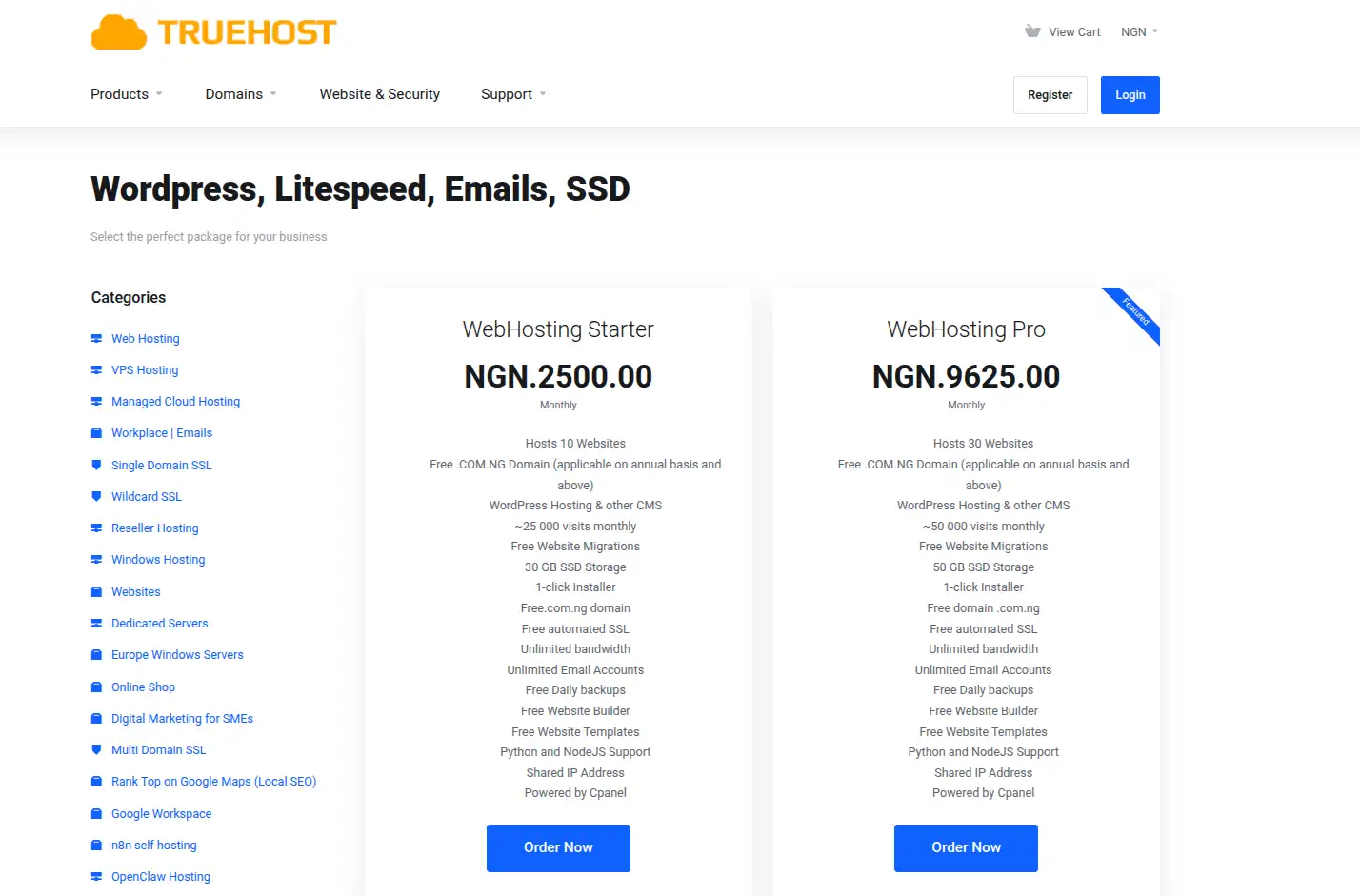
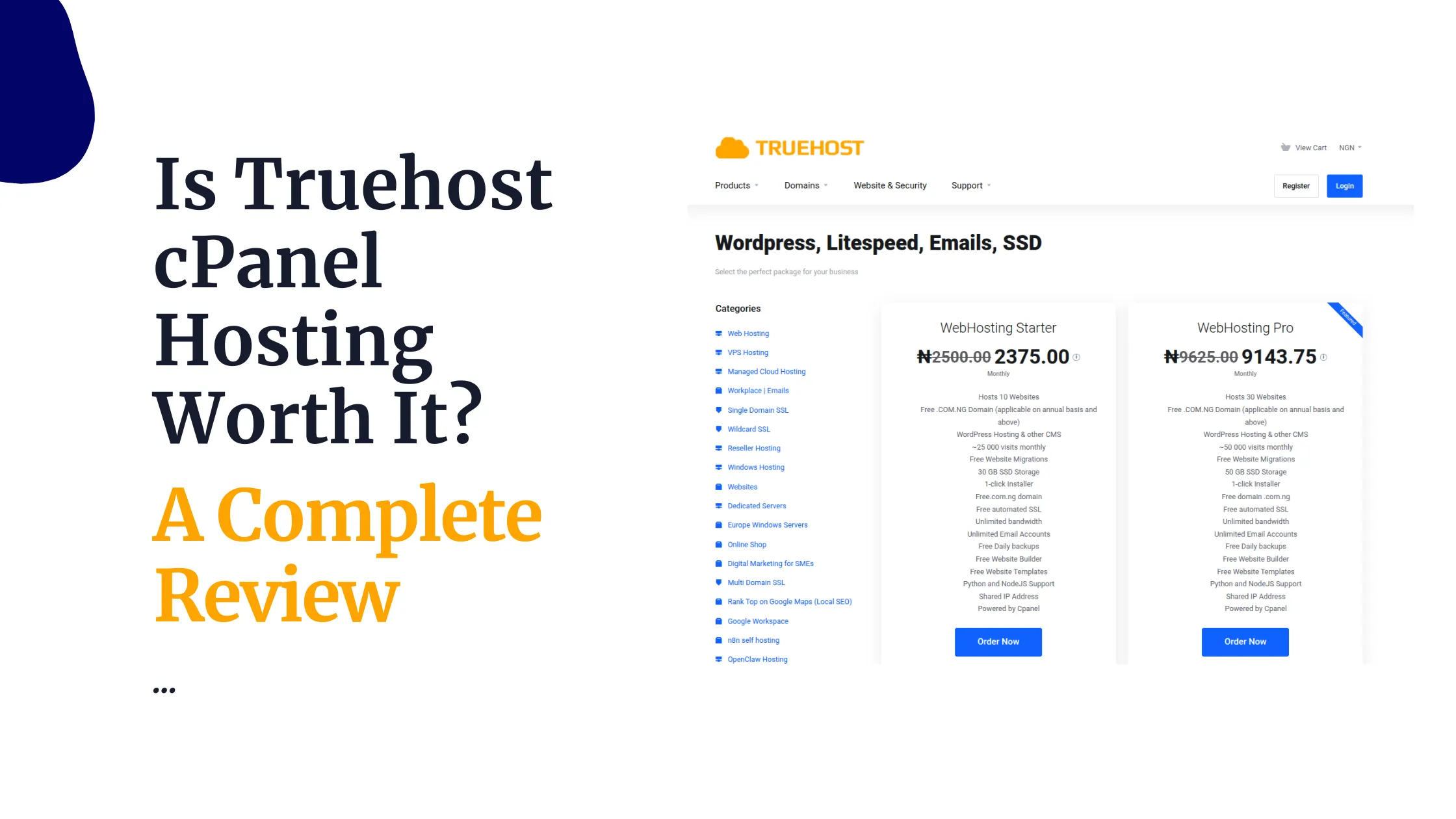
Truehost’s WordPress-ready shared hosting starts at ₦1,275 a month on longer billing terms, dropping as low as ₦416 a month on a triennial plan, or ₦2,500 a month if you’d rather pay monthly.
That entry tier includes 30GB of SSD storage and room to host up to 10 separate websites on a single account, which is generous compared to most competitors at a similar price.
The plan comes with unlimited email accounts, free SSL, and free daily backups included as standard rather than as a paid extra.
WordPress installs through a one-click Softaculous setup, and the whole thing runs on LiteSpeed servers, which tends to help with WordPress load times specifically.
Support is handled by a Lagos-based team, reachable 24/7, and everything is billed in naira with no dollar conversion to worry about.
A free .com.ng domain is included on annual plans, and if your site eventually outgrows shared hosting, Truehost offers a direct upgrade path into VPS hosting without needing to migrate to a different provider entirely.
Truehost is particularly suitable for users who want an affordable starting point and the ability to move into higher-resource hosting as their website grows, without paying for capacity they don’t need yet.
b) QServers WordPress Hosting
QServers has been operating in Nigeria since 2004 and runs dedicated WordPress hosting plans starting from around ₦1,700 a month on its monthly billing, or from roughly ₦18,500 a year on annual plans.
Entry-level storage sits around 2GB, with a free .com.ng domain included and unlimited email accounts even on the base tier.
Each WordPress plan is built to support a single WordPress installation, which keeps resources dedicated to that one site rather than spread across multiple projects.
cPanel with Softaculous handles installation, and QServers includes free cPanel-to-cPanel migration if you’re moving from another host.
One detail worth knowing upfront: QServers’ servers are based in Chicago, USA, rather than inside Nigeria, which can add some latency for local visitors compared to a Nigeria-based host, even though support and billing are fully local.
QServers tends to fit best for a single-site WordPress business or blog where the owner values strong support and a long operating track record over having the absolute lowest latency for Nigerian visitors.
c) HostAfrica WordPress Hosting
HostAfrica’s WordPress hosting starts at around ₦5,400 a month, which jumps to roughly ₦7,200 a month on renewal, and that entry tier includes hosting for 2 websites with 2 professional email accounts.
HostAfrica does maintain data center infrastructure closer to the region than some competitors, which can help with load times for African visitors specifically.
Free SSL is included, and the plans lean on a security stack that covers the basics expected of business-grade hosting.
Support is generally well regarded, and HostAfrica offers a clear upgrade path from shared hosting into VPS or dedicated infrastructure as a site’s needs grow.
The main thing to flag here is pricing and renewal.
At ₦5,400 a month for just 2 websites and 2 email accounts, HostAfrica sits considerably higher than Truehost’s entry tier, which offers 10 websites and unlimited email at less than half the price.
HostAfrica tends to suit businesses that specifically value its infrastructure and support reputation and are comfortable paying a premium for it, rather than users purely optimizing for value per naira.
d) HostNow WordPress Hosting
HostNow, sometimes styled HostNowNow, positions itself as a budget-friendly Nigerian host running on SSD-powered servers.
Its WordPress-ready shared hosting starts from around ₦8,000 a month at the tier offering 50GB of storage, though cheaper entry-level shared plans exist starting closer to ₦1,200 a year for very basic sites, so pricing varies significantly depending on which tier you land on.
Free SSL is included, along with a user-friendly control panel and support for common CMS platforms beyond just WordPress, including Joomla and Drupal.
Load times are generally reported in the 0.9 to 2.5 second range, reasonable for small to medium sites, though not as fast as some LiteSpeed-based competitors.
HostNow tends to work well for small businesses, bloggers, or resellers looking for an affordable, no-frills option, though it’s worth confirming exactly what’s included in backups and email accounts at whichever specific tier you’re considering, since these details vary noticeably between their plans.
e) SmartWeb WordPress Hosting
SmartWeb has been serving the Nigerian market since 2004 and offers a wide range of hosting types beyond just WordPress, including VPS, cloud, and dedicated servers.
Its entry-level Linux shared hosting starts around ₦2,000 a month, with WordPress-specific hosting promising notably faster load times than standard shared plans, though storage on the cheapest tier sits around 8GB, on the lower side for a WordPress site carrying much media.
SmartWeb includes free SSL and cPanel on its hosting plans, along with flexible monthly billing that doesn’t lock you into a long annual contract, which can suit users who want to test a plan before committing longer term.
One thing worth flagging honestly: some independent reviews have noted that SmartWeb’s support responsiveness can lag behind competitors, so if fast troubleshooting is very important to you, it’s worth testing their support channels before fully committing.
SmartWeb tends to fit businesses that want flexibility in billing and a wide range of hosting types under one provider, more than users chasing the absolute cheapest entry price.
Shared Hosting vs WordPress Hosting in Nigeria
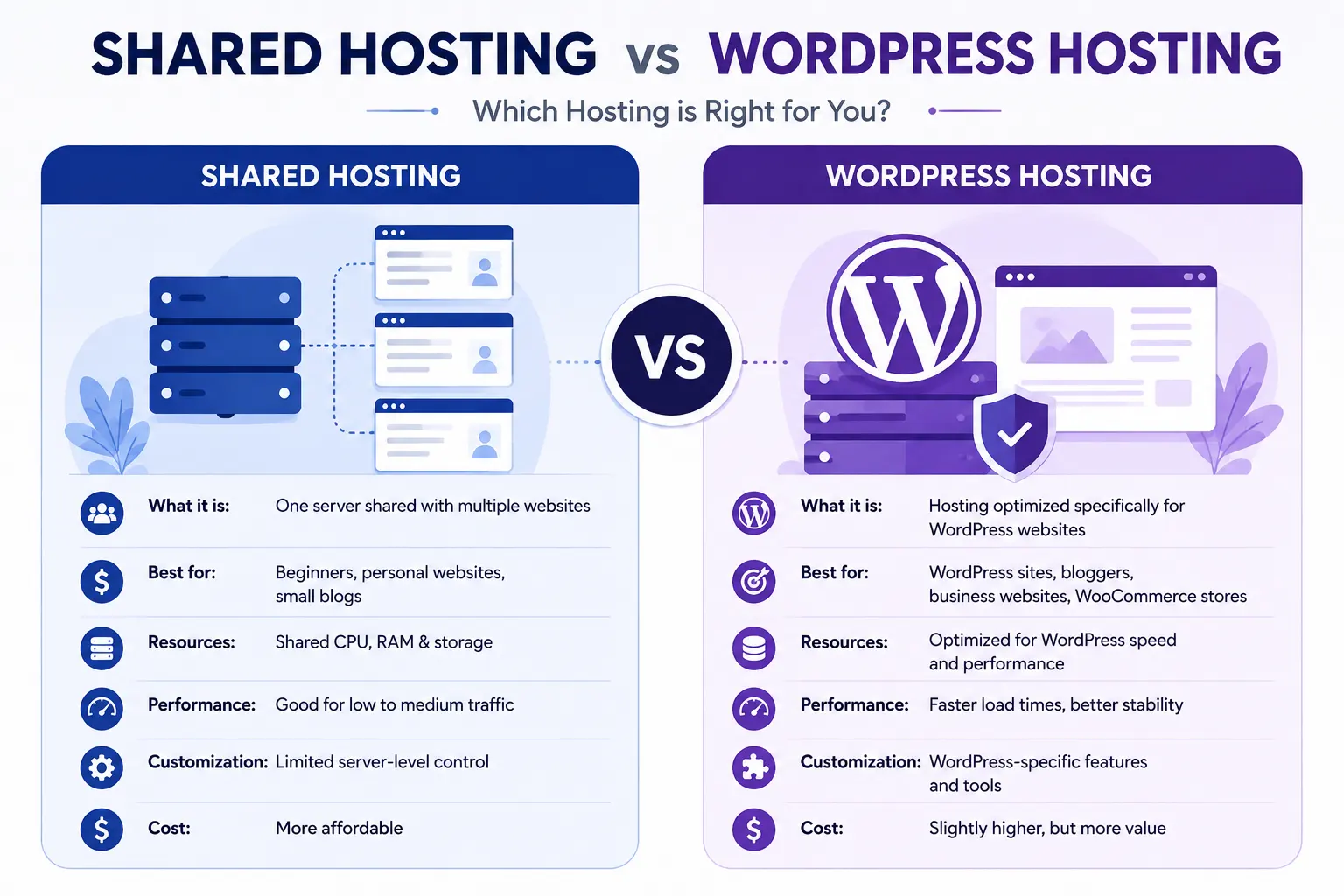
This distinction trips up a lot of beginners, so it’s worth spelling out clearly.
WordPress can absolutely run on ordinary shared hosting.
There’s nothing technically stopping you from installing WordPress on a generic shared plan, and for a huge number of small sites, that’s exactly what happens, with no issues at all.
What WordPress-specific hosting adds is optimization layered on top of that same underlying shared infrastructure:
- pre-configured caching tuned for WordPress’s structure
- security rules aimed at common WordPress vulnerabilities
- and sometimes staging environments or automatic core updates.
It’s less a completely different technology and more a specialized configuration of the same shared server model.
Paying extra for dedicated WordPress hosting makes the most sense once your site has real traffic, runs WooCommerce, or you simply want the performance and security tuning without configuring it yourself.
For a brand new blog with a handful of visitors a month, a standard shared plan with WordPress installed through one-click setup is genuinely enough, and spending extra for WordPress-specific hosting at that stage isn’t necessary yet.
Which WordPress Hosting Plan Should You Choose?
Rather than naming one blanket winner, here’s a practical breakdown by situation.
- For a new blog:
Choose an affordable entry-level shared plan with at least 5GB to 10GB of storage and one-click WordPress installation.
You don’t need much horsepower yet, so prioritize low cost and ease of setup over raw resources.
- For a small business:
Prioritize unlimited or generous email accounts, daily backups, and reliable uptime over squeezing out the lowest possible price.
A plan offering around 20GB to 30GB of storage with room for multiple websites gives you space to grow your online presence without hitting a wall in six months.
- For WooCommerce:
Choose a plan with enough resources to genuinely handle a store, ideally 2GB or more of RAM allocation where available, ample storage for product images, and confirmed daily backups, rather than simply picking the cheapest package on the page.
A store going down or losing order data costs far more than the price difference between hosting tiers.
- For established or high-traffic sites:
At this point, shared hosting of any kind starts to show its limits, and it’s worth looking at VPS or cloud hosting instead, where resources are dedicated rather than shared with other websites on the same server.
Across these scenarios, Truehost is worth considering as one of the stronger options available.
Particularly where its current plans combine solid storage, unlimited email, included daily backups, and a clear upgrade path into VPS hosting, all at pricing that stays competitive against the other providers covered here.
If you’re ready to compare plans directly, you can explore Truehost’s WordPress hosting plans and see which tier fits where your site is today.
Frequently Asked Questions About WordPress Hosting in Nigeria
What is the best hosting for WordPress in Nigeria?
There’s no single universal answer, since it depends on your site’s size, traffic, and budget. Truehost stands out for beginners and small businesses due to its storage-to-price ratio and included backups, while QServers and HostAfrica suit users prioritizing long track records or region-specific infrastructure.
How much does WordPress hosting cost in Nigeria?
Entry-level WordPress hosting in Nigeria generally ranges from around ₦1,200 to ₦8,000 a month depending on the provider and plan tier, with pricing shaped by storage limits, number of websites allowed, and included extras like backups and email.
Which Nigerian hosting company is best for WordPress?
Among local providers, Truehost, QServers, HostAfrica, HostNow, and SmartWeb all offer dedicated WordPress hosting options, each with different strengths in pricing, storage, and support responsiveness.
Is Truehost good for WordPress?
Yes. Truehost includes one-click WordPress installation, LiteSpeed servers, free SSL, and free daily backups on its plans, making it a solid fit for beginners and small businesses building a WordPress site in Nigeria.
What is the cheapest WordPress hosting in Nigeria?
Pricing shifts often, but entry-level plans from providers like Truehost and QServers tend to sit at the more affordable end of the market, particularly on longer billing terms, which usually lower the effective monthly rate.
Do I need WordPress hosting for my website?
Not necessarily, especially for a small or new site. Standard shared hosting with one-click WordPress installation works fine for most beginners. WordPress-specific hosting becomes more valuable once your site has real traffic or runs WooCommerce.
Can I host WooCommerce on shared hosting?
Yes, for smaller stores. As your product catalog and order volume grow, though, you’ll want a plan with enough storage and resource allocation to keep the store running smoothly, or consider upgrading to VPS hosting.
How much storage does a WordPress website need?
A simple blog can run comfortably on 1GB to 5GB. A business site with more media typically needs 10GB to 30GB, while a WooCommerce store with a large product catalog may need 30GB or more depending on image volume.
When should I upgrade my WordPress hosting plan?
Watch for slow load times, running low on storage, frequent downtime during traffic spikes, or outgrowing your email account limits. Any of these are signs it’s time to move up a tier or consider VPS hosting.
Can I move my WordPress website to another host?
Yes. Most Nigerian hosting providers, including Truehost and QServers, offer free website migration assistance, which typically covers moving your files, database, and email over to the new host without much manual work on your end.