Domain NamesFind and register your ideal domain name instantly.
 Web HostingEasy-to-use hosting powered by cPanel — ideal for managing websites in Nigeria.
 Windows HostingRun .NET apps with Windows-optimized hosting
 Affiliate ProgramMake money promoting our services
 Reseller HostingMake money by reselling our hosting products under your own brand
 .COM Domains
 All DomainsExplore all supported tld domains in Nigeria
 WhoisFind out who owns any domain, as well as verify your registration details
 VPS Hosting in Nigeria
 Dedicated ServersReimagine your site speed with your own complete server
 AI Website BuilderDesign your site with drag-and-drop tools
 Online Store BuilderStart your online shop without code
 Support PortalFind answers or get expert help
 Contact UsReach our team via chat or email
 BlogRead our extensive guides on web hosting and more
You log in to check your website and notice something’s wrong, pages aren’t loading, visitors are reporting errors, or worse, there are warnings that your site has been hacked. Suddenly, all the time, effort, and energy you put into building your online presence feels at risk.
The problem often isn’t your website; it’s that your site isn’t properly isolated.
When websites share server space or resources, a single security breach can ripple across everything else. That’s why isolating your website is one of the smartest moves you can make. It’s like giving your site its own secure walls, so even if trouble strikes elsewhere, your website remains safe, accessible, and under your control.
In this guide, we’ll walk you through what website isolation means, why it matters, and simple, practical ways to implement it, even if you’re not a tech wizard. By the end, you’ll know how to protect your site, your visitors, and your peace of mind.
What Does It Mean to Isolate a Website?
Website isolation means giving your site its own secure space, separate from other websites, applications, or server resources, so that any problem elsewhere doesn’t spill over and affect your site.
In practice, isolation works like having separate, protected units in a building. If one unit experiences a fire or plumbing issue, the damage is contained to that unit, and all other units remain safe and functional.
Similarly, isolating your website ensures that if another site on the same server is hacked or overloaded, your site continues to run smoothly, without interruption.
Why Isolation Matters
Without isolation, your website is vulnerable to a range of threats, even if you’re careful. Here’s why taking this step is essential:
- Protects against malware spread:
If another site on the same server gets infected, malware can jump from one site to another. Isolation stops this chain.
- Reduces server-related risks
Shared servers can be convenient, but if one site is compromised, it can affect everyone else on that server. Isolation keeps your site separate.
- Safeguards your data and visitors
Your customer information, files, and website content are shielded from external threats, helping you maintain trust.
- Improves stability and performance:
When your site doesn’t compete for resources with other sites, it runs faster and experiences fewer crashes.
Isolation is a practical and necessary step for anyone running a website. From small business owners and bloggers to online store operators, giving your site its own secure space provides greater control, peace of mind, and a stronger defense against potential threats.
Types of Website Isolation
Website isolation isn’t a one-size-fits-all solution. Depending on your needs, there are several ways to separate and protect your site:
a) Server-Level Isolation
With server-level isolation, each website is hosted on its own server or virtual server. This ensures that problems affecting one site, like crashes or hacks, don’t spill over to others. \
It’s a solid choice for high-traffic websites, ecommerce platforms, or any site that handles sensitive data.
b) Application-Level Isolation
Application-level isolation allows multiple websites to share the same server while running in separate environments, often called containers.
Tools like Docker or cPanel’s CloudLinux make this possible. Each site gets its own set of resources, so one website can’t consume all the server power or affect the others’ performance.
This method balances security and cost, making it ideal for small to medium sites.
c) Network Isolation
Network isolation separates your website’s traffic from other networks, creating an extra layer of security.
This is especially useful for online stores or sites that handle payments and sensitive user information. By controlling the flow of data, network isolation reduces the risk of attacks reaching your website from external sources.
How to Isolate Your Website Step by Step
Isolating your website might sound technical, but with the right approach, it’s straightforward. Follow these steps to give your site the protection it deserves:
Step 1: Choose the Right Hosting
Not all hosting is created equal, and your choice here lays the foundation for security. To properly isolate your website, consider:
- VPS Hosting: Gives you a virtual server environment that’s separate from other users.
- Dedicated Hosting: Provides an entire server exclusively for your website.
- Cloud Hosting with Containers: Each site runs independently, reducing the risk of one site affecting another.
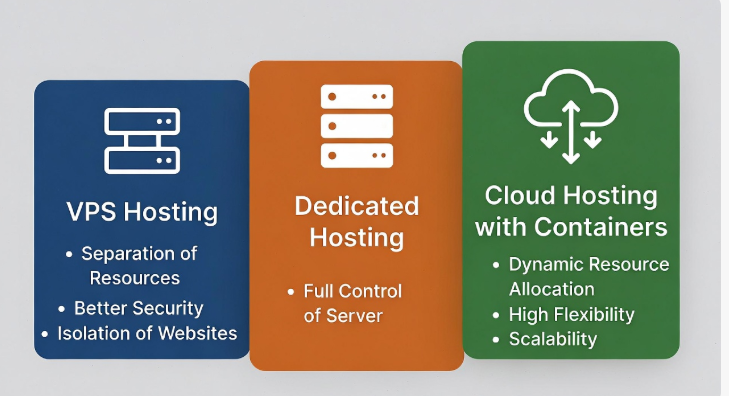
Your hosting choice is the first line of defense for your website’s safety.
Step 2: Use Separate Databases
Many websites share a single database by default, which can be risky. Instead:
- Give each site its own database with unique login credentials.
- This ensures that if one site is compromised, others remain unaffected.
Step 3: Implement Resource Limits
Websites sharing the same server can sometimes compete for resources, slowing each other down or even causing crashes. Tools like cPanel, CloudLinux, or Plesk let you:
- Allocate CPU, memory, and processing limits per website.
- Keep each site running smoothly, even under heavy load.
Step 4: Set Proper File and Directory Permissions
Permissions control who can modify your website files. To protect your site:
- Restrict access so only the website’s users can edit its files.
- Avoid overly permissive settings like 777; use 755 for directories and 644 for files.
- This step prevents unauthorized changes and reduces hacking risks.
Step 5: Use Containers for Isolation
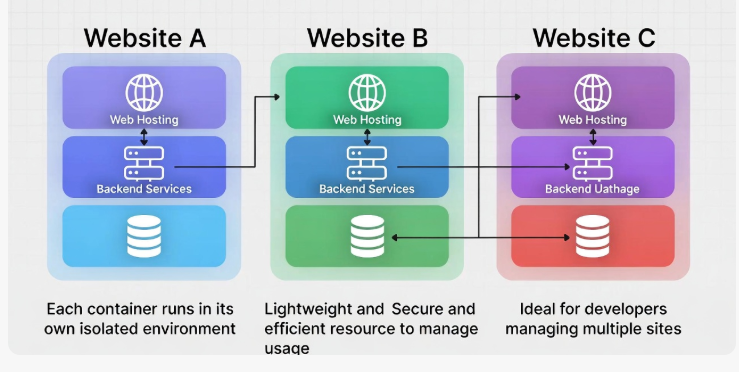
Containers, such as Docker, create completely separate environments for each website, even if they’re on the same server.
- They are lightweight, secure, and easy to manage.
- Ideal for developers or anyone managing multiple sites.
- Containers make updates and troubleshooting safer since one site won’t affect the others.
Step 6: Monitor Your Site Regularly
Even with isolation, ongoing vigilance is key:
- Install monitoring tools to detect unusual activity in real time.
- Regularly check server logs for signs of intrusion or performance issues.
- Keep all software, plugins, and themes up to date to patch vulnerabilities.
Tools That Help You Isolate Websites
Here’s a handy table of tools and platforms you can use:
| Tool/Platform | Type | Benefit |
| CloudLinux | Application-level | Limits resources per site |
| Docker | Containerization | Complete environment isolation |
| cPanel VPS | Hosting control panel | Easy separation with user accounts |
| Plesk | Hosting control panel | Simplifies permissions and limits |
| Firewalls | Network | Protects from external attacks |
Common Mistakes to Avoid
Even the best isolation setup can be undermined by simple mistakes. Avoid these common pitfalls to keep your website truly secure:
- Sharing databases across websites:
When multiple sites use the same database, a single breach can put all of them at risk. Keep each site’s data separate.
- Weak file permissions
Overly permissive settings make it easy for hackers to modify your files. Always use secure permissions like 755 for directories and 644 for files.
- Ignoring monitoring
Without regular checks, you may not notice attacks or performance issues until it’s too late. Continuous monitoring is essential.
- Overcrowding servers
Hosting too many sites on one server reduces the effectiveness of isolation. Each site should have adequate resources to run independently.
By steering clear of these mistakes, you strengthen your website’s defenses and ensure that your isolation measures actually work.
Why Isolation Improves Performance Too
Website isolation isn’t only about security; it also helps your site run faster and more reliably.
By keeping your site separate from others, you ensure it has the resources it needs to perform at its best.
Here’s how isolation boosts performance:
- Dedicated resources:
Your website won’t have to compete with others for CPU, memory, or bandwidth.
- Faster database operations
Separate databases prevent traffic from other sites from slowing down your queries.
- Reduced risk of downtime
Server crashes or overloads caused by other websites won’t affect your site.
- Consistent performance under load
Even during traffic spikes, your site remains stable and responsive.
Isolation gives your website a kind of “private lane” on the server highway, smooth, fast, and uninterrupted.
Conclusion
Isolating your website might seem technical at first, but it’s really about giving your site the protection and independence it deserves. By keeping your website separate from other sites, databases, and server resources, you minimize risks, prevent downtime, and improve performance.
Running a blog, managing an online store, or growing a business of any size, isolation puts you in control. It protects your content, your visitors, and the reputation you’ve worked hard to build.
At Truehost, we understand that website security is essential. By following these steps, you can set up your site in a way that’s secure, reliable, and ready to grow. A well-isolated website isn’t just safer, it’s faster, more stable, and gives you peace of mind knowing that your online presence is protected.