Domain NamesFind and register your ideal domain name instantly.
 Web HostingEasy-to-use hosting powered by cPanel — ideal for managing websites in Nigeria.
 Windows HostingRun .NET apps with Windows-optimized hosting
 Affiliate ProgramMake money promoting our services
 Reseller HostingMake money by reselling our hosting products under your own brand
 .COM Domains
 All DomainsExplore all supported tld domains in Nigeria
 WhoisFind out who owns any domain, as well as verify your registration details
 VPS Hosting in Nigeria
 Dedicated ServersReimagine your site speed with your own complete server
 AI Website BuilderDesign your site with drag-and-drop tools
 Online Store BuilderStart your online shop without code
 Support PortalFind answers or get expert help
 Contact UsReach our team via chat or email
 BlogRead our extensive guides on web hosting and more
Your store is busy. Orders are coming in. Someone just paid for two items. And then nothing. Your website stops loading.
You refresh. Still nothing. You check your phone. Nope.
Your heart sinks because you know what this means. Customers are trying to shop, and they’re leaving.
In Nigeria, this happens all the time. Power cuts, slow internet, fiber cables getting damaged, or your hosting provider having “temporary issues.”
One hour offline for a small business can cost ₦20,000 or more. Bigger stores lose even more. And honestly? Most of it isn’t even your fault.
This is exactly why website redundancy exists. It’s what keeps your site alive when things go wrong.
It’s the difference between lost sales and a smooth, running business. Let’s talk about it in a way that actually makes sense.
Why You Should Care About Website Redundancy
Your website isn’t just a website. It’s your shop. It’s your office. It’s how people decide whether to trust you or not.
When it goes down, customers notice. They think your business isn’t serious.
Google notices too, and your ranking can drop. People start shopping with someone else who is still online.
In countries with steady power and internet, downtime is just annoying. Here in Nigeria, it’s almost expected.
That’s why smart hosting providers build safety nets into their systems. That’s what website redundancy is.
It makes sure your site doesn’t rely on just one server, one connection, or one power source to survive. It keeps your business running no matter what.
So, What Is Website Redundancy?
Website redundancy is really just a safety net for your website.
Think of it like this: if one part of your site breaks, another part quietly takes over.
Your visitors never notice a thing. Your site keeps running, and your business keeps moving.
This can mean having more than one server, extra internet connections, backup power, or copies of all your data stored somewhere safe.
Without redundancy, your site is fragile. One small problem a server crash, a power cut, or a network hiccup and everything can go down.
With redundancy, problems still happen, but they don’t stop your business in its tracks.
Most people using WordPress Hosting for Beginners don’t even think about this until their first big outage. And trust me, that first time? It hurts.
The Main Parts of Website Redundancy (Explained Simply)
Website redundancy works because several systems support each other.
Let’s go through them slowly.
1) Multiple Servers
Your website lives on a server. That’s like a single stall at a busy market. If it collapses, no one buys anything. All the orders waiting there vanish.
That’s why good hosting providers use multiple servers. It’s like having several stalls spread out, all selling the same thing.
Here’s how it helps:
- Traffic spreads out. Instead of one server sweating under heavy load, say, during a Black Friday sale, visitors are balanced across all servers. No slowdowns.
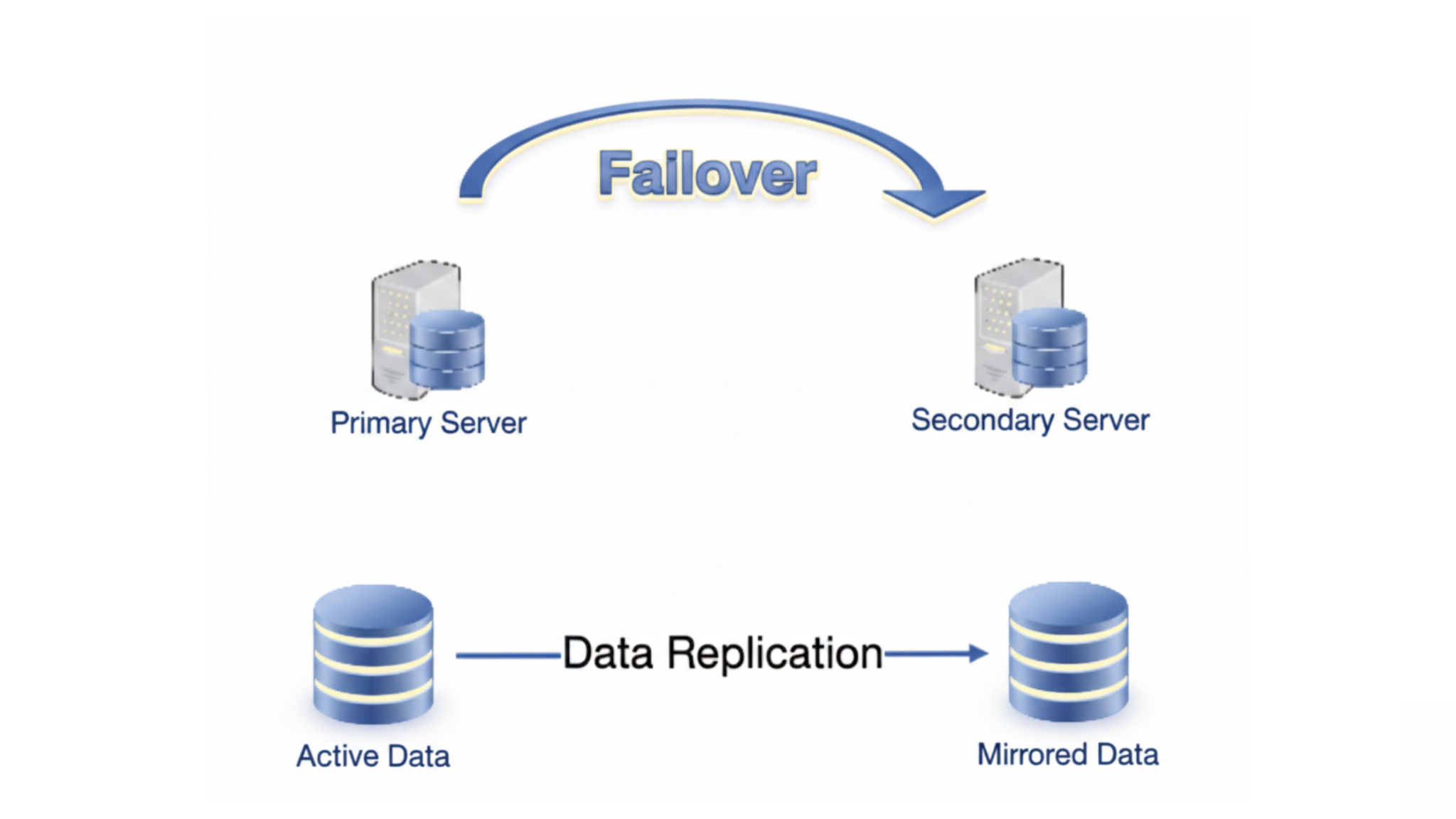
- Failover kicks in. If one server suddenly crashes, another server immediately takes over. The transition is seamless. Visitors never notice.
It’s like a backup generator for your shop’s busiest stall, except it’s automatic, and you don’t even have to press a button.
Many wordpress hosting plans include this without extra effort on your part.
2) Backups That Actually Save You
Backups are your time machine. A plugin goes rogue? A hacker sneaks in?
Someone deletes an important page by accident? With backups, none of that ruins your day.
But here’s the catch: they have to be automatic. Manual backups sound nice on paper, but in real life, you forget. And when you forget, disaster hits.
Automatic daily backups save you even if you don’t touch anything. The system takes a snapshot of your website and stores it safely.
Later, if something goes wrong, you just restore it, no panic, no lost orders.
This is one of the most important things to check in cheap WordPress hosting.
If a plan doesn’t include backups, it might save you a few thousand naira, but it could cost you tens of thousands in lost revenue.
3) Internet Backup (Network Redundancy)
Internet in Nigeria is… let’s be honest… unpredictable. One minute MTN is blazing fast.
Next, it drops like a badly cooked jollof pot. Airtel can go down without warning. Fiber cables get cut during road construction.
Network redundancy solves this. Hosting providers don’t rely on just one internet connection. If one fails, another automatically carries your traffic.
This keeps your website live for visitors even when:
- MTN goes down during peak hours
- Airtel slows your checkout process
- A fiber line is accidentally cut
Without this, your website could be “online” technically but unreachable for your customers. And in Nigeria, unreachable means lost sales.
4) Power Backup
Servers need electricity. No power, no site. That’s simple.
But power in Nigeria? NEPA and the grid can fail for hours. That’s why hosting providers use:
- UPS batteries to cover short flickers
- Generators for longer outages
It’s like having a generator at your shop. When NEPA goes off, the lights stay on, and your shop continues selling.
Hosting providers with power redundancy keep servers running no matter what the grid does. Without it, downtime is guaranteed.
5) Monitoring and Alerts
Imagine if you could watch your store 24/7. You’d notice a small leak before it floods the place. Monitoring does exactly that for your website.
Good hosting providers monitor:
- Whether your website is up
- How fast pages are loading
- Server health
And if something goes wrong, you get an instant alert. Phone, email, SMS, whatever it takes.
This is huge. Instead of waiting for angry customers to call or leave bad reviews, you fix the problem immediately. It’s like seeing a shoplifting attempt before it happens.
6) Disaster Recovery Plans
Sometimes the problems are bigger. Not a small outage real disasters: floods, fires, hacking attempts.
A disaster recovery plan is your “playbook” for these moments. It tells you:
- Where backups are stored
- How fast your systems can recover
- Who handles each step
For example, if your Lagos server floods during the rainy season. A proper plan will have a backup server in Abuja ready to take over.
Your website stays online, your orders keep coming, and your customers don’t even know anything happened.
Without a plan, even one serious event can wipe out days of work and thousands of naira.
TL;DR Version
Website redundancy is like a full safety net for your business:
- Multiple servers = your site keeps running if one fails.
- Automatic backups = rewind time when things break.
- Network redundancy = internet issues don’t block customers.
- Power backup = NEPA or generator outages don’t stop your site.
- Monitoring = problems are caught before customers notice.
- Disaster recovery = major crises don’t destroy your business.
Do this right, and downtime stops being a nightmare.
Your store, blog, or client sites stay open, safe, and ready even when Nigeria’s power and internet are acting up.
What You Gain From Website Redundancy
Website redundancy gives you peace of mind you can go about your day without worrying that a small glitch will ruin your sales.
It also gives your business an edge. Here’s how:
- Your site stays online, even when things go wrong
- Pages load faster, so visitors don’t leave out of frustration
- Your data is safe from accidents, hacks, or mistakes
- Customers trust you more because your site works reliably
- Google notices your site is stable, which helps with ranking
In Nigeria, where websites can fail under the slightest pressure, just staying online puts you ahead of the game.
Your competitors’ sites crash, but yours keeps running and your customers notice.
How to Set Up Website Redundancy Without Stress
Here’s a simple way to go about it:
Step 1: Take a Good Look at What You Have
Start by checking your current setup. Look at your servers, your data storage, your internet connections, and even your power backups. Ask yourself:
- What happens if my server crashes?
- Where is my data stored, and is there a backup?
- Could my internet connection fail and take my site offline?
Many people using WordPress Hosting for Beginners skip this step and only realize the holes when it’s too late.
A reliable hosting provider like Truehost can make this easier because their servers, backups, and domain services are already built for stability.
Step 2: Make a Solid Plan
Once you know where your weak spots are, plan how to fix them. Decide:
- Which systems need duplicates (like servers or databases)
- Where you want to store backups
- How traffic will be shared between servers (load balancing)
- How failover will work if something crashes
Prioritize the most important things like your checkout page, customer data, or critical content.
It’s like mapping your escape routes before a storm hits.
Step 3: Put the Plan Into Action
Now, start building your redundancy layer by layer:
- Set up multiple servers so your site doesn’t rely on just one
- Use data centers in different locations to avoid local outages
- Configure backups that run automatically
- Install load balancers and failover systems to handle traffic spikes
- Make sure your internet has backups with multiple ISPs
- Ensure power redundancy with UPS batteries and generators
You don’t need to do everything at once. Start with the most important parts and grow from there.
Step 4: Test and Keep Things Running
Redundancy isn’t a “set it and forget it” deal. You need to check it regularly:
- Simulate a server or network failure and see if your backup takes over
- Test that your backups actually restore correctly
- Monitor your site’s uptime and performance every day
- Do maintenance on servers, networks, and software so everything stays healthy
It’s like checking your car before a long trip. A quick inspection now saves hours of panic later.
Types of Website Redundancy (Quick Overview)
Here are the main types explained in simple, real-life terms:
Server Redundancy
Your website lives on a server. If that server crashes, your site goes down. Simple as that.
Server redundancy fixes this by using multiple servers to handle your traffic. So if one server gets overwhelmed or fails, another one steps in automatically.
Load balancing spreads visitors across all the servers evenly, and failover systems make sure your site keeps running without interruption.
Data Redundancy
Your website data, orders, customer info, and blog posts are your gold. Losing it is a nightmare.
Data redundancy protects this by keeping copies of your critical data in multiple places.
Daily backups, database replication, or cloud storage make sure that if one copy is lost or corrupted, another is ready to take over.
Network Redundancy
The internet in Nigeria can be unpredictable. One ISP might slow down, another might go offline, and suddenly your site becomes unreachable.
Network redundancy solves this by using multiple Internet Service Providers (ISPs) and different network paths.
If one fails, your site stays online because traffic automatically switches to another connection.
Power Redundancy
Servers need electricity to run, and we all know how power behaves here. A sudden NEPA blackout can bring your site to a halt.
Power redundancy combines Uninterruptible Power Supplies (UPS) with backup generators. The UPS keeps the lights on during short flickers, and the generator takes over for longer outages.
Geographic Redundancy
Sometimes the problem isn’t just a server or power outage, it’s location-based. A flood, storm, or fire can take out a whole data center.
Geographic redundancy spreads your servers and backups across multiple locations. If one area is affected, another location takes over instantly.
Real-Life Examples of Website Redundancy at Work
a) Google
Google doesn’t leave anything to chance.
Their data centers are packed with backups everywhere: servers, storage systems, internet connections, and even power supplies.
If one server fails, another immediately takes over. Traffic is shared evenly across multiple servers, and their global network of data centers means that even if one location has a problem, your search results or Gmail access stay smooth.
The lesson here is clear: redundancy works best when it’s layered. Multiple backups, load balancing, and rapid failover plans aren’t overkill; they’re what keep millions of users online all the time.
b) Dropbox
Dropbox lives and dies by its users’ files. Losing a single document would be a disaster.
That’s why they replicate every file across multiple data centers, use real-time synchronization, and run constant backups.
Even if one data center goes down, your files are safe and instantly accessible from another.
Traffic is balanced across servers so no single system gets overwhelmed.
For anyone running an online store or blog, the takeaway is simple: your data is only as safe as your backups.
Real-time replication and automated failover can save you from panic when accidents or outages happen.
The Takeaway for Your Website
You don’t need Google or Dropbox to benefit from redundancy. The principle is the same for a small blog or e-commerce store on WordPress hosting:
- Keep backups and replicas of your data
- Use multiple servers if possible
- Make sure traffic is spread evenly with load balancing
- Test failover so your site keeps running when something goes wrong
Even small steps, like using a reliable hosting provider with automatic backups and uptime guarantees, can save you from losing customers and money when issues arise.
Conclusion
Look, website redundancy isn’t some fancy tech thing. It’s just common sense.
Stuff will go wrong. Power cuts, slow internet, server issues, it happens. That’s normal.
What isn’t normal is letting your website crash because of it. If your site is important, redundancy should be important too.
Pick hosting providers who get this. Pick stability. Pick peace of mind. Your future self and your wallet will thank you.