Domain NamesFind and register your ideal domain name instantly.
 Web HostingEasy-to-use hosting powered by cPanel — ideal for managing websites in Nigeria.
 Windows HostingRun .NET apps with Windows-optimized hosting
 Affiliate ProgramMake money promoting our services
 Reseller HostingMake money by reselling our hosting products under your own brand
 .COM Domains
 All DomainsExplore all supported tld domains in Nigeria
 WhoisFind out who owns any domain, as well as verify your registration details
 VPS Hosting in Nigeria
 Dedicated ServersReimagine your site speed with your own complete server
 AI Website BuilderDesign your site with drag-and-drop tools
 Online Store BuilderStart your online shop without code
 Support PortalFind answers or get expert help
 Contact UsReach our team via chat or email
 BlogRead our extensive guides on web hosting and more
When you build a website, there’s a hidden factor that affects everything: the type of server storage. It’s not the most glamorous topic, but it’s the part that holds every photo, line of code, and product listing that makes your site yours.
The type of storage your host uses is like the foundation of a house. You don’t always see it, but it determines how stable and quick everything feels for your visitors.
In 2026, the difference between a slow site and a fast one, a glitchy experience and a smooth one, comes down to the server storage types.
In this guide, I’ll reveal what server storage is, compare the main types available today, and see how choosing the right one helps your website run better for everyone who visits.
What Is a Sever Storage?
Before we get to the different types, let’s first unpack what server storage is. Server storage is the permanent memory of a server. A server is a powerful computer that runs nonstop, and its storage is where it keeps every single piece of data, long-term.
When you have a website or an online service, everything that makes it work has to live somewhere it can be accessed at any time, from anywhere. That “somewhere” is the server’s storage.

Here’s what specifically gets placed into that storage:
- All your website’s files: The documents that contain your site’s design, its structure, and how it functions, such as HTML, CSS, and PHP files.
- All your content: Every image you’ve uploaded, every video, every downloadable PDF or document available on your site.
- Your database is a core part of storage. The database holds the changing, dynamic content of your site. This includes your blog posts, your product listings if you have a store, your customer information, and all the comments users have left.
- Your emails: If you have email addresses with your domain, all the messages sent and received are stored there.
- Copies of your site: Backups of your entire website are also stored here, so you can restore it if needed.
When someone visits your website, their computer sends a request to your server.
The server then retrieves the necessary files and data from its storage, sends them to the visitor’s browser, and displays the page.
The speed and reliability of this process depend heavily on the type of storage the server uses.
At Truehost, when you choose one of our hosting plans, we allocate a specific portion of this server storage just for you.

For example, our WebHosting Starter plan gives you 30 GB of this space. We use a high-performance storage technology (SSD) to ensure fast storage access, helping your website load faster for visitors.
Server Storage Types in 2026
Over the years, data storage technology has evolved. In 2026, we’re mainly comparing three core types.
1) HDD (Hard Disk Drive)
This is the older, traditional technology. Inside an HDD is a spinning magnetic disk like a tiny, super-fast vinyl record, and a mechanical arm that reads and writes data.
Because it has moving parts, it’s slower and more prone to physical wear and tear.
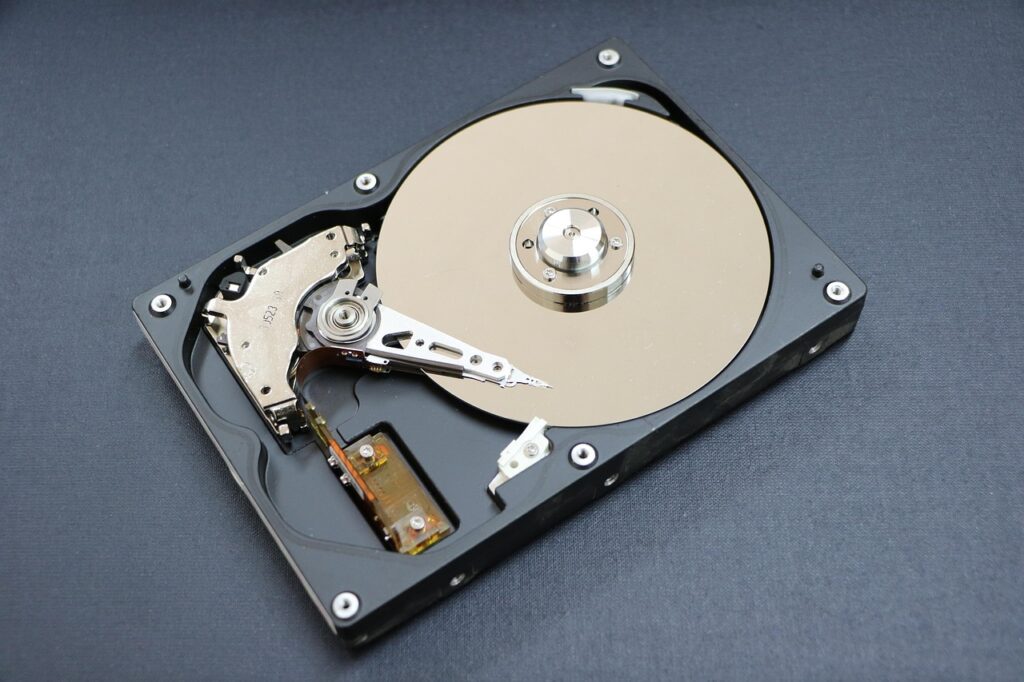
HDD is like a large, traditional library with physical books. A librarian (the mechanical arm) has to walk to the right aisle and shelf to find the book you need.
It gets the job done, but it takes time.
You’ll find it mostly in legacy systems and massive archives where cost per gigabyte is the top priority and speed is not a concern.
2) SSD (Solid State Drive)
This is the modern standard. SSDs have no moving parts. They use flash memory, the same technology in your smartphone or USB stick, but far more advanced and durable. Data is stored on microchips, enabling near-instant access.
It is like the same library, but every book has been digitized. You type the name into a computer, and it appears instantly. No walking, no waiting. That’s the speed difference.
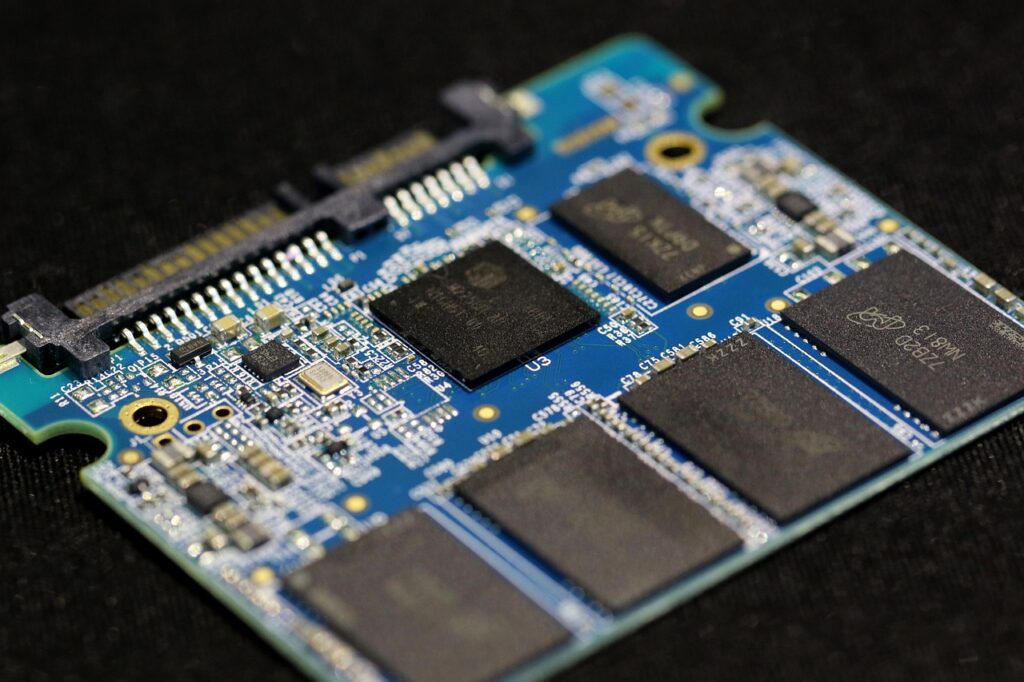
SSD is the workhorse of modern hosting. All Truehost plans, from our WebHosting Starter to Unlimited, use SSD storage. This is why our hosted websites are fast.
For example, a 30 GB or 50 GB SSD, as listed in our plans, means you get that amount of super-quick storage.
3) NVMe SSD (Non-Volatile Memory Express SSD)
This is the next evolution. It is a supercharged SSD. While a regular SSD is a major upgrade from an HDD, it can sometimes be limited by older connection paths inside the computer.
NVMe is designed from the ground up to use the fastest possible pathways, drastically reducing delays.
So… if a regular SSD is a powerful digital catalogue, an NVMe SSD is like having a direct, high-speed neural link to the entire database. The request and delivery of information happen at an astonishing rate.
You’ll find NVMe SSD in high-performance cloud servers, demanding database applications, and premium hosting tiers.
A Simplified Comparison of Server Storage
This is how the server storages compare:
| Features | HDD (Hard Disk Drive) | SSD (Solid State Drive) | NVMe SSD |
| Speed | Slow. Spinning disks cause delays. | Very Fast. 5x to 100x faster than HDDs. | Extremely Fast. Can be 2x to 7x faster than standard SSDs. |
| Durability | Lower. Mechanical parts can fail due to shock or wear. | High. No moving parts, more shock-resistant. | Very High. Similar rugged build to SSDs. |
| Noise and power | Audible noise and higher power use. | Silent and more energy-efficient. | Silent and highly energy-efficient. |
| Cost per GB | Lowest. Cheap for vast amounts of space. | Moderate. Higher than HDD, but prices are great. | Highest. Premium for the highest speed. |
| Best for | Cold storage, massive backups that are rarely accessed. | General-purpose hosting, websites, business applications. | Top-tier databases, real-time analytics, high-traffic platforms. |
Which Server Storage Should You Choose?
For most users, such as small businesses, bloggers, entrepreneurs, portfolio websites, and e-commerce stores, SSD storage is a great choice.
Here’s why getting an SSD is not really a choice anymore:
Website Speed: Google uses page speed as a ranking factor. A slow site hurts your visibility. More importantly, visitors will leave if a page takes more than a few seconds to load. SSDs ensure your site files are delivered quickly.
Reliability: Your website needs to be up. The mechanical nature of HDDs makes them a risk point for failure. SSDs are far more reliable, which contributes to strong uptime, like our 99.9% uptime guarantee.
Overall Experience: Everything on a server, loading a webpage, and accessing your email via cPanel feels snappier with an SSD.
Choosing an HDD in 2026 to save a tiny amount of money is a false economy. The cost of slower performance, higher bounce rates, and potential downtime is far greater.
NVMe, while fantastic, is sometimes overkill for a standard website and comes at a premium that may not be necessary yet.
That’s why at Truehost, we made the decision easy for you. Every single hosting plan we offer comes with SSD storage.
If you’re on our Starter plan with 30 GB SSD or our Unlimited plan with unlimited SSD space, you’re getting the modern, fast storage your online presence deserves.
How to Choose the Best Server Storage
Since SSDs are the standard, your decision now centres on how much SSD storage you need and which other features it offers. Here’s a simple guide:
Look at Your Current Needs
List what you’ll store. A simple brochure website might need 5-10 GB. A blog with hundreds of posts and images might need 20-30 GB.
An online store with thousands of product photos will need at least 50 GB.
Plan for Growth
Don’t buy just for today. If you plan to add content regularly, choose a plan that gives you room to grow. Our WebHosting Pro (50 GB SSD) or Unlimited (Unlimited SSD) plans are perfect for growth.
Check the Full Package: Storage is just one part. Look at the accompanying features:
- Bandwidth: Our plans include unlimited bandwidth, so you don’t pay extra as your traffic grows.
- Support: Can you get help when you need it? Our 24/7 customer support via live chat, WhatsApp, or phone is there for you.
- Security: Is an SSL certificate included? Ours are free and automated, keeping your site secure.
- Control: Do you get a user-friendly control panel? We provide cPanel access, the industry standard.
- Backups: Are your files backed up? We provide free daily backups to keep your data safe.
The Provider’s Infrastructure
A fast SSD in a poorly maintained server won’t help. Choose a provider, like Truehost, that invests in modern infrastructure, robust security, and reliable networks to get the full benefit of that SSD speed.
Start Simple, Upgrade Easily
It’s best to start with a plan that fits your immediate budget and needs, with a clear path to upgrade.
With Truehost, you can start with our Starter plan at NGN1,275/month and easily move to a larger plan as your website grows.
Wrapping It Up
So, what’s the bottom line?
For a fast, reliable website in 2026, SSD storage is the way to go. It’s become the standard because it’s simply better, faster, more durable, and built for modern websites.
That’s why every hosting plan at Truehost uses SSD storage. If you choose our Starter plan or our Unlimited plan, you’re getting the speed and reliability your site needs to perform well.
With Truehost, you get modern SSD storage, plus features like free SSL, 24/7 support, and easy upgrades, all designed to help your website grow without hassle.
Ready to get started? Find the SSD hosting plan that’s right for you.