Domain NamesFind and register your ideal domain name instantly.
 Web HostingEasy-to-use hosting powered by cPanel — ideal for managing websites in Nigeria.
 Windows HostingRun .NET apps with Windows-optimized hosting
 Affiliate ProgramMake money promoting our services
 Reseller HostingMake money by reselling our hosting products under your own brand
 .COM Domains
 All DomainsExplore all supported tld domains in Nigeria
 WhoisFind out who owns any domain, as well as verify your registration details
 VPS Hosting
 Dedicated ServersReimagine your site speed with your own complete server
 AI Website BuilderDesign your site with drag-and-drop tools
 Online Store BuilderStart your online shop without code
 Support PortalFind answers or get expert help
 Contact UsReach our team via chat or email
 BlogRead our extensive guides on web hosting and more
Self-hosting n8n gives you full control over your data, predictable costs, and no execution limits.
So, what n8n VPS requirements do you need to run it properly? The bare minimum is 1 vCPU, 2GB RAM, and 20-50GB of storage.
N8n is memory-bound, not CPU-bound. RAM is your limiting factor, not processing power. At idle, n8n uses about 100MB of memory. But once workflows start running, memory consumption climbs fast.
Every active workflow, every node, and every piece of data being processed eats into your available RAM. Your actual requirements depend entirely on your use case. Running a few simple automations once a day? You can get by with very little.
Processing large CSVs, using AI nodes, or handling hundreds of daily webhooks? You’ll need significantly more resources.
For most users just starting out, the minimum viable setup is 1 vCPU, 2GB RAM, 20-50GB storage, about 1TB bandwidth, and Ubuntu 24.04 LTS.
On Truehost, this configuration starts at ₦10,500 per month when billed triennially. It’s a complete VPS built specifically for n8n – pre-configured, PostgreSQL-ready, and SSL certificates already set up.
N8n Bare Minimums vs the Sweet Spot
| Resource | Bare minimum | Sweet spot |
| vCPU | 1 core | 2-4 cores |
| RAM | 2GB | 4-8GB |
| Storage | 20-50GB SSD/NVMe | 40-80GB NVMe |
| Bandwidth | 1TB | 2TB+ |
| OS | Ubuntu 24.04 LTS | Ubuntu 24.04 LTS |
The bare minimum gets you up and running. But it’s not where you want to stay long-term, especially if your automations start growing
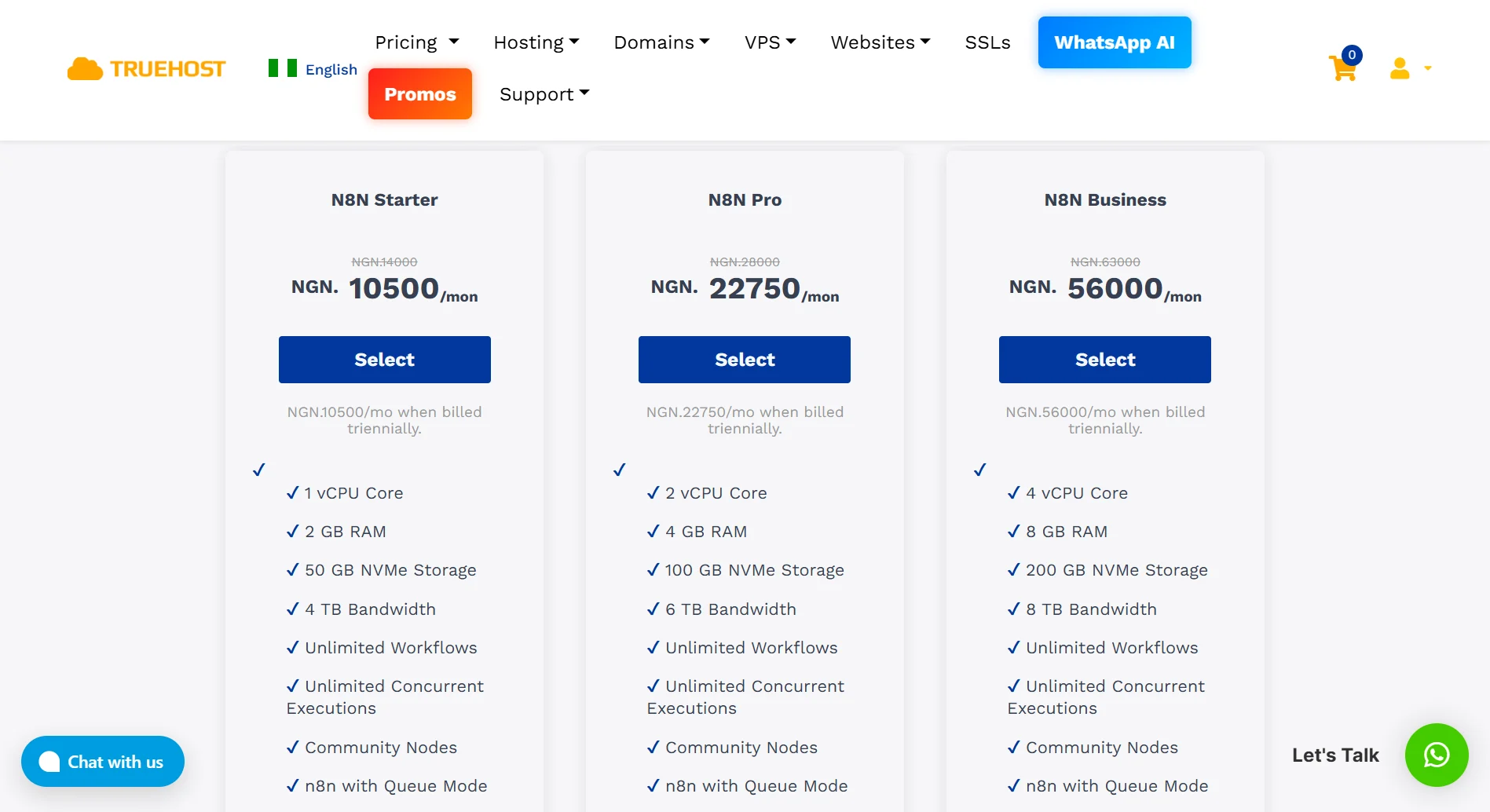
In this case, the bare minimum at Truehost is our n8n Starter plan, and the sweet spot is our n8n Pro plan.
What Are Minimum Requirements Good For?
A 1 vCPU, 2GB RAM setup can handle a surprising amount of work, as long as you’re realistic about what it can do.
- Development, testing, and staging environments. You can test workflows, experiment with new integrations, and break things without affecting production.
- Light production workloads are also manageable. For instance, personal automations that run a few times a day. Maybe a daily report generation, a Slack notification when someone fills out a form, or syncing data between two apps once per hour.
- Reactive and real-time workflows work fine too – as long as they’re not too complex. If a webhook triggers a simple automation that does three things and stops, the minimum VPS handles it without breaking a sweat.
- You can run multiple active workflows simultaneously, but there’s a catch. The more that run at once, the slower everything gets. A few concurrent executions? Fine. Twenty at the same time? You’ll notice the lag.
- Processing small API payloads is completely doable. Tiny JSON objects, short text strings, simple database queries.
- Basic AI Agent usage with small context windows works, but keep it simple. You’re not running massive language models locally. You’re calling external APIs like OpenAI or Anthropic with relatively short prompts.
- The minimum setup also works stably with SQLite if you regularly prune your logs. SQLite doesn’t use much RAM, which is a big advantage when you’re working with limited memory
Limitations of Using Bare Minimum Resources for n8n VPS
- Batch processing and large datasets will choke a minimum VPS: If you’re processing thousands of rows from a CSV or transforming large JSON payloads, the 2GB RAM ceiling becomes a problem fast. The Code node is particularly greedy here because it creates copies of data during processing.
- High workflow concurrency is another issue: If multiple workflows trigger simultaneously or there’s a sudden spike in traffic, the server struggles to keep up. Webhooks start timing out. Workflows fail silently. You might not even know until you check the logs.
- API payloads need to stay small: a 10MB JSON response could eat up most of your available memory during processing. If your automations integrate with heavy external APIs, plan for more resources.
- AI Agents on minimum specs are restricted to small context windows: No long chat histories, no lengthy documents to analyze. You’re limited to simple, short prompts and small responses.
- Database growth is limited: With 20-50GB of storage, your execution logs and workflow data have a hard ceiling. n8n stores every execution by default, and those logs add up quickly. Without regular pruning, you’ll run out of space.
- No room for running additional services on the same VPS: Forget about running Redis for queue mode, or a separate PostgreSQL database alongside n8n. The minimum VPS is a single-purpose machine – just n8n, nothing else.
- Frequent out-of-memory crashes if your workflows grow even slightly complex: That workflow that runs fine for months might suddenly start crashing. Why? Because memory usage isn’t linear. A small increase in data volume can push you past the tipping point
How to Optimize the Minimum n8n VPS Resources
a) Keep Workflows Simple and Avoid Complex Loops
Every loop iteration stores copies of your data in memory. Processing 1,000 items in a loop means holding 1,000 copies at once.
To optimize, use the Split In Batches node to break data into smaller chunks.
Filter data early in your workflow so you’re processing only what you actually need, not everything that comes through.
b) Schedule Heavy Tasks During Low-traffic Hours
Run resource-intensive workflows, such as large reports or batch operations, when your server is least active. This makes the full 2GB RAM available for that one job.
So, use the Schedule Trigger node to set heavy automations to run at 2 AM or 3 AM. This simple timing shift prevents crashes during busy hours.
c) Delete Old Execution Logs Regularly
n8n stores every execution by default. A workflow that runs every 5 minutes generates nearly 300 logs per day, and storage fills up quickly.
Set up an automated workflow that prunes logs older than 7 or 30 days using the Execute Workflow node, or configure n8n’s built-in pruning through the UI.
Regular cleanup keeps your database small and prevents storage-related crashes.
d) Use SQLite (not PostgreSQL) to Save RAM
SQLite runs in-process with n8n and doesn’t require a separate database service, so it uses much less memory. PostgreSQL is more robust but runs as its own service, consuming RAM you can’t spare on a 2GB VPS.
Stick with SQLite on the minimum tier and switch to PostgreSQL after you upgrade to more RAM.
e) Limit Concurrent Workflow Runs
Each concurrent execution consumes memory, and 2GB disappears quickly when multiple workflows run at once.
Use n8n’s concurrency settings to limit the number of simultaneous runs. Stagger scheduled workflows so they don’t overlap.
For webhook-triggered workflows, queue mode can help manage load, but it requires Redis, which adds its own memory overhead, so keep concurrent executions low on minimum specs.
f) Offload File Processing to External Services
Processing images, videos, or large documents on your VPS consumes significant memory. A single image resize could use hundreds of MB of RAM.
Instead, send files to external services like Cloudinary for images or serverless functions for document processing.

Your VPS handles only the orchestration – triggering the external service and receiving results, keeping memory usage low while the job still gets done.
Get Started with Truehost n8n VPS
At Truehost, we’ve built VPS plans specifically for n8n. You don’t get a generic server and hope it works. You get a purpose-built automation machine.
When you sign up, we automatically configure the containers, install PostgreSQL databases, set up reverse proxies, and generate free SSL certificates, all before you log in. You literally get running in minutes.
What you get:
- Unlimited workflows – build what you want, run what your VPS can handle. No execution caps, no surprise bills.
- Pay less – save thousands of Naira yearly compared to pay-per-execution cloud plans. Predictable monthly pricing in Naira.
- Full SSH root access – dedicated virtual hardware. Install Docker, run Python scripts, and add npm modules. Full control.
- Community nodes – install premium integrations directly into your workspace.
Plans (triennial pricing):
- Starter: ₦10,500/mo – 1 vCPU, 2GB RAM, 50GB storage, 4TB bandwidth
- Pro: ₦22,750/mo – 2 vCPU, 4GB RAM, 100GB storage, 6TB bandwidth
- Business: ₦56,000/mo – 4 vCPU, 8GB RAM, 200GB storage, 8TB bandwidth
Get running in 3 steps:
- Pick your server size
- We handle the setup
- Start automating
Are you on a small budget? Start with our n8n VPS starter plan at ₦10,500/month and scale as you grow.