Domain NamesFind and register your ideal domain name instantly.
 Web HostingEasy-to-use hosting powered by cPanel — ideal for managing websites in Nigeria.
 Windows HostingRun .NET apps with Windows-optimized hosting
 Affiliate ProgramMake money promoting our services
 Reseller HostingMake money by reselling our hosting products under your own brand
 .COM Domains
 All DomainsExplore all supported tld domains in Nigeria
 WhoisFind out who owns any domain, as well as verify your registration details
 VPS Hosting in Nigeria
 Dedicated ServersReimagine your site speed with your own complete server
 AI Website BuilderDesign your site with drag-and-drop tools
 Online Store BuilderStart your online shop without code
 SSLs
SSLs Support PortalFind answers or get expert help
 Contact UsReach our team via chat or email
 BlogRead our extensive guides on web hosting and more
Businesses spend countless hours on repetitive tasks like replying to emails, updating records, managing schedules, and moving data between apps.
OpenClaw helps automate these tasks by connecting AI to the tools your business already uses, allowing it to complete real work instead of just answering questions.
From customer support and sales to marketing and internal operations, OpenClaw can handle multi-step workflows with minimal supervision.
Here are 15 practical OpenClaw use cases that can help businesses save time, reduce manual work, and improve productivity.
1) Customer Support Automation

OpenClaw can handle a large share of repetitive support work before a human agent ever sees a ticket.
It classifies incoming requests, pulls relevant answers from a company’s knowledge base, drafts replies, updates CRM records, and escalates anything outside its scope to the right team.
For sensitive or high-stakes responses, businesses can insert a human-approval step before anything is sent to a customer.
Why it counts
- Reduces response times
- Lowers overall support workload
- Improves consistency across responses
- Keeps customer records updated automatically
2) AI Sales Assistant
Sales reps lose significant time to administrative work that has nothing to do with selling. OpenClaw can qualify inbound leads, research prospects, enrich company data, draft personalized outreach, schedule meetings, and keep CRM entries current, all without a rep manually touching each record.
Why it counts
- Improves lead quality before it reaches a rep
- Frees up selling time
- Personalizes outreach at scale
- Keeps CRM data accurate without manual entry
3) Marketing Content Operations
Rather than only generating text, OpenClaw can support the full content pipeline: researching competitors, building outlines, drafting articles, repurposing long-form content into social posts, uploading drafts to a CMS, and notifying editors when something is ready for review.
Why it counts
- Speeds up content production
- Simplifies handoffs between writers and editors
- Makes one piece of content easier to repurpose across channels
- Keeps publishing schedules on track
4) Lead Research & Prospecting
Manually researching prospects is one of the most time-consuming parts of outbound sales. OpenClaw automates company research, identifies decision-makers, scores leads against a defined ideal customer profile, builds prospect summaries, and enriches CRM records with the findings.
Why it counts
- Cuts research time significantly
- Improves the quality of prospects entering the pipeline
- Prioritizes the leads worth pursuing first
- Reduces manual data entry
5) Internal Knowledge Assistant
OpenClaw can function as a company-wide search layer, letting employees ask plain-language questions about HR policy, onboarding steps, SOPs, pricing, documentation, or engineering resources instead of digging through several disconnected systems.
Why it counts
- Gives employees instant answers
- Reduces repetitive questions directed at HR or IT
- Improves knowledge sharing across teams
- Speeds up onboarding for new hires
6) HR & Employee Onboarding

HR teams can offload much of onboarding administration to OpenClaw: sending welcome emails, requesting new accounts, distributing documentation, scheduling onboarding tasks, sending reminders, and answering common employee questions during the first weeks.
Why it counts
- Reduces HR administrative load
- Improves consistency of the onboarding experience
- Saves time across multiple departments, not just HR
- Improves the new-hire experience
7) Finance & Invoice Processing
Finance teams can use OpenClaw to extract data from invoices, categorize expenses, send payment reminders, route invoices for approval, and generate financial reports. Any step involving an actual payment should require human sign-off.
Why it counts
- Reduces manual data entry
- Speeds up the approval cycle
- Improves the quality and timeliness of reporting
- Minimizes processing errors
8) Meeting Assistant
Before, during, and after meetings, OpenClaw can gather relevant documents, take notes, generate summaries, assign action items, and schedule the necessary follow-ups, reducing the administrative overhead that surrounds most recurring meetings.
Why it counts
- Saves time on documentation
- Keeps meetings organized and on-topic
- Improves accountability for action items
- Ensures follow-up actions are actually tracked
9) Project Management Automation
OpenClaw can monitor a project’s progress directly from the tools a team already uses, create tasks, summarize updates, flag blockers, and notify managers when deadlines are at risk, without requiring someone to manually compile status updates.
Why it counts
- Improves visibility into project health
- Reduces time spent on manual status updates
- Surfaces issues earlier
- Keeps teams aligned to schedule
10) IT Help Desk Assistant
Routine IT requests password resets, software documentation, basic troubleshooting, ticket routing- can be handled by OpenClaw directly, with complex or sensitive issues escalated to a technician.
Why it counts
- Reduces IT team workload
- Improves response times for common requests
- Standardizes how routine issues are handled
- Frees technicians to focus on complex work
11) Business Intelligence Reporting
OpenClaw can pull data from multiple business systems on a recurring schedule and turn it into executive summaries, dashboards, and performance alerts, replacing manual spreadsheet compilation.
Why it counts
- Automates recurring reporting work
- Gives leadership near-real-time insight
- Reduces manual spreadsheet work
- Supports faster, better-informed decisions
12) Executive Assistant
Acting as a digital executive assistant, OpenClaw can organize calendars, prepare travel plans, summarize inbound email, produce daily briefings, and gather materials ahead of meetings.
Why it counts
- Saves executive time
- Reduces email overload
- Improves meeting preparation
- Keeps priorities visible and organized
13) Procurement & Vendor Management
Procurement teams can use OpenClaw to track supplier pricing, monitor contract renewal dates, manage purchase approvals, and generate inventory alerts, keeping vendor data organized in one place.
Why it counts
- Prevents missed contract renewals
- Improves the quality of purchasing decisions
- Simplifies vendor management overall
- Helps control costs
14) Compliance & Document Monitoring
In regulated industries, OpenClaw can monitor policy updates, regulatory changes, contract terms, and document expiration dates, notifying the relevant team whenever action is required.
Why it counts
- Supports ongoing compliance
- Reduces legal risk
- Prevents missed deadlines
- Improves visibility into document status
15) Custom Multi-Agent Business Teams
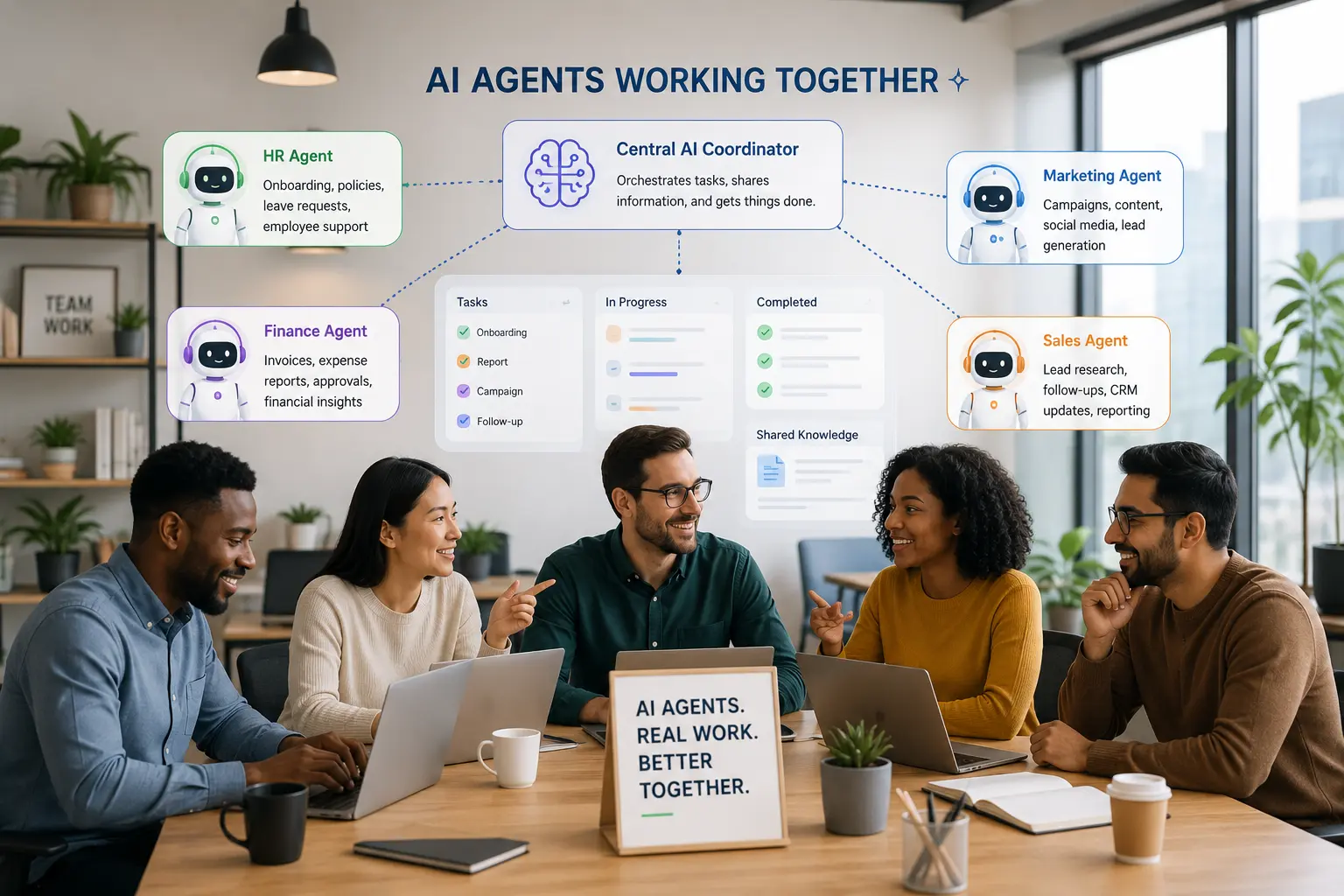
Rather than a single general-purpose assistant, businesses can deploy several specialized OpenClaw agents, one per department, such as marketing, sales, research, finance, operations, or support, that collaborate to complete workflows spanning multiple functions.
Why it counts
- Assigns tasks to agents specialized for that function
- Scales automation across the whole business, not one team
- Improves overall workflow efficiency
- Makes complex, multi-step processes easier to manage
Start Automating Your Business with OpenClaw
Every use case above solves the same underlying problem: work that is repetitive, time-consuming, and spread across too many disconnected systems. OpenClaw closes that gap by acting directly within the tools a business already uses, rather than adding another dashboard for someone to check.
None of this requires automating everything at once. The businesses that get the clearest results start with a single high-friction workflow, measure what it saves, and expand from there once the value is proven.
Ready to put OpenClaw to work for your business? Get started with OpenClaw hosting on Truehost and have your first automation running without managing the infrastructure yourself.
OpenClaw Use Cases for Businesses: FAQs
Can OpenClaw be used in a business?
Yes. OpenClaw is built specifically to connect to business systems, CRMs, email, messaging platforms, project management tools, and internal documentation, rather than functioning as a standalone chatbot. It is designed to take action inside those systems, not just answer questions about them.
Which businesses benefit most from OpenClaw?
Organizations with high volumes of repetitive, well-defined workflows see the fastest returns: e-commerce and customer support teams, B2B sales organizations, agencies producing recurring content, and companies managing multiple disconnected tools. Businesses with heavier compliance or data-sensitivity requirements can still benefit but typically need more careful setup around approvals and permissions.
Is OpenClaw secure enough for business use?
Security depends heavily on deployment and configuration rather than the framework alone. Because OpenClaw can execute real actions- sending messages, running commands, modifying records- businesses should run it in a sandboxed or containerized environment, scope its access permissions tightly, and require human approval for sensitive actions like payments or external communications.
Can OpenClaw replace customer support agents?
Not entirely. OpenClaw is well suited to handling repetitive, well-defined inquiries, order status, account questions, and basic troubleshooting; but it works best as a layer in front of human agents rather than a full replacement. Complex, sensitive, or emotionally charged issues still benefit from human judgment.
What business apps can OpenClaw integrate with?
OpenClaw is commonly connected to CRMs such as HubSpot and Salesforce, support platforms like Zendesk and Intercom, communication tools including Slack and Gmail, project management systems like Asana and Jira, and document platforms such as Google Drive, Notion, and Confluence. Its integration options are extensible, so the specific set of connected tools varies by deployment.
Can OpenClaw automate sales and CRM tasks?
Yes. This is one of its higher-ROI use cases: lead scoring, prospect research, personalized outreach drafting, meeting scheduling, and keeping CRM records synchronized are all workflows OpenClaw can handle with limited manual oversight.
What’s the difference between OpenClaw and traditional AI chatbots for businesses?
A traditional chatbot generates a response and stops there. OpenClaw is built to complete multi-step tasks: it can reason about what needs to happen next, call the necessary tools or systems, and carry a workflow through to completion, including actions outside the conversation itself, such as updating a record or sending a scheduled follow-up.
Should businesses self-host OpenClaw or use a managed deployment?
Self-hosting offers more control and lower direct software costs but requires technical setup, ongoing maintenance, and security hardening. A managed deployment trades some of that control for faster setup and reduced operational burden. The right choice generally depends on whether a business has in-house technical capacity to maintain its infrastructure and monitor agent behavior over time.