Domain NamesFind and register your ideal domain name instantly.
 Web HostingEasy-to-use hosting powered by cPanel — ideal for managing websites in Nigeria.
 Windows HostingRun .NET apps with Windows-optimized hosting
 Affiliate ProgramMake money promoting our services
 Reseller HostingMake money by reselling our hosting products under your own brand
 .COM Domains
 All DomainsExplore all supported tld domains in Nigeria
 WhoisFind out who owns any domain, as well as verify your registration details
 VPS Hosting
 Dedicated ServersReimagine your site speed with your own complete server
 AI Website BuilderDesign your site with drag-and-drop tools
 Online Store BuilderStart your online shop without code
 Support PortalFind answers or get expert help
 Contact UsReach our team via chat or email
 BlogRead our extensive guides on web hosting and more
You have a business, a skill, and an idea you’ve been sitting on. But right now, you don’t have a website.
And somewhere in the back of your mind, you think getting one means learning to code, hiring a developer, or spending money you don’t have.
None of that is true.
In this guide, you’ll see exactly how to build a website in Nigeria. A Step by step, even if you’ve never done it before. By the time you finish reading, your website can be live today.
What You Need Before You Start
Before we jump into the steps, let’s talk about what makes up a website. There are just three things you need:
- A domain name
- Web hosting
- A website builder
That’s it. Every website on the internet, from a small blog to a major brand, is built on these three things. Let’s quickly explain what each one means before we dive in.
Your domain name is the address of your website. It’s what people type into their browser to find you, something like www.yourbusiness.com.ng.
A .com.ng address also helps your site appear in search results when Nigerians are looking for what you offer.
Web hosting is where your website lives on the internet. Think of it as renting shelf space.
When someone types your domain name, they’re pulling up everything stored in that space.
A website builder is the tool you use to design your site.
It lets you pick a layout, add your text and photos, and arrange everything, all with a few clicks, drags, and drops, with zero code involved.
Get all three in one place.
Our Truehost Nigeria Webhosting Lite plan gives you hosting, a free .com.ng domain, and a built-in website builder, starting from just ₦500 a month.
Pay with your Nigerian card and you won’t get dollar surprises.
➤ Get started with Webhosting Lite here.
Step-by-Step: How to Build Your Website
Step 1: Choose Your Domain Name
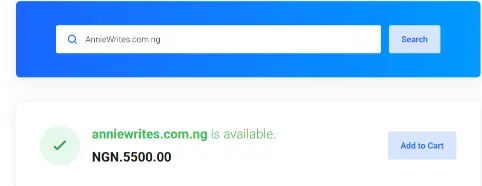
Your domain name is your first impression. It’s worth spending a few minutes picking the right one.
Keep it short and easy to spell. Make it close to your business name so people can remember it without effort.
A few quick tips:
- Something people can say out loud without spelling it
- Avoid dashes and numbers if possible, they confuse people
- A .com.ng extension builds instant trust with Nigerian visitors
For example, if your business is called Naija Fresh Juice, then naijafreshjuice.com.ng works perfectly. It’s local, clear, and easy to remember.
Once you have a name in mind, check if it’s available directly on the Truehost Nigeria website. The search is free and takes seconds.
Step 2: Buy Hosting
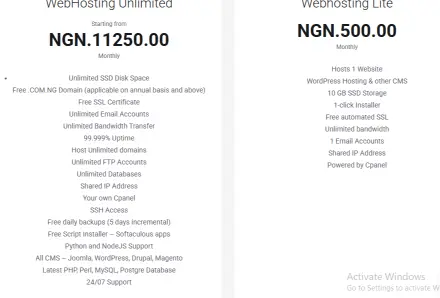
Many people treat hosting as an afterthought.
Then they wonder why their site loads slowly, disappears without warning, or costs more than they expected.
Here’s what actually important when choosing hosting in Nigeria:
Speed
Nigerian visitors expect pages to load fast. If your site takes more than 3 seconds to load, most people leave before seeing anything.
Look for hosting on SSD storage, it loads much faster than older systems.
Uptime
Uptime means how often your site is actually online. Look for a 99.9% uptime guarantee.
Every hour your site is down is a potential customer who goes elsewhere.
Naira pricing
Many international hosting companies charge in dollars. Every time the Naira weakens, your bill quietly goes up.
Choose a host that prices everything in Naira, so you always know what you’re paying.
Local support
When something goes wrong at an odd hour, you want someone who can actually help.
A support team that answers on WhatsApp, picks up the phone, and understands the Nigerian context is worth more than any fancy global brand.
₦500/month. That’s what Webhosting Lite starts at.
Here’s what you get with Truehost Nigeria’s Webhosting Lite plan:
- Fast SSD hosting optimised for Nigeria
- 99.9% uptime guarantee
- Prices fully in Naira currency.
- Free SSL certificate to keeps your site secure
- Free daily backups for your content to always safe
- Free .com.ng domain on eligible plans
- 24/7 support via WhatsApp, live chat, and phone
- 30-day money-back guarantee
- Pay with your Nigerian debit card
Start with Webhosting Lite, from just ₦500/month
Step 3: Install WordPress (It Takes About 1 Minute)
WordPress is the most used website platform in the world.
Millions of websites, from personal blogs to large businesses, run on it. It’s powerful, flexible, and beginner-friendly.
The best part? You don’t need any technical skills to use it.
With Truehost Nigeria, you can install WordPress with one click from your hosting dashboard.
You don’t download anything. You don’t upload files or touch settings.
Click install WordPress, pick your website name, set a password, and you’re done.
In about 60 seconds, you’ll have a working WordPress website ready to build on.
Step 4: Choose a Theme for Your Website
A theme controls how your website looks. Think of it as the design template your content sits inside.
It’s like choosing the layout and colour scheme for your brand’s online home.
WordPress has thousands of free themes inside its official directory. You can also find premium ones if you want something more specific or polished.
Here’s what to look for when choosing:
- Mobile-friendly: Over 80% of Nigerians browse on their phones. Your site must look great on any screen.
- Fast loading: A theme with too many animations or effects can slow things down. Clean and simple works better.
- Easy to edit: Pick a theme that lets you change colours, fonts, and sections without needing a developer.
Popular free themes like Astra, Kadence, and Hello Elementor are excellent starting points.
They’re fast, clean, and widely supported. Install one, activate it, and you’ll immediately see your website start to take shape.
Step 5: Customize Your Website
This is where it starts to feel real.
Once your theme is installed, you customize everything using a drag-and-drop page builder.
These tools work directly inside WordPress. You click on any part of your page, edit it, and see the changes instantly.
But the most popular builders are Elementor and Divi. Both are beginner-friendly. Both are free to start.
Here’s what you can change without writing a single line of code:
- Your logo and business name
- Colours and fonts that match your brand
- Text and images on every page
- Contact forms, WhatsApp buttons, and social media links
- Sections you can move, hide, or duplicate
Keep your homepage clean. A visitor should know within three seconds what your business does.
Put your most important message at the very top. Make it simple and clear.
Step 6: Create Your Key Pages
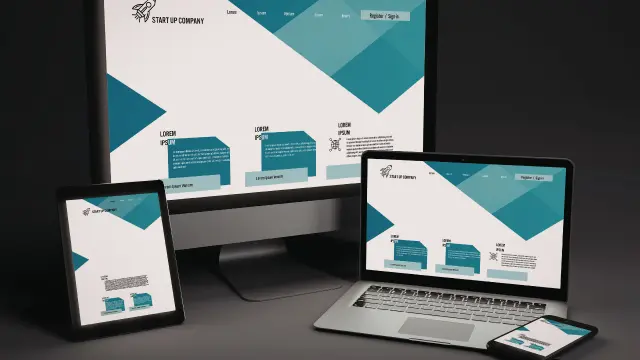
A complete, working website needs at least three pages. Here’s what each one should do:
Home Page
This is your first impression. Tell visitors who you are, what you do, and why they should choose you. Add a clear button that tells them what to do next, like Contact Us, Book a Call, or Shop Now.
About Page
People want to know who they’re dealing with. Share your story, your values, and what makes you different. Add a real photo, it builds trust faster than anything else.
Contact Page
Make it easy to reach you. Add a simple form with your WhatsApp number, email, and location, if relevant. The easier this page is to use, the more inquiries you get.
If you sell products or services, you’ll also want a Services page or a Shop page. Keep each page focused.
Write in plain, friendly language. Your visitor should feel like you’re speaking directly to them, because you are.
Step 7: Review and Publish Your Website
Before you go live, run through a quick check:
- Read through every page for spelling mistakes
- Click every button and link to make sure they go to the right place
- Open your site on your phone to see how it looks on mobile
- Submit your contact form yourself to confirm it works
When everything looks good, publish each page in WordPress. Your site is now live.
Share the link straight away. Send it to friends. Post it on Instagram. Add it to your WhatsApp Business profile. Your website is working for you now, even when you’re asleep.
What Does It Actually Cost? (A Quick Breakdown)
Here’s the honest breakdown of what building your website costs when you do it right:
| What You Need | Estimated Cost |
| Domain Name (.com.ng) | Free with eligible Webhosting Lite plan |
| Hosting (Webhosting Lite) | From ₦500/month |
| WordPress | Free |
| Theme (basic) | Free |
| Page Builder (basic) | Free |
| SSL Certificate | Free(included in plan) |
You can have a fully working, professional website live for less than the cost of a good meal, every month. That’s the truth.
Common Mistakes to Avoid

Overcomplicating it
Many beginners try to make their first website look like a massive brand. Start simple. A clean, working website beats a complicated one that takes months to finish. You can always improve it as you grow.
Paying too much
Some hosting companies bill in dollars, hide extra fees, and lock you into long contracts before you understand what you’re signing up for. Make sure pricing is clear, in Naira, and fair from day one.
Choosing a hosting that’s slow in Nigeria
Your visitors are in Nigeria. Your hosting should be built for Nigerian users. Slow load times push people away before they even see your content.
Skipping the mobile check
Over 80% of Nigerians use the internet on their phones. Always check your website on a small screen before you publish. If it looks messy on mobile, people will leave.
Your Website Can Be Live Today
You’ve seen the steps. They’re simple and they work.
Building a website in Nigeria doesn’t take a degree. It doesn’t take weeks of learning. It doesn’t take a big budget.
What it takes is a clear plan and the right starting point.
Here at Truehost Nigeria, we know exactly what you’re dealing with.
You have a business to run. You’ve been putting off getting online because it felt complicated, too expensive, or just something to deal with another day.
You’ve maybe been burned before, paid someone, waited months, and got something that didn’t work right or cost far more than promised.
We’ve heard that story many times. And it’s exactly why we built the Webhosting Lite plan.
Here at Truehost Nigeria, we believe every Nigerian business deserves to be online, without the stress, the dollar billing, and the confusion that comes from dealing with companies that don’t understand your reality.
Webhosting Lite is designed for people who are ready to start. Clean. Affordable. Built for Nigeria.
Your competitors already have websites.
Your customers are already searching online.
Every day you wait is a day someone else gets found instead of you.
➤ Click here to get started with Webhosting Lite.