Domain NamesFind and register your ideal domain name instantly.
 Web HostingEasy-to-use hosting powered by cPanel — ideal for managing websites in Nigeria.
 Windows HostingRun .NET apps with Windows-optimized hosting
 Affiliate ProgramMake money promoting our services
 Reseller HostingMake money by reselling our hosting products under your own brand
 .COM Domains
 All DomainsExplore all supported tld domains in Nigeria
 WhoisFind out who owns any domain, as well as verify your registration details
 VPS Hosting in Nigeria
 Dedicated ServersReimagine your site speed with your own complete server
 AI Website BuilderDesign your site with drag-and-drop tools
 Online Store BuilderStart your online shop without code
 Support PortalFind answers or get expert help
 Contact UsReach our team via chat or email
 BlogRead our extensive guides on web hosting and more
Slow websites chase people away. You’ve felt it before you click a link, the page crawls, and you close it without thinking twice.
That same thing can happen to your business if your website isn’t fast, safe, and always online.
Many people in Nigeria want a solid online presence, but hosting can feel confusing. Some platforms are slow.
Some are too expensive. And then there’s AWS web hosting, powerful, trusted worldwide, and able to make even a simple website load in seconds.
The only problem? AWS looks complicated at first. Too many buttons. Strange names.
And the fear of extra charges. But once you understand the basics, it becomes simple and friendly.
This guide shows you how to host a basic static website on AWS web hosting. By the time you’re done, your site will be:
- Fast
- Secure
- Using HTTPS
- Easy for visitors in Nigeria and anywhere else
You’ll learn how to:
- Set up your AWS account
- Connect your domain using Route 53
- Store files on S3
- Get free SSL
- Speed up your site with CloudFront
- Point your domain to the final setup
Setting Up Your AWS Account
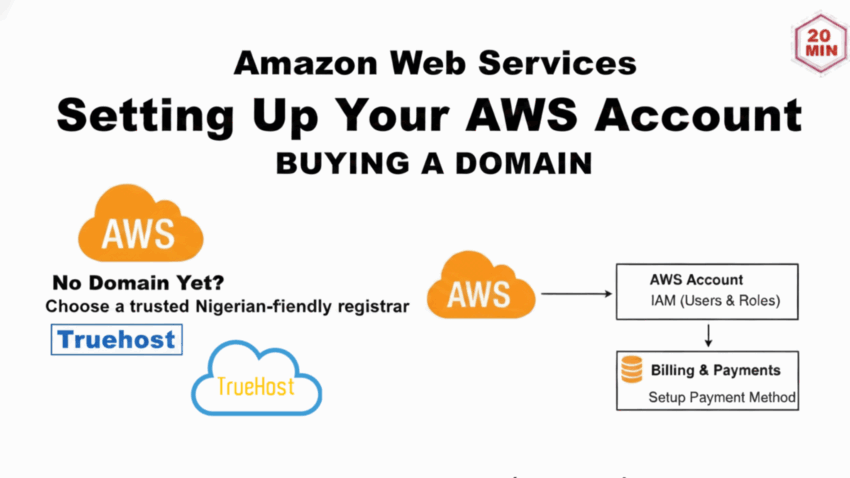
Before anything else, you need an AWS account. This is where all your hosting tools live.
The setup is quick and doesn’t cost anything upfront.
Go to the AWS Management Console and sign up with your email and a card.
AWS only charges you when you pass the free limits, so you can relax. Most beginners stay inside the Free Tier without spending a naira.
New users get credits and free access to many services for 12 months. For a small static website, this free plan is more than enough. You get:
- 5 GB storage on S3
- 20,000 S3 file requests
- 1 million CloudFront requests
- Free SSL certificates from ACM
This is enough to run a small business site, a landing page, a portfolio, or a simple project.
For this setup, you’ll use four tools:
- Route 53 – for your domain
- S3 – for your website files
- ACM – for free SSL
- CloudFront – for speed
Connecting Your Domain with Route 53
Your domain is your website’s address. It’s what people type, like yourbusiness.com.ng.
DNS is the system that sends visitors to the right place, and Route 53 handles that job inside AWS.
It’s fast, stable, and works smoothly with every other AWS tool you’ll use.
If you don’t have a domain yet, you can buy one from trusted Nigerian-friendly registrars like:
- Truehost
- Whogohost
- DomainKing
- Namecheap
Some domains cost as low as ₦1,000 per year, while .com.ng domains usually go for around ₦7,000 per year.
Once you have your domain, follow these steps:
- Open Route 53
- Click Create hosted zone
- Type your domain name
- Choose Public hosted zone
- Create the zone
- Copy the nameserver (NS) records
- Paste the NS records into your domain provider’s dashboard
- Wait up to 48 hours for it to update
A hosted zone keeps DNS records that control how your domain works. These are the common ones:
- A Record – points your domain to an IP
- CNAME Record – gives another name to something
- MX Record – handles email
- TXT Record – used for verification and security
Route 53 Costs (Nigeria Estimate)
| Item | Price |
| Hosted zone | About ₦800 monthly |
| DNS queries | About ₦640 per 1 million |
Route 53 stays affordable and works well even for small websites in Nigeria.
Step 2: Setting Up Your S3 Bucket
Now it’s time to create the “home” where your website files will live. AWS calls this place S3 (Simple Storage Service).
It works like a clean, organized shelf where you store your HTML, CSS, JavaScript, and images.
S3 is perfect for static websites because it’s fast, secure, and doesn’t break easily.
Follow these steps to create your bucket:
- Open the S3 console
- Click Create bucket
- Name it exactly like your domain (for example:
yourbusiness.com.ng) - Choose a region close to West Africa (eu-west-1 works very well)
- Turn off Block all public access
- Create the bucket
Next, upload your website files:
- Open your new bucket
- Click Upload
- Add all your website files
- Make sure index.html is there (that’s your homepage)
Turn on static website hosting:
- Go to Properties
- Scroll to Static website hosting
- Switch it on
- Set the index document to index.html
Now you need to make your files public. Go to Permissions > Bucket Policy and paste this policy. Replace yourbusiness.com.ng with your own bucket name:
{
“Version”: “2012-10-17”,
“Statement”: [{
“Effect”: “Allow”,
“Principal”: “*”,
“Action”: “s3:GetObject”,
“Resource”: “arn:aws:s3:::yourbusiness.com.ng/*”
}]
}
After saving, copy your S3 website link from the Properties page. Open it in your browser.
Your website should show, even if it’s a simple one-page site, that this first “live moment” always feels exciting.
S3 Costs (Nigeria Estimate)
| Item | Free Tier | Price After Free Tier |
| Storage | 5 GB | About ₦37 per GB |
| GET requests | 20,000 | About ₦640 per million |
Most small websites run for less than ₦1,600 per month, sometimes even less.
Adding an SSL Certificate with ACM
You’ve seen websites with a lock icon beside the URL. That lock means the site is using HTTPS, which keeps visitors safe.
It protects the information sent between their browser and your website. It also helps your Google ranking because search engines trust secure sites more.
AWS gives free SSL certificates through AWS Certificate Manager (ACM). You don’t have to pay, and you don’t have to renew anything yourself AWS handles it.
Follow these steps:
- Change your AWS region to us-east-1
- Open ACM
- Click Request certificate
- Choose Public certificate
- Add your domain name and the “www” version
- Select DNS validation
- Click Create records in Route 53
- Wait for the certificate to show Issued
Why us-east-1?
CloudFront only accepts certificates from that region, so this step makes sure everything works smoothly later on.
Once the certificate is issued, you’re done. It renews automatically. No stress. No extra work.
Your website is now ready to use proper HTTPS a small change that builds trust and makes your site look more professional.
Speeding Up Your Website with CloudFront
Nobody enjoys a slow website. And in Nigeria, where network speed changes from place to place, you want your site to load fast no matter where someone is browsing from.
That’s where CloudFront comes in.
CloudFront is AWS’s Content Delivery Network (CDN). It stores copies of your website in many locations around the world.
So when someone in Nigeria opens your site, CloudFront sends the content from the closest location. This cuts loading time and makes everything feel smoother.
Follow these steps to set it up:
- Open the CloudFront console
- Click Create distribution
- Use your S3 website endpoint as the origin
- Set the viewer protocol to Redirect HTTP to HTTPS
- Add both domain names (
example.com.ngandwww.example.com.ng) - Select the SSL certificate you created in ACM
- Set index.html as the default root object
- Create the distribution
CloudFront may take up to 30 minutes to finish deploying. When it’s ready, test the CloudFront domain name in your browser. Your site should load quickly and securely.
CloudFront Costs (Nigeria Estimate)
| Item | Free Tier | Price After Free Tier |
| Data out | 1 TB | About ₦18 per GB |
| Requests | 10 million | About ₦1.30 per 10,000 |
CloudFront can speed up your site by as much as 40%, which is a big win for visitors on mobile networks.
Pointing Your Domain to CloudFront
Now that CloudFront is up and running, the last thing you need to do is make your domain yourname.com.ng or businessname.ng load your site through CloudFront.
This is the step that connects everything together.
You’ll do this inside Route 53, where your domain is hosted.
How to Point Your Domain to CloudFront
- Open Route 53
- Click Hosted Zones
- Select your domain (e.g., example
.com.ng) - Click Create Record
- Choose A IPv4 Address
- Turn on Alias
- In the alias target box, pick your CloudFront distribution
- Save the record
Repeat the same steps for the www version of your domain so both addresses go to CloudFront.
Once you save, DNS will update. It may take anywhere from a few minutes to a couple of hours.
When it’s done, visiting your domain will show your site directly from CloudFront with fast loading and full HTTPS security.
What Your Setup Looks Like Now
Your domain → Route 53 → CloudFront → Secure (HTTPS) + Fast → S3 Bucket (your website)
This is the full pipeline used by many modern websites, including some very large Nigerian blogs and e-commerce brands.
Testing to Make Sure Everything Works
- Visit your domain without “www”
- Visit it again with “www”
- Try
http://(should redirect tohttps://) - Check your site speed (you’ll notice the difference!)
After this step, your website is officially live, secure, and optimized.
Tips to Reduce AWS Costs for Nigerian Users
Let’s be honest… AWS can feel expensive if you’re not careful. The good news?

Static websites cost almost nothing when set up properly.
If you follow these cost-saving tips, you’ll keep your monthly bill extremely low perfect for beginners, small businesses, and personal projects in Nigeria.
1. Turn Off S3 Static Hosting (Rely on CloudFront Instead)
CloudFront will deliver your files, so you don’t need S3’s paid website hosting feature.
You only pay tiny storage fees, often less than ₦200/month.
2. Enable CloudFront Caching (This Reduces Data Costs)
CloudFront caches your content in edge locations.
This reduces:
- S3 requests
- Bandwidth from S3
- Your bill
And it makes your site load crazy fast.
3. Use Only the Free SSL Certificate from ACM
Never buy SSL certificates from external providers.
The ACM certificate is:
- Free
- Auto-renewing
- Fully trusted
It’s perfect for personal and business websites.
4. Turn Off CloudFront Logging
CloudFront logs cost money because they store data in S3.
If you don’t need detailed analytics, disable the logs and save a nice chunk of change.
5. Keep Media Files Light
Large images = higher bandwidth fees.
Before uploading anything, compress it using:
- TinyPNG
- CompressJPEG
- Squoosh
You’ll maintain quality and reduce AWS costs.
6. Don’t Create Unused CloudFront Distributions
Each one costs money, even if it’s small.
If you’re experimenting, delete test distributions immediately.
7. Remove Old SSL Certificates
Extra certificates don’t cost money, but they clutter your dashboard and may confuse you later.
A clean account = fewer mistakes = fewer accidental charges.
8. Monitor Billing (This Is Important!)
Enable billing alerts in AWS so you never get surprised.
You can set AWS to notify you if your bill crosses:
- $1
- $2
- $5
Whatever you’re comfortable with.
Realistic Monthly Cost for Nigerians Using This Setup
Most static sites cost between ₦300 – ₦1,500 per month, depending mainly on visitor traffic.
Small business sites often sit on the lower side of this range.
Conclusion
Congratulations! You now have a fully live, fast, and secure website on AWS.
Your site loads quickly for visitors in Nigeria and anywhere in the world. Along the way, you learned how to:
- Set up your AWS account
- Connect your domain with Route 53
- Store files on S3
- Add free SSL with ACM
- Speed up your site with CloudFront
- Point your domain to your website
AWS can feel complicated at first, but once you break it into steps, it becomes manageable.
Your website is now ready to grow with your business. You can monitor usage on the AWS dashboard and scale anytime without worrying about downtime.
If you want an easier path, managed hosting services handle the tech for you while you focus on your business.
FAQs
1) Is AWS hosting free for Nigerians?
Yes, AWS offers a Free Tier for 12 months. You get free S3 storage, CloudFront requests, and SSL certificates. You only pay if you exceed these limits.
2) Can I host a small business website entirely for free?
For small static sites with light traffic, yes. The Free Tier usually covers your storage and bandwidth.
3) Do I need technical skills to use AWS?
Basic steps like uploading files and connecting a domain are straightforward. Following a guide makes it manageable even if you’re new.
4) How long does it take for a website to go live?
From creating an S3 bucket to pointing your domain via CloudFront, it can take a few hours, mostly waiting for DNS and CloudFront propagation.
5) Does my SSL certificate expire?
No, AWS Certificate Manager handles renewals automatically.
6) Can I move my website later?
Yes, your files are in S3, so migrating to another host or upgrading to a dynamic site is possible.