Domain NamesFind and register your ideal domain name instantly.
 Web HostingEasy-to-use hosting powered by cPanel — ideal for managing websites in Nigeria.
 Windows HostingRun .NET apps with Windows-optimized hosting
 Affiliate ProgramMake money promoting our services
 Reseller HostingMake money by reselling our hosting products under your own brand
 .COM Domains
 All DomainsExplore all supported tld domains in Nigeria
 WhoisFind out who owns any domain, as well as verify your registration details
 VPS Hosting
 Dedicated ServersReimagine your site speed with your own complete server
 AI Website BuilderDesign your site with drag-and-drop tools
 Online Store BuilderStart your online shop without code
 Support PortalFind answers or get expert help
 Contact UsReach our team via chat or email
 BlogRead our extensive guides on web hosting and more
You registered your domain with Whogohost. Good choice at the time.
But maybe your renewal costs keep going up. Or support takes too long to reply.
Or you want your hosting and domain in one place, with pricing in Naira, and no forex surprises every renewal cycle.
Some Nigerian business owners also find that they are paying renewal fees in dollars through GoDaddy for international domains like .com.
When the Naira drops, your renewal cost jumps with it. That unpredictability adds up over time.
That feeling is valid.
Moving your domain doesn’t have to be stressful.
After walking through this process dozens of times, here is exactly how to transfer your domain from Whogohost to Truehost Nigeria, step by step, with zero downtime.
Before You Start: Quick Checklist
Run through these before you begin. It saves you from avoidable delays.
- Your domain is at least 60 days old
- Your domain is active, not expired or suspended
- You can log in to your Whogohost account
- The email on your Whogohost account still works, and you can access it
- Your domain has not been transferred in the last 60 days
All five boxes checked? You are ready to go.
Step 1: Unlock Your Domain on Whogohost
Whogohost locks every domain by default. This is a safety feature that stops anyone from moving your domain without your permission.
Before a transfer can happen, you need to turn off that lock. Here is how:
- Log in to your Whogohost client panel
- Click on Domains in the top menu bar
- Find the domain you want to transfer and click Manage Domain
- Click Registrar Lock on the left side of the panel
- Click Disable Registrar Lock
- Save your changes
Your domain is now unlocked and ready to move. If you cannot find the lock option, Whogohost support can point you to it in just a few seconds.
Step 2: Get Your EPP Code from Whogohost
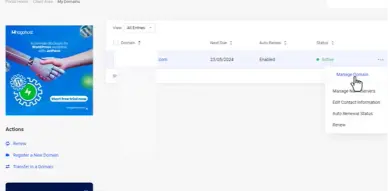
The EPP code is also called an authorization code or auth code.
Think of it as the key to your domain. Without it, Truehost cannot start the transfer on their end.
To get it from Whogohost:
- Log in to your Whogohost client panel
- Click on Domains in the menu
- Click on the domain name you want to transfer
- Click Get EPP Code on the left side of the panel
- Copy and save the code that appears on your screen
The code appears right on your screen. Copy it carefully. Watch for extra spaces before or after the code.
Those extra spaces will cause errors during the transfer.
Keep this code somewhere safe. You will need it in the next step.
EPP codes can expire within a day or two, so do not wait too long before using them.
Step 3: Go to Truehost Nigeria and Start the Transfer
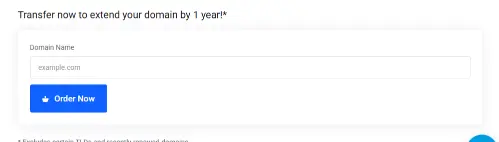
Head over to Truehost Nigeria at truehost.com.ng. Navigate to the Domain Transfer page.
Here is what to do:
- Log in to your Truehost Nigeria account or create one if you are new
- Type in the domain name you want to transfer
- Paste your EPP code when the system asks for it
- Choose any add-ons you want, such as WHOIS privacy protection
- Pay in Naira. No dollar conversion, no forex stress, no surprise charges
That is all it takes on your end. Truehost handles the rest from here.
Step 4: Approve the Transfer Email
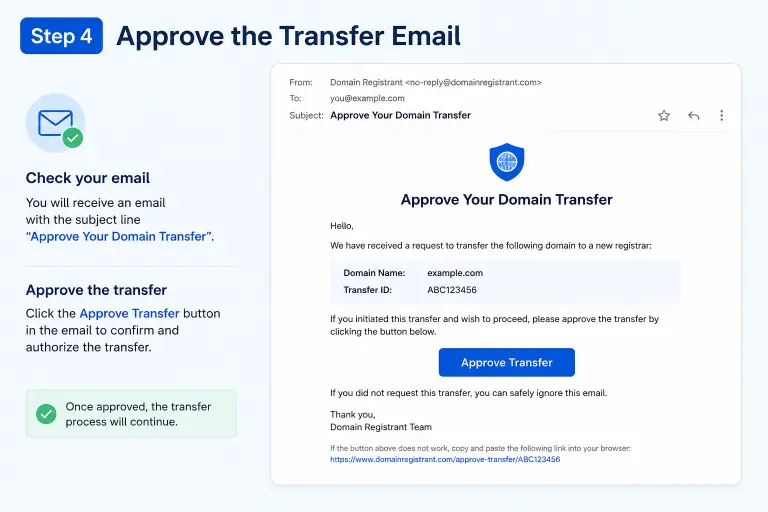
After placing the order, check your email inbox right away.
You will receive a transfer confirmation email. Open it and click the approval link inside. This step is required.
Without your approval, the transfer will not move forward.
Whogohost may also send a separate email asking you to confirm the outgoing transfer. Check both your inbox and your spam folder.
Missing this email is the most common reason transfers get delayed.
Once you approve from both sides, the transfer officially starts.
Step 5: Wait for the Transfer to Complete
Domain transfers are not instant. Here is what to expect based on your domain type:
| Domain Type | Transfer Time |
| .com.ng, .ng (Nigerian domains) | 1 to 2 days, sometimes faster |
| .com, .net, .org (international) | 5 to 7 days |
Your website and email stay live the whole time. Visitors can still reach your site while the transfer is in progress.
There is no downtime at all.
Once the transfer is complete, Truehost Nigeria adds an extra year to your domain for free.
You do not lose any time from your current registration.
Step 6: Check Your DNS Settings After the Transfer
This step is one that most people skip. Do not skip it.
After a transfer, some DNS settings may reset to their defaults.
If your website or email stops working after the transfer completes, this is almost always the reason.
Here is what to verify in your Truehost Nigeria dashboard:
- Your nameservers are pointing to the right place
- Your A record is pointing to your hosting server IP address
- Your MX records are set correctly for your email to work
- Any custom DNS records you had before are still in place
If you were using Whogohost’s nameservers before, you will need to update them inside your Truehost dashboard to point to your hosting server.
If you are also moving your hosting to Truehost at the same time, this gets handled automatically during setup.
A simple way to check is to open your website in a browser once the transfer completes.
If it loads without errors, your DNS is fine.
If you see a blank page or an error, your nameservers or a record likely need to be updated in your Truehost dashboard.
What should your DNS settings look like?
Our Truehost support team can check them for you at no extra charge.
Step 7: Confirm Everything Is Working
Give your site a proper check once the transfer is done. Run through these quickly:
- Log in to your Truehost Nigeria dashboard and confirm your domain is listed there
- Open your website in a browser and confirm it loads correctly
- Send a test email from and to your business email address
- Check that any subdomains you have are still working
If anything looks off, the Truehost support team is available around the clock to help you fix it.
What to Do If the Transfer Gets Stuck
Most transfers complete without any issues. But sometimes a transfer can stall. Here are the most common reasons and how to fix them:
- The transfer confirmation email was not approved. Go back to your email and look for the approval link from Truehost or Whogohost. Check spam too.
- The domain was still locked when the transfer started. Go back to your Whogohost panel and confirm the registrar lock is off.
- The EPP code was entered with extra spaces. Go back to Truehost and re-enter the code carefully, without any spaces at the beginning or end.
- The domain is less than 60 days old. ICANN rules prevent transfers within the first 60 days of registration. You will need to wait until that period passes.
If none of these fixes the issue, contact Truehost Nigeria support directly. They can check the transfer status and push it through if something is holding it up on the registry side.
Why Nigerians Are Moving to Truehost
You are not just moving a domain. You are moving to a better experience overall.
Thousands of Nigerian businesses have made this switch, and the biggest reason they stay is simple.
Everything is in Naira, support is local, and there are no surprise charges at renewal time.
| Feature | What You Get |
| Naira Pricing | Pay in Naira every time. No forex surprises or dollar conversion headaches |
| Transparent Renewal Costs | Renewal prices are shown upfront. What you see is what you pay next year |
| Zero Downtime Transfer | Your website and email keep running throughout the transfer process |
| Free Extra Year | Truehost adds one year to your domain the moment the transfer completes |
| 24/7 Local Support | A support team that understands the Nigerian market and responds fast |
| WHOIS Privacy: | Optional privacy protection to keep your personal details off public records |
| Bundle with Hosting | Add SSD web hosting during checkout and manage everything in one dashboard |
Frequently Asked Questions
Will my website go down during the transfer?
Your website stays live from start to finish. There is no downtime during a domain transfer as long as your DNS settings remain the same.
How much does it cost to transfer to Truehost Nigeria?
The transfer fee is paid in Naira. The exact amount depends on your domain extension. You can check current transfer prices on the Truehost Nigeria domain transfer page. All prices are listed in Naira, with no hidden fees.
How long does the transfer take?
Nigerian domain extensions like .com.ng and .ng usually transfer in 1 to 2 days. International extensions like .com and .net take 5 to 7 days.
Do I lose my remaining domain time after the transfer?
You lose nothing. Your current expiry date stays the same. On top of that, Truehost adds one full extra year for free once the transfer completes.
What if I cannot find the EPP code on Whogohost?
Log in to your Whogohost panel, go to Domains, then click your domain name. Look for the “Get EPP Code” option on the left side. If you cannot find it, contact Whogohost support. The Truehost Nigeria team can also walk you through it.
Can I transfer my domain and hosting at the same time?
Yes. During the Truehost Nigeria checkout, you can also add an SSD hosting plan. You get everything set up in one go, pay once in Naira, and manage it all from one dashboard.
What happens if my domain expires before the transfer completes?
Try to start the transfer at least 10 days before your expiry date. If your domain expires mid-transfer, the transfer may fail. Renew it with Whogohost first if the expiry date is very close, then start the transfer.
Transfer Your Domain to Truehost Nigeria Today
Your domain is one of the most valuable assets your business has online.
It makes sense to keep it with a registrar that prices in Naira, responds quickly, and offers predictable annual renewals.
The transfer process takes less than ten minutes of your time. The rest happens automatically in the background while your site stays live.
Head to truehost.com.ng/domains/transfer, enter your domain name, paste your EPP code, and pay in Naira. You will be done in minutes.
Truehost Nigeria is ready to take it from here.