Domain NamesFind and register your ideal domain name instantly.
 Web HostingEasy-to-use hosting powered by cPanel — ideal for managing websites in Nigeria.
 Windows HostingRun .NET apps with Windows-optimized hosting
 Affiliate ProgramMake money promoting our services
 Reseller HostingMake money by reselling our hosting products under your own brand
 .COM Domains
 All DomainsExplore all supported tld domains in Nigeria
 WhoisFind out who owns any domain, as well as verify your registration details
 VPS Hosting
 Dedicated ServersReimagine your site speed with your own complete server
 AI Website BuilderDesign your site with drag-and-drop tools
 Online Store BuilderStart your online shop without code
 Support PortalFind answers or get expert help
 Contact UsReach our team via chat or email
 BlogRead our extensive guides on web hosting and more
Tired of watching your monthly hosting bill eat into your budget?
In Nigeria, with rising data costs and NEPA blackouts, paying for unused space feels like throwing money away.
Building your own web hosting server gives control over your site, saves cash, and brings the satisfaction of running it yourself.
This guide walks through every step, from picking a PC to launching your website.
It’s written for Nigerian creators, small business owners, or tech enthusiasts who want to save money without getting bogged down in technical jargon.
By the end, you’ll know if DIY hosting works for you or if it’s smarter to choose a managed service like Truehost hosting, which handles local challenges for you.
Here’s what’s coming up:
- Choosing hardware that survives power surges
- Installing Ubuntu like a simple recipe
- Setting up remote access and file sharing
- Configuring domains, ports, and going live
- Extra tips on security and when to call professionals
Ready to turn a spare room corner into a server powerhouse? Let’s get started.
1) Get a Good Computer
Your server requires a computer that can run for extended periods without stress.
A laptop is not the best choice because it heats up fast and the parts are harder to replace.
A desktop works better and gives you more space to upgrade later.
Here is what to look for:
- Intel i3 or Ryzen 3
- 8GB RAM for normal use
- 16GB RAM if you want more speed
- 256GB SSD for fast loading
- A UPS to protect the system during blackouts
You can check Jumia or Konga for deals. A refurbished HP 240 G10 with an i3 costs around ₦880,000. The i5 version goes for about ₦1,120,000.
Quick Guide
| Level | Model | Price |
| Starter | Refurb i3 Desktop | ₦500k–₦800k |
| Mid | HP 240 G10 i5 | ₦1m–₦1.2m |
| High | Custom Ryzen Build | ₦1.5m+ |
After buying the PC, test it with a stress tool like Prime95. This helps you know if it can handle long hours of work without crashing.
2) Get the Operating System
Your server needs an operating system, and the best free option for this job is Ubuntu Server.
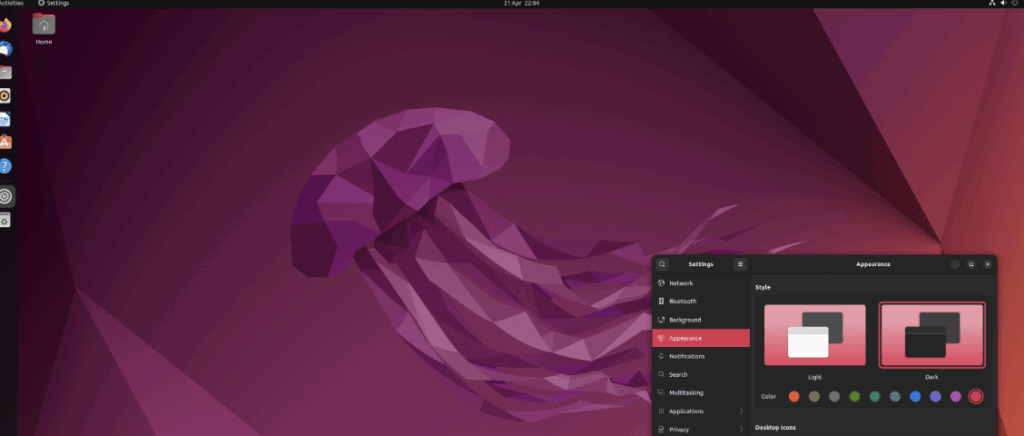
It is fast, easy to update, and works well even with Nigeria’s power problems.
Windows can slow things down and needs paid licenses, so Ubuntu saves money and stress.
Here is what to do:
- Go to the official Ubuntu website.
- Download the latest Ubuntu Server ISO file. It is small and fits on most connections.
- Get an 8GB USB flash drive.
- Use a tool like Rufus on another computer to turn the USB into a bootable drive.
If your network is slow during the day, download the ISO at night when data is cheaper and more stable.
Once the file is ready and the USB is set, your server is prepared for installation in the next step.
Step 3: Install the OS!
Time to breathe life into that PC. Boot from your USB mash F12 or Escape at startup to pick it.
Select English (or your vibe), then keyboard layout. Hit “Install Ubuntu Server.”
Networking? It sniffs your WiFi or Ethernet automatically via DHCP. No network? No sweat; install offline and connect later.
Storage setup is key. Use the whole disk for simplicity. Ubuntu handles partitions now, no swap needed.
Pick your drive, confirm wipes (backup first!), and set a username/password. Import SSH keys from GitHub if you’re fancy.
Watch the progress bar crawl like Abuja traffic. 10-20 minutes later, yank the USB and reboot. The login screen greets you. Boom, your blank canvas.
Stuck? Ubuntu’s docs are gold: Ubuntu Server Guide.
Step 4: Set up VNC
Headless servers are the move, no monitor hogging desk space. VNC lets you remote in from your phone, like peeking into your gen’s kitchen from afar.
Install TightVNC: Open terminal, run sudo apt update && sudo apt install tightvncserver.
Start it with vncserver :1 -geometry 1024×768 -depth 24.
Set a password when prompted. Firewall? sudo ufw allow 5901 for port access.
Connect from your laptop via RealVNC Viewer, enter your server’s IP (find with ip addr show). You’re in, tweaking like a pro.
Security first: Tunnel over SSH to hide from snoops. In NG’s shared WiFi spots, this keeps hackers at bay.
Step 5: Install FTP
Files need a door to your server. FTP is that polite butler, but we’ll upgrade to SFTP for locks.
sudo apt install vsftpd. Edit /etc/vsftpd.conf, uncomment local_enable=YES and write_enable=YES. Restart: sudo systemctl restart vsftpd.
Why vsftpd? It’s secure, fast, and sips resources. Test locally with ftp localhost.
For NG uploads over spotty 4G, SFTP via FileZilla feels safer no plain-text passwords flying around.
Step 6: Configure FTP Users
One user rules all? Recipe for chaos. Create dedicated ones.
sudo adduser yourusername set password, skip extras. Chroot them: Add to /etc/ftpusers? Nah, edit conf for chroot_local_user=YES.
Permissions: sudo chown -R yourusername:yourusername /home/yourusername/public. Now they stay jailed in their folder.
Test: Connect as that user. Upload a file. If it bounces, check logs with sudo tail -f /var/log/vsftpd.log.
This setup scales to add users for family sites without overlap.
Step 7: Configure and Activate FTP Server!
Polish time. In conf, set pasv_enable=YES and pasv_min_port=40000 for NAT routers.
sudo systemctl enable vsftpd to auto-start. Boom your own web hosting server now shuttles files like a Lagos courier.
Remote test: From another device, FTP to your IP. Success? High-five. Issues? UFW might block sudo ufw allow 21.
Step 8: Install HTTP Support, Sit Back and Relax!
Web serving is the fun part. Apache is beginner-friendly, like garri to fufu.
sudo apt install apache2. Start: sudo systemctl enable apache2 && sudo systemctl start apache2.
Test: Browse to your IP, see the default page? Yours.
For dynamic sites, LAMP stack: sudo apt install mysql-server php libapache2-mod-php php-mysql. Secure MySQL: sudo mysql_secure_installation.
Configure virtual hosts in /etc/apache2/sites-available/000-default.conf for multiple sites. Reload: sudo systemctl reload apache2.
Your own web hosting server now serves pages. Add SSL later with Let’s Encrypt free armor.
# Quick LAMP check
sudo systemctl status apache2 mysql php8.2-fpm
Relax? Not yet monitored with htop (install if needed).
Step 9: Install a Video Game Server (Optional)
Why stop at web? Turn it into a multiplayer hangout. Minecraft fans in NG, this is for you.
Install Java: sudo apt install default-jdk. Download server jar from minecraft.net, run java -Xmx1024M -Xms1024M -jar server.jar nogui.
Edit server.properties for ports (25565 default). Start script: Make a bash file.
Resource hog? Limit to off-peak. Separate from web traffic, your own web hosting server doubles as a Naija gaming den.
Step 10: Forward the Ports!
Your server’s whispering in a bubble. Ports forward shouts it out.
Router login: Usually 192.168.1.1, admin/password. Forward 80/443 (web), 21 (FTP), 5901 (VNC), 25565 (games).
NG ISPs like MTN/Glo hand dynamic IPs changes like weather. Fix with DDNS: No-IP free tier auto-updates. Install their client on server.
Security: Only open what’s needed. VPN for extra shield.
Step 11: Get a Free Domain!
IP addresses? Forgettable like a wrong number. Domains are your branded signboard.
Free? Freenom’s .tk works, but flaky. Better: DuckDNS subdomains. For NG cred, snag .ng via NiRA-accredited like Whogohost starts cheap, not free, but local trust.
Point DNS: A record to your IP (or DDNS hostname). Tools like Cloudflare free tier help.
Pro move: Truehost bundles domains with hosting zero hassle for NG billing.
| Option | Cost | Pros | Cons |
| Freenom .tk | Free | Quick | Unreliable renewals |
| DuckDNS | Free | Easy DDNS | Subdomain only |
| .ng via Whogohost | ₦5,000+/yr | Local SEO boost | Paid |
Step 12: Test It Out!
Launch day jitters? Crush them with checks.
Browser your domain page loads? FTP a test file. VNC in remotely. Tools: GTmetrix for speed, UptimeRobot for 24/7 watch (free alerts).
NG twist: Ping from mobile data vs. fiber. Slow? Tweak Apache caches.
Errors? Logs are your detective: sudo journalctl -u apache2.
If it hums, celebrate. Your own web hosting server is live.
Advanced Tips & Security Best Practices
DIY shines, but leaks sink ships. Lock it down.
Install Fail2Ban: sudo apt install fail2ban bans brute-force pests.
SSL: sudo apt install certbot python3-certbot-apache, then sudo certbot –apache. Free HTTPS glow.
Backups: Rsync to external drive, or cloud. NG power? Solar inverter mandatory.
| Threat | Fix | Why It Matters |
| Hacking | UFW + Fail2Ban | Blocks 99% probes |
| Downtime | UPS + Monitoring | Beats NEPA surprises |
| Data Loss | Weekly Rsync | Quick recovery |
We get it; maintenance bites. That’s why our hosting plans bake this in.
When to Upgrade to Professional Hosting
Your setup rocks for learning, but scales like a keke in traffic fine short-term, jams later.
DIY pros: Zero recurring fees, total control. Cons: 24/7 babysitting, security headaches, and NG uptime fights.
| DIY | Truehost /hosting |
| Cost: One-time ₦500k+ | ₦2k/month starter |
| Control: Full | Managed ease |
| Uptime: Your effort | 99.9% guaranteed |
| Support: Forums | 24/7 NG team |
Traffic spikes? Pros win. Check Truehost Hosting for one-click NG-optimized servers. We handle the blackouts.
Conclusion
You did it your own web hosting server, from blank PC to buzzing site.
Saved cash, gained skills, maybe even hosted that family reunion page.
Tweak as you go. Questions? Drop a comment or hit our blog for more NG tech wins.
What’s your first site? Share below. And if DIY’s too much, Truehost’s got your back check out our hosting.