Domain NamesFind and register your ideal domain name instantly.
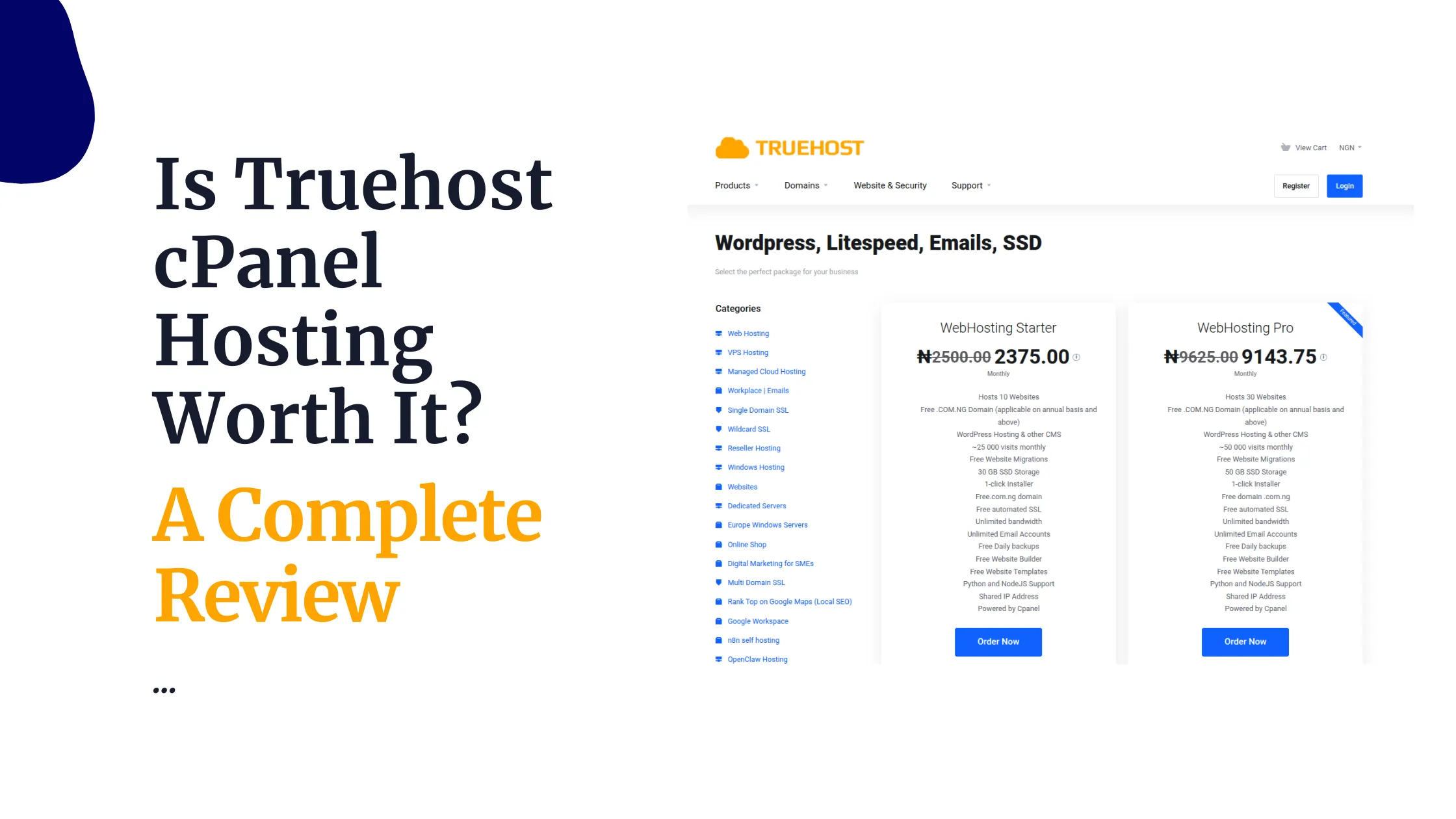
 Web HostingEasy-to-use hosting powered by cPanel — ideal for managing websites in Nigeria.
 Windows HostingRun .NET apps with Windows-optimized hosting
 Affiliate ProgramMake money promoting our services
 Reseller HostingMake money by reselling our hosting products under your own brand
 .COM Domains
 All DomainsExplore all supported tld domains in Nigeria
 WhoisFind out who owns any domain, as well as verify your registration details
 VPS Hosting
 Dedicated ServersReimagine your site speed with your own complete server
 AI Website BuilderDesign your site with drag-and-drop tools
 Online Store BuilderStart your online shop without code
 Support PortalFind answers or get expert help
 Contact UsReach our team via chat or email
 BlogRead our extensive guides on web hosting and more
Your team isn’t spending hours copying data between apps, chasing approvals, or retyping the same follow-up email.
Or at least, it shouldn’t be.
Every day, repetitive manual tasks eat into time that should go to selling, supporting customers, or building your product. That time doesn’t come back.
These n8n automation examples fix that. Each one is a task you can hand off to a workflow instead of a person.
The numbers back this up. McKinsey’s Global Institute analysis found that businesses adopting automation see productivity gains of 20% to 30%.
Verizon’s 2025 State of Small Business Survey found that 82% of small employers now use at least one automation tool. This isn’t a niche practice anymore. It’s how competitive teams operate.
This guide will cover 25 workflows across 7 departments. Let’s get into it.
Sales & CRM Automation
Your sales team’s time is worth more than data entry. n8n gives that time back.
1) Lead Capture and CRM Auto-Sync
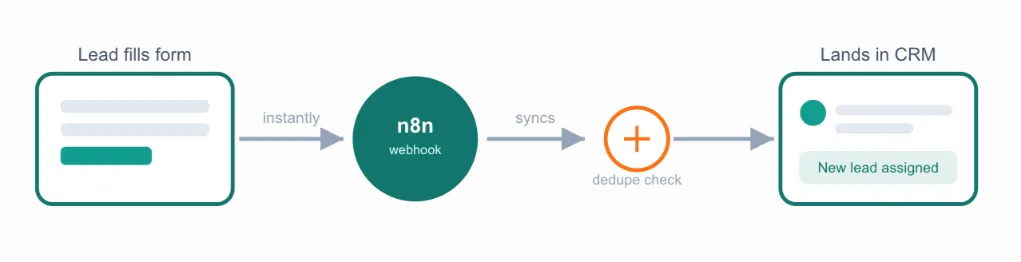
Pull new leads from web forms, ads, or landing pages straight into your CRM. No manual entry.
The moment a lead fills a form, the workflow fires. Your rep sees the lead before the coffee gets cold. Speed is important here more than most reps realize.
Example: A workflow connects a Facebook Lead Ads form, or a Typeform survey, to a CRM like HubSpot or Pipedrive. Every new lead lands in the pipeline within seconds, not hours, instead of sitting in an export file waiting for someone to upload it.
Tradeoff: Test the workflow thoroughly before going live. A missed edge case can create duplicate contact records, which is more annoying to clean up than the manual entry you were trying to avoid.
2) Post-Meeting Brief Generator
Auto-summarize sales calls. Drop the notes, next steps, and action items straight into the deal record.
Nobody types up meeting notes at 6 p.m. again. Connect a call recorder on Zoom or Google Meet to a transcription service, then let n8n’s AI node summarize and file it while your rep moves to the next meeting.
Tradeoff: AI summaries are a first draft, not a final one. Have your rep skim it for accuracy on complex or high-value deals before it becomes the record everyone relies on.
3) Automated Follow-Up Sequences
Trigger timed emails or SMS based on what a lead does, or doesn’t do, after first contact.
No reply in three days? The sequence nudges again. No manual tracking needed. n8n monitors CRM status changes or email opens and automatically sends the next message via Gmail or Twilio.
Research from Graf Growth Partners found sales professionals save roughly two hours a day using AI and automation tools, time that goes straight back into relationship-building calls.
4) Lead Scoring and Qualification Routing
Score leads on fit and intent automatically. Route the hottest ones straight to the right rep’s queue.
Reps stop wasting hours on leads that were never going to close.
Automation implementations drive a sharp jump in CRM usage, mainly because the data going in is finally clean and consistent.
Clean data means better scoring, and better scoring means reps spend their day on leads worth chasing.
Marketing & Content Automation
Marketing runs on consistency. n8n keeps campaigns on schedule without a person babysitting every channel.
5) Cross-Channel Campaign Sync
Launch and track a campaign across email, ads, and social from one workflow. Nothing goes out of sync.
Your campaign calendar becomes a trigger, not a spreadsheet someone has to update by hand. When a launch date moves, every connected channel moves with it.
Example: A workflow connects Mailchimp, Meta Ads Manager, and a social scheduler like Buffer. Update the launch date once, and the email, the ad set, and the social posts all shift together.
Tradeoff: Map out the trigger conditions carefully at the start. A campaign workflow touching four platforms is harder to debug than a single-channel one if something fires out of order.
6) Content Publishing Workflow
Move a piece from draft to approval to scheduled publish, across your CMS and social accounts, automatically.
Your editor approves once. The workflow does the rest, pushing the same content to WordPress, LinkedIn, and X without anyone touching three separate dashboards.
Example: A status change from ‘ready for review’ to ‘approved’ in your CMS triggers the WordPress post to go live and queues matching social posts through Buffer or Hootsuite, all timed to your usual publishing schedule.
7) Real-Time Brand Alert System
Get notified the moment your brand, a competitor, or a tracked keyword shows up online.
Example: A workflow monitors mentions across news sites and social feeds using a tool like Brand24 or Google Alerts as the source, then pushes a Slack alert within minutes of a new mention. That’s the difference between catching a PR issue early and finding out from a customer.
8) Social Media Auto-Scheduling and Repurposing
Turn one blog post into a week of social posts. Scheduled and queued without extra manual work.
This is one of the simplest n8n automation examples to set up, and one of the most useful.
One draft becomes five to seven posts, each formatted for its platform, without your content team retyping a single caption.
AI Agent & Customer Support Automation
Support tickets don’t stop coming in after 5 p.m. AI-driven workflows don’t clock out either.
9) AI Customer Support Agent
Let an AI-powered workflow handle common questions and tickets. Escalate to a human only when needed.
Connect n8n to a helpdesk like Zendesk or Freshdesk. The AI node classifies incoming tickets, answers from your knowledge base, and only pings a human agent when it’s uncertain or the customer asks for one.
Freshworks reports some support teams cutting first response times from hours down to minutes once AI handles the first layer of tickets.
Tradeoff: Set a clear escalation threshold from day one. An AI agent that guesses instead of escalating damages trust faster than a slow human response would.
10) AI Sales Assistant
Automatically qualify leads, answer product questions, and book meetings. No rep lifting a finger for the first touch.
Example: A chatbot on your pricing page answers common objections, checks the lead against your qualification criteria, and books a call directly on a rep’s Calendly the moment the lead is ready.
11) Automated Contract Reviewer
Have an AI workflow scan incoming contracts for risky clauses. Flag them before anyone signs.
This catches the clause a tired lawyer might skim past on a Friday afternoon.
Tradeoff: Treat the flagged clauses as a starting point, not a verdict. A human still needs to sign off before anyone else does.
12) AI Meeting Notetaker and Action-Item Tracker
Transcribe meetings automatically. Push action items straight into your project management tool.
Tools like Fireflies or Otter handle the transcription. n8n takes it from there, extracting tasks and assigning them to the right owner in Asana, Trello, or ClickUp.
No more ‘wait, who was doing that again?’
HR & Onboarding Automation
A new hire’s first week sets the tone. Automation makes sure nothing falls through.
13) Employee Onboarding Workflow
Automatically create accounts, send welcome documents, and schedule training for every new hire.
One trigger. Every system updated. A new hire in your HRIS kicks off Google Workspace account creation, Slack invites, and document sharing, with no HR person chasing seven different tools on their first morning.
14) Employee Document Management
File contracts, IDs, and certifications automatically, with alerts before anything expires.
Example: A workflow flags an expiring work permit 30 days out, so renewal happens before it becomes a crisis. Nobody finds out about a lapsed document from a compliance officer. Store the files in Google Drive or a dedicated HR document system, and let n8n handle the reminder logic on top.
15) Leave and Time-Off Approval Workflow
Route a leave request through approval, update the team calendar, and sync it to payroll. All in one pass.
This removes the usual chain of forwarded emails and forgotten calendar updates. A request submitted through a form or tool like BambooHR moves to the manager’s Slack for approval, then updates the shared calendar and payroll system automatically once approved.
Finance & Invoicing Automation
Finance teams lose real money to manual paperwork. The numbers back this up clearly.
16) Automated Invoice Processing
Generate, send, and reconcile invoices with your accounting software. No manual data entry.
A deal closing in your CRM can trigger invoice creation directly in QuickBooks or Xero, with no one re-typing line items.
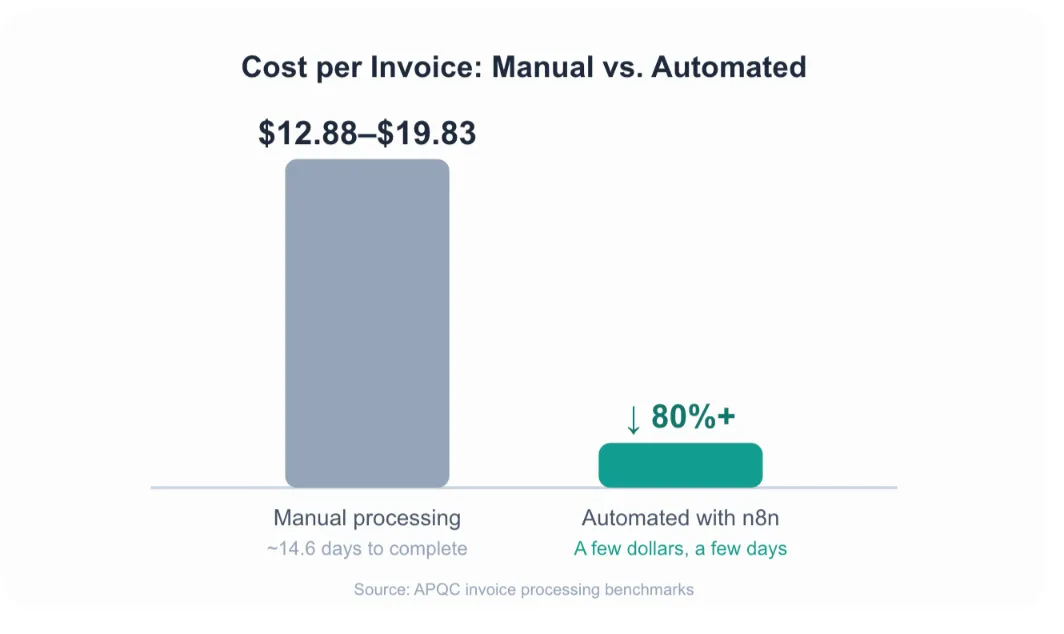
Industry benchmarking from APQC puts manual invoice processing at roughly $12.88 to $19.83 per invoice and about 14.6 days to complete.
Automated processing brings that down to a few dollars per invoice and a few days, a cost drop of 80% or more.
17) Expense Approval and Reimbursement Workflow
Move a submitted receipt through approval and into payment automatically.
Example: An employee snaps a photo of a receipt in a tool like Expensify. The workflow routes it to their manager for approval, then pushes it into QuickBooks or Xero for payment. No more expense reports sitting in an inbox for three weeks.
Tradeoff: Set a spending threshold that still requires manual sign-off. Full automation works well for routine expenses, but larger or unusual claims deserve a human look.
18) Overdue Payment Notice Bot
Send automatic reminders on unpaid invoices, escalating politely the longer they go unpaid.
n8n checks your accounting software’s aging report on a schedule and sends the first reminder a few days after the due date, then a firmer one at 30 and 60 days.
You get paid faster. Nobody has to make an awkward phone call.
Finance teams running these workflows on Truehost’s n8n self-hosting keep the entire process, and the payment data behind it, on infrastructure they control.
IT Operations & DevOps Automation
Downtime is expensive. Automated response is one of the clearest ways to shrink it.
19) Incident Response Automation
Detect an issue, open a ticket, and notify the on-call engineer automatically. In seconds instead of minutes.
Your monitoring tool triggers the alert. n8n creates the ticket in Jira or a similar tracker and pings the right person, no dashboard-watching required.
Case studies compiled by Rootly show AI-driven incident automation cutting mean time to resolution by 40% or more in production environments.
That’s the gap between a five-minute blip and a customer-facing outage.
20) CI/CD Pipeline Automation
Trigger builds, tests, and deployments automatically. Instant notifications on success or failure.
Your developers push code. The workflow builds, tests, and deploys it, then reports back. Nobody babysits a terminal window waiting for a build to finish.
Example: A push to your main branch on GitHub triggers a build in GitHub Actions or Jenkins, and n8n posts the pass-or-fail result straight to your team’s Slack channel.
21) SSL Certificate and Domain Expiry Watchdog
Get warned well before a certificate or domain lapses, instead of finding out when a site goes down.
Example: A workflow checks SSL expiry dates weekly and posts a warning to Slack 14 days before renewal is due. If you’re already running your infrastructure on a Truehost VPS, this same workflow can watch every domain on your account from one dashboard.
22) Auto-Archiver for Stale Cloud Resources
Automatically flag or clean up unused AWS or cloud resources that are quietly running up your bill.
Most teams only notice a forgotten server when the invoice arrives. A workflow catches it weeks earlier.
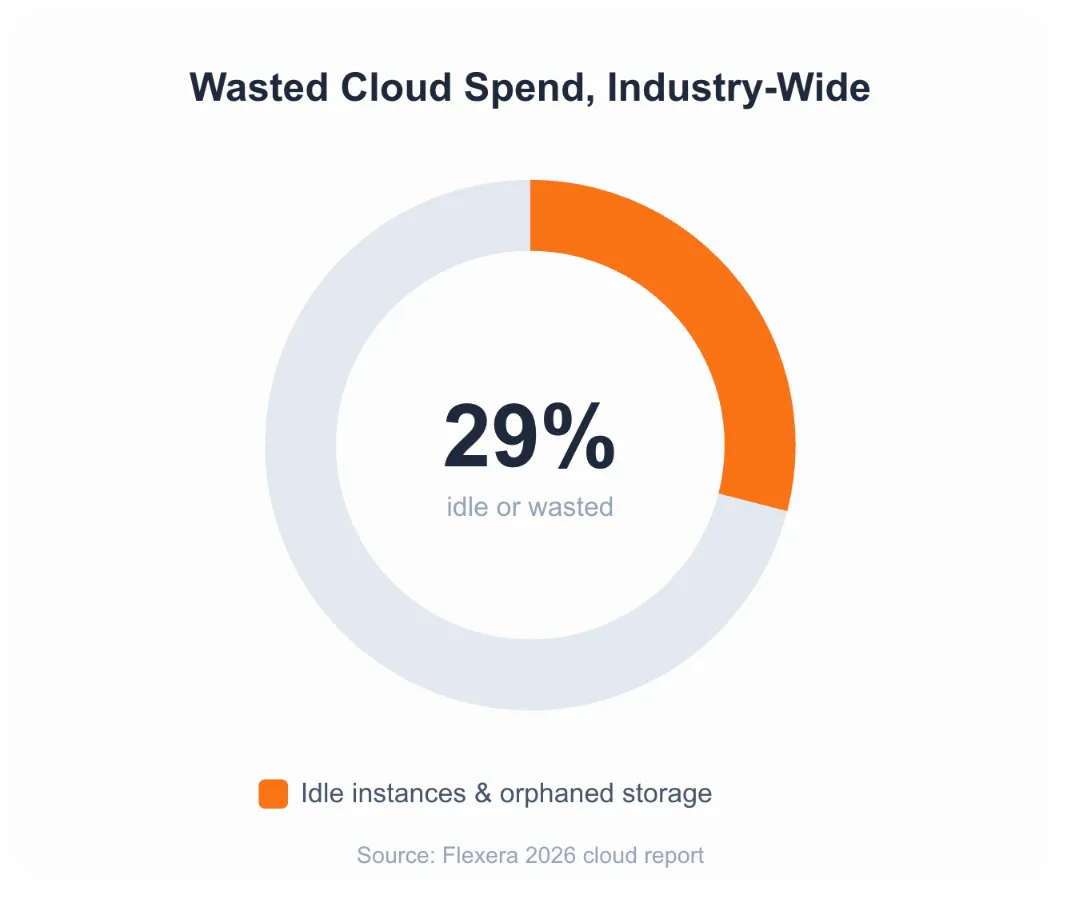
Flexera’s 2026 cloud report found that around 29% of IaaS and PaaS cloud spend goes to waste industry-wide, mostly idle instances, orphaned storage, and over-provisioned compute that nobody remembered to shut down.
Custom API & Systems Integration
Not every tool talks to every other tool out of the box. This is where n8n earns its keep.
23) Legacy System Integration
Bridge an older, hard-to-replace system with your modern tools using custom API or webhook workflows.
Most businesses have one system nobody wants to touch, but everybody still depends on. n8n’s HTTP Request node connects to almost any API, so you don’t have to replace the old system to modernize around it.
Example: An older on-premise billing system with no modern API can still be bridged through scheduled database queries or file exports that n8n picks up and pushes into your current tools.
24) ERP and CRM Synchronization
Keep inventory, orders, and customer records identical across your ERP and CRM at all times.
When a sale updates stock in one system, the other updates instantly. Nobody sells a product that’s already out of stock because two systems disagreed.
This works the same way when you’re syncing a system like SAP or NetSuite with Salesforce or HubSpot.
Tradeoff: Decide which system is the ‘source of truth’ for each field before you build the sync. Two systems both trying to be authoritative is how data conflicts start.
25) Multi-Tool Webhook Sync
Mirror data in real time across tools like Slack, Google Sheets, and Airtable. Every team sees the same numbers.
This closes the gap between ‘the spreadsheet says one thing’ and ‘Slack says another.’ With n8n’s growing library of 400+ integrations, most of these connections take an afternoon to build, not a development sprint.
Get n8n Self Hosting and Start Automating
n8n has grown fast. It now counts over 230,000 active users worldwide, and it ships with 400+ ready-made integrations to connect the tools listed above.
Self-hosting gives you the biggest advantage: unlimited workflows without the per-task pricing that platforms like Zapier charge.
You also keep full control of your data, which is important for finance and HR workflows especially.
We at Truehost make this simple. Instead of wrestling with servers, Docker, and updates yourself, get n8n self-hosting with Truehost and let us handle the infrastructure.
Truehost n8n features and prices in Naira
We offer three n8n hosting plans, all with unlimited workflows and unlimited concurrent executions:
| Plan | Price (Monthly) | Specs |
|---|---|---|
| N8N Starter | ₦14,000 | 1 vCPU, 2 GB RAM, 50 GB NVMe, 4 TB bandwidth |
| N8N Pro | ₦28,000 | 2 vCPU, 4 GB RAM, 100 GB NVMe, 6 TB bandwidth |
| N8N Business | ₦63,000 | 4 vCPU, 8 GB RAM, 200 GB NVMe, 8 TB bandwidth |
Every plan includes:
- Unlimited workflows and unlimited concurrent executions
- Community nodes and n8n with queue mode
- 100+ pre-made n8n workflows to start from
- Automated installation
- Dedicated support
Stop copying data by hand. Order your n8n self-hosting plan with Truehost today and have your first workflow running this week.
n8n Automation Examples FAQs
Do I need to know how to code to use n8n?
No. n8n is a visual, drag-and-drop tool. Basic logic helps for advanced workflows, but most of these n8n automation examples need no code at all.
Can I self-host n8n in Nigeria?
Yes. We at Truehost host n8n on local infrastructure with plans priced in Naira, starting at ₦14,000 a month.
Can I move my existing n8n.cloud workflows to Truehost?
Yes. n8n workflows export as JSON files, so you can import them directly into your self-hosted instance on our servers.
How many workflows can I run on a Truehost n8n VPS?
All our n8n plans include unlimited workflows and unlimited concurrent executions. Your only real limit is server resources, so choose a plan that matches your team’s size and workload.