Domain NamesFind and register your ideal domain name instantly.
 Web HostingEasy-to-use hosting powered by cPanel — ideal for managing websites in Nigeria.
 Windows HostingRun .NET apps with Windows-optimized hosting
 Affiliate ProgramMake money promoting our services
 Reseller HostingMake money by reselling our hosting products under your own brand
 .COM Domains
 All DomainsExplore all supported tld domains in Nigeria
 WhoisFind out who owns any domain, as well as verify your registration details
 VPS Hosting
 Dedicated ServersReimagine your site speed with your own complete server
 AI Website BuilderDesign your site with drag-and-drop tools
 Online Store BuilderStart your online shop without code
 Support PortalFind answers or get expert help
 Contact UsReach our team via chat or email
 BlogRead our extensive guides on web hosting and more
You sent a proposal last week. The client never replied. Your follow-up went unanswered, too.
Then someone with less experience landed the same contract.
You later found out that their email was [email protected]. Yours was [email protected].
That small difference decided everything.
In Nigeria, trust is earned fast or lost faster. Clients size up your business in seconds. Your email address is usually the first thing they see.
An email tied to your business domain shows you are serious. A free Gmail address says you are still testing the idea.
After helping Nigerian businesses across Lagos, Abuja, and Port Harcourt set up professional emails, the same issue comes up every time.
A branded email is the easiest upgrade most businesses keep putting off. Here is how to create a professional email address for your Nigerian Business today.
What You Need Before You Start
You need two things to get started: a domain name and an email hosting service.
A domain name is your business’s web address. For example, yourcompany.com or yourcompany.com.ng.
It is the part that comes after the “@” in your email. Without it, you cannot have a branded email address.
An email hosting service stores your emails on secure servers. It handles sending, receiving, and filtering out spam.
Think of it as the engine that powers your inbox.
Some providers bundle both together. You register a domain and get email hosting in one plan. Others sell them separately. Either way, you need both before you begin.
Step 1: Register a Domain Name for Your Business
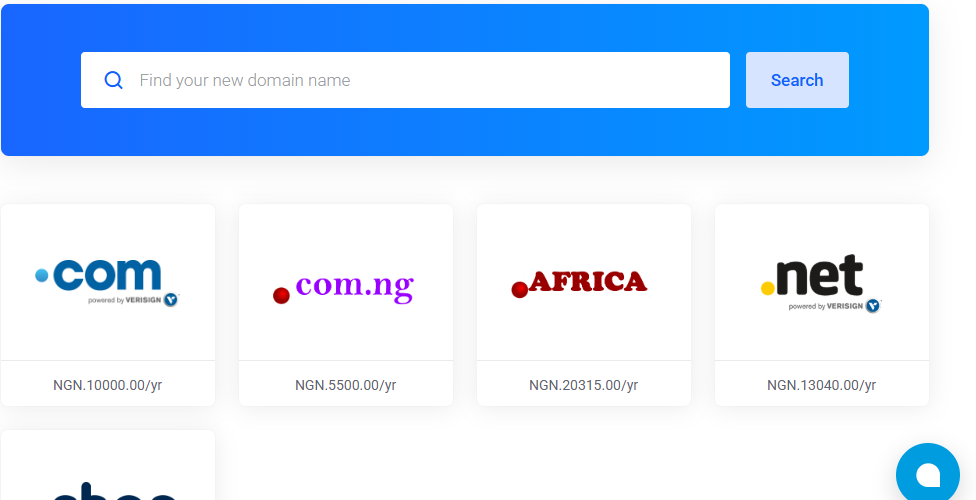
Your domain name is your business identity online.
Pick something that matches your business name. Keep it short, easy to spell, and easy to say out loud. Avoid numbers and hyphens.
For example, if your business is Chidi Consults, go for chidiconsults.com or chidiconsults.com.ng. That is clean, simple, and professional.
Which domain extension should you choose?
- .com: The most recognized globally. Works for any business.
- .com.ng: Great for businesses focused on the Nigerian market. It signals local presence.
- .ng: Shorter and modern. Works well for tech startups and agencies.
A .com domain costs around ₦12,000 per year. A .com.ng domain is cheaper, starting from about ₦3,500 per year.
Some email hosting plans include a free domain for the first year. Check before you pay separately.
You can buy your domain from local Nigerian providers like Truehost Nigeria, WhoGoHost, or QServers.
Global options like Namecheap and Hostinger also work. Local providers accept Naira and offer support in your time zone.
Step 2: Choose an Email Hosting Provider
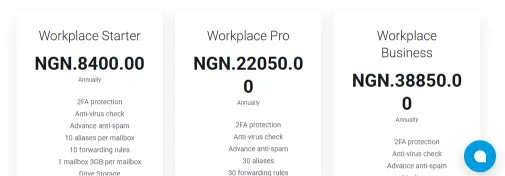
Your email hosting provider handles all your email traffic.
It stores your messages, filters spam, and ensures your emails land in your inbox. Choosing the right one saves you headaches later.
For Nigerian businesses, local providers have clear advantages. They accept Naira payments.
Their support teams work in your time zone. Your emails travel through servers that are closer to your clients.
Here are the main things to look for when choosing a provider:
- Uptime guarantee: Look for at least 99.9%. It means your email stays online almost all the time.
- Storage per mailbox: Aim for at least 5GB per account.
- Spam and virus protection: Your provider should filter junk before it reaches you.
- Local support: Nigerian providers understand your timezone and payment options.
- Naira payment: If dollar charges are a concern, go with a local provider.
Here are five providers that work well for Nigerian businesses:
| Provider | Starting Price | Free Plan | Naira Payment | Best For |
| Truehost | ₦8,400/month | No | Yes | Small & growing businesses |
| WhoGoHost | Contact for pricing | No | Yes | Nigerian teams needing local support |
| Zoho Mail | Free (up to 5 users) | Yes | No | Startups and solo entrepreneurs |
| Google Workspace | ~₦2,500/user/month | No | No | Teams using Google tools |
| Hostinger | ~₦3,000/month | No | No | Budget-friendly global option |
If you are starting and want to keep costs low, Zoho Mail’s free plan is a solid choice.
It supports up to five email addresses at zero cost. As your business grows, you can upgrade to more storage and features.
Step 3: Create Your Email Account
Once you have your domain and hosting plan, log in to your provider’s dashboard. The process is similar across most platforms.
- Log in to your hosting control panel (cPanel or your provider’s dashboard).
- Find the Email or Email Accounts section.
- Click Create New Account or Add Email.
- Type in your preferred address. For example, [email protected].
- Set a strong password. Mix letters, numbers, and symbols.
- Click Create or Save.
Your email address is now live. Most providers confirm this immediately.
What email format should you use?
Pick a consistent format for your whole team. Here are the most common ones used by Nigerian businesses:
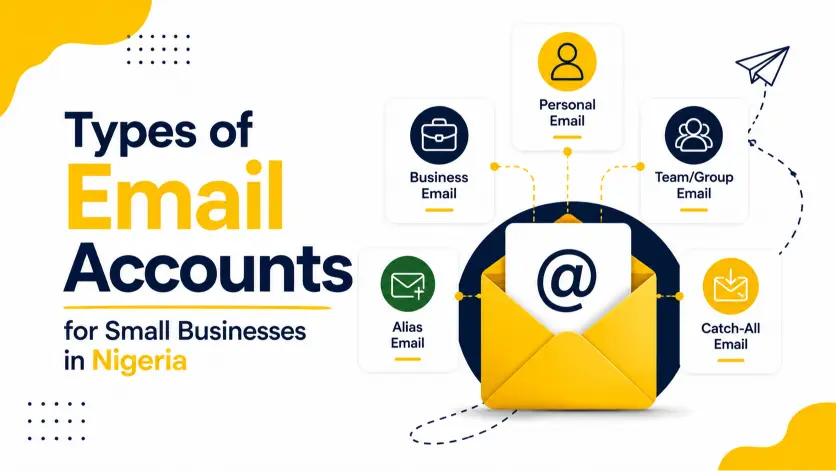
- [email protected]: Great for general inquiries
- [email protected]: Personal and approachable
- [email protected]: More formal and professional
- [email protected]: Dedicated sales channel
- [email protected]: For customer service and help
Choose one style and apply it across your whole team. Mixing formats looks disorganized.
For a solo business owner, info@ or your first name works best.
Step 4: Access Your Email on Your Phone or Laptop
You do not need to log in to a web browser every time. You can add your business email to Gmail, Outlook, or Apple Mail on your phone.
Your hosting provider will give you two sets of server details. IMAP settings are for receiving emails. SMTP settings are for sending them.
How to add your business email inside the Gmail app on Android:
- Open the Gmail app on your phone.
- Tap your profile photo in the top right corner.
- Select Add another account.
- Choose Other.
- Enter your business email address and tap Next.
- Select Personal (IMAP) and enter your password.
- Enter the incoming mail server details from your provider.
- Enter the outgoing mail server details from your provider.
- Tap Next to finish the setup.
Your business email will now appear in your Gmail app alongside your other accounts.
Clients receive emails from your business address. Your personal Gmail stays separate.
Choosing the Right Email Format for Your Business Type
The right format depends on what your business does and how your clients interact with you.
For service businesses and consultants: Use your first name. Something like [email protected] feels personal and builds a connection.
Clients know exactly who they are talking to.
For e-commerce and product businesses: Use role-based addresses. [email protected] or [email protected] tells customers exactly where to send their message.
It also looks more organized.
For agencies and growing teams: Use [email protected]. This format scales well.
It avoids confusion when two team members share the same first name.
For solo freelancers: Keep it simple. [email protected] or [email protected] works perfectly. It is professional without overcomplicating things.
Step 5: Set Up a Professional Email Signature
Your email signature does a quiet but powerful job. Every email you send is a small advertisement for your brand.
A good signature includes five things:
- Your full name
- Your job title
- Your business name
- Your phone number
- Your website address
Keep it to four or five lines. Long signatures with too many logos or icons look cluttered. Simple and clean always wins.
Most email apps let you set a default signature in settings. Once it is set, every new email automatically includes it. You save time and always look put together.
Mistakes to Avoid After Setting Up
Many Nigerian business owners create a professional email and then lose trust because of small errors. Here are the ones to watch for.
Using a weak password
A hacked business email can publicly embarrass your brand. Set a strong password from day one.
Use at least 12 characters with a mix of letters, numbers, and symbols. Enable two-factor authentication if your provider supports it.
Skipping SPF and DKIM setup
These are email authentication records. They tell inbox providers like Gmail and Yahoo that your emails are coming from a legitimate source.
Without them, your messages may land in spam folders. Ask your hosting provider to walk you through this. Most do it at no extra charge.
Using one email for everything
Create separate addresses for different purposes. Use info@ for public inquiries, sales@ for leads, and support@ for clients.
It keeps your inbox organized and your business looking structured.
Letting your domain expire
Your domain needs yearly renewal. Set up auto-renewal the day you register it.
If your domain expires, your email stops working immediately. You could miss important client messages without knowing it.
Checking email only on the web dashboard
Many business owners create their email and then forget to connect it to their phone.
They miss messages for hours or even days. Always set it up on your device so you get notifications in real time.
What to Do After Your Email Is Live
Setting up your email is just the first step. A few extra moves will make it work even harder for your business.
Set up email forwarding
If you have multiple addresses, such as info@ and support@, you can forward them all to a single main inbox.
It means you do not have to check several accounts. Everything lands in one place.
Create department emails as you grow
As your team expands, create separate addresses for each department.
Think hr@, finance@, or logistics@. It keeps communication structured and easy to manage.
Update your email everywhere
Add your new professional email to your business cards, website, social media profiles, and WhatsApp Business account.
Every touchpoint should show the same address.
Test your deliverability
Send a test email to a Gmail and a Yahoo account. Check if it lands in the inbox or in spam.
If it goes to spam, contact your provider to fix your SPF and DKIM records.
How Much Does It Cost in Nigeria?
The price depends on the provider and plan you choose.
Zoho Mail offers a free plan for up to five email addresses. It is a good starting point if you are on a tight budget.
Local Nigerian providers like Truehost start from about ₦8,400 per month. WhoGoHost offers flexible plans that scale as your team grows.
Both accept Naira payments and provide local customer support.
Google Workspace starts at around ₦2,500 per user per month. It gives you Gmail, Google Drive, Meet, Docs, and more in one package.
It works best for teams that already use Google tools.
Hostinger offers global plans starting at around ₦3,000 per mailbox per month.
It is a budget-friendly option if you do not need local support.
A good rule of thumb: start with what fits your budget today. You can always upgrade later. The goal is to get your professional email up and running as soon as possible.
Whatever you spend, think of it as an investment in how your business looks to every client you contact. The return starts from your very first email.
Get Your Professional Email Today

Your email address is often the first thing clients notice about your business.
A branded address like [email protected] builds trust before a single word is read.
Getting started takes less than one hour.
Register your domain, pick a hosting plan, create your account, connect it to your phone, and add your signature.
Every email you send after that works for your brand automatically.
Start today and show up like the business you are building.