Domain NamesFind and register your ideal domain name instantly.
 Web HostingEasy-to-use hosting powered by cPanel — ideal for managing websites in Nigeria.
 Windows HostingRun .NET apps with Windows-optimized hosting
 Affiliate ProgramMake money promoting our services
 Reseller HostingMake money by reselling our hosting products under your own brand
 .COM Domains
 All DomainsExplore all supported tld domains in Nigeria
 WhoisFind out who owns any domain, as well as verify your registration details
 VPS Hosting
 Dedicated ServersReimagine your site speed with your own complete server
 AI Website BuilderDesign your site with drag-and-drop tools
 Online Store BuilderStart your online shop without code
 Support PortalFind answers or get expert help
 Contact UsReach our team via chat or email
 BlogRead our extensive guides on web hosting and more
Your website will not crash on an ordinary day.
It will crash on the day everything finally falls into place.
Traffic pours in, and a campaign launches. People rush to your site simultaneously, and the pages stop loading.
The server freezes, visitors leave, and opportunities disappear in seconds.
This is exactly what server capacity planning is designed to prevent. It is not a background technical task you ignore until something breaks. It is the process that decides whether your website survives success or collapses under it.
In 2026, online growth is unpredictable. One viral post, an AI-powered feature, or a seasonal sale can multiply traffic without warning. High-resolution media, automation tools, and real-time applications all put extra pressure on servers. If your capacity is not planned ahead of time, performance suffers quickly.
That is why this guide exists. You will learn how to forecast server needs clearly, avoid painful downtime, and keep your website fast even when demand spikes. When traffic shows up, your server should be ready, not scrambling to catch up.
What Is Server Capacity Planning?
Server capacity planning is the process of ensuring your server has the right amount of resources to run your website or application smoothly, even as demand increases.
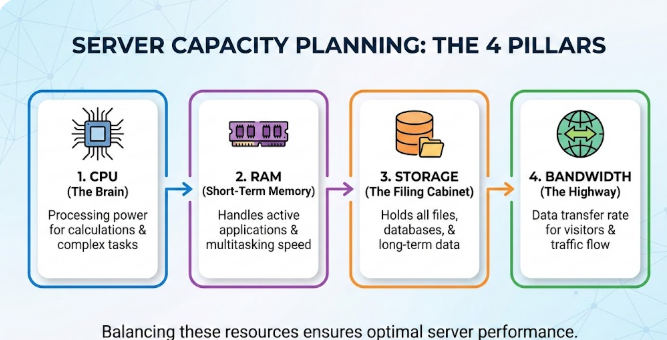
It focuses on four core areas:
- CPU for processing requests
- RAM for handling active tasks
- Storage for files and databases
- Bandwidth for moving data in and out
The goal is simple. You prepare your server before traffic spikes, not after performance starts to break down.
When capacity is planned properly, your site stays fast during peak periods. When it is ignored, slow pages, errors, and downtime become unavoidable.
Server capacity planning helps you find the balance between performance and cost, so your server works efficiently without wasting resources.
Why Server Capacity Planning Matters in 2026
Online traffic no longer grows in a straight line. It spikes without warning.
A single social media post can send thousands of visitors your way in minutes.
A promotion can double demand overnight.
A piece of content can go viral while you are asleep.
When that happens, your server either keeps up or it breaks.
In 2026, server capacity planning matters more than ever because:
- Websites must stay fast under pressure
Speed is no longer optional. Visitors expect pages to load instantly, even during peak traffic. Properly planned resources prevent slowdowns when demand increases.
- Downtime damages trust and search rankings
When your site goes offline, users leave and rarely come back. Search engines also notice repeated outages, which can quietly hurt your SEO over time.
- Unplanned growth leads to wasted spending
Without clear planning, many businesses overspend on resources they do not actually use. Capacity planning helps you pay for what you need, not what you fear.
- Cloud and VPS costs can rise without warning
Auto-scaling and on-demand resources are helpful, but unmanaged usage leads to surprise bills. Planning keeps costs predictable and under control.
- Modern apps demand more from servers
AI tools, high-quality media, and real-time features place heavier loads on infrastructure. Servers that were “good enough” last year may struggle today.
Capacity planning is a business decision that protects performance, revenue, and reputation.
Who Needs Server Capacity Planning?
If you run anything online, this applies to you.
Especially if you have:
- An ecommerce store
- A growing blog or news site
- A SaaS or web app
- A business website with paid traffic
Even small websites need planning once traffic starts growing.
Step-by-Step Guide to Server Capacity Planning
You do not need complex software or a big IT team to plan server capacity. Most of this can be done using tools you already have and a bit of consistency.
Follow these steps in order. Each one builds on the last.
1) Check Your Current Usage
Start with what is happening right now.
Log in to your hosting dashboard and review:
- CPU usage
- RAM usage
- Disk space
- Bandwidth consumption
Look at data from the last 30 days, not just today.
Pay attention to:
- Average usage
- Peak usage
- Times when resources spike
If you are on shared hosting and visibility is limited, request usage reports from support or use basic server monitoring tools to get a clearer picture.
You cannot plan the future without understanding the present.
2) Understand Your Traffic Patterns
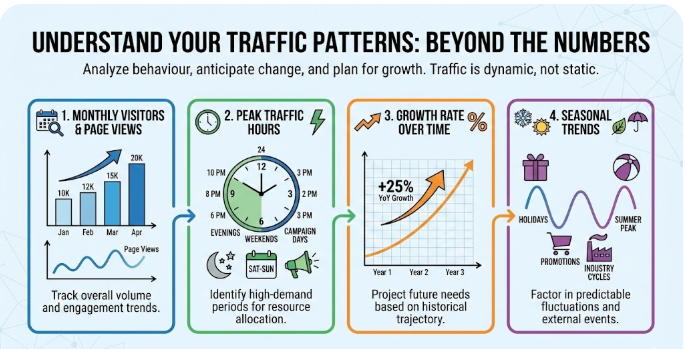
Traffic numbers matter, but patterns matter more.
Use analytics tools to check:
- Monthly visitors and page views
- Peak traffic hours (evenings, weekends, campaign days)
- Growth rate over time
Also factor in seasonal trends. Some months are naturally busier than others due to promotions, holidays, or industry cycles.
Traffic is rarely stable. Capacity planning assumes change, not consistency.
3) Forecast Future Needs
Now look ahead.
Think about the next 12 to 24 months, not just the next upgrade.
Ask yourself:
- Are you planning marketing campaigns?
- Will you add ecommerce, video, or new features?
- Are ads or social media expected to drive more users?
Once you estimate growth, add a safety margin.
A good rule:
Plan for 30–50% extra capacity beyond your forecast.
In 2026, features like AI tools, live chat, and rich media increase server load faster than many people expect.
4) Estimate Resource Requirements
You do not need perfect math. Use practical ranges.
Here is a simple guideline for most websites:
| Website Type | CPU Cores | RAM (GB) | Storage (GB) | Bandwidth (TB/month) |
| Small Blog | 1–2 | 2–4 | 20–50 | 0.5–2 |
| Medium Business Site | 2–4 | 4–8 | 50–200 | 2–10 |
| High-Traffic Ecommerce | 4–8+ | 8–32+ | 200+ | 10+ |
These are starting points. Your real numbers should come from your usage data.
If possible, run basic load tests to see when response times start slowing down. Even free tools can reveal weak points.
5) Choose the Right Hosting Type
Match your server plan to your needs, not your fears.
- Shared Hosting
Affordable, but limited. Suitable for low-traffic sites. - VPS Hosting

Dedicated resources, flexible upgrades, and strong performance. Ideal for growing businesses.
- Dedicated Servers
Full control and maximum power. Best for large platforms with steady high traffic. - Cloud or Managed Solutions
Auto-scales easily, but costs must be watched closely.
Many websites move to VPS hosting once growth becomes consistent because it balances cost, control, and scalability.
6) Monitor and Adjust Regularly
Capacity planning is not a one-time task.
Set up alerts for:
- High CPU usage
- Low available RAM
- Storage nearing limits
Review usage monthly.
Upgrade before you hit 80% capacity. That buffer gives you time to test changes and avoid rushed decisions.
Teams that upgrade early avoid downtime. Teams that wait usually upgrade during an outage.
7) Prepare for Traffic Peaks
Not all growth is gradual.
To handle sudden spikes:
- Enable caching
- Optimize images and scripts
- Use a CDN for faster delivery
- Plan server upgrades ahead of major campaigns
If growth is permanent, plan migrations early rather than reacting under pressure.
Tools That Make Server Capacity Planning Easier
You do not need expensive software to plan server capacity well. The right tools simply help you see what is happening, spot trends early, and act before problems show up.
Here are the most useful tools, starting with the basics.
i) Hosting Dashboards
Your hosting dashboard is your first and most important tool.
Most dashboards show:
- CPU and RAM usage
- Disk space consumption
- Bandwidth trends
- Peak usage periods
These numbers tell you how close your server is to its limits. Checking them regularly helps you notice slow creep before it turns into a crash.
If you are on a VPS or dedicated server, these dashboards give clearer and more accurate data than shared hosting.
ii) Traffic Analytics Tools
Traffic data explains why your server is under pressure.
Analytics tools help you see:
- Daily and monthly visitors
- Pages with the highest traffic
- Peak browsing times
- Traffic growth over time
This information connects usage spikes to real user behavior. When you know where traffic comes from and when it peaks, forecasting becomes far more accurate.
iii) Server Monitoring and Logs
Monitoring tools show what happens behind the scenes.
They track:
- Real-time CPU and memory usage
- Sudden load spikes
- Background processes are consuming resources
Server logs are equally valuable. They reveal errors, failed requests, and performance bottlenecks that dashboards might hide.
Free monitoring tools are often enough for small and medium sites, as long as you review the data consistently.
iv) Advanced Forecasting Tools
For larger or fast-growing platforms, deeper insight helps.
Advanced tools can:
- Predict future resource needs
- Detect hidden bottlenecks
- Alert you before performance degrades
These tools are useful when traffic is high, applications are complex, or downtime is costly. They turn capacity planning from guesswork into data-backed decisions.
Conclusion
Server capacity planning is not about preparing for failure. It is about preparing for growth.
When your server has the right resources:
- Your website stays fast
- Traffic spikes stop being scary
- Downtime becomes rare
- Costs stay predictable
In 2026, waiting until your site slows down is already too late. Planning gives you control, confidence, and room to grow without pressure.
This is where Truehost makes the difference.
Truehost helps you plan server capacity the right way by offering:
- Scalable VPS and dedicated servers
- Clear resource dashboards with real-time usage data
- Easy upgrades when your traffic grows
- Support teams that help you plan before problems happen
Instead of guessing, you get visibility.
Instead of reacting, you stay prepared.
If you are serious about growth, your server should never hold you back.
Try Truehost VPS hosting today and give your website the power it needs to grow smoothly, no matter how much traffic comes your way.