Domain NamesFind and register your ideal domain name instantly.
 Web HostingEasy-to-use hosting powered by cPanel — ideal for managing websites in Nigeria.
 Windows HostingRun .NET apps with Windows-optimized hosting
 Affiliate ProgramMake money promoting our services
 Reseller HostingMake money by reselling our hosting products under your own brand
 .COM Domains
 All DomainsExplore all supported tld domains in Nigeria
 WhoisFind out who owns any domain, as well as verify your registration details
 VPS Hosting
 Dedicated ServersReimagine your site speed with your own complete server
 AI Website BuilderDesign your site with drag-and-drop tools
 Online Store BuilderStart your online shop without code
 Support PortalFind answers or get expert help
 Contact UsReach our team via chat or email
 BlogRead our extensive guides on web hosting and more
When it comes to running a business online, your hosting infrastructure is everything.
A weak or poorly built foundation can cause everything else to struggle. Slow servers, unexpected downtime, or security gaps can drive away visitors, cost you sales, and damage your reputation.
On the flip side, a strong, well-designed hosting infrastructure ensures your website runs fast, stays online, and keeps your data secure, giving your business the stability it needs to grow.
In 2026, the digital world is more competitive than ever. Customers expect websites that load instantly, operate 24/7, and protect their information.
If your hosting setup isn’t up to standard, you risk losing opportunities and revenue. That’s why investing in the right business hosting infrastructure isn’t just a technical choice; it’s a business decision.
This guide will walk you through everything you need to know: the essential components of hosting infrastructure, strategies to boost security and scalability, and practical tips to ensure peak performance.
By the end, you’ll not only understand what makes a hosting setup strong, but you’ll also be equipped to build one that supports your business growth efficiently and confidently.
What is Business Hosting Infrastructure?
Business hosting infrastructure refers to the technical setup that powers your website or online application.
It’s not just about having a server; it’s about how your server, network, storage, and security all work together to provide a seamless experience for your users.
Simply put, it’s the backbone that keeps your website running smoothly, handles your traffic, and protects your data.
Why Your Business Needs the Right Hosting Infrastructure
You might be wondering, “Do I really need to overthink my hosting plan? Can’t I just pick the cheapest option?” The truth is, your hosting infrastructure is more than just a server; it’s the backbone of your online business.
Choosing the wrong setup can slow your website, frustrate visitors, and even put your data at risk.
Here’s why getting it right matters:
- Performance:
Every second counts. A slow-loading website can drive potential customers away before they even see your products or services.
The right infrastructure ensures your pages load quickly, keeping visitors engaged and happy.
- Reliability:
Downtime is more than an inconvenience; it’s lost revenue and credibility.
A solid hosting setup keeps your site online 24/7, no matter traffic spikes or minor technical hiccups.
- Security:
Cyberattacks aren’t rare; they’re a daily threat. A strong infrastructure safeguards sensitive information, from your business data to your customers’ personal details, giving everyone peace of mind.
- Scalability:
Your business isn’t static, and neither should your hosting. A flexible infrastructure grows with you, easily handling increased traffic, new features, and expanding operations without slowing down or crashing.
Key Components of Business Hosting Infrastructure
To build a strong hosting setup, you first need to understand the pieces that make it work. Business hosting infrastructure isn’t one single thing.
It’s a combination of systems working together to keep your website fast, secure, and always available.
Let’s break down the core components in plain language.
1) Servers
Servers are the engine behind your website. They store your files, process visitor requests, and deliver content to users every time someone visits your site.
The type of server you choose directly affects speed, stability, and how much control you have.
Here are the main server options businesses use:
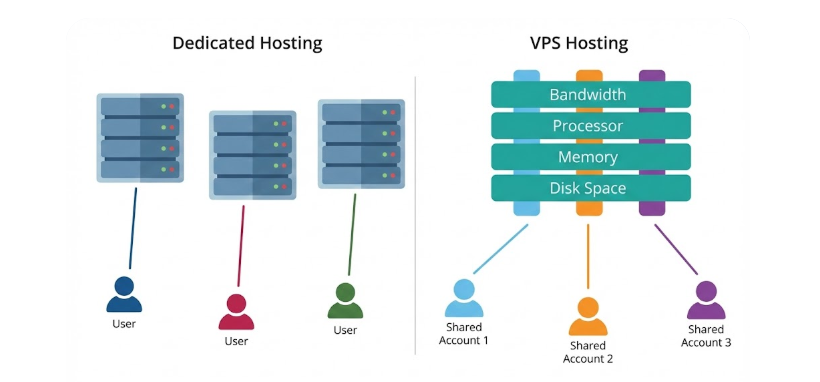
- Shared Hosting:
This is the most affordable option. Your website shares server resources with many other sites. It works for very small websites, but performance can drop when traffic increases.
- VPS Hosting:
With a Virtual Private Server, you get dedicated resources within a shared environment. This means better speed, more stability, and greater control, without the high cost of a dedicated server.
You get an entire physical server for your business. This delivers top-tier performance and control, but it’s best suited for large businesses with heavy traffic and technical teams.
- Cloud Hosting:
Your website runs on multiple servers instead of just one. This setup is flexible, reliable, and easy to scale, making it ideal for growing businesses.
2) Storage & Databases
Every image, page, customer record, and transaction needs a place to live. That’s where storage and databases come in. The faster and more reliable your storage, the better your website performs.
Here’s what you should know:
- SSD Storage:
Solid State Drives are fast and reliable. They load data quickly, which helps your website respond faster to users.
- Relational Databases (MySQL, PostgreSQL):
These stores store structured data like user accounts, orders, and content. They’re widely used and perfect for most business websites.
- NoSQL Databases (MongoDB, Redis):
These handle large volumes of unstructured data. They’re ideal for complex applications and high-traffic platforms.
Storage Types Comparison
| Storage Type | Speed | Best For | Cost |
| HDD | Slow | Archives and backups | Low |
| SSD | Fast | Business websites and apps | Medium |
| NVMe | Very Fast | High-performance applications | High |
Choosing the right storage ensures your website feels smooth, responsive, and reliable.
3) Network & Connectivity
Even the best server won’t help if your network is weak. Network infrastructure determines how quickly and reliably your website reaches users.
Key elements to look for include:
- Redundant Internet Connections:
If one connection fails, another takes over. This minimizes downtime and keeps your site accessible.
- Content Delivery Network (CDN):
A CDN delivers your content from servers closer to your visitors, reducing load times, especially for international users.
- Load Balancers:
These distribute traffic across multiple servers, so no single server gets overwhelmed during traffic spikes.
Without proper networking, your site can slow down or crash during busy periods, hurting both user experience and revenue.
4) Security Infrastructure
Security should never be an afterthought. Your hosting infrastructure must actively protect your website and data from constant online threats.
Essential security components include:
- Firewalls:
They filter traffic and block malicious requests before they reach your server.
- SSL Certificates:
These encrypt data shared between your website and users, protecting sensitive information like login details and payments.
- Regular Backups:
Backups ensure you can recover quickly if something goes wrong, whether it’s a cyberattack or accidental data loss.
- Monitoring Tools:
These tools watch your system in real time and alert you to unusual or suspicious activity.
Strong security builds trust and keeps both your business and customers safe.
5) Monitoring & Management Tools

Running a server without monitoring is risky. You need visibility into how your infrastructure is performing at all times.
Monitoring and management tools allow you to:
- Track server performance and resource usage
- Detect downtime instantly
- Identify issues before they affect users
- Plan upgrades and scaling more accurately
Popular monitoring solutions include Nagios, Zabbix, and cloud-based dashboards that provide real-time insights without complex setup.
With proper monitoring, you stay in control and avoid unpleasant surprises.
2026 Trends in Business Hosting Infrastructure
The hosting world changes fast. Here’s what shapes 2026.
a) AI Integration
Hosts use AI for auto-scaling, threat detection, and resource tweaks. Your site runs more smoothly without manual work.
b) Edge Computing
Data processes closer to users. Faster speeds for Nigerian visitors or global reach.
c) Hybrid and Multi-Cloud
Mix private and public clouds. Avoid lock-in and optimize costs.
d) Green Hosting

Eco-friendly data centers. Many prefer sustainable options.
e) Enhanced Security
Quantum-safe encryption and AI defenses rise. Cyber threats grow.
f) Serverless Options
Run code without managing servers. Focus on your business.
These trends make hosting smarter and more efficient.
How to Choose the Right Hosting for Your Business
Choosing the right hosting isn’t about picking the most popular plan. It’s about choosing what actually works for your business today, and still works tomorrow as you grow. Follow these simple steps to make the right decision without stress.
1) Assess Your Business Needs
Start with clarity. Your hosting choice should match how your website is used.
Ask yourself:
- How much traffic do you expect? A few visitors a day or hundreds?
- What type of site are you running? An e-commerce store needs more power than a simple blog.
- What’s your budget? Balance affordability with performance; cheap hosting can cost more in the long run.
When you understand your needs, choosing becomes easier.
2) Check the Must-Have Features
Good hosting always includes the basics. Don’t compromise on these:
- Uptime guarantee: Your website should stay online consistently.
- SSD storage: Faster loading speeds for better user experience.
- Free SSL certificate: Protects your visitors and builds trust.
- Daily backups: Your safety net if anything goes wrong.
- 24/7 customer support: Help should be available whenever you need it.
If a hosting plan misses any of these, it’s a red flag.
3) Look at Scalability
Your business won’t stay the same forever, and your hosting shouldn’t either.
Choose a provider that allows:
- Easy upgrades
- No downtime during scaling
- Flexible plans as traffic increases
Scalability saves you from costly migrations later.
4) Read Real Reviews
Marketing pages always sound perfect. Reviews tell the real story.
Focus on:
- Actual user experiences
- Feedback on uptime and support
- How issues are handled, not just praise
This helps you avoid unpleasant surprises.
5) Test Customer Support
Before you commit, test them.
- Ask a simple question
- Check response time
- See how clearly they explain things
Good support shows you how they’ll treat you when it really matters.
Why Local Hosting Matters for Nigerian Businesses
For businesses in Nigeria, location matters more than you think. Hosting with local or Africa-optimized providers means:
- Lower latency for faster loading speeds
- Local payment options, including Naira
- Support that understands local challenges
At Truehost, we understand these needs deeply. Our hosting plans are affordable, scalable, and built for Nigerian businesses. You get fast SSD storage, free SSL certificates, and reliable support designed to grow with you.
Best Practices for Business Hosting in 2026
Running a business website in 2026 means higher expectations from users and stricter demands on performance and security. The good news? A few smart practices can keep your hosting setup reliable, fast, and future-ready.
Here’s what to focus on:
- Use a Content Delivery Network (CDN):
A CDN helps your website load faster by serving content from locations closer to your visitors. This is especially important if your audience is spread across different regions.
- Automate Backups:
Backups should run automatically, daily or weekly. If something breaks or data is lost, you can restore your site quickly without panic or downtime.
- Keep Software Updated:
Outdated software creates security gaps. Regular updates protect your server from vulnerabilities and keep everything running smoothly.
- Test Performance Regularly:
Check page load speed, server response time, and uptime often. Small performance issues can grow into big problems if ignored.
- Document Your Hosting Setup:
Clear documentation makes it easier for your team to troubleshoot issues, onboard new staff, or upgrade your infrastructure without confusion.
Common Mistakes to Avoid
Even experienced business owners slip up when it comes to hosting. Knowing what not to do is just as important.
Watch out for these common mistakes:
- Underestimating Traffic:
It’s fine to start small, but always plan for growth. Traffic spikes can crash underpowered hosting setups.
- Ignoring Security:
One security breach can damage your reputation and customer trust. Security should always be a priority, not an afterthought.
- Neglecting Backups:
Without backups, a simple error can wipe out critical data and take your site offline for days.
- Overcomplicating Architecture:
More tools don’t always mean better performance. Simple, well-structured setups are easier to manage and scale.
- Skipping Monitoring:
Without proper monitoring, problems stay hidden until users complain or revenue is already lost.
Avoiding these mistakes puts your business in a much stronger position online.
Final Thoughts
Your business hosting infrastructure is the engine that keeps your online business running. Speed, uptime, security, and scalability all depend on the choices you make here. Get it right, and your website becomes a powerful growth tool. Get it wrong, and even the best ideas struggle to survive online.
As your business grows in 2026 and beyond, your hosting should grow with you. That means choosing an infrastructure that’s reliable today, flexible tomorrow, and secure at every stage. When your hosting works quietly in the background, you’re free to focus on what really matters: serving customers and building your business.
We at Truehost understand that hosting is the backbone of every successful online business. That’s why our solutions are designed to support you at every step:
- VPS and Cloud Hosting: Scalable resources built for growing businesses
- Managed Security: Firewalls, SSL certificates, and automated backups
- 24/7 Support: Fast, reliable help whenever issues arise
- Easy-to-use Dashboard: Monitor, upgrade, and manage your infrastructure with ease
With the right partner, your hosting infrastructure becomes an asset, not a headache.
Try VPS Hosting with Truehost and build your business on a foundation you can trust.