DomainsFind and register your ideal domain name instantly.
 Web HostingEasy-to-use hosting powered by cPanel — ideal for managing websites in Nigeria.
 Windows HostingRun .NET apps with Windows-optimized hosting
 Affiliate ProgramMake money promoting our services
 Reseller HostingMake money by reselling our hosting products under your own brand
 .COM Domains
 All DomainsExplore all supported tld domains in Nigeria
 WhoisFind out who owns any domain, as well as verify your registration details
 Dedicated ServersReimagine your site speed with your own complete server
 AI Website BuilderDesign your site with drag-and-drop tools
 Online Shop BuilderStart your online shop without code
 Support PortalFind answers or get expert help
 Contact UsReach our team via chat or email
 BlogRead our extensive guides on web hosting and more
A direct .ng domain has no applicant-status restriction under the Nigeria Internet Registration Association’s domain policy.
An individual, business, nonprofit, public body, or overseas applicant can register one through an accredited registrar such as Truehost.
You do not routinely need a CAC certificate, Nigerian citizenship or residence proof, an existing website, or a special eligibility letter. You do need a policy-compliant name, the right to use it, accurate registrant details, a registration term, and a way to pay.
This guide separates those requirements from optional choices, then walks through the current Truehost journey.
We tested the journey and stopped at Review & Checkout before entering personal data, accepting the terms, or paying.
Who can register a .ng domain?
NiRA classifies direct .ng domain as open and does not restrict the applicant type.
You can apply in your own name or for an organisation, whether you operate in Nigeria or elsewhere.
NiRA still requires accurate registration information and may request information that establishes legal identity.
NiRA accepts applications through accredited registrars. Truehost appears on NiRA’s accredited list, so you can complete the registration with us.
What you need and what you do not
You need | You do not routinely need |
|---|---|
A compliant, available | A CAC certificate |
The right to use the name | Nigerian citizenship or residence proof |
Accurate contact and billing details | A sector eligibility or accreditation letter |
A one-to-five-year registration term | An existing website or hosting plan |
A supported payment method | Custom nameservers |
Acceptance of the registrant agreement and our terms | A direct application to NiRA |
The distinction is important because direct .ng follows an open registration route.
The requirements that still decide the application
a) The name follows NiRA syntax
Choose a name that uses unaccented letters, digits, or internal hyphens. Do not begin or end the label with a hyphen, use an entirely numeric label, or submit an internationalised label beginning with xn--.
The standard route starts at three characters before .ng. NiRA handles one- and two-character names separately, including through auctions. The complete address, including .ng, cannot exceed 64 characters.
Shorter does not automatically mean better. Prefer a name that someone can hear once, spell correctly, and connect it with your brand.
b) The name clears policy and rights checks
NiRA can reserve or reject offensive, restricted, geographic, premium, or rights-conflicting names.
You, as the registrant, also carry responsibility for choosing a name you have the right to use.
Before paying for a branded term, check your own company records and relevant trademark records.
A defensive or speculative registration does not override another party’s rights.
c) The registrant details are accurate
Prepare the registrant’s name, email address, phone number, street address, city, state, postcode, and country.
You can add a company name where it applies.
Use contact details that the registrant controls. NiRA policy requires complete, accurate, and current registration information, and the email address supports account and domain notices.
d) The term and payment are ready
NiRA’s registration policy permits a registration period of one to five years. Choose the term during configuration and review both the registration amount and the renewal line before checkout.
Our current registration price for the .ng domain is 14000.00 NGN. Renewal is ₦15,000.00.
e) You can accept the agreement
The applicant must accept the registrant agreement and the registrar’s terms.
If you register for an organisation or client, confirm that you have authority to submit its details and accept the terms on its behalf.
Register after the requirements pass
The following steps record our tested direct .ng journey. We used the synthetic address ngready825.ng and placed no order just to show you how easy to register a .ng domain with us.
1) Search the complete .ng address
Open our direct .ng page and enter the complete address you want. Include .ng so the search stays focused on the direct extension.

2) Select the exact .ng result
Find the result that matches the complete address and use its Buy Now button if the domain is available.
Our test returned ngready825.ng and opened the configuration screen for that exact domain.
The result page may also present separate suggestions or bundles. Follow the single .ng result when you want only the direct domain.
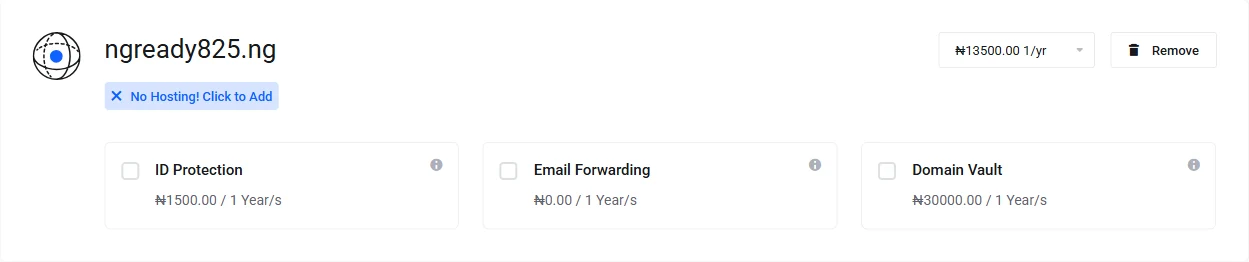
3) Choose the term and optional services
Confirm the domain spelling, then choose a one-to-five-year term.
[domain_pricing_table]
ID Protection, Email Forwarding (Free Addon), and Domain Vault appeared as optional services in our test; they did not form part of the basic registration requirement.
4) Confirm the nameservers
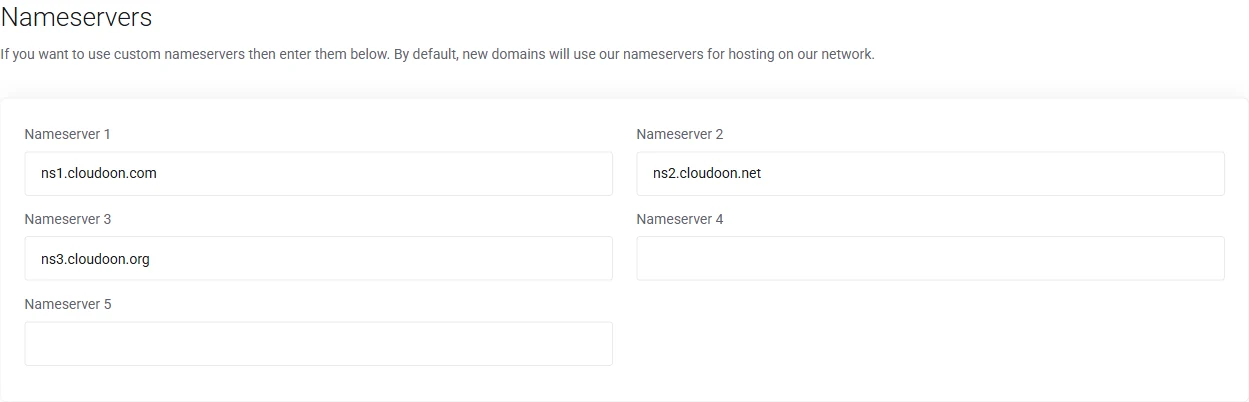
Keep our default nameservers if you will use our DNS or hosting. Replace them only when another hosting provider has given you its nameserver values.
Must you fill these up during registration?
No. You do not need custom nameservers to register the domain. You can change the DNS destination later when your website or email setup requires it.
5) Review the domain and renewal line
Select Continue to open Review & Checkout. Check the spelling, registration term, amount due now, and renewal line before you enter contact details.
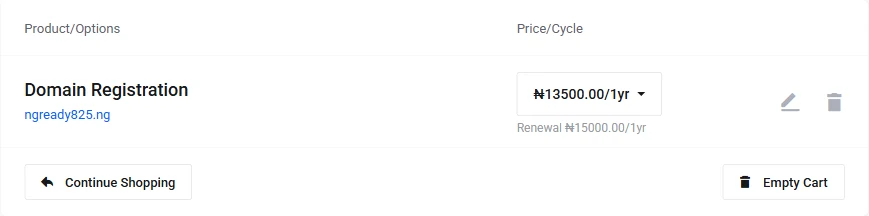
This is the useful point to catch a spelling or term error before adding registrant details.
6) Enter contact and registrant details
Enter a working email address and phone number for the account contact.

Complete the billing address fields. The checkout asks for street address, city, country, state, and postcode; company name remains optional.
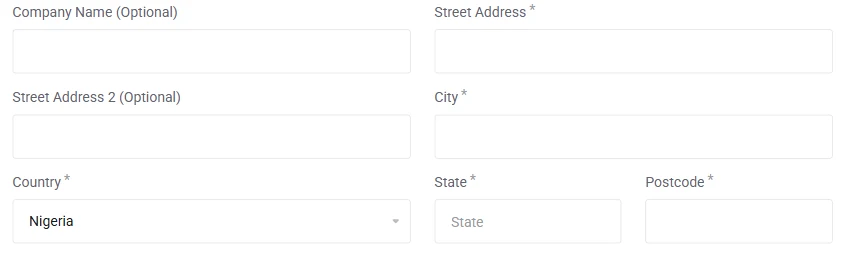
The domain registrant can use the default account contact or an alternative contact for this billing section.
Choose the person or organisation that should hold the registration, not a temporary helper who will not control the domain later.
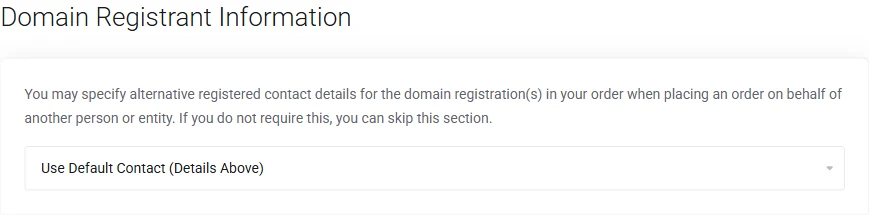
The registrant-information choice in our tested checkout. This field determines whose contact record accompanies the domain application.
7) Choose payment and submit when ready
Our checkout presented Paystack card payment and PayPal during the test.
Choose the method available to you, then inspect the order summary one final time.

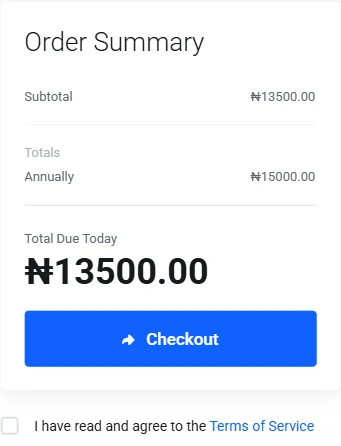
Read the terms, accept them only when you have the authority to proceed, and select Checkout when the order details are correct.
What happens after submission?
Payment and submission fall outside this test because they would create a real transaction.
After you submit your own order, use the client area and account email to confirm the payment and domain status.
Do not treat a checkout receipt alone as proof that the registry has completed the registration.
For a deeper post-purchase walkthrough, use our registration guide.
If you still need to choose a name, read the availability guide or examine the .ng benefits before you buy.
Direct .ng keeps the eligibility barrier low, but the registrant record and name choice still deserve care. When your details and name are ready, start your search.